 TutorialKart.com
Apache MADlib Tutorial
Apache MADlib is an open-source library for scalable in-database analytics. It provides SQL-based implementations of statistical, mathematical, and machine learning algorithms so that analysis can run close to the data instead of moving large tables into a separate tool.
This Apache MADlib tutorial explains what MADlib is, where it fits in a database analytics workflow, why it is useful for large datasets, and how data scientists and SQL users can start thinking about machine learning inside PostgreSQL-compatible and MPP database environments.
What is Apache MADlib?
Apache MADlib is designed for in-database machine learning and analytics. In a typical analytics project, data is already stored in relational tables. Instead of exporting that data to an external program for every model training step, MADlib lets you call analytical functions from SQL and store the results back in database tables.
MADlib is especially useful when datasets are too large to move repeatedly between the database and external analytics environments. It can take advantage of database execution, parallel query processing, and, in MPP systems, distributed computation across multiple segments or nodes.
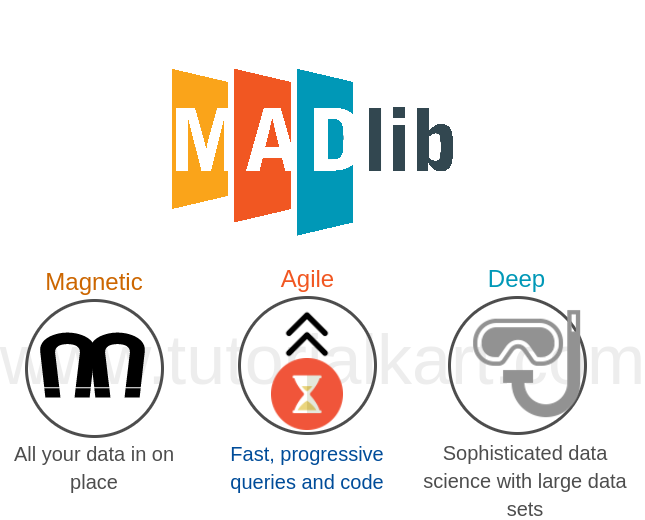
The name MADlib comes from the ideas of Magnetic, Agile, and Deep data analysis. These ideas describe a system where data is kept in one place, analysts can iterate quickly, and advanced statistical methods can be applied directly to large datasets.
Why Apache MADlib runs analytics inside the database
In many organizations, the database is the central place where cleaned and structured data already exists. Moving large data to a separate machine learning environment can add time, storage cost, duplication, and governance issues. MADlib reduces this movement by exposing algorithms as database functions.
When the analytical work runs inside the database, the workflow can stay close to SQL. A data scientist or analyst can prepare input tables, train a model, inspect results, and score new data using SQL statements. This makes MADlib practical for teams that already use SQL for reporting, feature preparation, and data exploration.
Magnetic, Agile, and Deep features of MADlib
- Magnetic – MADlib supports the idea of bringing organizational data and analytical work closer together inside the database.
- Agile – Analysts can test hypotheses, transform tables, run algorithms, and refine models through SQL-based iterations.
- Deep – MADlib includes statistical and machine learning methods that can be used for classification, regression, clustering, dimensionality reduction, and other analytical tasks.
How Apache MADlib handles large datasets
MADlib is developed so that algorithms can benefit from the database engine that stores the data. In an MPP database, the data is distributed across segments. MADlib algorithms are written to work with that distributed execution model, which helps reduce unnecessary data transfer and improves scalability for suitable workloads.
MADlib is built around SQL for a simple reason: many business datasets already live in SQL databases, and teams already access them through SQL interfaces. MADlib brings machine learning technology to that environment rather than requiring every analysis step to happen outside the database.
Common Apache MADlib analytics and machine learning tasks
Apache MADlib includes functions for several common analytics tasks. The exact list depends on the installed MADlib version, but the library is generally used for the following categories of work.
- Regression analysis: Build models that estimate continuous numeric values from input features.
- Classification: Train models that assign rows to categories, such as churn risk, fraud flag, or document class.
- Clustering: Group similar records without predefined labels.
- Dimensionality reduction: Reduce feature space for analysis and model preparation.
- Association and pattern analysis: Identify relationships and patterns in large transactional datasets.
- Graph and text-related analytics: Apply selected methods to connected data or text-derived features when the database schema is prepared for that use case.
Basic Apache MADlib workflow in SQL
A normal Apache MADlib workflow starts with a source table. The table contains the target column to predict or analyze and the feature columns used by the algorithm. After preparing the table, you call a MADlib function from SQL. The function writes model details, summary information, or prediction output into database tables.
The exact function names and parameters vary by algorithm. The following example is not tied to one specific algorithm; it shows the general SQL pattern used by many MADlib functions.
SELECT madlib.algorithm_name(
    'input_table',
    'output_table',
    'target_column',
    'feature_expression'
);
After the function runs, you can inspect the output tables with normal SQL queries.
SELECT *
FROM output_table;
This SQL-first style is one of the main reasons MADlib is different from a standalone machine learning library. The database remains the execution and storage environment for both data and analytical results.
Where Apache MADlib is used
Because MADlib is a general-purpose analytics library, it can be used in many domains where large relational datasets are already available. Typical use cases include customer analytics, risk modeling, operational analytics, recommendation features, anomaly detection, healthcare analysis, public sector reporting, and manufacturing process analysis.
The important requirement is not the industry. The important requirement is that the data is available in a supported database environment and that the analysis can be expressed through the algorithms and SQL interfaces provided by MADlib.
Where Apache MADlib fits in the big data ecosystem
Apache MADlib fits into the part of the big data ecosystem where SQL, storage, and scalable processing are central. It is not meant to replace every Python, R, Spark, or notebook-based workflow. Instead, it is useful when the database is already the best place to keep the data and when running analytics inside that database is simpler or more efficient.
For example, a team may still use external tools for visualization, experimentation, or application development. MADlib can handle selected model training or scoring tasks inside the database, while the rest of the analytics pipeline continues to use other tools.
Apache MADlib compared with external machine learning tools
| Area | Apache MADlib approach | External ML tool approach |
|---|---|---|
| Data movement | Runs algorithms close to database tables | Often exports data to another runtime |
| Interface | SQL functions and database tables | Programming APIs, notebooks, scripts, or pipelines |
| Best fit | Large relational data already stored in a supported database | Custom modeling, broad library support, and flexible experimentation |
| Output | Model, summary, and scoring tables in the database | Files, objects, model registries, or application artifacts |
In practice, teams may use both approaches. MADlib is useful for SQL-centered analytics, while external tools are useful when the project needs specialized algorithms, custom code, or deployment patterns outside the database.
When Apache MADlib is a good choice
- Your data is already stored in a supported relational or MPP database.
- Your team is comfortable writing SQL and wants to keep analytics close to database tables.
- The dataset is large enough that repeated export and import steps are inconvenient.
- You need repeatable analytical steps that can be scheduled or managed as SQL workflows.
- The algorithms provided by MADlib match the business problem you are solving.
When Apache MADlib may not be the right tool
- You need a highly specialized algorithm that is not available in MADlib.
- Your data is mostly outside the database and does not need in-database processing.
- Your team depends heavily on Python or R libraries for custom feature engineering and model experimentation.
- Your production system needs a model-serving architecture outside the database.
- Your database environment does not support the required MADlib installation.
Apache MADlib learning path for beginners
If you are new to Apache MADlib, start with the database and SQL basics before moving into algorithms. The following learning path keeps the process practical.
- Confirm that MADlib is installed and available in your database.
- Read the list of available MADlib modules for your installed version.
- Create a small input table with clean numeric and categorical columns.
- Run one simple algorithm and inspect the output tables.
- Try prediction or scoring on a separate table.
- Compare the result with a baseline SQL report or a simple external model.
- Move to larger datasets only after you understand the function parameters and output schema.
Apache MADlib FAQ
What is Apache MADlib?
Apache MADlib is an open-source library for scalable in-database analytics. It provides SQL-callable functions for statistical analysis and machine learning so that models and analytical results can be created near the data stored in database tables.
Is Apache MADlib only for big data?
No. MADlib can be used on smaller datasets too, but its main advantage appears when data is large enough that moving it out of the database becomes slow, costly, or hard to manage.
Do I need SQL knowledge to use Apache MADlib?
Yes. MADlib is used through SQL functions, so you should be comfortable with tables, queries, joins, column expressions, and result inspection before using MADlib for machine learning tasks.
Does Apache MADlib replace Python or R machine learning?
No. MADlib is an in-database analytics option. Python and R are still useful for custom modeling, visualization, experimentation, and workflows that need libraries outside the database.
What should I check before using Apache MADlib in a project?
Check database compatibility, installed MADlib version, available algorithms, table size, data quality, feature preparation needs, and whether the output format fits your reporting or model-scoring workflow.
Editorial QA checklist for this Apache MADlib tutorial
- Confirm that all MADlib function examples match the version used in the target database before publishing version-specific code.
- Do not describe unsupported algorithms as available unless they are listed in the installed MADlib documentation.
- Use SQL examples only when the input table, output table, target column, and feature expression are clear.
- Explain in-database analytics without implying that MADlib replaces every external machine learning tool.
- Check that database compatibility details are updated when the target environment changes.