 TutorialKart.com
A Salesforce Dev Hub is an org that you enable for creating and managing scratch orgs and second-generation packages. It acts as the central Salesforce DX org for tracking scratch org usage, package development, and related development activity.
This tutorial explains how to enable Dev Hub, install Salesforce CLI, authorize the Dev Hub from a terminal, assign an alias, set it as the default Dev Hub, and verify the configuration.
What You Need for Salesforce Dev Hub Setup
- A Salesforce production, business, or supported Developer Edition org in which Dev Hub can be enabled.
- Administrator access or the permissions required to change Dev Hub settings.
- Salesforce CLI installed on your local computer.
- A web browser for completing the Salesforce authorization flow.
Dev Hub is commonly used with source-driven development. Project files and metadata are maintained outside the org, normally in a version control system, while temporary scratch orgs provide isolated environments for development and testing.
Enable Dev Hub in a Salesforce Org
Enable Dev Hub in the Salesforce org that your development team will use to manage scratch orgs and package development. Choose the org carefully because Dev Hub cannot simply be disabled after it has been enabled.
Open the Dev Hub Settings Page
- Log in to the Salesforce org using an administrator account.
- Click the gear icon and select Setup.
- Enter Dev Hub in the Quick Find box.
- Select Dev Hub from the matching Setup results.
In older Salesforce interfaces, the setting may appear under Develop | Dev Hub. The Quick Find box is the more reliable way to locate the setting in the current Setup interface.
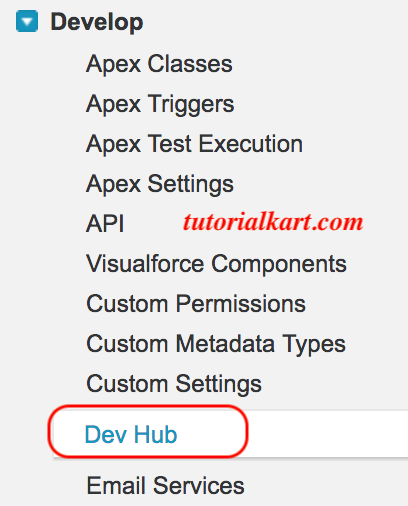
Turn On the Salesforce Dev Hub Setting
- On the Dev Hub Setup page, select Enable Dev Hub.
- Review the packaging options shown for the org.
- Enable the applicable packaging features when you intend to develop unlocked packages or second-generation managed packages.
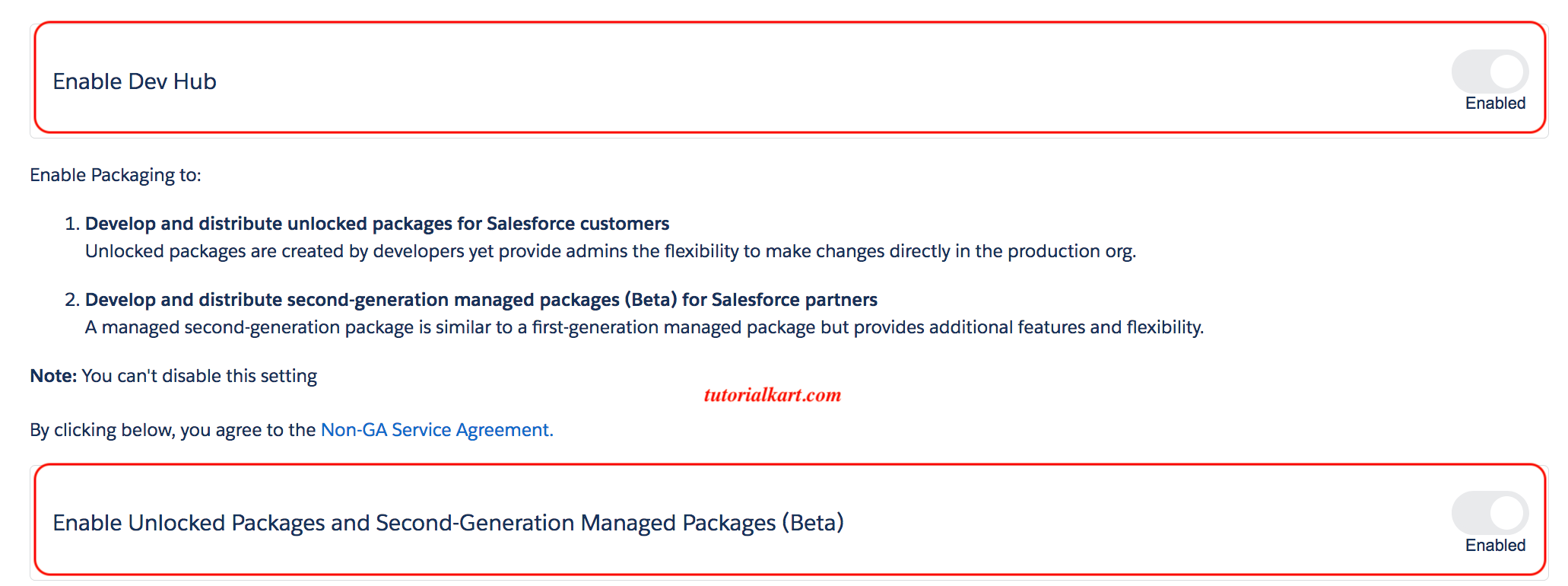
Enabling Dev Hub allows authorized users and connected development tools to create and manage scratch orgs. Packaging features serve a different purpose and should be enabled according to the package type your team plans to build.
| Dev Hub feature | Purpose |
|---|---|
| Dev Hub | Creates and manages scratch orgs and provides the central Salesforce DX development org. |
| Unlocked Packages | Supports modular package development for metadata that you control and deploy. |
| Second-Generation Managed Packages | Supports managed package development for applicable Salesforce partner distribution workflows. |
Install the Current Salesforce CLI
Salesforce CLI provides the commands used to authorize the Dev Hub, create scratch orgs, work with metadata, run tests, and automate Salesforce development tasks.
The current executable is sf. Older tutorials and screenshots may use the legacy sfdx executable. Install the latest Salesforce CLI from the official Salesforce CLI download page and choose the installer that matches your operating system and processor.
| Operating system | Common installer choices |
|---|---|
| macOS | Installer for Apple Silicon or Intel processors |
| Windows | Installer for x64 or ARM64 systems |
| Linux | Installer or archive for a supported 64-bit Linux system |
| npm | Global npm installation when Node.js and npm are already available |
The links below appeared in the original version of this tutorial. Salesforce can change installer packages and supported platforms, so use the official current download page when a legacy installer link no longer works.
| Operating System | Salesforce CLI Installer |
| mac OS | https://sfdc.co/sfdx_cli_osx |
| Windows 32-bit | https://sfdc.co/sfdx_cli_win |
| Windows 64-bit | https://sfdc.co/sfdx_cli_win64 |
| Debian / Ubuntu 64 | https://sfdc.co/sfdx_cli_linux |
| Debian / Ubuntu x86 | https://sfdc.co/sfdx_cli_linux_x86 |
Verify the Salesforce CLI Installation
Open Terminal on macOS or Linux, or PowerShell or Command Prompt on Windows, and run the following command:
sf --versionYou can also display the available command groups:
sf commandsIf the terminal returns Salesforce CLI version information, the installation is available through your system path.
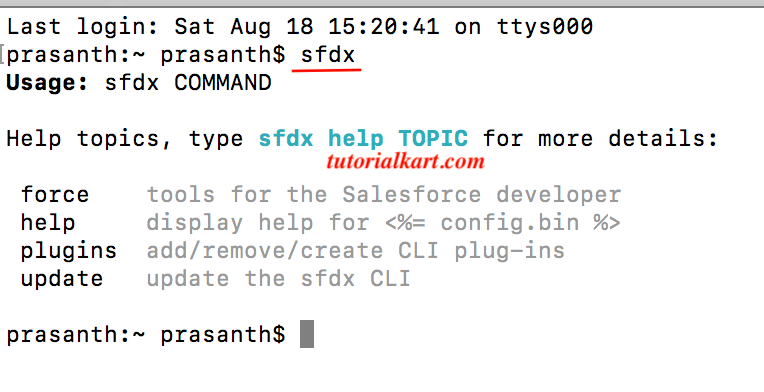
Log In to the Salesforce Dev Hub from the CLI
Authorize the Dev Hub using the Salesforce CLI web login flow. The command below opens a Salesforce login page in your default browser, assigns the alias DevHub, and marks the authorized org as the default Dev Hub.
sf org login web --alias DevHub --set-default-dev-hubComplete these steps in the browser:
- Log in with the username and password for the org in which Dev Hub was enabled.
- Complete multi-factor authentication or your organization’s single sign-on process when required.
- Review the access request.
- Click Allow to authorize Salesforce CLI.
- Return to the terminal after the authorization page confirms that the login is complete.
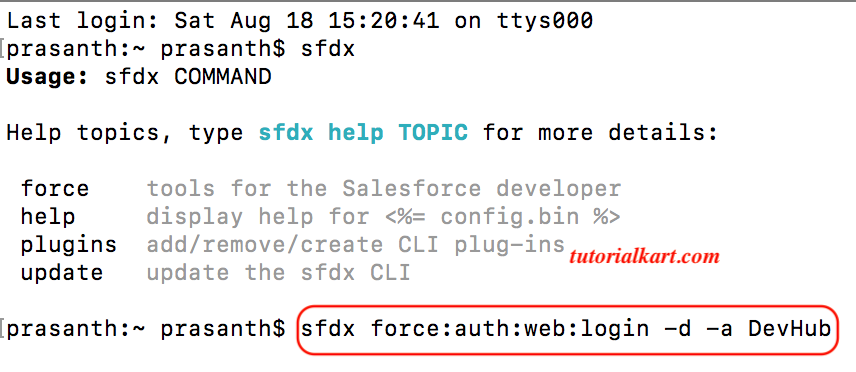
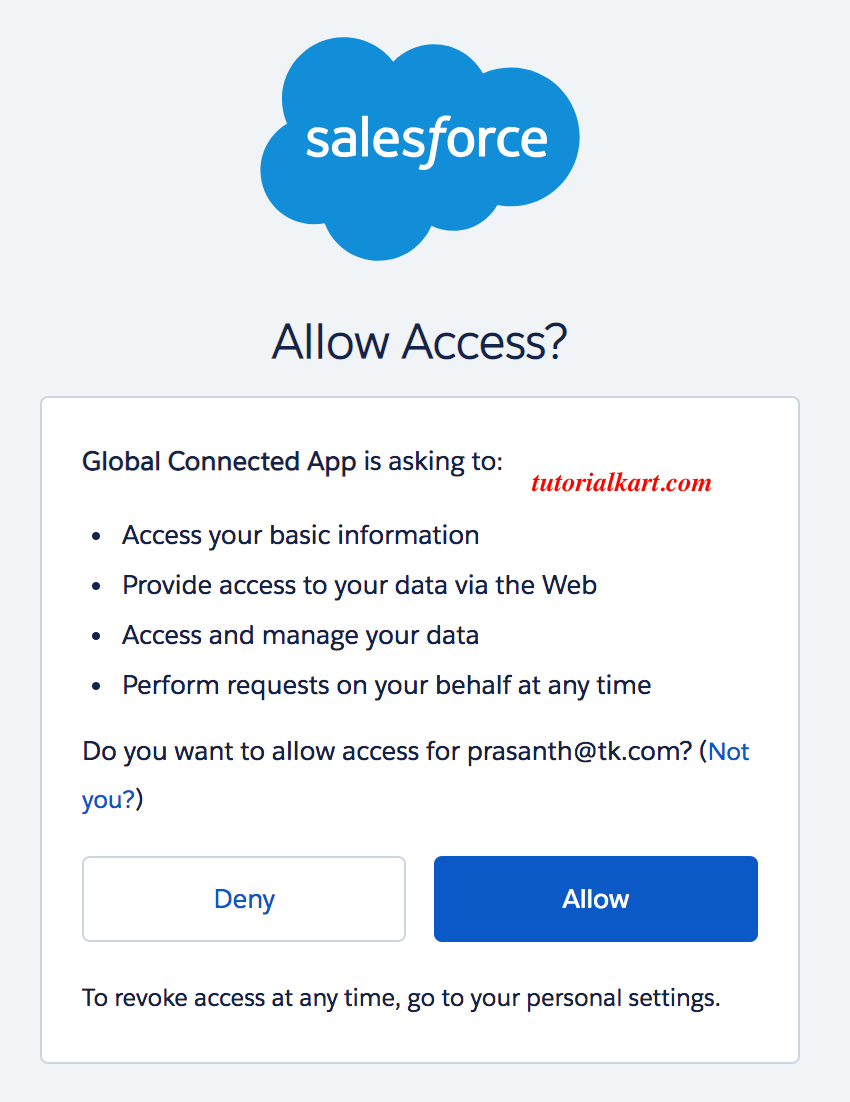
The original Salesforce DX command for the same type of browser-based authorization was commonly written as follows:
sfdx force:auth:web:login -d -a DevHubUse the current sf org login web syntax for new scripts and instructions. The legacy form is included to help readers understand older screenshots and existing automation.
After authenticating, a message similar to the following can appear in the terminal.
Successfully authorized prasanth@tk.com with org ID 00D6F000002SEW1UAO
You may now close the browser
Verify the Default Dev Hub Configuration
List the Salesforce orgs that are currently authorized on your computer:
sf org listConfirm that the org appears with the DevHub alias and is identified as the default Dev Hub. You can also display details for that specific org:
sf org display --target-org DevHubTo explicitly set an already-authorized org as the default Dev Hub, run:
sf config set target-dev-hub=DevHubThe alias is a local name stored by Salesforce CLI. It lets you use DevHub in commands instead of repeatedly entering the full Salesforce username.
Create a Test Scratch Org from the Dev Hub
After the Dev Hub is authorized, you can test the setup from a Salesforce DX project that contains a scratch org definition file. A common command is:
sf org create scratch \
  --definition-file config/project-scratch-def.json \
  --alias TestScratchOrg \
  --duration-days 7 \
  --set-default
The definition file determines the scratch org edition, features, and settings. The command fails when the target Dev Hub is unavailable, the user lacks permission, the definition file is invalid, or the Dev Hub’s scratch org allocation has been reached.
Fix “The Specified Org Is Not a Dev Hub”
This error means the CLI target is not recognized as a Dev Hub. Check the following items:
- Confirm that Enable Dev Hub is selected in Salesforce Setup for the authorized org.
- Make sure you logged in to the intended production or Developer Edition org rather than an unrelated sandbox or user account.
- Run
sf org listand verify which org is marked as the default Dev Hub. - Set the correct alias with
sf config set target-dev-hub=DevHub. - Reauthorize the org if its stored authentication has expired or been revoked.
You can reauthorize the org with:
sf org login web --alias DevHub --set-default-dev-hubSalesforce Dev Hub Setup FAQs
What is a Salesforce Dev Hub?
A Salesforce Dev Hub is an enabled Salesforce org used to create and manage scratch orgs and support second-generation package development. It is the central org for Salesforce DX development activities rather than the temporary org in which each individual feature is built.
How do I enable Dev Hub in Salesforce?
Open Salesforce Setup, enter Dev Hub in Quick Find, select the Dev Hub settings page, and select Enable Dev Hub. Administrator access or suitable permissions are required.
How do I set a default Dev Hub in Salesforce CLI?
Set it during login with sf org login web --alias DevHub --set-default-dev-hub. For an org that is already authorized, use sf config set target-dev-hub=DevHub.
Should I use the sf command or the sfdx command?
Use the current sf command for new work. The older sfdx commands can still appear in legacy tutorials, scripts, and screenshots, but current Salesforce CLI documentation uses the unified sf syntax.
Is a Dev Hub the same as a scratch org?
No. The Dev Hub is the persistent controlling org that creates and tracks scratch orgs. A scratch org is a temporary, configurable Salesforce environment used for development, testing, or automation.
Salesforce Dev Hub Setup Review Checklist
- Dev Hub is enabled in the intended Salesforce org.
- Packaging settings are enabled only when required by the planned package workflow.
- The latest Salesforce CLI is installed and
sf --versionruns successfully. - The correct Salesforce account was authorized through the browser.
- The authorized org has a clear alias such as
DevHub. sf org listidentifies the expected default Dev Hub.- A test scratch org can be created from a valid Salesforce DX project definition.
- Authentication details, usernames, org IDs, and access tokens are not committed to version control or exposed in shared screenshots.