 TutorialKart.com
How to Define and Check Rate Types in SAP FSCM
This tutorial explains how to check existing rate types and define a new exchange rate type in SAP Financial Supply Chain Management (FSCM). Exchange rate types distinguish the rates used for different currency translation purposes, such as buying rates, selling rates, average rates, planning rates, or other organization-specific valuation requirements.
SAP FSCM Rate Type Configuration Details
- Transaction code: SPRO
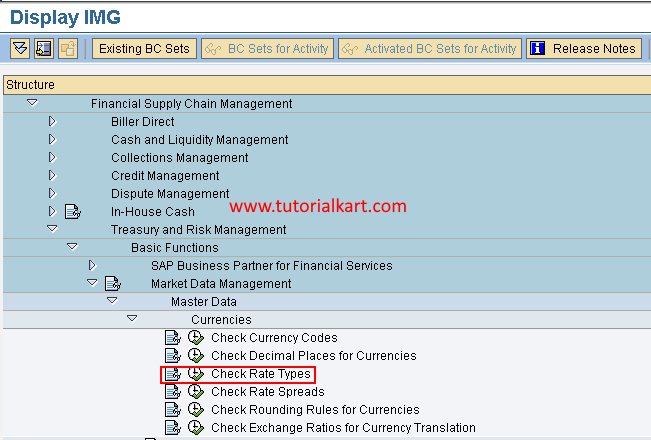
- SAP IMG path: Financial Supply Chain Management > Treasury and Risk Management > Basic Functions > Market Data Management > Master Data > Currencies > Check Rate Types
Before creating a rate type, review the existing entries and confirm that a suitable standard or custom rate type is not already available. A rate type should represent a clearly defined business purpose because it may later be referenced in exchange-rate maintenance, currency conversion, valuation, reporting, and treasury processes.
Steps to Check Rate Types in SAP FSCM
Step 1: Enter transaction code SPRO in the SAP command field and press Enter.

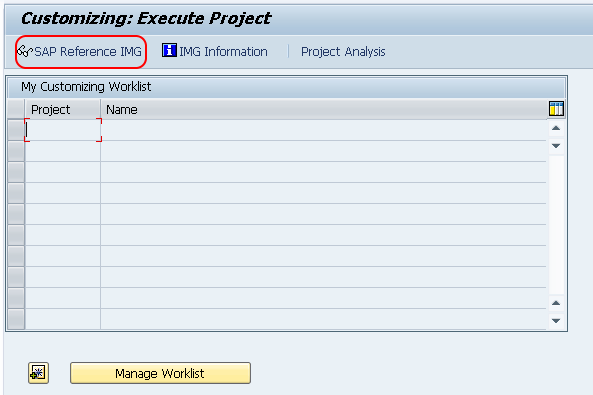
Step 2: On the next screen, choose SAP Reference IMG to open the Implementation Guide.
Step 3: On the Display IMG screen, follow this navigation path:
- Financial Supply Chain Management
- Treasury and Risk Management
- Basic Functions
- Market Data Management
- Master Data
- Currencies
- Check Rate Types
Choose the IMG activity Check Rate Types to display the configured currency translation exchange rate types.
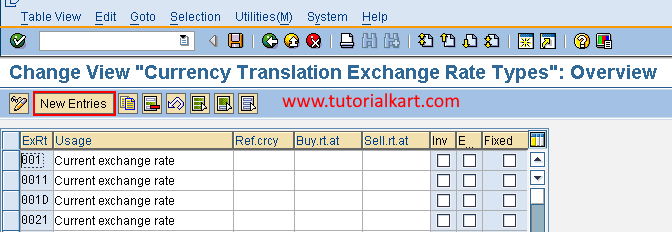
Step 4: On the Change View: Currency Translation Exchange Rate Types overview screen, review the existing entries. To define a new exchange rate type, choose New Entries.
Fields Used to Define an Exchange Rate Type in SAP
Step 5: On the New Entries screen for currency translation exchange rate types, enter the required details.
- ExRt: Enter the key that uniquely identifies the exchange rate type in SAP.
- Usage: Enter a clear description of the business purpose for which the exchange rate type will be used.
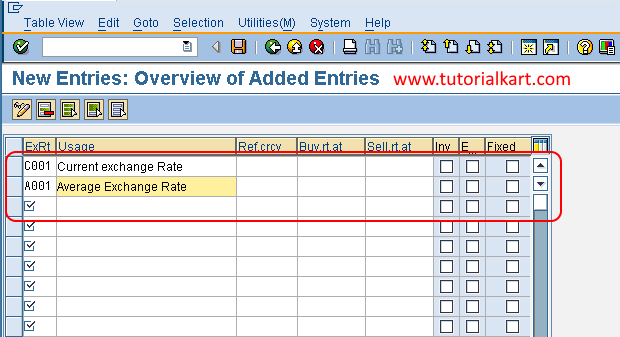
Step 6: Verify the entered key and description, and then choose the Save icon. If SAP requests a customizing transport, assign the change to the appropriate transport request according to your system landscape.
How Exchange Rate Types Work in SAP FSCM
An exchange rate type identifies which set of exchange rates SAP should use for a particular currency conversion. The rate type does not itself contain the currency rate. Instead, it acts as a classification key that is referenced when exchange rates are maintained for currency pairs and validity dates.
For example, an organization may use separate rate types for operational postings, treasury valuation, budgeting, consolidation, or internal reporting. The exact rate types and their permitted uses depend on the organization’s configuration and business processes.
Checks Before Creating a New SAP Rate Type
- Review existing exchange rate types to avoid creating a duplicate.
- Confirm the required business purpose with the finance or treasury process owner.
- Follow the organization’s naming convention for custom configuration keys.
- Check whether downstream currency conversion or valuation settings must reference the new rate type.
- Document which source will provide the corresponding exchange rates and how often those rates will be updated.
Common Problems When Maintaining SAP FSCM Rate Types
- New Entries is unavailable: Check the user’s customizing authorization and confirm that the client is open for changes.
- The rate type key already exists: Review the existing entry and use it if it represents the required business purpose.
- The rate type cannot be used in currency conversion: Confirm that the related exchange rates and dependent configuration have been maintained.
- The change is missing in another system: Verify that the customizing request was released and imported into the target system.
- Unexpected conversion results occur: Check the selected rate type, currency pair, validity date, and maintained exchange-rate value.
SAP FSCM Rate Type Configuration Review
- Confirm that the rate type appears in the overview after saving.
- Verify that the rate type key is unique and correctly entered.
- Ensure that the usage description clearly identifies the intended business process.
- Check that the correct customizing transport request contains the change.
- Test the rate type in the relevant currency translation or valuation process before production use.
The exchange rate type is now available in SAP FSCM. Maintain the corresponding currency exchange rates and dependent settings before using the new rate type in operational or valuation processes.