 TutorialKart.com
How to Define Contact Person Authority in SAP FSCM
In SAP Financial Supply Chain Management, contact person authority identifies the level or type of authorization assigned to a contact person in a business partner relationship. This tutorial explains how to define an authority key and description through the SAP Reference IMG.
SAP FSCM Define Authority Transaction Code and IMG Path
- Transaction code: SPRO
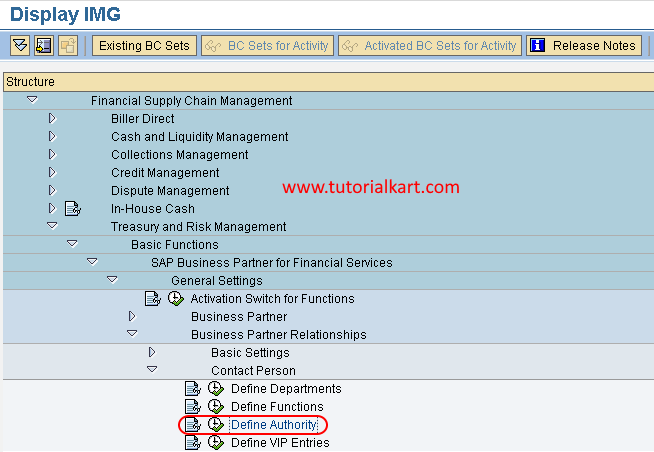
- SAP IMG Path: SPRO > Financial Supply Chain Management > Treasury and Risk Management > Basic Functions > SAP Business Partner for Financial Services > General Settings > Business Partner Relationships > Contact Person > Define Authority
Before creating an entry, determine the authority key, description, and naming convention required by your organization. Check the existing entries first to avoid creating duplicate or unclear authority codes.
Open the SAP Reference IMG with Transaction SPRO
Step 1: From the SAP Easy Access screen, enter transaction code SPRO in the command field and press Enter.

Step 2: Choose SAP Reference IMG to open the Implementation Guide.
Navigate to Define Authority for Contact Persons
Step 3: In the Display IMG screen, expand the following configuration nodes:
- Financial Supply Chain Management
- Treasury and Risk Management
- Basic Functions
- SAP Business Partner for Financial Services
- General Settings
- Business Partner Relationships
- Contact Person
Select the IMG activity Define Authority.
Create a New Contact Person Authority in SAP FSCM
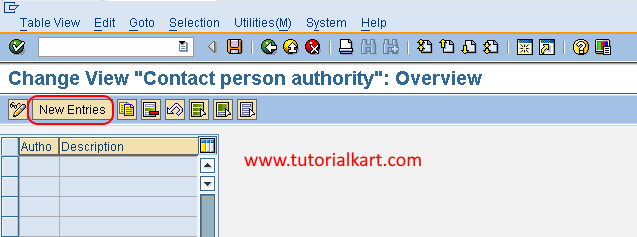
Step 4: On the Change View: Contact Person Authority: Overview screen, review the existing authority entries and choose New Entries.
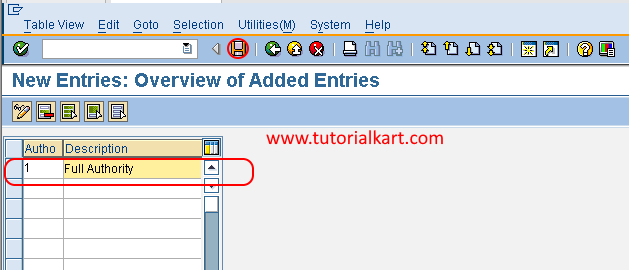
Step 5: On the New Entries screen, enter the required authority details.
- Autho: Enter the unique key that identifies the contact person authority in SAP.
- Description: Enter a clear description of the authority represented by the key.
Use a short, consistent key and a description that clearly explains the permitted authority. Avoid descriptions that are too broad to distinguish one authority level from another.
Save and Transport the SAP Contact Person Authority
Step 6: Verify the authority key and description, and then choose the Save icon. If SAP prompts for a customizing request, assign the change to the appropriate transport request according to your system landscape and transport procedure.
The authority entry is now available for selection in the relevant contact person and business partner relationship processes. Defining an authority does not automatically assign it to a contact person; the assignment must be completed separately in the appropriate master data process.
Checks for SAP FSCM Contact Person Authority Configuration
- Confirm that the authority key is unique in the configuration table.
- Check that the description clearly identifies the permitted authority.
- Verify that the entry was created in the correct SAP client.
- Record the customizing transport request used for the change.
- Test that the new authority can be selected in the intended contact person process.
- Confirm that users maintaining the assignment have the required authorization.
Common Issues When Defining Authority in SAP FSCM
Why is the New Entries option unavailable?
The configuration view may be open in display mode, the client may not allow changes, or the user may not have the required customizing authorization. Switch to change mode and verify the client and authorization settings.
What does the Autho field represent?
The Autho field stores the key that identifies a contact person authority. The description explains the meaning of that key to users maintaining business partner relationships.
Does defining authority grant SAP user permissions?
No. This configuration defines a business meaning for contact person authority within the relationship data. It does not replace SAP user roles, profiles, or authorization objects.
Why is a transport request requested when saving?
Define Authority is a customizing activity. In a development or customizing client, SAP commonly records the change in a customizing transport request so it can be moved to quality and production systems.