 TutorialKart.com
How to Define Security Price Types in SAP FSCM
In this tutorial, you will learn how to define security price types in SAP Financial Supply Chain Management step by step. A security price type identifies the category of market price recorded for a security, such as a closing price, bid price, ask price, or another organization-specific price classification.
Security price types help SAP Treasury and Risk Management distinguish between different market price values when security prices are maintained, imported, evaluated, or used in reporting.
- Transaction code: SPRO
- SAP IMG Path: Financial Supply Chain Management > Treasury and Risk Management > Basic Functions > Market Data Management > Master Data > Securities > Define security price types in SAP
Security Price Type Configuration Prerequisites
Before creating a security price type, confirm the naming convention and business purpose with the treasury or market-data team. The key should clearly distinguish the price category and should not duplicate an existing entry.
- Confirm that you have authorization to access SAP Customizing through
SPRO. - Review the existing security price types before creating a new entry.
- Decide the price type key, long description, and short description.
- Confirm how the new price type will be used in market-data entry, interfaces, valuation, or reporting.
- Use the required Customizing transport request when saving changes in a development or quality system.
Steps to Configure Security Price Types in SAP
Configuration steps to define security price types in SAP
Step 1: Enter transaction code “SPRO” in the SAP command field as shown below image.

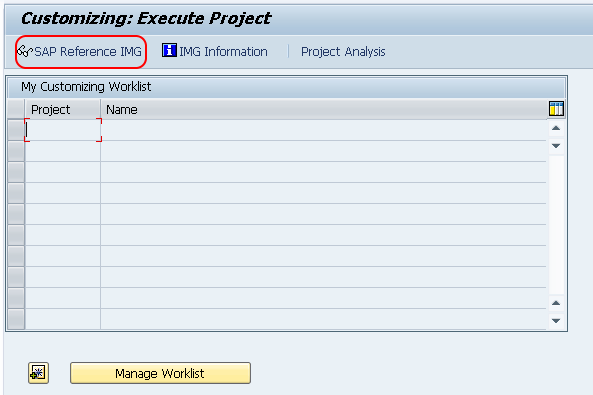
Step 2: In next screen, click on the option “SAP Reference IMG”
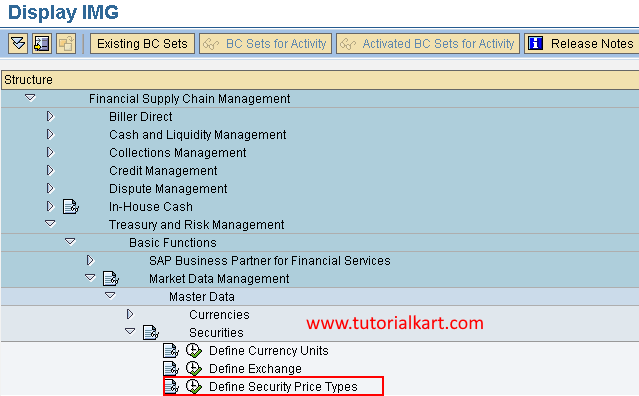
Step 3: On display IMG screen, follow the IMG navigation menu path Financial Supply Chain Management – Treasury and Risk Management – Basic Functions – Market Data Management – Master Data – Securities and choose the IMG activity “Define security price types”.
Step 4: On change view “Securities: security price types” overview screen, click on new entries option to define new security price types in SAP FSCM as per requirements.

Step 5: On new entries security price types screen, enter the following details
- Price Type: Enter the key that defines as security price types in SAP FSCM
- Long Name: Enter the long description of price type
- Short name: Enter the short description of price type
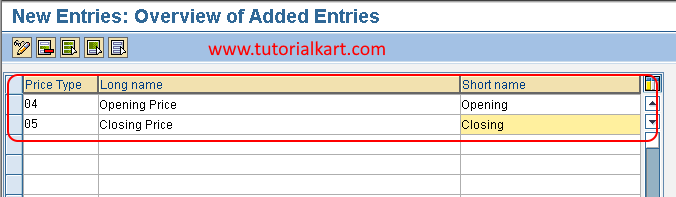
After entering all the required details of security price details, choose save icon and save the configured details Security Price Types in SAP.
Security Price Type Fields in SAP FSCM
The configuration screen contains the identifying key and descriptions used throughout the system. Enter each field consistently so that users can recognize the correct price category during market-data maintenance.
| Field | Purpose | Configuration guidance |
|---|---|---|
| Price Type | Unique key for the security price category | Use a short, stable key that follows the organization’s Customizing convention. |
| Long Name | Full description displayed where sufficient space is available | Describe the exact market price represented by the key. |
| Short Name | Abbreviated description used in compact fields or lists | Keep the text recognizable and consistent with the long name. |
For example, an organization may distinguish between closing, bid, and ask prices. The exact keys and descriptions should follow its approved treasury and market-data naming standards.
How Security Price Types Are Used in SAP Treasury
A security may have more than one market price for the same date, exchange, or quotation source. The price type provides an additional classification so that SAP can identify which price value is being maintained or processed.
- Manual market-data entry: Users select the appropriate price type when entering security prices.
- Market-data interfaces: Imported price records can be mapped to the corresponding SAP price type.
- Valuation processes: Relevant valuation settings may refer to an appropriate market price category.
- Reporting and analysis: Price types help users distinguish between different quoted values for the same security.
Creating a security price type does not by itself load market prices or determine every valuation rule. Related master-data, market-data, valuation, and interface settings must also be configured according to the business process.
Validate the New SAP Security Price Type
After saving the configuration, verify the entry before it is transported or used in production.
- Return to the security price type overview and confirm that the new key is displayed.
- Check the long and short descriptions for spelling and clarity.
- Confirm that the entry was assigned to the correct Customizing transport request.
- Test whether the price type is available in the relevant security market-data process.
- Verify any inbound market-data mapping that is expected to supply values for the new price type.
- Confirm that downstream valuation and reporting processes interpret the price type as intended.
Common Issues When Defining Security Price Types
Security Price Type Key Already Exists
If SAP does not accept the new key, check the existing entries. Each price type must have a unique identifier. Reuse an existing entry when it represents the same business meaning, or choose a different approved key.
New Price Type Is Not Available for Market Data
Confirm that the configuration was saved successfully and transported to the system where testing is taking place. Also review related market-data, security master, valuation, and interface settings because the price type definition may be only one part of the complete setup.
Imported Security Prices Use the Wrong Price Type
Review the mapping used by the external market-data interface. The source provider’s price classification must be mapped to the correct SAP security price type.
Security Price Type Changes Cannot Be Saved
Check the user’s Customizing authorization, the client change settings, and whether a valid transport request is available. In controlled systems, direct Customizing changes may be restricted.
SAP Security Price Type Configuration Checklist
- The security price type key is unique and follows the approved naming convention.
- The long name clearly describes the represented market price.
- The short name is concise and understandable in selection lists.
- The entry has been saved to the correct Customizing transport request.
- The price type appears in the intended security market-data process.
- External market-data mappings use the correct SAP price type.
- Valuation and reporting behavior has been tested with representative data.
Security Price Types in SAP FSCM: Frequently Asked Questions
What is a security price type in SAP?
A security price type is a Customizing key that classifies a market price recorded for a security. It allows different price categories, such as bid, ask, or closing values, to be identified separately.
Which transaction is used to define security price types?
Use transaction SPRO and follow the SAP Reference IMG path for Treasury and Risk Management, Market Data Management, Securities, and Define Security Price Types.
Does creating a security price type automatically create market prices?
No. The configuration creates the price classification only. Security prices must still be entered manually or supplied through a market-data interface.
Can an existing SAP security price type be changed?
Descriptions can generally be adjusted through Customizing, subject to authorization and transport controls. Changing the meaning of a key already used in historical market data should be avoided because it may cause inconsistent interpretation.
Result of the SAP Security Price Type Setup
After the entry is saved and transported, the new security price type can be used by the relevant SAP Treasury and Risk Management processes. Complete the setup by validating market-data entry or interface mapping and confirming that valuation and reporting processes use the intended price category.