 TutorialKart.com
SOQL statements and Salesforce Object Search Language (SOSL) statements can be evaluated in Apex by surrounding the statement with square brackets [ ]. Salesforce Apex code commonly includes variable declarations, SOQL queries, control structures, lists, and data manipulation language (DML) operations.
A SOQL query is used to read records from Salesforce objects. It is similar in purpose to a SQL SELECT statement, but it is written for Salesforce objects, fields, and relationships instead of database tables. SOQL keywords are not case-sensitive, but writing keywords in uppercase and object or field API names consistently makes queries easier to read.
For the official syntax reference, see Salesforce’s SOQL SELECT statement documentation. For beginner practice, Salesforce Trailhead also has a useful module on getting started with SOQL queries.
When is a SOQL Query Used in Salesforce Apex?
- SOQL is used to retrieve records from one Salesforce object, such as
Account,Contact, or a custom object. - SOQL can retrieve related records using relationship queries when the relationship is defined in Salesforce.
- SOQL is used to count records that match a condition, usually with
COUNT(). - SOQL can sort returned records using
ORDER BY. - SOQL can filter records by text, number, date, DateTime, checkbox, picklist, and lookup fields.
- SOQL is used in the
queryStringparameter of API query calls. - SOQL is used inside Apex statements with square brackets.
- SOQL is often used in Visualforce controllers, Lightning controller logic, services, triggers, and getter methods.
- SOQL can be tested in tools such as Developer Console Query Editor, Workbench, Salesforce CLI, VS Code extensions, and older Force.com Explorer examples.
Basic SOQL Query Syntax for a First Salesforce Query
The basic SOQL syntax has a field list, an object name, and optional clauses such as WHERE, ORDER BY, and LIMIT.
SELECT FieldName1, FieldName2
FROM ObjectName
WHERE FieldName = 'Value'
ORDER BY FieldName ASC
LIMIT 10
For a first SOQL query, start with a small field list and a standard object. The following query reads the record ID and name from Account records.
SELECT Id, Name
FROM Account
LIMIT 10
How to Write Your First SOQL Query in Salesforce Query Editor
To write your first SOQL query, use an object API name and the API names of the fields you want to retrieve. Standard object names usually look like Account and Contact. Custom object names end with __c, such as Student__c. Custom field API names also end with __c, such as College__c.
- Open a SOQL tool such as Developer Console Query Editor, Workbench, Salesforce Inspector, or another Salesforce query tool used in your org.
- Choose the object you want to query, for example
Account. - List only the fields you need, for example
NameandPhone. - Run the query and check the returned records.
- Add
WHERE,ORDER BY, orLIMITafter the basic query is working.
How to Write First SOQL Query in Force.com Explorer?
In Salesforce Apex coding, the API names of the object are required in SOQL. SOQL statements evaluates to a list of sObjects, a single sObject, or an Integer for count method queries. Before getting started with writing our first SOQL statements we need to install Force.com Explorer. We can also use third party tools to write and execute queries in Salesforce.com.
SOQL Statement
Select PHONE, Name From ACCOUNT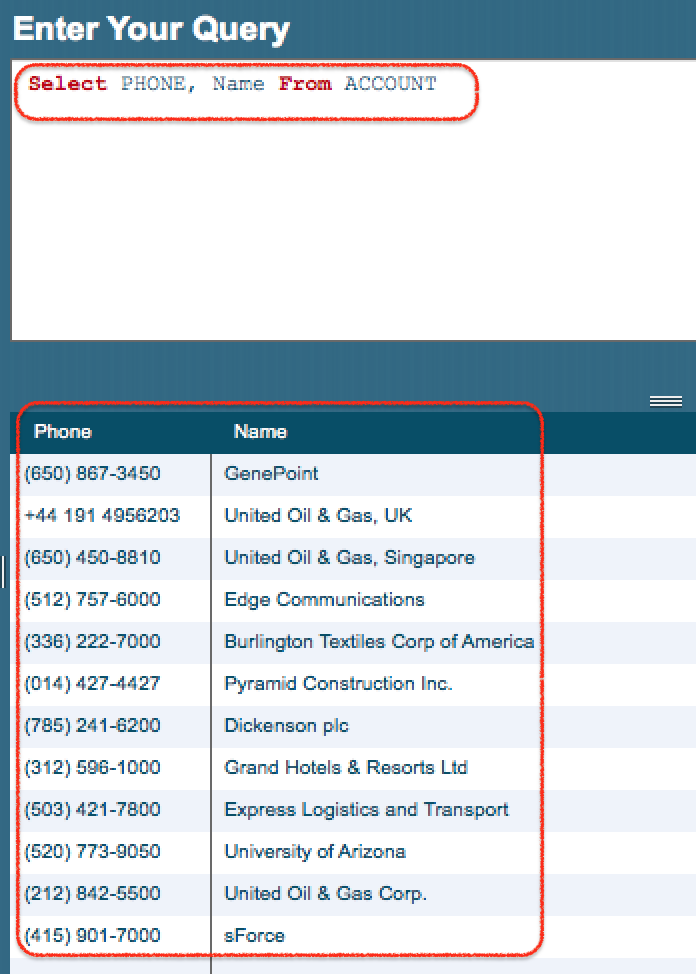
As shown above, Phone number and name for standard field of the Account object are extracted.
The same query is commonly written with uppercase SOQL keywords and standard field capitalization as shown below. Both versions work because SOQL keywords are case-insensitive, but the second format is easier to scan.
SELECT Phone, Name
FROM AccountSelect Name, Phone, AnnualRevenue, CustomerPriority__c FROM ACCOUNT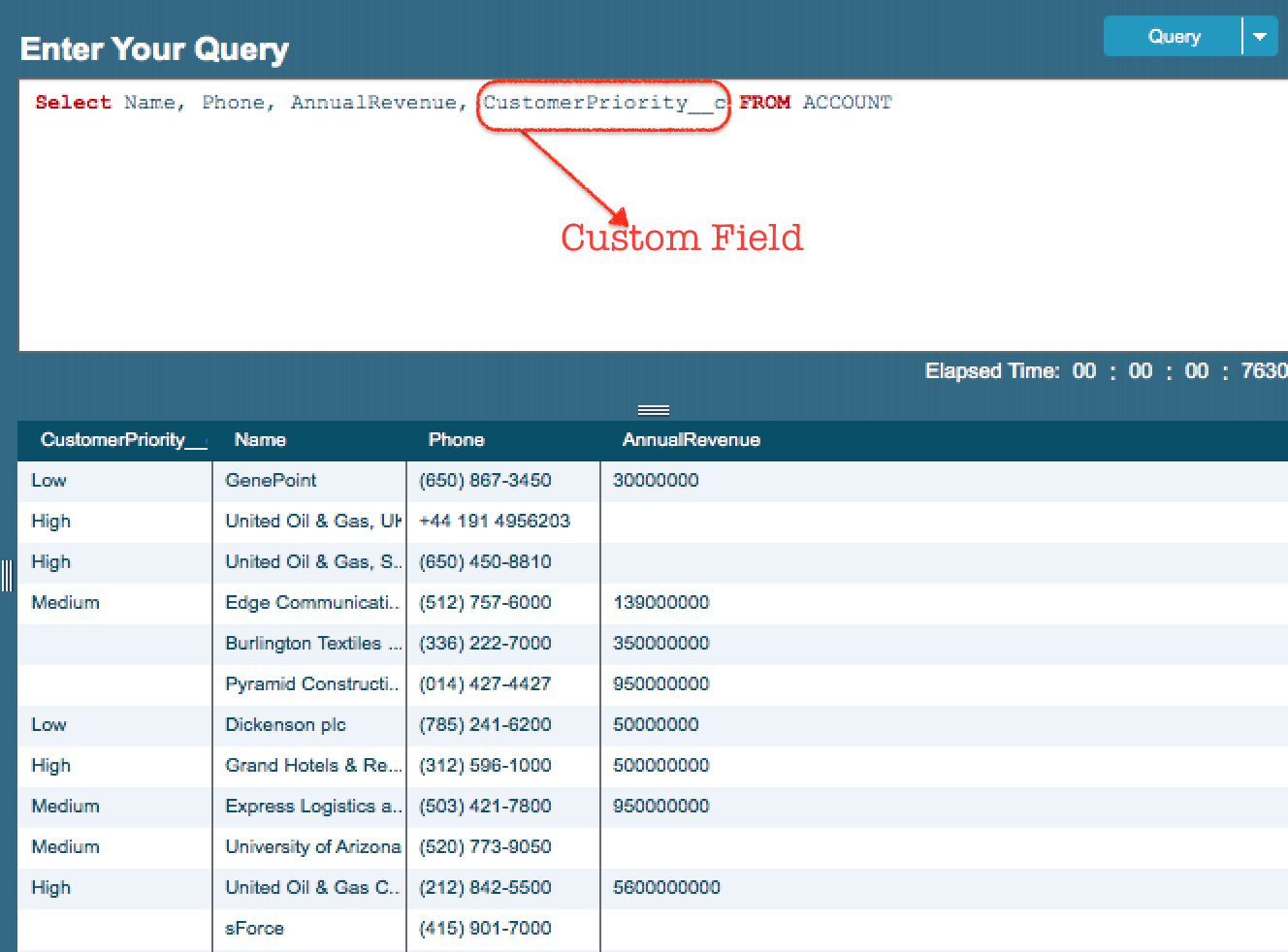
As shown in above example, we fetching custom fields in the Standard Object. Here Name and Phone are Standard fields where CustomePriority__c is the custom field.
In Salesforce, custom field API names end with __c. The query above retrieves standard fields such as Name, Phone, and AnnualRevenue, along with the custom field CustomerPriority__c.
SELECT name,State__c, College__C FROM Student__c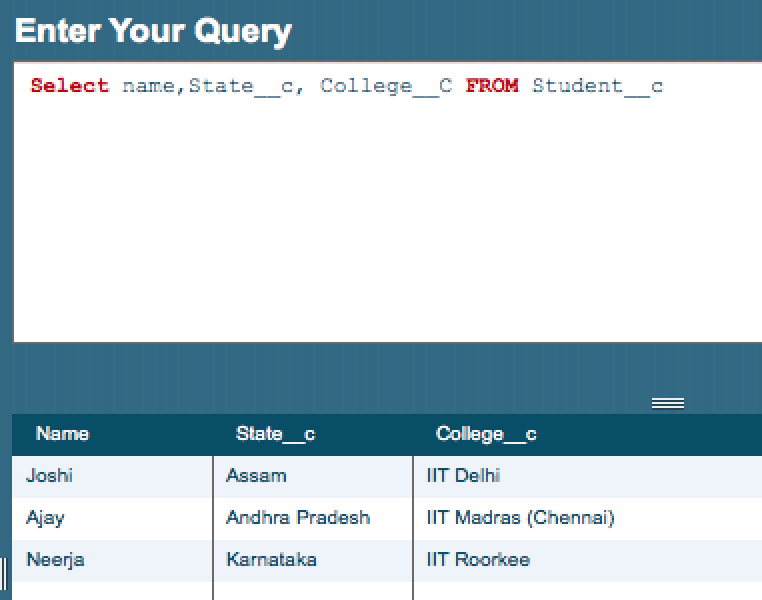
As shown in above SOQL statement, Student__c is a custom object where State__c and College__c are custom fields. Student name , state and college details are retrieved from the custom object Student__c.
A cleaner version of the same custom object query is shown below. The object API name is Student__c, and the custom field API names are State__c and College__c.
SELECT Name, State__c, College__c
FROM Student__c
SOQL Query with WHERE Clause for Filtering Salesforce Records
After writing a basic query, add a WHERE clause to return only records that match a condition. String and picklist values are written inside single quotes.
SELECT Id, Name, Phone
FROM Account
WHERE Name = 'TutorialKart'
Use comparison operators for number, date, and text filters. For example, the following query returns Account records with annual revenue greater than a given amount.
SELECT Id, Name, AnnualRevenue
FROM Account
WHERE AnnualRevenue > 1000000
SOQL Query with ORDER BY and LIMIT for Small Test Results
When testing a SOQL query for the first time, add LIMIT so that the result is small. Add ORDER BY when you want records returned in a predictable order.
SELECT Id, Name, CreatedDate
FROM Account
ORDER BY CreatedDate DESC
LIMIT 10
This query returns the latest Account records first and limits the result to 10 records.
How to Write a SOQL Query Inside Apex Code
Inside Apex, a static SOQL query is written inside square brackets. The query result is usually assigned to a list of sObjects.
List<Account> accounts = [
    SELECT Id, Name, Phone
    FROM Account
    LIMIT 10
];
When the filter value comes from an Apex variable, use a bind variable with a colon.
String accountName = 'TutorialKart';

List<Account> accounts = [
    SELECT Id, Name, Phone
    FROM Account
    WHERE Name = :accountName
];
Bind variables are preferred in Apex because the value is supplied by Apex instead of being manually concatenated into the query string.
SOQL and SQL Difference for Beginners Writing a First Query
SOQL looks similar to SQL, but it is not the same language. SQL queries database tables. SOQL queries Salesforce objects and fields. SOQL also follows Salesforce relationship rules and governor limits when used in Apex.
| Point | SOQL | SQL |
|---|---|---|
| Main target | Salesforce objects such as Account and Contact | Database tables |
| Field names | Salesforce field API names | Column names |
| Joins | Uses relationship queries | Uses join clauses |
| Used in Apex | Yes, inside square brackets or dynamic SOQL | No, Apex uses SOQL for Salesforce records |
| Search across many objects | Use SOSL when broad text search is needed | Depends on the database and SQL query design |
SOQL Query Mistakes to Avoid in Your First Salesforce Query
- Using field labels instead of API names: SOQL needs the API name, such as
CustomerPriority__c, not only the label shown on the page layout. - Forgetting
__cfor custom fields and objects: Custom object and custom field API names usually end with__c. - Selecting too many fields: Start with the fields needed for the task. Smaller queries are easier to test and maintain.
- Missing quotes around text values: Use
Name = 'TutorialKart', notName = TutorialKart. - Testing without
LIMIT: UseLIMITwhile learning or troubleshooting so the result set stays manageable.
Quick SOQL Query Patterns for Salesforce Beginners
| Requirement | SOQL pattern |
|---|---|
| Read a few Account records | SELECT Id, Name FROM Account LIMIT 10 |
| Read records with a text filter | SELECT Id, Name FROM Account WHERE Name = 'TutorialKart' |
| Read records starting with text | SELECT Id, Name FROM Account WHERE Name LIKE 'Tut%' |
| Sort newest records first | SELECT Id, Name FROM Account ORDER BY CreatedDate DESC LIMIT 10 |
| Count Account records | SELECT COUNT() FROM Account |
| Query a custom object | SELECT Name FROM Student__c |
FAQs on Writing Your First SOQL Query in Salesforce
How do I write a SOQL query?
Start with SELECT, list the field API names, add FROM, and then write the Salesforce object API name. Example: SELECT Id, Name FROM Account LIMIT 10. Add WHERE only when you need to filter records.
What is the basic syntax of SOQL?
The basic syntax is SELECT fieldList FROM ObjectName. A more complete query can include WHERE, ORDER BY, and LIMIT, such as SELECT Id, Name FROM Account WHERE Name LIKE 'A%' ORDER BY Name LIMIT 20.
How is SOQL pronounced?
SOQL is commonly pronounced as “soh-kul” or spoken as the individual letters “S-O-Q-L”. Both are understood in Salesforce discussions. The important point is that SOQL means Salesforce Object Query Language.
Can SOQL query custom objects and custom fields?
Yes. Use the API names of custom objects and custom fields. Custom API names usually end with __c. Example: SELECT Name, College__c FROM Student__c.
Can I write SOQL inside Apex code?
Yes. In Apex, place a static SOQL query inside square brackets and assign the result to a list or sObject variable. Example: List<Account> accounts = [SELECT Id, Name FROM Account LIMIT 10];.
Editorial QA Checklist for This First SOQL Query Tutorial
- Check that every SOQL example uses Salesforce object and field API names, not only labels.
- Confirm that existing images and links remain unchanged in the WordPress content.
- Verify that new SOQL syntax examples use the
language-sql syntaxPrismJS class. - Verify that new Apex examples use the
language-java syntaxPrismJS class because Apex syntax is Java-like. - Confirm that beginner examples include
LIMITwhere a small test result is useful.
What You Learned About Writing Your First SOQL Query
In this Salesforce Developer Tutorial, we learned how to write a first SOQL query using standard fields, custom fields, standard objects, and custom objects. We also looked at filtering with WHERE, sorting with ORDER BY, limiting results with LIMIT, and writing SOQL inside Apex code.