 TutorialKart.com
To get the length of a string in TypeScript, use the length property. It returns the number of UTF-16 code units stored in the string.
For ordinary English letters, digits, spaces, and most common symbols, the returned value usually matches the number of visible characters. Some Unicode characters, such as emoji and certain combined characters, can occupy more than one UTF-16 code unit.
Get TypeScript String Length with the length Property
The syntax for reading the length of a TypeScript string is:
stringValue.lengthThe property returns a number. String indexes begin at 0, but the length value represents the total number of UTF-16 code units in the string.
TypeScript String Length Example Using a String Object
In the following example, we will take a string variable, initialize it with some value and then find its length.
example.ts
var str = new String("Hello World")
var len = str.length
console.log(str)
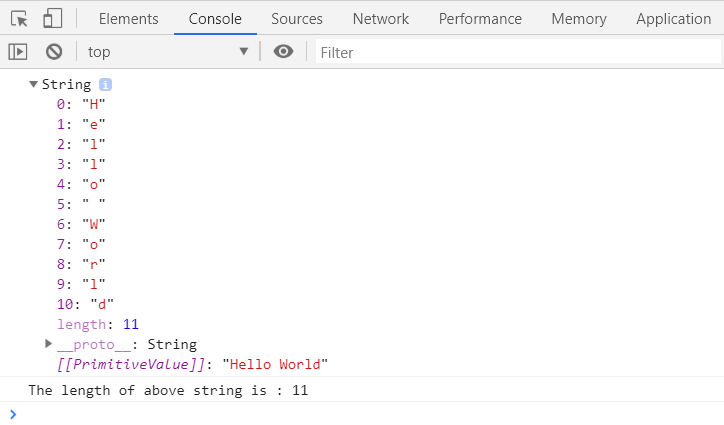
console.log("The length of above string is : "+len)
The text Hello World contains five letters, one space, and five more letters. Therefore, its length is 11.
When you convert the code into JavaScript using the command tsc example.ts, you will get the following JavaScript Code.
example.js
var str = new String("Hello World");
var len = str.length;
console.log(str);
console.log("The length of above string is : " + len);
If you run this JavaScript code in a web-browser, the output in the console would be as shown in the following screenshot:
Find the Length of a TypeScript String Literal
You can also use the length property directly on a string constant.
example.ts
var len = "Hello World".length
console.log("The length of above string is : "+len)
The output would be same as in the above example.

Use Primitive string Values Instead of String Objects
TypeScript supports both the primitive string type and the boxed String object. In most application code, prefer primitive strings because they are simpler and behave as expected with TypeScript type checking.
const message: string = "Hello World";
const length: number = message.length;

console.log(length);11The declaration new String("Hello World") creates an object, while "Hello World" is a primitive string. Both expose a length property, but the primitive form is generally preferred.
Check Whether a TypeScript String Is Empty
A string is empty when its length is 0. You can compare the property directly with zero.
const value: string = "";

if (value.length === 0) {
    console.log("The string is empty");
}
The string is emptyTo check whether a string contains at least one UTF-16 code unit, use value.length > 0.
const username: string = "Alice";

if (username.length > 0) {
    console.log("A username was provided");
}
Check TypeScript String Length After Removing Whitespace
A string containing only spaces is not technically empty. Its length is greater than zero. Use trim() before checking the length when leading and trailing whitespace should be ignored.
const input: string = "   ";

console.log(input.length);
console.log(input.trim().length);

if (input.trim().length === 0) {
    console.log("No visible text was entered");
}
3
0
No visible text was enteredApply a Maximum String Length in TypeScript
TypeScript does not enforce a maximum runtime string length through the string type. To validate a user-defined limit, compare the string’s length with the required maximum.
const displayName: string = "Christopher";
const maximumLength: number = 10;

if (displayName.length > maximumLength) {
    console.log(`Display name must contain at most ${maximumLength} characters`);
}
Display name must contain at most 10 charactersThis is runtime validation. A normal TypeScript declaration such as let code: string does not restrict the value to a specific number of characters.
Count Emoji and Unicode Characters in TypeScript
The length property counts UTF-16 code units rather than user-perceived characters. As a result, some emoji return a length greater than 1.
const emoji: string = "😊";

console.log(emoji.length);
console.log(Array.from(emoji).length);
2
1Array.from() iterates by Unicode code points, so it handles many emoji more intuitively than length. However, even code-point counting may not match the number of visible symbols when a displayed character is built from multiple code points, such as some family emoji, flags, or letters combined with accent marks.
TypeScript String Length and Array Length
Strings and arrays both provide a length property, but they measure different values. A string’s length is the number of UTF-16 code units, while an array’s length is based on its indexed elements.
const text: string = "TypeScript";
const languages: string[] = ["TypeScript", "JavaScript", "Python"];

console.log(text.length);
console.log(languages.length);
10
3Common TypeScript String Length Mistakes
- Calling length as a function: Use
text.length, nottext.length(). - Assuming spaces are ignored: Spaces, tabs, and newline characters contribute to the returned length.
- Using new String unnecessarily: Prefer primitive values such as
const text = "Hello". - Reading length from null or undefined: Verify that an optional value exists before accessing its property.
- Assuming length always equals visible characters: Emoji and combined Unicode characters may produce a different result.
TypeScript String Length FAQs
How do I get the length of a string in TypeScript?
Use the length property, as in const size = text.length. It returns a number representing the string’s UTF-16 code units.
Is TypeScript string length a property or a method?
It is a property. Write text.length without parentheses.
How can I check if a TypeScript string is not empty?
Use text.length > 0. When whitespace-only input should count as empty, use text.trim().length > 0.
Can TypeScript declare a string with an exact length?
The standard string type does not enforce an exact character count. Exact or maximum lengths usually require runtime validation. Advanced template-literal and recursive types can model some fixed-length cases, but they add complexity and do not replace validation of external input.
Why does an emoji have a TypeScript string length of 2?
JavaScript and TypeScript strings use UTF-16. Some emoji are represented by a surrogate pair containing two UTF-16 code units, so the length property returns 2.
Editorial QA Checklist for TypeScript String Length Examples
- Confirm that every example accesses
lengthas a property rather than a function. - Verify that the reported length includes spaces and other whitespace present in each example string.
- Distinguish primitive
stringvalues from boxedStringobjects. - State that
lengthcounts UTF-16 code units when discussing emoji or Unicode text. - Check that maximum-length examples are described as runtime validation rather than a built-in restriction of the TypeScript
stringtype. - Ensure that empty-input examples explain when
trim()should be applied.