 TutorialKart.com
Angular Hello World Application
This tutorial creates a first Angular application with Angular CLI, runs it on a local development server, and changes the root component to display a Hello World message. It also explains the generated project files and identifies differences between the original Angular 6 workflow and current Angular projects.
Angular Hello World prerequisites
Before creating the application, install a Node.js version compatible with the Angular release you intend to use. npm is installed with Node.js. You also need Angular CLI, a terminal or command prompt, and a code editor such as Visual Studio Code.
Verify the installed tools before continuing:
node --version
npm --version
ng version
If the ng command is unavailable, install Angular CLI globally with npm install -g @angular/cli. A legacy Angular 6 project requires older compatible tooling, whereas a newly created project uses the installed current CLI.
Angular CLI syntax for creating a project
Run the following Angular CLI command in a terminal or command prompt to create a project:
ng new <project-name>nginvokes Angular CLI.newcreates a new Angular workspace and initial application.<project-name>is replaced with the name of the project.
Use a simple lowercase project name containing letters, numbers, and hyphens. A name such as hello-world is suitable for this example. Avoid spaces and underscores because workspace naming rules can differ across CLI versions.
Create the Angular hello-world project
Move to the directory in which the project should be stored, and run:
ng new hello-worldCurrent Angular CLI releases may ask about stylesheet format, routing, server-side rendering, and other project options. For a basic Hello World application, accept the defaults unless you need a particular configuration. Angular CLI then creates the workspace, writes the configuration and source files, and installs npm dependencies.
The following preserved output was produced by Angular CLI 6.0.8 on Windows. A current CLI creates a different file set and reports different package versions. Treat this as a historical Angular 6 example rather than the expected output of a current installation.
C:\workspace\angular>ng new hello-world
CREATE hello-world/angular.json (3593 bytes)
CREATE hello-world/package.json (1315 bytes)
CREATE hello-world/README.md (1027 bytes)
CREATE hello-world/tsconfig.json (384 bytes)
CREATE hello-world/tslint.json (2805 bytes)
CREATE hello-world/.editorconfig (245 bytes)
CREATE hello-world/.gitignore (503 bytes)
CREATE hello-world/src/environments/environment.prod.ts (51 bytes)
CREATE hello-world/src/environments/environment.ts (631 bytes)
CREATE hello-world/src/favicon.ico (5430 bytes)
CREATE hello-world/src/index.html (297 bytes)
CREATE hello-world/src/main.ts (370 bytes)
CREATE hello-world/src/polyfills.ts (3194 bytes)
CREATE hello-world/src/test.ts (642 bytes)
CREATE hello-world/src/assets/.gitkeep (0 bytes)
CREATE hello-world/src/styles.css (80 bytes)
CREATE hello-world/src/browserslist (375 bytes)
CREATE hello-world/src/karma.conf.js (964 bytes)
CREATE hello-world/src/tsconfig.app.json (194 bytes)
CREATE hello-world/src/tsconfig.spec.json (282 bytes)
CREATE hello-world/src/tslint.json (314 bytes)
CREATE hello-world/src/app/app.module.ts (314 bytes)
CREATE hello-world/src/app/app.component.html (1141 bytes)
CREATE hello-world/src/app/app.component.spec.ts (994 bytes)
CREATE hello-world/src/app/app.component.ts (207 bytes)
CREATE hello-world/src/app/app.component.css (0 bytes)
CREATE hello-world/e2e/protractor.conf.js (752 bytes)
CREATE hello-world/e2e/src/app.e2e-spec.ts (307 bytes)
CREATE hello-world/e2e/src/app.po.ts (208 bytes)
CREATE hello-world/e2e/tsconfig.e2e.json (213 bytes)
npm WARN deprecated istanbul-lib-hook@1.2.1: 1.2.0 should have been a major version bump

> node-sass@4.9.2 install C:\workspace\angular\hello-world\node_modules\node-sass
> node scripts/install.js

Cached binary found at C:\Users\TutorialKart\AppData\Roaming\npm-cache\node-sass\4.9.2\win32-x64-64_binding.node

> node-sass@4.9.2 postinstall C:\workspace\angular\hello-world\node_modules\node-sass
> node scripts/build.js

Binary found at C:\workspace\angular\hello-world\node_modules\node-sass\vendor\win32-x64-64\binding.node
Testing binary
Binary is fine

> @angular/cli@6.0.8 postinstall C:\workspace\angular\hello-world\node_modules\@angular\cli
> node ./bin/ng-update-message.js

npm WARN optional SKIPPING OPTIONAL DEPENDENCY: fsevents@1.2.4 (node_modules\fsevents):
npm WARN notsup SKIPPING OPTIONAL DEPENDENCY: Unsupported platform for fsevents@1.2.4: wanted {"os":"darwin","arch":"any"} (current: {"os":"win32","arch":"x64"})

added 1102 packages from 1279 contributors and audited 21866 packages in 20.585s
found 13 vulnerabilities (9 low, 4 high)
  run `npm audit fix` to fix them, or `npm audit` for details
warning: LF will be replaced by CRLF in .editorconfig.
The file will have its original line endings in your working directory.
warning: LF will be replaced by CRLF in .gitignore.
The file will have its original line endings in your working directory.
warning: LF will be replaced by CRLF in README.md.
The file will have its original line endings in your working directory.
warning: LF will be replaced by CRLF in angular.json.
The file will have its original line endings in your working directory.
warning: LF will be replaced by CRLF in e2e/protractor.conf.js.
The file will have its original line endings in your working directory.
warning: LF will be replaced by CRLF in e2e/src/app.e2e-spec.ts.
The file will have its original line endings in your working directory.
warning: LF will be replaced by CRLF in e2e/src/app.po.ts.
The file will have its original line endings in your working directory.
warning: LF will be replaced by CRLF in e2e/tsconfig.e2e.json.
The file will have its original line endings in your working directory.
warning: LF will be replaced by CRLF in package-lock.json.
The file will have its original line endings in your working directory.
warning: LF will be replaced by CRLF in package.json.
The file will have its original line endings in your working directory.
warning: LF will be replaced by CRLF in src/app/app.component.html.
The file will have its original line endings in your working directory.
warning: LF will be replaced by CRLF in src/app/app.component.spec.ts.
The file will have its original line endings in your working directory.
warning: LF will be replaced by CRLF in src/app/app.component.ts.
The file will have its original line endings in your working directory.
warning: LF will be replaced by CRLF in src/app/app.module.ts.
The file will have its original line endings in your working directory.
warning: LF will be replaced by CRLF in src/browserslist.
The file will have its original line endings in your working directory.
warning: LF will be replaced by CRLF in src/environments/environment.prod.ts.
The file will have its original line endings in your working directory.
warning: LF will be replaced by CRLF in src/environments/environment.ts.
The file will have its original line endings in your working directory.
warning: LF will be replaced by CRLF in src/index.html.
The file will have its original line endings in your working directory.
warning: LF will be replaced by CRLF in src/karma.conf.js.
The file will have its original line endings in your working directory.
warning: LF will be replaced by CRLF in src/main.ts.
The file will have its original line endings in your working directory.
warning: LF will be replaced by CRLF in src/polyfills.ts.
The file will have its original line endings in your working directory.
warning: LF will be replaced by CRLF in src/styles.css.
The file will have its original line endings in your working directory.
warning: LF will be replaced by CRLF in src/test.ts.
The file will have its original line endings in your working directory.
warning: LF will be replaced by CRLF in src/tsconfig.app.json.
The file will have its original line endings in your working directory.
warning: LF will be replaced by CRLF in src/tsconfig.spec.json.
The file will have its original line endings in your working directory.
warning: LF will be replaced by CRLF in src/tslint.json.
The file will have its original line endings in your working directory.
warning: LF will be replaced by CRLF in tsconfig.json.
The file will have its original line endings in your working directory.
warning: LF will be replaced by CRLF in tslint.json.
The file will have its original line endings in your working directory.
    Successfully initialized git.
Warnings should be read rather than ignored automatically. The output above contains deprecation, optional dependency, line-ending, and audit messages associated with packages from the Angular 6 period. A warning does not always stop project creation, but security and compatibility messages should be reviewed in the context of the project’s locked dependency versions. Avoid applying an automatic audit fix to a legacy project without first checking the proposed package changes.
Run the Angular Hello World development server
Navigate into the generated project directory and start the Angular development server:
cd hello-world
ng serve --open
ng serve compiles the application, starts a local server, and watches the source files for changes. The --open option opens the application in the default browser.
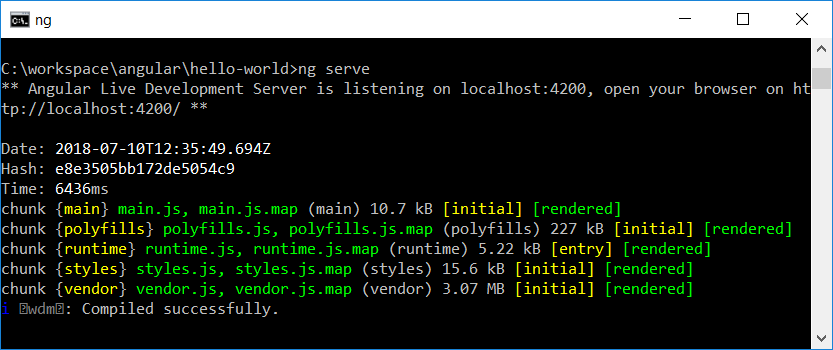
After compilation succeeds, open http://localhost:4200/ if the browser does not open automatically. Port 4200 is the usual default. Angular CLI reports a different address if another host or port was configured.
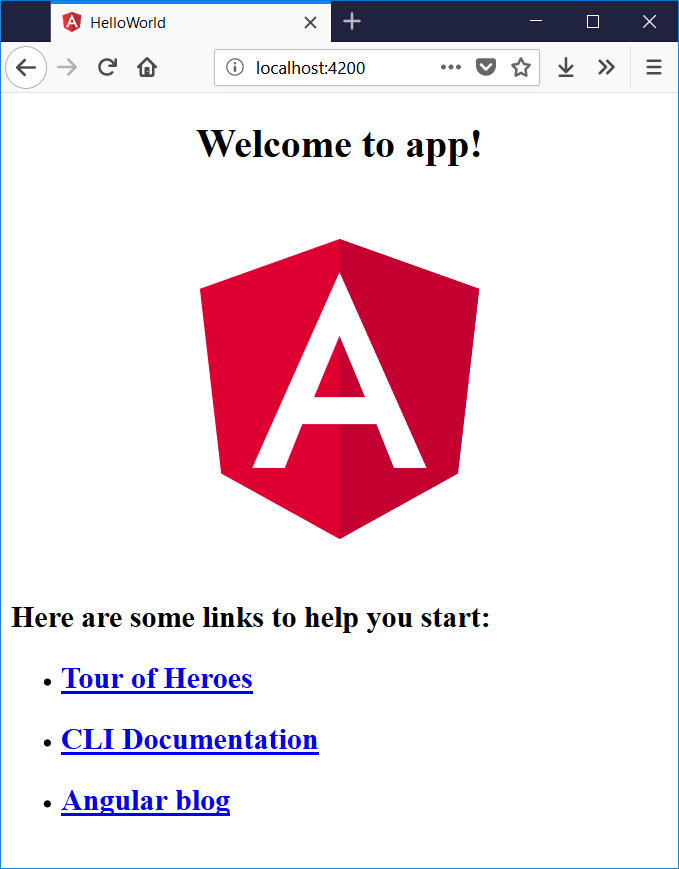
The development server is for local development. It is not the production deployment server. Use ng build to create a deployable build after the application is ready.
Display Hello World in the Angular root component
Open the generated project in Visual Studio Code or another TypeScript editor:
code .Locate the root component template under src/app. Depending on the Angular CLI version and selected file-naming style, it may be named app.component.html or app.html. Replace its generated markup with:
<main class="hello-card">
  <h1>Hello World!</h1>
  <p>My first Angular application is running.</p>
</main>
Save the file while ng serve is running. The CLI recompiles the application, and the browser normally refreshes with the new message.
Add the following optional styles to the root component stylesheet, which may be named app.component.css or app.css:
.hello-card {
  max-width: 36rem;
  margin: 4rem auto;
  padding: 2rem;
  text-align: center;
  border: 1px solid #d7d7d7;
  border-radius: 0.75rem;
  font-family: Arial, sans-serif;
}

.hello-card h1 {
  margin-top: 0;
  color: #b00020;
}
Add Angular interpolation to the Hello World example
A static message confirms that the project runs. Interpolation demonstrates how an Angular template reads data from its component class. In a current standalone root component, the TypeScript file follows this general pattern:
import { Component } from '@angular/core';

@Component({
  selector: 'app-root',
  standalone: true,
  templateUrl: './app.component.html',
  styleUrl: './app.component.css'
})
export class AppComponent {
  message = 'Hello World!';
}
Use interpolation in the corresponding template:
<main class="hello-card">
  <h1>{{ message }}</h1>
  <p>My first Angular application is running.</p>
</main>
The double braces tell Angular to evaluate the message property and render its value as text. Changing the property in the component changes the heading rendered by the template.
Angular 6 version of the Hello World component
Angular 6 uses NgModules rather than standalone components. In the original project structure shown above, AppComponent is declared in src/app/app.module.ts. Its component metadata does not contain standalone: true, and the stylesheet setting uses the styleUrls array.
import { Component } from '@angular/core';

@Component({
  selector: 'app-root',
  templateUrl: './app.component.html',
  styleUrls: ['./app.component.css']
})
export class AppComponent {
  message = 'Hello World!';
}
Both versions use the same basic component model: a selector identifies the component, a template defines its markup, a stylesheet controls its local presentation, and the class provides data and behavior.
Angular Hello World project file structure
The exact files generated by ng new hello-world depend on the Angular CLI version and the options selected during project creation.
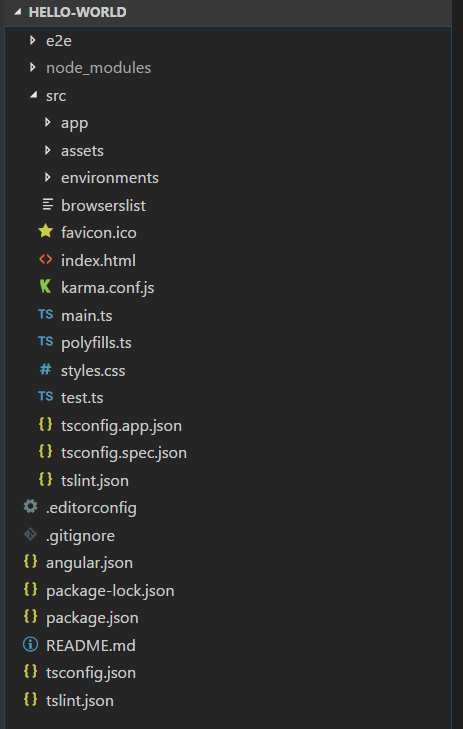
src/: Contains the application source files, global styles, static assets, and bootstrap code.src/app/: Contains the root component and most application-specific components, services, routes, and related files.src/main.ts: Provides the browser entry point that bootstraps the Angular application.node_modules/: Contains packages installed by npm. It is generated from the dependency declarations and lock file and should not be edited manually.package.json: Defines npm scripts and the project’s direct dependencies and development dependencies.package-lock.json: Records resolved dependency versions so installations can be reproduced more consistently.angular.json: Stores Angular workspace settings for builds, development servers, tests, assets, and styles.tsconfig.json: Contains shared TypeScript compiler configuration.- Test files: Their names and tools vary by Angular generation. The Angular 6 screenshot includes Karma and Protractor-related files that may not appear in a current project.
Test the Angular Hello World production build
After confirming the application in the development server, create a build:
ng buildAngular CLI writes the compiled output under the configured output directory, commonly within dist/. The exact nested directory structure depends on the Angular version, builder, and rendering configuration. Check the command output and angular.json rather than assuming a fixed folder path.
Angular client-side and server-side rendering for the first app
A basic Angular application served during this tutorial runs primarily as a client-side rendered application. The browser downloads the application code, Angular starts in the browser, and components render the interface.
Angular can also be configured for server-side rendering, where the server generates initial HTML before the application becomes interactive in the browser. Some projects also use prerendering to generate HTML during the build. A Hello World exercise does not require server-side rendering, but rendering strategy becomes relevant when planning discoverability, initial loading behavior, hosting, and access to browser-only APIs.
Troubleshoot the Angular first application
ngis not recognized: Reopen the terminal after installing Angular CLI and verify that npm’s global executable directory is available on the system path.- Node.js version is unsupported: Use a Node.js release compatible with the selected Angular version. Angular 6 and current Angular releases do not share the same compatibility range.
- The command is outside an Angular workspace: Run
cd hello-worldbefore usingng serveorng build. - Port 4200 is already in use: Stop the other process or run
ng serve --port 4300and open the reported URL. - The page does not update: Save the edited file and inspect the terminal for template or TypeScript compilation errors.
- Dependency installation fails: Check the Node.js, npm, Angular CLI, and project package versions before deleting lock files or changing dependencies.
- An Angular 6 application fails with a current CLI: Reproduce a compatible legacy environment or follow a staged framework upgrade. Do not assume a current global CLI can build every historical project unchanged.
Angular Hello World frequently asked questions
Which command creates the Angular Hello World project?
Run ng new hello-world. Then enter the project directory with cd hello-world and start the local development server with ng serve --open.
Where should I write Hello World in an Angular application?
Place the markup in the root component template under src/app. Depending on the CLI version and selected naming style, the file may be app.component.html or app.html.
Is a basic Angular Hello World application CSR or SSR?
The basic application in this tutorial is client-side rendered. Angular also supports server-side rendering and prerendering when those capabilities are added to the project’s configuration.
Why does my Angular project structure differ from the screenshot?
The screenshot and preserved terminal output come from Angular CLI 6.0.8. Current CLI releases use different builders, testing tools, bootstrap patterns, file names, and defaults, so a newly generated workspace will not match it exactly.
Can I create the Angular first app without installing the CLI globally?
Yes. Angular examples can be explored in an online playground, and npm can invoke a selected CLI package without maintaining a permanent global installation. For a local project, make sure the CLI used to create or maintain it is compatible with its Angular packages.
Angular Hello World tutorial QA checklist
- Verify that
node --version,npm --version, andng versioncomplete before creating the project. - Confirm that the project name used in commands is consistently
hello-world. - Check whether the generated root template is named
app.component.htmlorapp.htmlbefore instructing readers to edit it. - Keep Angular 6 NgModule examples separate from current standalone-component examples.
- Confirm that
http://localhost:4200/displays the edited Hello World message whileng serveis running. - Review dependency and audit warnings instead of stating that all console warnings can be ignored.
- Verify that
ng buildcompletes and that the output location matches the active workspace configuration.
Next steps after the Angular Hello World application
The Hello World application establishes the Angular workspace, development server, root component, template, styling, and build workflow. Continue with components, property and event binding, services, dependency injection, routing, forms, and HTTP requests in this Angular Tutorial.