 TutorialKart.com
Julia – Save Plot as PNG or JPEG
To save a plot created with the Plots.jl package, call savefig() with a filename that includes the required image extension. For PNG output, you can also use the png() convenience function.
The file extension normally determines the output format. For example, savefig("plot.png") creates a PNG image, while savefig("plot.jpg") requests JPEG output when the selected plotting backend supports it.
Install and load Plots.jl before saving a Julia plot
If Plots.jl is not installed, add it once from the Julia package manager.
using Pkg
Pkg.add("Plots")
Load the package in the script or Julia session where the plot is created.
using PlotsUsing savefig(“filename”) to save the plot locally
In this example, we will save the plot to as a PNG file.
using Plots

#data to plot
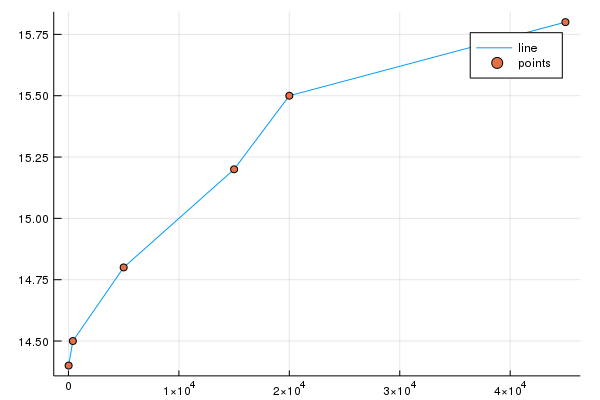
globaltemperatures = [14.4, 14.5, 14.8, 15.2, 15.5, 15.8];
numindustries = [17, 400, 5000, 15000, 20000, 45000];

#use GR module
gr();

#plot
plot(numindustries, globaltemperatures, label="line")
#add points
scatter!(numindustries, globaltemperatures, label="points")

#save plot
savefig("C:\\plot.png")
The plot is saved to the local storage at the location specified in the arguments to savefig() function.

And the plot is
Save a specific Julia plot object with savefig
savefig("filename.png") saves the current plot. In scripts that create several plots, it is clearer to store the required plot in a variable and pass that plot object explicitly to savefig().
using Plots

x = 1:10
y = x .^ 2

p = plot(x, y, label="x²", xlabel="x", ylabel="y")
savefig(p, "quadratic-plot.png")
This form avoids accidentally saving a different plot that was created later in the same session.
Using png() method to save the file as .png
If you want to save the file with .png extension, then you can use png() method with the path for the file without the extension.
using Plots

#data to plot
globaltemperatures = [14.4, 14.5, 14.8, 15.2, 15.5, 15.8];
numindustries = [17, 400, 5000, 15000, 20000, 45000];

#use GR module
gr();

#plot
plot(numindustries, globaltemperatures, label="line")
#add points
scatter!(numindustries, globaltemperatures, label="points")

#save plot as PNG
png("C:\\plot2")
The file will be saved as PNG at the specified location.

Save a Julia plot as a JPEG file
To request JPEG output, provide a filename ending in .jpg or .jpeg. Format availability can depend on the plotting backend, so PNG is often the more portable choice for charts and diagrams.
using Plots

gr()

p = plot(
    1:5,
    [2, 5, 3, 7, 6],
    marker=:circle,
    label="Values"
)

savefig(p, "values-plot.jpg")
If JPEG export is unavailable with the active backend, save the plot as PNG or use another backend that supports the required format.
Choose the folder where Julia saves the plot
A filename without a directory is saved in Julia’s current working directory. Use pwd() to display that directory.
println(pwd())
savefig("my-plot.png")
For a specific directory, build the path with joinpath(). This is preferable to manually joining path separators because it works across Windows, macOS, and Linux.
using Plots

output_directory = joinpath(homedir(), "plots")
mkpath(output_directory)

p = plot(1:10, rand(10), label="Random values")
output_file = joinpath(output_directory, "random-plot.png")

savefig(p, output_file)
println(output_file)
mkpath() creates the directory when it does not already exist. Without it, saving fails if the specified parent directory is missing.
Set the saved Julia plot size and resolution
For raster formats such as PNG and JPEG, the image dimensions affect the amount of detail in the saved output. Set the plot’s size attribute before calling savefig().
using Plots

gr()

p = plot(
    1:20,
    sin.(1:20),
    size=(1600, 900),
    linewidth=3,
    xlabel="Sample",
    ylabel="sin(x)",
    label="Signal"
)

savefig(p, "high-resolution-plot.png")
The size=(1600, 900) setting creates a wider raster image than the default. Backend-specific DPI settings may also be available, but support and behavior can vary. Setting explicit pixel dimensions is a straightforward option when a predictable PNG size is required.
Save a Julia plot layout containing multiple subplots
A plot layout can be saved in the same way as a single plot. Create the subplots, combine them into one plot object, and pass that object to savefig().
using Plots

x = range(0, 2pi, length=200)

p1 = plot(x, sin.(x), label="sin(x)")
p2 = plot(x, cos.(x), label="cos(x)")

combined_plot = plot(p1, p2, layout=(1, 2), size=(1200, 450))
savefig(combined_plot, "trigonometric-layout.png")
Verify that the Julia plot file was created
Use isfile() to confirm that the expected output file exists after saving.
using Plots

output_file = joinpath(pwd(), "verified-plot.png")
p = plot(1:5, [3, 1, 4, 1, 5], label="Data")

savefig(p, output_file)
println(isfile(output_file))trueFix common Julia savefig and PNG export problems
- The file cannot be found: Run
pwd()to check the current working directory, or use an absolute path. - The destination directory does not exist: Create it first with
mkpath(directory). - The wrong plot is saved: Assign the required plot to a variable and call
savefig(plot_object, filename). - The filename has no extension: Include
.png,.jpg, or another supported extension when usingsavefig(). - JPEG export fails: The active backend may not support that format. Save as PNG or switch to a compatible backend.
- The exported plot is too small or unclear: Increase the plot’s pixel dimensions with the
sizeattribute before saving. - A PlotlyJS image is not exported: Static image export can require additional backend-specific components. Check the requirements of the selected backend rather than assuming all backends export files in the same way.
Julia plot saving syntax reference
savefig("filename.png")
savefig(plot_object, "filename.png")
png("filename_without_extension")
png(plot_object, "filename_without_extension")
Use the explicit plot-object forms when a program creates multiple figures. Use joinpath() when constructing portable file paths.
Frequently asked questions about saving plots in Julia
How do I save a Julia plot as PNG?
Call savefig("plot.png") after creating the plot. You can also use png("plot"), which adds the PNG extension.
How do I save a Julia plot as JPEG?
Pass a .jpg or .jpeg filename to savefig(), such as savefig(p, "plot.jpg"). JPEG availability depends on the active plotting backend.
Where does savefig store a Julia plot?
When only a filename is supplied, the file is stored in the current working directory returned by pwd(). Supply an absolute path or a path created with joinpath() to use another folder.
How do I increase the resolution of a saved Julia plot?
Increase the pixel dimensions with a setting such as size=(1600, 900) when creating the plot. Some backends also provide DPI-related options, but their support can differ.
Why does savefig save the wrong plot in Julia?
Calling savefig("file.png") saves the current plot. Store the intended plot in a variable and call savefig(p, "file.png") to select it explicitly.
Editorial QA checklist for Julia plot export examples
- Confirm that every
savefig()example uses a supported filename extension. - Check that Windows paths escape backslashes correctly or use
joinpath(). - Verify that examples saving a named plot pass the correct plot object to
savefig(). - Confirm that destination directories are created before the plot is saved.
- Test JPEG examples with the stated plotting backend and retain a PNG alternative when JPEG is unavailable.
- Open the exported image and verify its dimensions, labels, legend, and subplot layout.
Summary of saving PNG and JPEG plots in Julia
In this Julia Tutorial, we learned how to save a plot as PNG or JPEG to filesystem. Use savefig() with an appropriate extension, pass the plot object explicitly when necessary, and use joinpath() to create portable output paths.