 TutorialKart.com
What is DevOps in simple terms?
DevOps is a way of building and running software where development, operations, quality, security, and business teams work together to deliver reliable changes faster. The word DevOps combines development and operations, but the idea is broader than two teams sharing tasks.
In simple terms, DevOps means reducing the gap between writing code and safely running that code for real users. It uses collaboration, automation, measurement, and continuous feedback so that software can move from idea to production in smaller, safer steps.
All the following statements are true about DevOps when they are applied with the right culture and process:
- DevOps is development and operations collaboration.
- DevOps is using automation where manual work is slow, repetitive, or risky.
- DevOps is small deployments that are easier to test, review, and roll back.
- DevOps is feature switches and controlled releases when a feature should be enabled gradually.
- DevOps is treating infrastructure as code so environments can be recreated consistently.
- DevOps is decentralized decision-making within clear engineering and business guardrails.
- DevOps is a process and culture, not a single product or tool.
DevOps culture improves communication and collaboration between teams, breaking the silos that often form when developers, testers, system administrators, release managers, and support teams work separately.
DevOps aims at:
- Developing high-quality software that is easier to change and maintain
- Deploying in frequent, controlled cycles instead of large risky releases
- Reducing the time needed to move from idea to implementation
- Improving reliability, observability, and recovery when something fails
- Using production feedback to guide future development
Why DevOps matters in software delivery
Traditional software delivery often separates responsibilities. Developers write code, testers validate it, operations teams deploy and maintain it, and support teams handle incidents. When each team optimizes only its own step, releases can become slow and failures can be hard to trace.
DevOps changes the focus from isolated activities to the complete flow of customer value. A feature is not truly complete only because the code is committed. It becomes useful when it is tested, released, monitored, supported, and improved based on feedback.
A good DevOps approach usually improves four areas:
- Speed: smaller changes can move through the delivery pipeline more quickly.
- Quality: automated checks catch many defects before release.
- Reliability: monitoring, alerting, and repeatable deployment practices reduce operational risk.
- Learning: teams use metrics, logs, incidents, and user behavior to decide what to improve next.
DevOps foundational aspects
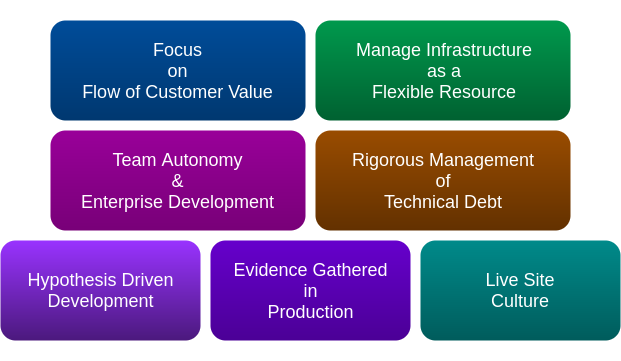
The following foundational aspects and behaviors help drive DevOps culture in an organization or team.
Team autonomy with enterprise alignment in DevOps
DevOps teams need enough autonomy to make engineering decisions quickly, but that autonomy should remain aligned with business goals, compliance needs, security standards, and architecture guidelines. A team should be free to improve its service, but not in a way that creates hidden risk for the organization.
Rigorous management of technical debt in DevOps teams
Technical debt makes every release slower and more fragile. DevOps teams manage technical debt continuously by improving tests, simplifying builds, removing unused code, updating dependencies, and documenting operational behavior. Time must be reserved for debt reduction; otherwise delivery speed decreases over time.
Flow of customer value from code to production
DevOps changes the mindset from completing individual tasks to improving the flow of customer value. A developer should not think only about whether code is checked into version control. A tester should not think only about whether test cases are completed. The team should think about whether the change is useful, safe, observable, and ready for users.
Evidence gathered from production systems
DevOps teams learn from production instead of relying only on assumptions. Logs, metrics, traces, error reports, incident reviews, and user behavior help teams understand how software performs in real conditions. This leads to hypothesis-driven development: a team makes a change, measures its effect, and uses that evidence to decide the next step.
Live-site responsibility in DevOps culture
Live-site culture means the team cares about how the application behaves after release. Code that is not stable in production has not yet delivered value. This does not mean releasing carelessly. It means building the habits, monitoring, rollback plans, support processes, and ownership needed to run software responsibly.
Infrastructure as a flexible DevOps resource
Infrastructure should be managed in a repeatable and auditable way. Instead of manually configuring servers, networks, databases, and permissions, DevOps teams define infrastructure using version-controlled configuration. This makes environments easier to reproduce, review, test, and restore.
DevOps practices used in real delivery pipelines
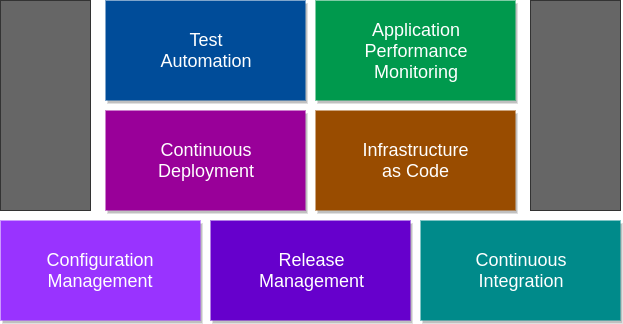
The following practices are commonly used in DevOps. A team does not become a DevOps team merely by installing tools. These practices are useful only when they support better collaboration, faster feedback, and safer delivery.
Configuration management for consistent DevOps environments
Configuration management helps teams understand what they are deploying, how they are deploying it, and which configuration is going into each environment. It reduces differences between development, test, staging, and production systems.
Release management for controlled DevOps deployments
Release management defines how a change moves from source code to production. It includes versioning, approvals, release notes, deployment windows, rollback planning, and communication. In DevOps, release management should make frequent delivery safer, not add unnecessary delays.
Continuous integration in DevOps
Continuous integration means developers merge code frequently into a shared branch, and every change is automatically built and tested. The goal is to find integration problems early, when they are easier to fix.
- Code is committed to version control.
- The build runs automatically.
- Unit tests, static checks, and security checks run as part of the pipeline.
- The team receives quick feedback if the change breaks something.
Continuous delivery and continuous deployment in DevOps
Continuous delivery means the software is kept in a releasable state. A human approval may still be required before production deployment. Continuous deployment goes one step further: changes that pass the required automated checks are deployed to production automatically.
The two terms are related but not identical. Many teams start with continuous delivery before moving to continuous deployment because production automation requires strong testing, monitoring, security checks, and rollback capability.
Application performance monitoring and observability in DevOps
Application performance monitoring helps teams watch production systems for latency, errors, resource usage, availability, and user experience. Observability goes deeper by using logs, metrics, and traces to understand why a system behaves in a certain way. Both are important because DevOps teams need real feedback after deployment.
Test automation across the DevOps lifecycle
Test automation reduces manual effort and gives faster feedback. DevOps teams usually automate unit tests, integration tests, API tests, deployment tests, smoke tests, security checks, and user interface tests where suitable. Not every test should be automated, but repetitive and release-critical tests should not depend only on manual execution.
Infrastructure as code in DevOps
Infrastructure as code means infrastructure changes are written, reviewed, stored, and applied like application code. Any change to infrastructure should be automated and version controlled where possible. This improves repeatability and reduces configuration drift between environments.
Typical DevOps lifecycle from plan to operate
A practical DevOps lifecycle connects planning, coding, building, testing, releasing, deploying, operating, and monitoring. The lifecycle is continuous because feedback from production goes back into planning and improvement.
| DevOps stage | Main purpose | Typical activity |
|---|---|---|
| Plan | Decide what should be built or improved | Backlog refinement, user stories, incident learning |
| Code | Create and review software changes | Version control, peer review, branching strategy |
| Build | Package the application consistently | Build automation, dependency checks, artifact creation |
| Test | Verify quality before release | Automated tests, security scans, integration checks |
| Release | Prepare approved changes for delivery | Versioning, approvals, release notes, change records |
| Deploy | Move the change into an environment | Deployment automation, feature flags, rollback plans |
| Operate | Run the service reliably | Capacity planning, incident response, backup checks |
| Monitor | Learn from system and user behavior | Metrics, logs, traces, alerts, dashboards |
DevOps and Agile: how they work together
Agile and DevOps are closely related, but they are not the same. Agile focuses mainly on iterative software development, customer feedback, and adaptive planning. DevOps extends that thinking into build, release, deployment, operations, monitoring, and production support.
Following are Agile principles that apply strongly to DevOps culture:
- The highest priority is to satisfy the customer through early and continuous delivery of useful software.
- Working software should be delivered frequently.
- Business stakeholders and developers should work together throughout the project.
- Working software is the primary measure of progress.
- Teams should reflect regularly on how to become more effective.
Processes and practices influenced by Agile thinking include:
- Source control
- Small and frequent releases
- Automated testing
- Continuous integration
- Continuous delivery and deployment
- Peer review
- Immutable infrastructure
- Fast feedback from users and production systems
DevOps tools and where they fit
DevOps tools help teams automate and observe the delivery lifecycle. However, tools alone do not create DevOps. A tool should be selected only after the team understands the process problem it is trying to solve.
| DevOps need | Tool category | What the tool helps with |
|---|---|---|
| Track code changes | Version control | Repositories, branches, pull requests, code review |
| Build and test changes | CI tools | Automated builds, tests, quality checks |
| Deploy applications | CD and release tools | Deployment pipelines, approvals, rollback workflows |
| Manage environments | Infrastructure as code and configuration tools | Provisioning, configuration, repeatable environments |
| Run applications | Containers and orchestration | Packaging, scaling, service management |
| Detect issues | Monitoring and observability | Alerts, dashboards, logs, traces, metrics |
| Improve security | DevSecOps tools | Dependency scanning, secret detection, policy checks |
Common DevOps misconceptions
Several misunderstandings can weaken a DevOps adoption. The following points keep the meaning clear.
- DevOps is not only automation. Automation is important, but collaboration and ownership are equally important.
- DevOps is not a job title alone. A DevOps engineer may support pipelines and platforms, but DevOps is a team practice.
- DevOps is not the same as Agile. Agile improves software development cycles; DevOps connects development with delivery and operations.
- DevOps does not mean releasing without control. Good DevOps improves control through testing, visibility, and repeatable deployment.
- DevOps does not remove operations. It brings operational thinking earlier into design and development.
How a team can start adopting DevOps
A team can start small instead of trying to change every process at once. The first goal should be to make the current delivery flow visible and remove the most painful bottlenecks.
- Map the current path from code commit to production release.
- Find where work waits, fails, or depends on manual handoffs.
- Put all application code and configuration in version control where appropriate.
- Automate the build and basic test process first.
- Add deployment automation for lower environments before production.
- Improve monitoring, logging, and alerting for production systems.
- Review incidents without blame and convert lessons into engineering improvements.
- Measure lead time, deployment frequency, change failure rate, and recovery time to understand progress.
DevOps QA checklist for this tutorial
Use this checklist to review whether a DevOps explanation or implementation plan is complete and practical.
- Does the explanation define DevOps as culture, process, and automation rather than a single tool?
- Does it clearly distinguish continuous integration, continuous delivery, and continuous deployment?
- Does it explain how monitoring and production feedback influence future development?
- Does it include infrastructure as code, test automation, release management, and configuration management?
- Does it avoid implying that DevOps removes security, operations, or release control?
- Does it describe how Agile principles influence DevOps without treating Agile and DevOps as identical?
DevOps FAQs
What exactly is DevOps in simple terms?
DevOps is a software delivery approach where development and operations work together to build, test, deploy, monitor, and improve software continuously. It combines culture, automation, measurement, and feedback.
Is DevOps a tool or a process?
DevOps is not a single tool. It is a culture and process supported by tools. Tools help with version control, CI/CD, infrastructure automation, monitoring, and security, but the main goal is better software delivery and reliability.
What is the difference between DevOps and Agile?
Agile focuses on iterative development and customer feedback during software creation. DevOps extends that idea into build, testing, release, deployment, operations, monitoring, and incident learning.
What are the main DevOps practices?
The main DevOps practices include continuous integration, continuous delivery, release management, configuration management, infrastructure as code, test automation, monitoring, observability, and incident review.
Does DevOps require continuous deployment to production?
No. DevOps does not require every team to deploy automatically to production. Continuous delivery keeps software ready for release, while continuous deployment automatically releases approved changes that pass the required checks. A team should choose the model that fits its risk, compliance, and operational maturity.
DevOps works best when teams treat software delivery as one connected system. The aim is not only to release faster, but to release smaller changes, learn from production, recover quickly, and continuously improve the service delivered to users.