 TutorialKart.com
C# for Loop
A C# for loop repeats a block of statements while a condition remains true. It is most useful when the initialization, stopping condition, and update for an iteration can be written together.
The loop checks its condition before each iteration. If the condition is false at the first check, the loop body does not execute.
C# for Loop Syntax
 for(initialization; boolean_expression; increment_decrement_update){
     /* statement(s) */
 }
The three expressions inside the parentheses have distinct roles:
foris the C# keyword that starts the loop.initializationruns once, before the first condition check. It commonly declares and initializes a loop variable.boolean_expressionis evaluated before every iteration. The loop continues while it evaluates totrue.increment_decrement_updateruns after each completed iteration. It commonly increments, decrements, or otherwise updates the loop variable.statement(s)form the loop body and execute once per iteration.
Each of the three expressions is optional, but the two semicolons are required. When an expression is omitted, the program must handle the corresponding work elsewhere.
Example 1: Print Numbers from 3 to 7 with a C# for Loop
The following program initializes i to 3, continues while i <= 7, and increments i after each iteration.
Program.cs
using System;

namespace CSharpExamples {
    class Program {
        static void Main(string[] args) {
            for(int i=3;i<=7;i++) {
                Console.WriteLine(i);
            }
        }
    }
}
Output
PS D:\workspace\csharp\HelloWorld> dotnet run
3
4
5
6
7
How the C# for Loop Executes
In the previous example, the initialization is int i=3. It runs only once and creates a loop variable named i with the value 3. Because the variable is declared in the loop header, its scope is limited to the for statement and its body.
The condition is i<=7. C# evaluates this condition before every iteration. When the condition becomes false, execution moves to the first statement after the loop.
The update expression is i++. It runs after the loop body and increases i by 1.
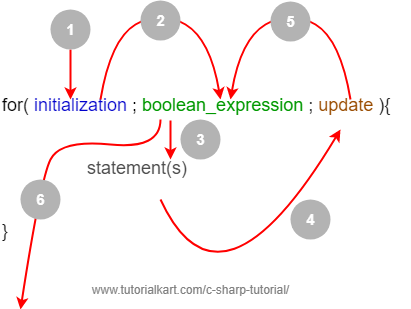
The execution order is: run the initialization once, test the condition, execute the loop body when the condition is true, run the update expression, and test the condition again. This sequence repeats until the condition is false.
Example 2: Count Down with a Decrementing C# for Loop
A for loop can count downward by using a decrement expression. This example prints the numbers from 8 to 4.
Program.cs
using System;

namespace CSharpExamples {
    class Program {
        static void Main(string[] args) {
            for(int i=8;i>=4;i--) {
                Console.WriteLine(i);
            }
        }
    }
}
Output
PS D:\workspace\csharp\HelloWorld> dotnet run
8
7
6
5
4
Example 3: Move the Update into the C# for Loop Body
The update expression may be omitted from the loop header. In this example, i-- appears inside the loop body instead.
Program.cs
using System;

namespace CSharpExamples {
    class Program {
        static void Main(string[] args) {
            for(int i=8;i>=4;) {
                Console.WriteLine(i);
                i--;
            }
        }
    }
}
Because the update section is empty, the loop variable must be changed inside the body. Forgetting to update a variable that controls the condition can create an infinite loop.
Example 4: Use Variables Declared before the C# for Loop
The initialization section can be empty when the required variables already exist. The update section can also contain multiple expressions separated by commas.
Program.cs
using System;

namespace CSharpExamples {
    class Program {
        static void Main(string[] args) {
            int a=2;
            int b=3;
            for( ; a+b<=8; b=b+2, a--) {
                Console.WriteLine(a+b);
            }
        }
    }
}
Output
PS D:\workspace\csharp\HelloWorld> dotnet run
5
6
7
8
Here, the condition uses both a and b. After each iteration, b increases by 2 and a decreases by 1.
Example 5: Create an Open-Ended C# for Loop and Exit with break
The condition may also be omitted. A loop written as for(;;) has no built-in stopping condition, so its body must use a control statement such as break, return, or an exception to terminate execution.
Program.cs
using System;

namespace CSharpExamples {
    class Program {
        static void Main(string[] args) {
            int b=3;
            for( ; ; b=b+2) {
                if(b>10){
                    break;
                }
                Console.WriteLine(b);
            }
        }
    }
}
Output
PS D:\workspace\csharp\HelloWorld> dotnet run
3
5
7
9
When b becomes greater than 10, the break statement exits the loop immediately.
Use break and continue inside a C# for Loop
The break statement ends the nearest loop. The continue statement skips the remaining statements in the current iteration and proceeds to the update expression.
The following example skips the value 3 and stops when i reaches 6.
using System;

for (int i = 1; i <= 10; i++)
{
    if (i == 3)
    {
        continue;
    }

    if (i == 6)
    {
        break;
    }

    Console.WriteLine(i);
}
Output
1
2
4
5
Iterate through a C# Array by Index
A for loop is useful when an array element’s index is needed. Array indexes start at 0, so the condition should normally use i < array.Length.
using System;

string[] languages = { "C#", "Java", "Python" };

for (int i = 0; i < languages.Length; i++)
{
    Console.WriteLine($"{i}: {languages[i]}");
}
Output
0: C#
1: Java
2: Python
Using i <= languages.Length would attempt to access an index equal to the array length and cause an IndexOutOfRangeException.
Nested C# for Loops
A for loop can be placed inside another for loop. The inner loop completes all of its iterations for each single iteration of the outer loop.
Example 6: Print Coordinate-Like Values with Nested for Loops
The outer loop controls a, and the inner loop controls b. For every value of a, the inner loop prints two values of b.
Program.cs
using System;

namespace CSharpExamples {
    class Program {
        static void Main(string[] args) {
            for(int a=1; a<=4; a++) {
                for(int b=1; b<=2; b++) {
                    Console.WriteLine(a+"."+b);
                }
            }
        }
    }
}
Output
PS D:\workspace\csharp\HelloWorld> dotnet run
1.1
1.2
2.1
2.2
3.1
3.2
4.1
4.2
In this case, the outer loop runs four times and the inner loop runs twice for each outer iteration, so the statement executes 4 × 2 = 8 times.
C# for Loop and foreach Loop: Which One to Use?
Use a for loop when you need the index, want to move through values in a custom step, need to iterate backward, or must update elements by position. Use a foreach loop when you only need to read each item in a collection in sequence.
Common C# for Loop Errors
- Off-by-one conditions: Use
<instead of<=when iterating through zero-based array indexes. - Update in the wrong direction: A condition such as
i >= 0normally requiresi--, noti++. - Missing update: Ensure that a value affecting the condition changes during the loop.
- Changing the loop variable unexpectedly: Modifying the control variable inside the body can make the loop harder to reason about.
- Using a for loop when no counter is needed: A
whileorforeachloop may express the intent more clearly.
C# for Loop Frequently Asked Questions
Can a C# for loop have more than one initialization or update expression?
Yes. Multiple initialization or update expressions can be separated with commas. They must still fit the syntax of the corresponding section.
Can all three expressions in a C# for loop be omitted?
Yes. for(;;) creates an open-ended loop. The loop must be terminated by logic in its body, such as a break or return statement.
When should I use for instead of foreach in C#?
Use for when you need an index, custom stepping, reverse iteration, or indexed updates. Use foreach when you simply need each element in sequence.
What happens if the C# for loop condition is false initially?
The loop body is skipped because the condition is checked before the first iteration.
C# for Loop Summary
In this C# Tutorial, you learned how the for loop initializes a counter, checks a condition, performs an update, and repeats a block of statements. The examples covered counting up and down, omitted loop expressions, break and continue, array iteration, and nested loops.