 TutorialKart.com
C# while Loop
A C# while loop repeatedly executes a block of statements while a specified condition evaluates to true. It is useful when the number of iterations is not known before the loop starts.
The condition is checked before every iteration. Therefore, if the condition is false when execution reaches the loop, the loop body does not run even once.
C# while Loop Syntax
Following is the syntax of While Loop in C#.
 while(condition){
     /* statement(s) */
 }
In this syntax:
whileis the C# keyword that starts the loop.conditionis a Boolean expression that must evaluate totrueorfalse.statement(s)form the loop body and execute repeatedly while the condition remainstrue.
A value used by the condition should normally change inside the loop. Otherwise, the condition may never become false, resulting in an infinite loop.
Example 1: Print Numbers from 5 to 9 Using a C# while Loop
The following program starts with a equal to 5. The loop prints the current value and increments it until the condition a <= 9 becomes false.
Program.cs
using System;

namespace CSharpExamples {
    class Program {
        static void Main(string[] args) {
            int a=5;
            while(a<=9){
                Console.WriteLine(a);
                a++;
            }
        }
    }
}
Output
PS D:\workspace\csharp\HelloWorld> dotnet run
5
6
7
8
9
How the C# while Loop Executes
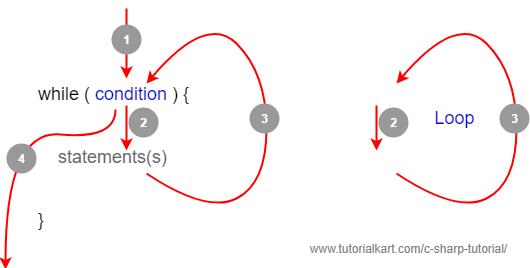
Step 1: Program execution reaches the while statement and evaluates the condition.
Step 2: If the condition is true, the statements inside the loop body execute.
Step 3: After the loop body finishes, execution returns to the condition. The condition is evaluated again.
Step 4: When the condition becomes false, the loop ends and execution continues with the first statement after the loop.
In Example 1, a++ changes the value used by the condition. Without this update, a would remain 5 and the loop would continue indefinitely.
Example 2: Exit a C# while Loop with break
The break statement ends the nearest enclosing loop immediately, even when the loop condition is still true.
Program.cs
using System;

namespace CSharpExamples {
    class Program {
        static void Main(string[] args) {
            int a=5;
            while(a<=9){
                Console.WriteLine(a);
                a++;
                if(a==8){
                    break;
                }
            }
        }
    }
}
When the value of a becomes 8, the break statement executes and program control leaves the loop.
Output
PS D:\workspace\csharp\HelloWorld> dotnet run
5
6
7
Skip a C# while Loop Iteration with continue
The continue statement skips the remaining statements in the current iteration and returns execution to the loop condition.
Update the loop variable before executing continue. Otherwise, the loop can repeatedly test the same value.
using System;

int number = 0;

while (number < 6)
{
    number++;

    if (number == 3)
    {
        continue;
    }

    Console.WriteLine(number);
}
Output
1
2
4
5
6
When number is 3, continue skips Console.WriteLine(number). The next condition check then begins.
Nested while Loops in C#
A C# while loop can be placed inside another while loop. The inner loop completes all of its iterations for each iteration of the outer loop.
Example 3: Run a while Loop inside Another while Loop
In this example, the outer loop controls a, while the inner loop controls b. The inner variable is reset to 1 during every outer-loop iteration.
Program.cs
using System;

namespace CSharpExamples {
    class Program {
        static void Main(string[] args) {
            int a=1;
            while(a<4){
                int b=1;
                while(b<3){
                    Console.WriteLine(a+"."+b);
                    b++;
                }
                a++;
            }
        }
    }
}
Output
PS D:\workspace\csharp\HelloWorld> dotnet run
1.1
1.2
2.1
2.2
3.1
3.2
The outer loop runs three times. For each outer iteration, the inner loop runs twice, so the output statement executes six times.
Read Input Repeatedly with a C# while Loop
A while loop is often used when a program must continue until the user enters a particular value. The number of required iterations is not known in advance.
using System;

string input = "";

while (input != "exit")
{
    Console.Write("Enter a value, or type exit: ");
    input = Console.ReadLine() ?? "";
}

Console.WriteLine("Loop ended.");
The condition is evaluated before each prompt. When the user enters exit, the condition becomes false and the loop ends.
C# Infinite while Loop
A loop written as while(true) has a condition that never becomes false by itself. Such loops are normally used only when another statement, such as break, return, or an exception, provides a controlled exit.
Example 4: C# Infinite while Loop
The following program continuously prints and increments an integer. Because the condition is always true and there is no exit statement, the loop does not terminate normally.
Program.cs
using System;

namespace CSharpExamples {
    class Program {
        static void Main(string[] args) {
            int a=1;
            while(true){
                Console.WriteLine(a++);
            }
        }
    }
}
Output
Only part of the output is provided here.
PS D:\workspace\csharp\HelloWorld> dotnet run
1
2
3
4
5
6
.....
In modern C# projects, integer overflow behavior can depend on whether the code runs in a checked or unchecked context. The main issue in this example is that the loop has no normal termination condition.
C# while Loop Compared with do-while and for
Use a while loop when repetition depends mainly on a condition and the number of iterations is not known beforehand. Use a do-while loop when the body must execute at least once. Use a for loop when initialization, condition, and update naturally belong in one loop header.
while: checks the condition before the body and may execute zero times.do-while: checks the condition after the body and executes at least once.for: is commonly used for counter-controlled iteration.
Common C# while Loop Mistakes
- Not updating the condition variable: Ensure that some statement changes a value used by the condition.
- Updating in the wrong direction: A condition such as
count > 0normally requires the value to decrease. - Using
continuebefore an update: This can repeatedly process the same value and create an infinite loop. - Using an incorrect boundary: Review whether the condition should use
<,<=,>, or>=. - Assuming the loop runs once: A
whileloop runs zero times when its initial condition is false.
C# while Loop Frequently Asked Questions
Does a C# while loop always execute at least once?
No. The condition is checked before the first iteration. If it is initially false, the loop body is skipped.
How do you stop an infinite while loop in C#?
Make the loop condition become false, or leave the loop using a statement such as break or return. A cancellation signal may also be appropriate in long-running application code.
What is the difference between break and continue in a C# while loop?
break ends the loop completely. continue skips the rest of the current iteration and starts the next condition check.
When should a while loop be used instead of a for loop in C#?
Use a while loop when the loop is controlled mainly by a condition, event, or input and the iteration count is not known in advance. Use a for loop when working with a clear counter or range.
C# while Loop Summary
In this C# Tutorial, you learned how a C# while loop checks its condition before each iteration, repeats statements while the condition is true, and exits when the condition becomes false. The examples also covered break, continue, nested loops, input-controlled loops, and infinite loops.