 TutorialKart.com
C# Substring
Use the C# String.Substring() method to extract part of a string. You can extract all characters from a specified index to the end of the string, or extract a fixed number of characters.
C# Substring() Syntax
string.Substring(int startIndex, int length)The Substring() method has the following parameters:
startIndex: The zero-based index at which the substring begins.length: The number of characters to include in the substring.
The length parameter is optional. When only startIndex is provided, C# returns the characters from that position through the end of the original string.
Because string indexes are zero-based, the first character is at index 0, the second character is at index 1, and so on.
Example 1 – C# Substring Using startIndex
In the following example, Substring(4) returns all characters beginning at index 4. In HelloWorld, the character at index 4 is o.
Program.cs
using System;

namespace CSharpExamples {

    class Program {
        static void Main(string[] args) {
            string str = "HelloWorld";
            int startIndex = 4;

            string substring = str.Substring(startIndex);
            Console.WriteLine("Substring is : "+substring);
        }
    }
}
Output
PS D:\workspace\csharp\HelloWorld> dotnet run
Substring is : oWorld
Example 2 – C# Substring Using startIndex and length
In this example, Substring(4, 3) starts at index 4 and returns three characters.
Program.cs
using System;

namespace CSharpExamples {

    class Program {
        static void Main(string[] args) {
            string str = "HelloWorld";
            int startIndex = 4;
            int length = 3;

            string substring = str.Substring(startIndex, length);
            Console.WriteLine("Substring is : "+substring);
        }
    }
}
Output
PS D:\workspace\csharp\HelloWorld> dotnet run
Substring is : oWo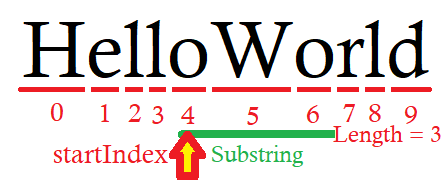
Example 3 – Read C# Substring Values from the User
The following program reads a string, starting index, and substring length from the console. It then passes those values to Substring(startIndex, length).
Program.cs
using System;

namespace CSharpExamples {

    class Program {
        static void Main(string[] args) {
            Console.Write("Enter a string : ");
            string str = Console.ReadLine();

            Console.Write("Enter startIndex : ");
            int startIndex = Convert.ToInt32(Console.ReadLine());

            Console.Write("Enter length : ");
            int length = Convert.ToInt32(Console.ReadLine());

            string substring = str.Substring(startIndex, length);
            Console.WriteLine("Substring is : "+substring);
        }
    }
}
Output
PS D:\workspace\csharp\HelloWorld> dotnet run
Enter a string : Welcome to TutorialKart for C# Tutorial.
Enter startIndex : 5
Enter length : 12
Substring is : me to Tutori

PS D:\workspace\csharp\HelloWorld> dotnet run
Enter a string : TutorialKart
Enter startIndex : 5
Enter length : 3
Substring is : ial
How C# Substring Indexes and Length Work
For the string HelloWorld, the character positions are:
Character: H e l l o W o r l d
Index:     0 1 2 3 4 5 6 7 8 9
Therefore, Substring(4) returns oWorld, while Substring(4, 3) returns oWo. The length argument is a character count, not an ending index.
Extract Text Before or After a Delimiter in C#
You can combine IndexOf() with Substring() when the position of the required text is determined by a delimiter.
using System;

class Program
{
    static void Main()
    {
        string email = "alex@example.com";
        int separatorIndex = email.IndexOf('@');

        string userName = email.Substring(0, separatorIndex);
        string domain = email.Substring(separatorIndex + 1);

        Console.WriteLine(userName);
        Console.WriteLine(domain);
    }
}
Output
alex
example.com
Check the result of IndexOf() before using it as a substring boundary. The method returns -1 when the delimiter is absent.
Avoid ArgumentOutOfRangeException with Substring()
Substring() throws an ArgumentOutOfRangeException when the supplied range is outside the string. Common invalid cases include:
startIndexis less than zero.startIndexis greater than the string length.lengthis less than zero.startIndex + lengthis greater than the string length.
You can validate the indexes before extracting the substring:
string text = "TutorialKart";
int startIndex = 5;
int length = 3;

if (startIndex >= 0 &&
    length >= 0 &&
    startIndex <= text.Length - length)
{
    string result = text.Substring(startIndex, length);
    Console.WriteLine(result);
}
else
{
    Console.WriteLine("The requested substring range is invalid.");
}
The condition startIndex <= text.Length - length verifies that the requested range does not extend beyond the final character.
C# Substring Edge Cases
text.Substring(0)returns the complete string.text.Substring(text.Length)returns an empty string.text.Substring(startIndex, 0)returns an empty string whenstartIndexis valid.text.Substring(0, text.Length)returns the complete string.- Calling
Substring()on anullstring causes aNullReferenceException.
Substring() Does Not Modify the Original C# String
C# strings are immutable. The Substring() method creates and returns a new string; it does not remove characters from or otherwise change the original string.
string original = "HelloWorld";
string extracted = original.Substring(5);

Console.WriteLine(original);
Console.WriteLine(extracted);
Output
HelloWorld
World
C# Substring Frequently Asked Questions
Does C# Substring use a zero-based index?
Yes. An index of 0 refers to the first character of the string.
Is the second Substring argument an ending index?
No. The second argument is the number of characters to return. For example, Substring(2, 4) returns four characters beginning at index 2.
How do I get the last characters of a string in C#?
Subtract the required character count from Length and use the result as the starting index. For example, text.Substring(text.Length - 3) returns the final three characters when the string contains at least three characters.
Can C# Substring return an empty string?
Yes. It returns an empty string when the starting index equals the string length or when a valid length of 0 is specified.
C# Substring Editorial Checklist
- Confirm that every starting position is described as a zero-based index.
- Verify that each
lengthvalue is treated as a character count rather than an ending index. - Check that
startIndex + lengthdoes not exceed the source string length. - Validate delimiter positions returned by
IndexOf()before passing them toSubstring(). - Confirm that examples distinguish the returned substring from the unchanged original string.
Summary
In this C# Tutorial, we learned how to extract part of a string with Substring(startIndex) and Substring(startIndex, length). We also examined zero-based indexes, delimiter-based extraction, empty results, immutability, and range validation.