 TutorialKart.com
What is Microsoft Dynamics 365 Customer Service?
Microsoft Dynamics 365 Customer Service is a customer relationship management application for recording, assigning, tracking, and resolving customer support requests. Support teams use it to manage cases, customer interactions, knowledge articles, queues, entitlements, and service-level commitments from a shared workspace.
The application stores each support request as a case linked to relevant customer records, such as an account or contact. Agents can review previous interactions, add activities, search approved knowledge content, and document the resolution without maintaining separate records in email or spreadsheets.
Dynamics 365 Customer Service is part of the wider Dynamics 365 product family. It primarily supports CRM service processes, while other Dynamics 365 applications cover areas such as sales, finance, supply chain management, and field service. It can also share customer data and business processes with Microsoft Dynamics 365 for sales.
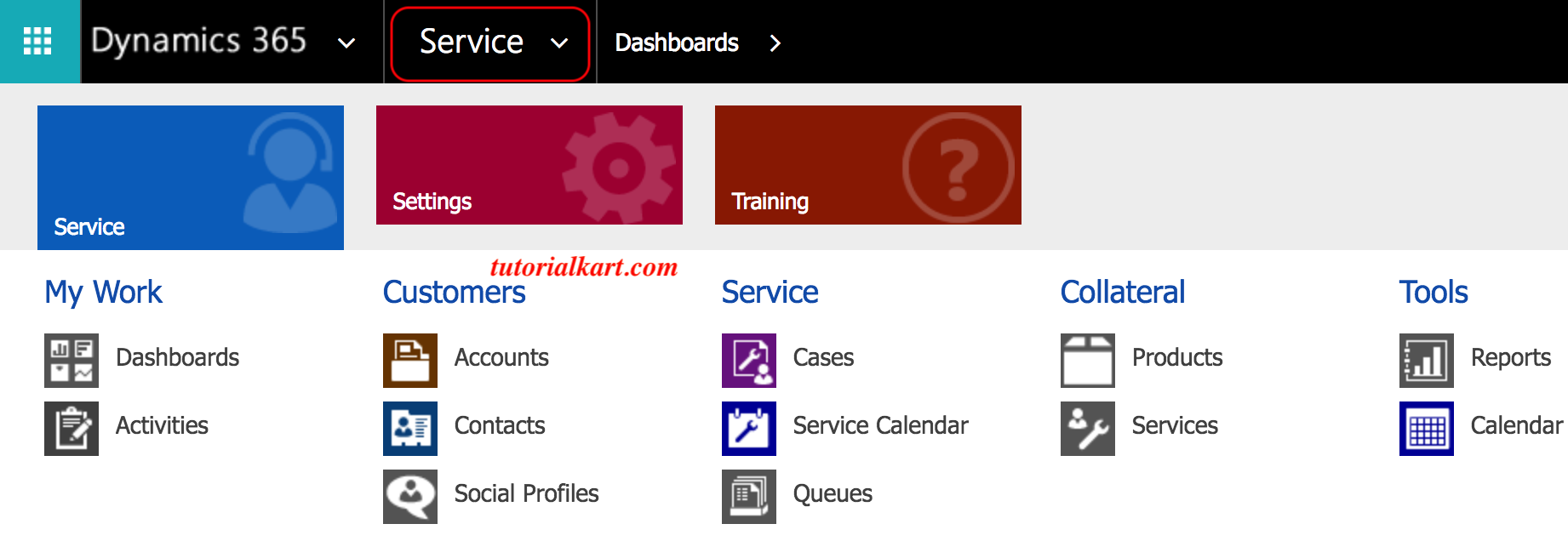
Core components of the Dynamics 365 Customer Service module
- Cases: Support records used to track customer questions, problems, complaints, and requests from creation through resolution.
- Accounts and contacts: Customer records that provide identity, organization, communication, and relationship information.
- Activities: Phone calls, emails, appointments, tasks, and other interactions associated with a case or customer.
- Queues: Work lists that organize cases and activities awaiting review or assignment.
- Knowledge articles: Reviewed support content that agents can search and use while investigating or answering common questions.
- Entitlements: Definitions of the support a customer is eligible to receive, including applicable products, channels, terms, or case allowances.
- Service Level Agreements: Time-based service commitments measured through configured success, warning, and failure conditions.
- Routing: Rules and assignment capabilities that direct incoming work to an appropriate queue or representative.
Dynamics 365 Customer Service case lifecycle
A typical customer service lifecycle begins when an agent or an enabled channel creates a case. Depending on the organization’s configuration and licensed capabilities, a request may originate from sources such as phone, email, a web form, chat, or another integrated channel.
A case is the main record used to manage a customer issue or request. It identifies the customer, describes the problem, records its origin and priority, and provides a place to track ownership, activities, service targets, notes, and the final resolution.
- Case creation: A new support request is recorded and connected to the appropriate customer.
- Classification: The case is categorized and assigned details such as priority, subject, product, or origin.
- Routing and assignment: The case enters a queue or is assigned to an agent according to the organization’s support process.
- Investigation: The agent reviews customer history, records activities, collaborates where necessary, and searches knowledge content.
- Service monitoring: Applicable entitlement and SLA conditions determine coverage and track time-based targets.
- Resolution: The solution is documented, the resolution details are saved, and the case is closed.
- Reactivation when required: A resolved case may be reopened if the issue returns or the resolution needs further work, subject to the configured process.
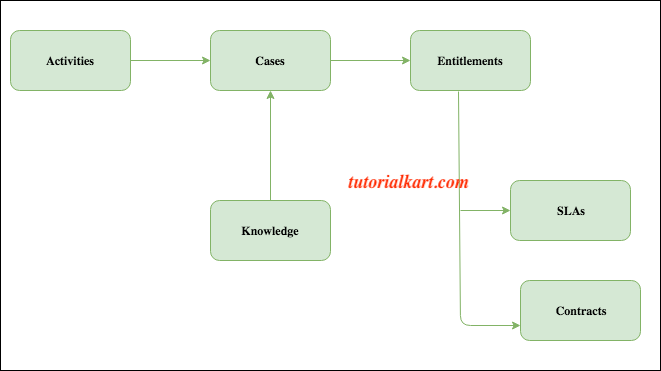
Cases, queues, and routing in Dynamics 365 Customer Service
Cases provide the detailed record of work, while queues organize work that has not yet been completed. A queue can represent a support team, product group, region, or another operational unit. Agents can review available queue items, or administrators can configure routing rules to direct work according to defined conditions.
Routing design should use data that agents can apply consistently. For example, an organization might route cases by language, product, support tier, or issue category. Required fields and clear classification values improve routing accuracy and make service reports more reliable.
Customer service activities and interaction history
Activities track interactions and follow-up work performed during the case resolution process. Common activity types include phone calls, tasks, emails, and appointments. Linking activities to the case gives other agents a chronological view of what has already happened and what remains outstanding.
Agents should record meaningful outcomes rather than creating activities with vague subjects. A useful phone-call record, for example, identifies the purpose of the call, the customer’s response, decisions made, and the next action. This reduces repeated questions when ownership changes.
Knowledge management for consistent case resolution
Knowledge management gives agents a searchable collection of support instructions, troubleshooting steps, policies, and answers. Articles can be reviewed and published through an organization’s governance process so that agents use current, approved information.
Knowledge articles do not replace case notes. The article contains reusable guidance, while the case should record how that guidance was applied to the specific customer and whether it resolved the issue.
Dynamics 365 Customer Service entitlements
Entitlements describe the support a customer is allowed to receive. An entitlement can be associated with a customer and, where appropriate, particular products or support terms. It may also limit support using an available number of cases or another configured allocation.
When an entitlement is applied to a case, the service team can determine whether the request is covered and which support conditions apply. Entitlement configuration should reflect the organization’s actual support policy; it does not by itself replace billing, order management, or contract-document systems.
Service Level Agreements and KPI timers
A Service Level Agreement, or SLA, represents a measurable service commitment. An SLA item defines when a timer starts, the conditions for success, warning and failure thresholds, and any actions that should occur as those thresholds are reached.
Typical SLA measurements include first-response time and resolution time. Business hours, pause conditions, case priority, entitlement terms, and other configured criteria can affect how a target is calculated. Administrators should test SLA behavior outside production with cases created before, during, and after business hours.
Older Dynamics 365 material may refer to standard and enhanced SLAs. Those terms describe legacy configuration approaches and should not be treated as the design model for a new implementation. Current projects should follow Microsoft’s current SLA documentation and the features available in the organization’s environment.
Entitlements compared with SLAs
| Customer service feature | Question it answers | Example |
|---|---|---|
| Entitlement | Is this customer eligible for support, and under what terms? | A customer is entitled to ten email support cases for a covered product. |
| SLA | How quickly must the service team meet a defined target? | A high-priority case requires an initial response within the configured business-time target. |
| Queue or routing rule | Which team or agent should receive the work? | Cases for a particular product are sent to its specialist queue. |
| Knowledge article | What approved guidance can help resolve the issue? | An agent follows a published troubleshooting procedure. |
Contracts and legacy customer service records
Some older Dynamics CRM implementations use contract and contract-line records to represent purchased support, time allowances, or case limits. Modern implementations generally evaluate entitlements for customer support eligibility. Organizations upgrading an older deployment should review dependencies on legacy contract records before changing the service model or migrating data.
Omnichannel capabilities in Dynamics 365 Customer Service
Organizations that license and configure the relevant capabilities can extend case management with digital engagement and unified routing. This can bring supported conversations and work items into an agent experience and assign them using criteria such as queue membership, availability, capacity, or configured skills.
Omnichannel implementation requires more than enabling a communication channel. Administrators must define routing behavior, agent capacity, queue membership, operating hours, escalation paths, security access, and the records that should be created from each interaction.
Dynamics 365 Customer Service configuration QA checklist
- Confirm that new cases are linked to the correct account, contact, and product records.
- Verify that each case-origin channel creates complete records without producing avoidable duplicates.
- Test queue and routing rules with every supported priority, category, language, and support tier.
- Check that agents can access the cases, activities, queues, and knowledge articles required by their security roles.
- Validate entitlement consumption, expiration, product coverage, and renewal scenarios.
- Test SLA timers against business hours, holidays, pause conditions, warning thresholds, and resolution events.
- Confirm that resolved cases contain clear resolution details and that reactivation follows the intended process.
- Review dashboards and reports to ensure that status, ownership, response, and resolution metrics use consistent definitions.
Microsoft Dynamics 365 Customer Service FAQs
Is Microsoft Dynamics 365 Customer Service a CRM or ERP application?
Dynamics 365 Customer Service is primarily a CRM application because it manages customer relationships, support requests, and service interactions. The broader Dynamics 365 family also includes ERP applications for finance, supply chain, and other operational processes.
What is the difference between a case and an activity?
A case represents the customer issue or support request being managed. An activity represents an individual interaction or task, such as an email, phone call, appointment, or follow-up action. A single case can contain multiple related activities.
Does Dynamics 365 Customer Service support phone, email, chat, and web requests?
It can support cases and interactions originating from multiple channels, but the available channels depend on licensing, configuration, integrations, and the Dynamics 365 capabilities deployed by the organization. A phone number or email address for a particular support operation must be configured by that organization; Dynamics 365 does not provide one universal customer-service address for every implementation.
What is the difference between Dynamics 365 Customer Service Professional and Enterprise?
Professional and Enterprise licensing can differ in feature scope and usage rights. Because Microsoft can revise product packaging, an organization should compare the current licensing guide and product documentation against its requirements for case management, knowledge, SLAs, routing, analytics, and digital engagement before selecting a license.