 TutorialKart.com
Microsoft Dynamics CRM
Microsoft Dynamics CRM is now part of Microsoft Dynamics 365, a cloud business application platform that includes CRM and ERP capabilities. In everyday use, people still say “Dynamics CRM” when they mean the customer engagement apps in Dynamics 365, especially Sales, Customer Service, Marketing, Field Service, and related service applications.
A CRM system helps an organization store customer information, manage sales opportunities, track service requests, coordinate marketing activities, and view customer interactions in one place. Instead of keeping customer data in separate spreadsheets, emails, or local databases, Microsoft Dynamics CRM gives teams a shared record of leads, accounts, contacts, cases, activities, and follow-ups.
Microsoft explains Dynamics 365 as a family of business applications, and its CRM resources describe customer relationship management as a solution for centralizing and streamlining customer interactions. You can refer to the official Microsoft Dynamics 365 pages for current product naming and licensing details: Microsoft Dynamics 365, What is CRM?, and Dynamics 365 pricing overview.
Microsoft Dynamics CRM modules in Dynamics 365 customer engagement
Microsoft Dynamics CRM was historically described around three main CRM areas: sales, marketing, and customer service. In Dynamics 365, these areas are delivered as separate but connected business applications. The commonly used customer engagement modules are:
- Sales Module.
- Marketing Module.
- Customer service module.
- Field service.
- Project service Automation.
Depending on the organization, these apps may also connect with Microsoft 365, Teams, Outlook, Power BI, Power Platform, finance applications, supply chain applications, or custom Dataverse tables. This is why Dynamics 365 is often described as more than a traditional CRM package.
What Microsoft Dynamics CRM is used for in a business
Microsoft Dynamics CRM is used to manage the full customer lifecycle. A lead may begin as a marketing response, become a sales opportunity, convert into an account and contact, and later create customer service cases or field service work orders. Dynamics 365 helps teams track these stages without losing context.
| Business need | How Microsoft Dynamics CRM helps |
|---|---|
| Lead tracking | Stores enquiries, lead sources, qualification details, and follow-up activities. |
| Opportunity management | Tracks sales stages, estimated revenue, products, competitors, and close dates. |
| Customer service | Records cases, service history, priorities, queues, knowledge articles, and resolutions. |
| Marketing coordination | Supports customer segments, campaigns, journeys, event responses, and engagement tracking. |
| Field work | Helps schedule technicians, work orders, resources, assets, and service appointments. |
| Reporting | Provides dashboards and views for sales pipeline, service performance, activity tracking, and customer trends. |
Microsoft Dynamics 365 for Sales
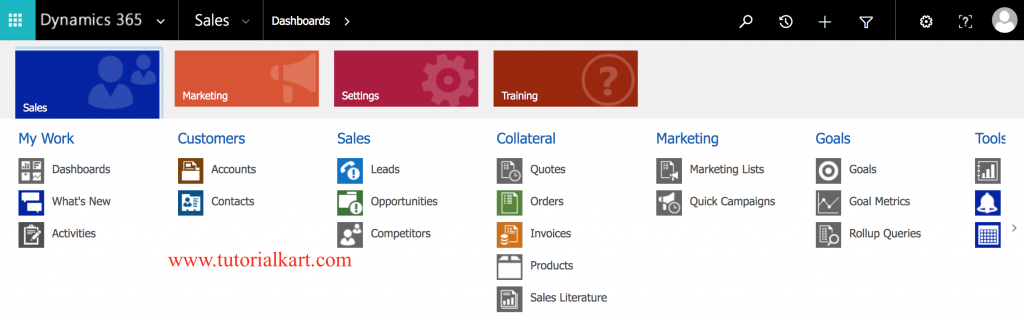
Microsoft Dynamics CRM for Sales provides the tools for sales team to manage Leads and Opportunities. Microsoft Dynamics 365 for sales module is comprised of a set of entities, processes, dashboards, and reports, along with the ability to see the products and services offered as well as the associated sales literature.
- Within the Sales module, the Sales team has the ability to manage their own customers, contacts, current orders, services, existing issues, and resolutions.
- With all this information at your fingertips, a sales person can walk into any new opportunity fully prepared, avoiding any unexpected surprises.
- Sales team have full knowledge of the customer and its current needs, level of satisfaction, and potential contention subjects.
In practical use, the Sales app usually revolves around leads, accounts, contacts, opportunities, quotes, orders, invoices, activities, goals, dashboards, and pipeline reports. Sales managers can use the data to review forecasted revenue, monitor open opportunities, and identify deals that need attention. Sales representatives can use the same records to plan calls, send emails, record meetings, and keep follow-up tasks visible.
Common sales records in Microsoft Dynamics CRM
- Lead: A potential customer or enquiry that has not yet been fully qualified.
- Account: A company or organization that your business works with or may work with.
- Contact: An individual person linked to an account or sales process.
- Opportunity: A potential sale with estimated value, close date, stage, and probability.
- Activity: A call, email, appointment, task, or other interaction related to a customer record.
Microsoft Dynamics 365 for Customer Service
Microsoft Dynamics 365 for customer service includes a set of powerful features used to manage and track customer complaints and service activities. It also used to track customer interactions within your organisation.
- Using Service module, service management and service scheduling can be viewed.
- The management aspect deals primarily with managing service tickets. They are called Cases within the context of Dynamics CRM.
The Customer Service app is mainly used by support teams, help desk users, service managers, and contact center teams. It helps them record customer issues as cases, assign cases to queues or users, apply service-level expectations, search knowledge articles, and close cases with a clear resolution. This gives the organization a service history for each customer instead of treating every support request as a separate conversation.
How cases work in Microsoft Dynamics CRM customer service
A case normally represents a customer problem, complaint, question, or request. The case record may include the customer, subject, origin, priority, owner, queue, status, notes, activities, related products, and resolution. When cases are tracked consistently, managers can measure response time, backlog, recurring problems, and support quality.
Microsoft Dynamics 365 for Marketing
Microsoft Dynamics 365 for marketing completes the set of module is targeted for marketing professionals. This marketing module provides set of tools for retaining existing customers, attracting new customers and expanding the business.
Marketing in Dynamics 365 is used to plan and manage customer communication before, during, and after the sales process. Depending on the product version and licensing, marketing teams may work with segments, emails, customer journeys, event management, forms, landing pages, consent records, and campaign performance. The exact feature set can change, so product names and availability should be checked against the current Microsoft Dynamics 365 documentation before implementation.
Marketing data that connects with Microsoft Dynamics CRM sales records
The main value of connecting marketing with CRM is that campaign responses can be linked to leads, contacts, accounts, and opportunities. For example, a customer who attends a webinar or submits a form may become a lead for the sales team. When this handoff is tracked in Dynamics 365, both marketing and sales teams can see the same customer context.
Microsoft Dynamics 365 for Field Service
Dynamics 365 for field service is a new application developed by Microsoft to reduce service cost, maximize efficiency and to improve customer satisfaction.
Field Service is used when customer service work must be performed at a customer location or asset location. Typical examples include installation, inspection, repair, preventive maintenance, and on-site support. The module helps teams create work orders, assign resources, schedule technicians, track service tasks, manage customer assets, and record work completion details.
Field service records in Microsoft Dynamics CRM
- Work order: The main record for an on-site service job.
- Bookable resource: A technician, team, equipment, or other resource that can be scheduled.
- Customer asset: A product, machine, system, or item installed for a customer.
- Service task: A checklist item or activity that must be completed during service.
- Schedule board: A planning view used to assign work to available resources.
Dynamics 365 for Project Service Automation
Microsoft Dynamics 365 for project service automation helps in deepening customer engagement and build customer confidence through a responsive engagement model.
Project Service Automation was used by project-based organizations to manage sales, resourcing, delivery, and billing around customer projects. In newer Dynamics 365 environments, project capabilities are commonly associated with project operations and related finance or resource management features. The main idea remains the same: connect project sales with project planning, time entry, resource usage, delivery tracking, and customer billing.
Is Dynamics 365 an ERP or CRM?
Dynamics 365 is both a CRM and ERP platform because Microsoft sells several connected business applications under the Dynamics 365 name. The CRM side focuses on sales, customer service, marketing, field service, and customer engagement. The ERP side focuses on areas such as finance, supply chain, commerce, human resources, and business operations.
When someone says “Microsoft Dynamics CRM,” they usually mean the CRM/customer engagement part of Dynamics 365. When someone says “Dynamics 365 Finance” or “Dynamics 365 Supply Chain Management,” they are normally referring to ERP applications. This difference is important when comparing products, planning a project, or estimating licensing.
Microsoft Dynamics CRM advantages for sales and service teams
The main advantage of Microsoft Dynamics CRM is that it gives users a structured view of customer data. Teams can see who the customer is, what has already happened, what is open, and what should happen next. This reduces duplicate work and makes it easier to manage customer follow-up.
- Shared customer view: Sales, service, and management users can work from the same customer records.
- Process tracking: Leads, opportunities, cases, and work orders can follow defined business stages.
- Activity history: Calls, appointments, tasks, and emails can be connected to customer records.
- Dashboards and reports: Managers can review pipeline, case status, activities, and performance metrics.
- Microsoft ecosystem integration: Dynamics 365 can work with products such as Outlook, Excel, Teams, Power BI, and Power Platform depending on configuration.
- Customization: Organizations can configure tables, forms, views, business rules, workflows, and security roles to match their processes.
Microsoft Dynamics CRM learning path for beginners
Microsoft Dynamics CRM is easier to learn when you understand the data model first. Beginners should not start with customization or administration immediately. It is better to learn how customers, activities, sales records, and service records are connected.
- Understand the difference between leads, accounts, contacts, and opportunities.
- Learn how activities such as tasks, phone calls, emails, and appointments are tracked.
- Practice the sales process from lead qualification to opportunity closure.
- Practice the service process from case creation to case resolution.
- Learn views, forms, dashboards, charts, and basic reporting.
- Understand users, teams, business units, and security roles.
- Move to customization topics such as tables, columns, forms, business rules, workflows, Power Automate, and Dataverse.
For a functional user, the first goal is to use the application correctly. For an administrator or consultant, the next goal is to understand configuration, security, data migration, integrations, and environment management.
Microsoft Dynamics CRM example customer lifecycle
The following example shows how different Dynamics 365 CRM modules can work together in a normal customer lifecycle:
- A visitor submits a form or attends an event and becomes a lead.
- The sales team qualifies the lead and creates an account, contact, and opportunity.
- The opportunity moves through stages such as qualify, develop, propose, and close.
- After the sale, the customer contacts support and a case is created.
- If the issue requires an on-site visit, a field service work order is scheduled.
- Managers review dashboards to understand sales performance, service volume, and customer activity.
This is the reason Microsoft Dynamics CRM is usually evaluated as a customer engagement platform rather than only a contact database.
Microsoft Dynamics CRM implementation points to check
Before implementing Microsoft Dynamics CRM, an organization should define its business process clearly. A CRM project can become difficult when teams configure too many fields, skip data cleanup, or copy old spreadsheet habits into a new system.
- Define the sales, service, marketing, and field service processes before configuration.
- Decide which records are required: leads, accounts, contacts, opportunities, cases, work orders, or custom tables.
- Clean duplicate customer data before migration.
- Plan user roles, access levels, teams, and business units carefully.
- Keep forms simple for everyday users and avoid unnecessary fields.
- Train users on the business process, not only on screen navigation.
- Review Microsoft licensing pages before buying because app names and prices can change.
Microsoft Dynamics CRM FAQ
What is Microsoft Dynamics CRM used for?
Microsoft Dynamics CRM is used to manage customer relationships across sales, service, marketing, and field operations. It helps teams track leads, accounts, contacts, opportunities, cases, activities, and customer history in one system.
Is Microsoft Dynamics CRM the same as Dynamics 365?
Microsoft Dynamics CRM is the older name many people still use for the CRM features now delivered through Dynamics 365 customer engagement applications. Dynamics 365 includes both CRM applications and ERP applications.
Is Dynamics 365 an ERP or CRM system?
Dynamics 365 includes both ERP and CRM applications. Sales, Customer Service, Marketing, and Field Service are CRM-focused applications, while Finance, Supply Chain Management, Commerce, and related apps are ERP-focused applications.
Is Microsoft Dynamics CRM difficult to learn?
Microsoft Dynamics CRM is manageable for beginners when they start with core records such as leads, accounts, contacts, opportunities, cases, and activities. Administration, customization, integrations, and security design require more structured learning and practice.
Which Microsoft Dynamics CRM module should beginners learn first?
Beginners usually learn the Sales module first because it introduces common CRM records such as leads, accounts, contacts, activities, and opportunities. After that, Customer Service is useful for understanding cases, queues, knowledge articles, and service processes.
Editorial QA checklist for this Microsoft Dynamics CRM tutorial
- Does the page clearly explain that Microsoft Dynamics CRM is now part of Dynamics 365 customer engagement?
- Does the tutorial distinguish CRM applications from ERP applications in Dynamics 365?
- Are Sales, Customer Service, Marketing, Field Service, and Project Service Automation explained with practical use cases?
- Are older product names handled carefully without implying that every old name is still current?
- Are current pricing and licensing details referred to official Microsoft pages instead of hard-coded figures?
- Do the FAQs answer real beginner questions about Microsoft Dynamics CRM, Dynamics 365, ERP vs CRM, and learning difficulty?