 TutorialKart.com
Apex Arrays and Lists
An Apex array stores an ordered collection of elements of the same data type. Each element is identified by a zero-based index, so the first element is at index 0. In Apex, array notation and the List collection type are interchangeable; for example, String[] and List<String> describe the same kind of collection.
Apex Array Declaration Syntax
The following legacy snippet illustrates an attempted declaration. The corrected Apex forms are shown immediately below it.
<String> [] arrayOfProducts = new List<String>();String[] arrayOfProducts = new List<String>();
List<String> productList = new List<String>();Both declarations create an empty list of strings. Use either notation consistently within a class. The List<String> form is often clearer when working with collection methods such as add(), size(), and contains().
Dynamic Apex Array Declaration
Datatype[] arrayname =new DataType[size];For Apex code, initialize an empty collection and add values as required. Apex lists grow dynamically, so a fixed capacity normally does not need to be declared.
String[] names = new String[]();
names.add('Malli');
names.add('Adarsh');
Static Apex Array Initialization
DataType[] arrayname =new DataType[] {20,40};A static initializer supplies the elements when the collection is created. The declared element type must match the values in the initializer.
String[] names = new String[] {'Malli', 'Adarsh', 'Kiran'};
Integer[] scores = new Integer[] {20, 40};
Apex Array Notation Compared with List Collections
Apex does not treat array notation as a separate fixed-size collection. An Apex array is a list written with bracket notation. Both forms are ordered, indexed, dynamically sized, and restricted to the declared element type.
| Feature | Array notation | List notation |
|---|---|---|
| Example | String[] names | List<String> names |
| Element type | String only | String only |
| Indexing | Zero-based | Zero-based |
| Size | Can grow or shrink | Can grow or shrink |
| Collection methods | List methods are available | List methods are available |
Accessing and Printing an Apex Array of Strings
Use an index to read or replace one element. Check the collection size before accessing an index because an index outside the valid range causes a runtime exception. To inspect the complete array while developing, pass it to System.debug().
String[] names = new String[] {'Malli', 'Adarsh', 'Kiran'};

System.debug(names[0]);
System.debug(names);

for (String currentName : names) {
    System.debug(currentName);
}
The first debug statement prints the element at index 0. The enhanced for loop processes every string without requiring a numeric index.
Useful Apex List Methods for String Arrays
| Operation | Apex example | Purpose |
|---|---|---|
| Add an element | names.add('Ravi'); | Appends a string to the list. |
| Read an element | names.get(0) | Returns the value at the specified index. |
| Replace an element | names.set(0, 'Anita'); | Replaces the value at an existing index. |
| Count elements | names.size() | Returns the current number of elements. |
| Check for a value | names.contains('Ravi') | Tests whether the list contains the supplied string. |
| Remove an element | names.remove(0) | Removes the element at the specified index. |
| Clear the list | names.clear() | Removes all elements. |
Apex Controller for Displaying a String Array
The following example exposes an array of strings through an Apex controller and displays the values in a Visualforce pageBlockTable. To create the controller in the Developer Console, select File → New → Apex Class, enter ArrayExample as the class name, and save it.
- Enter the Apex class name to create new Apex Class.
ArrayExample Apex Class Code
Public class ArrayExample {
    Public String[] myval{set;get;}
    Public String name{get;set;}
    Public ArrayExample() {
        name = 'Prasanth';
        myval = new String[] {'Malli','Adarsh','kiran'};
    }
}
The constructor initializes myval with three strings. The public properties make the array and the name value available to the Visualforce page through their generated accessors.
Visualforce Page for the Apex String Array
The Visualforce page assigns the controller’s myval property to the table’s value attribute. During each iteration, the variable a represents one string in the array. The column renders that current value.
<apex:page controller="ArrayExample" >
    <apex:form>
        <apex:pageBlock>
            <apex:pageBlockTable value="{!myval}" var="a">
                <apex:column value="{!a}"/>
            </apex:pageBlockTable>
            <apex:outputLabel>{!name}</apex:outputLabel>
        </apex:pageBlock>
    </apex:form>
</apex:page>
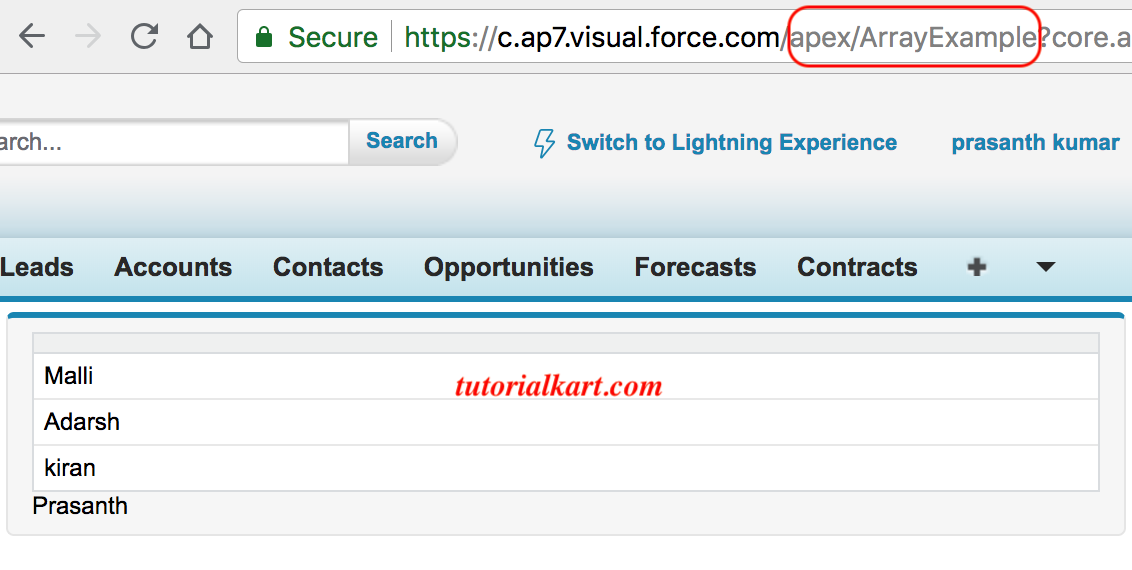
Output of the Apex Array Example
The page renders each value from myval as a separate table row and displays the value of name below the table.
Apex String Array Troubleshooting
- Invalid index: An array containing three elements has valid indexes from
0through2. - Null collection: Declare and initialize the list before calling methods such as
add(). - Type mismatch: A
String[]accepts strings, not values of unrelated Apex types. - Missing Visualforce access: Expose controller data through a public property or getter that the page can evaluate.
- Unexpected table output: Confirm that the table’s
valuereferences the array property and itsvarname matches the expression used by the column.
Apex Array Example QA Checklist
- Confirm that every array value matches the declared Apex element type.
- Verify that indexed access starts at zero and remains below
size(). - Test the controller with an empty array as well as a populated array.
- Check that the Visualforce page references the correct controller property and iteration variable.
- Review debug logs to confirm the array contains the expected strings before the page renders.
Frequently Asked Questions About Apex Arrays
How do you create a list of strings in Apex?
Declare it as List<String> names = new List<String>();. You can also use the equivalent array notation, String[] names = new String[]();.
How do you declare an array with values in Apex?
Use an initializer such as String[] names = new String[] {'Malli', 'Adarsh', 'Kiran'};. The values must be compatible with the declared element type.
How do you print an Apex array of strings?
Use System.debug(names) to write the collection to a debug log. To process or print one value at a time, iterate over the array with a for loop.
Are Apex arrays fixed in size?
No. Apex array notation represents a List, which can grow when elements are added and shrink when elements are removed.
What is the difference between an Apex List and a Set?
A List is ordered, supports zero-based indexing, and can contain duplicate values. A Set stores unique values and does not provide indexed access.