 TutorialKart.com
Apex Getter and Setter Methods in Visualforce Controllers
When a Visualforce page needs to display a value from an Apex controller, or send a value entered by the user back to the controller, the controller must expose that value through Apex getter and setter methods. In this Salesforce tutorial, we will understand how Apex getter methods and setter methods work with Visualforce expressions such as {!name}.
In Apex, getters and setters are most commonly used with controller properties. A getter returns a value to the Visualforce page. A setter receives a value from an input component on the Visualforce page and stores it in an Apex variable or property.
- Setter method : This will take the value from the visualforce page and stores to the Apex variable name.
- getter method : This method will return a value to a visualforce page whenever a name variable is called.
The basic idea is shown below. When Visualforce refers to {!name}, Salesforce looks for a readable controller property named name, or for a method named getName(). When a Visualforce input component updates {!name}, Salesforce needs a writable property or a setter method such as setName(String name).
 public class Example {
     public void Set(String name) {
         this.name = name;
     }
     public String getName() {
         return name;
     }
 }
How Visualforce Calls Apex get and set Methods
Visualforce uses expression syntax to bind a page component to an Apex controller member. For example, {!name} is not just plain text. It is an expression that asks the controller for the value of name. The same expression can also send a value back to the controller when it is used in an input component such as <apex:inputText>.
| Visualforce usage | Apex member needed | Purpose |
|---|---|---|
<apex:outputText value="{!name}"/> | getName() or { get; } | Display a value from Apex on the page |
<apex:inputText value="{!name}"/> | setName(String value) or { set; } | Accept user input and store it in Apex |
<apex:commandButton> | Controller action method if specified | Submit the form and process the current property values |
Apex get Method for Displaying a Value in Visualforce
When visualforce page want to get the value of a variable defined in the Apex. It will invoke get method of that variable.
Example
<apex:outputlabel > {!name} </apex:outputlabel>In the above example, Visualforce page is trying to use name variable which is declared in Apex class. So it invokes automatically getname( ) method in the Apex class and this method will return the value of that variable.
Example for getter method using visualforce and Apex class is as shown in the following code snippet.
public class Prasanth {
    String name;
    public String getName() {
        return 'Tutoriart.com';
    }
}
Visualforce Page Calling the Apex Getter Method
<apex:page controller="example2" sidebar="false">
    <apex:outputLabel> {!name}</apex:outputLabel>
</apex:page>
As shown above, when the page is loaded first it creates an object for prasanth class. When outputlabel calls {!name} in the Visualforce page, it invokes getname( ) method in the controller class.
For a working Visualforce page, the controller name in the <apex:page> tag must match the Apex class that is being used as the controller. The following updated example shows the same getter concept with matching controller and page names.
public class GetterExampleController {
    public String getName() {
        return 'TutorialKart.com';
    }
}<apex:page controller="GetterExampleController" sidebar="false">
<apex:outputText value="{!name}"/>
</apex:page>In this example, the page expression {!name} calls the controller method getName(). The method returns a string, and Visualforce displays that string on the page.
Apex Getter Method Output in Visualforce

Apex Setter Method for Accepting Visualforce Input
Setter method will take the value from the visualforce page and stores to the Apex variable name.To understand about setter method ( ), let us write an Apex class for passing the values and saving the values to Apex variables.
A setter is needed when the page has an input component bound to a controller value. For example, when a user types a name in <apex:inputText value="{!name}"/> and submits the form, Visualforce assigns the typed value to the controller by using the setter for name.
Apex Class Demonstrating Setter Method with Visualforce
public class setter {
    public string name;
    public string getname() {
        return name;
    }
    public void Setname(String name) {
        this.name=name;
    }
}
Visualforce Page Passing Input to the Apex Setter
<apex:page controller="setter">
    <apex:form>
        <apex:outputLabel> Enter name </apex:outputLabel>
        <apex:inputText value="{!name}"/>
        <apex:commandButton value="click" reRender="one"/>
        <div>
         <apex:outputLabel id="one"> Hello your name is {!name}
        </apex:outputLabel>
        </div>
    </apex:form>
</apex:page>
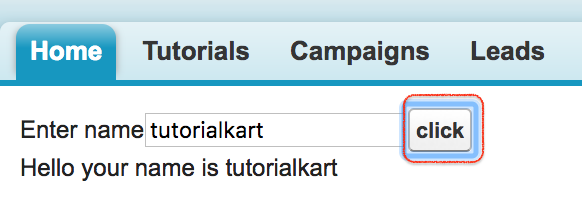
In the above example, we have written simple Apex code to pass the values and save the values to Apex variables.
The important point is that the same expression, {!name}, is used in two ways. In <apex:inputText>, it sends the entered value to Apex. In <apex:outputLabel>, it reads the current value from Apex and displays it back to the user.
Apex Setter Method Output After Visualforce Form Submit
Using Apex Properties Instead of Separate getName and setName Methods
In many Apex controllers, you will see property syntax instead of manually writing separate getter and setter methods. This is shorter and easier to read when the controller only needs to store and return a value without extra logic.
public String name { get; set; }The above property gives Visualforce both read and write access to name. It is similar to providing a getter and setter for the same variable.
public class NameController {
    public String name { get; set; }

    public NameController() {
        name = 'TutorialKart.com';
    }
}<apex:page controller="NameController">
<apex:form>
<apex:outputLabel value="Enter name" for="nameInput"/>
<apex:inputText id="nameInput" value="{!name}"/>
<apex:commandButton value="Show Name" reRender="result"/>
<apex:outputPanel id="result">
<p>Hello, {!name}</p>
</apex:outputPanel>
</apex:form>
</apex:page>Use property syntax when there is no special validation or transformation required. Use explicit getter and setter methods when you need custom logic, such as trimming input, returning a calculated value, or preventing invalid values from being stored.
Apex Getter and Setter Naming Rules for Visualforce
Visualforce property binding follows a naming pattern. If the page uses {!name}, the controller can expose that value as a property named name, or through methods named getName() and setName(String value). The property name used on the page should not include the words get or set.
| Apex controller member | Visualforce expression | Correct usage |
|---|---|---|
public String getName() | {!name} | Getter method returns the value |
public void setName(String value) | {!name} | Setter method receives the value |
public String name { get; set; } | {!name} | Property handles both read and write |
public String getFullName() | {!fullName} | Getter can expose a calculated value |
Read-only Apex Getter Property for Calculated Visualforce Values
A getter does not always need a matching setter. If the value is calculated in Apex and should only be displayed on the Visualforce page, create a read-only getter. This keeps the page from trying to update a value that should be controlled only by Apex logic.
public class FullNameController {
    public String firstName { get; set; }
    public String lastName { get; set; }

    public String getFullName() {
        if (String.isBlank(firstName) && String.isBlank(lastName)) {
            return '';
        }
        return String.valueOf(firstName).trim() + ' ' + String.valueOf(lastName).trim();
    }
}<apex:page controller="FullNameController">
<apex:form>
<apex:inputText value="{!firstName}" html-placeholder="First name"/>
<apex:inputText value="{!lastName}" html-placeholder="Last name"/>
<apex:commandButton value="Show Full Name" reRender="result"/>
<apex:outputPanel id="result">
<p>Full name: {!fullName}</p>
</apex:outputPanel>
</apex:form>
</apex:page>Here, firstName and lastName are writable properties because the page accepts user input for them. fullName is read-only because it is calculated by the getFullName() method.
Common Mistakes in Apex Getter and Setter Methods
- Using the method name in Visualforce: Use
{!name}, not{!getName}, when binding to a getter method namedgetName(). - Controller name mismatch: The
controllerattribute in<apex:page>must match the Apex class name used for the page. - Missing setter for input fields: If
<apex:inputText value="{!name}"/>cannot write back to Apex, check whether the property hasset;or a validsetName(String value)method. - Keeping variables unnecessarily public: Prefer properties such as
public String name { get; set; }instead of exposing raw variables without control. - Adding heavy SOQL logic in getters: Getter methods can be called more than once during the Visualforce page lifecycle, so avoid expensive repeated queries inside getters. Cache values when needed.
When to Use Getter Methods, Setter Methods, and Apex Properties
| Requirement in Visualforce | Recommended Apex approach | Reason |
|---|---|---|
| Display a fixed or calculated value | Getter method | Allows Apex to calculate and return the value |
| Accept simple text input | Property with { get; set; } | Short and clear for basic form values |
| Validate or clean input before storing | Explicit setter method | Allows custom logic before assignment |
| Display a value that should not be edited | Read-only getter or { get; private set; } | Prevents Visualforce from changing the value directly |
FAQs on Apex Getter and Setter Methods
What are getter and setter methods in Apex?
Getter and setter methods in Apex expose controller values to a Visualforce page. A getter returns a value to the page, while a setter receives a value submitted from an input component on the page.
Why does Visualforce call getName() when the page uses {!name}?
Visualforce treats {!name} as a property expression. If the controller has a method named getName(), Visualforce uses that method to read the value of name.
Do I always need both get and set methods in Apex?
No. Use only a getter when the value is displayed but not edited. Use both getter and setter, or a property with get and set, when the Visualforce page needs to read and update the value.
Can I use public String name { get; set; } instead of getName() and setName()?
Yes. Apex property syntax is commonly used for simple Visualforce form values. Separate getter and setter methods are useful when you need custom logic.
Should SOQL queries be placed inside Apex getter methods?
Avoid repeated SOQL queries inside getters because Visualforce may call getters multiple times during page rendering. Query once and store the result in a property when possible.
Editorial QA Checklist for This Apex Getter and Setter Tutorial
- Confirm that every Visualforce expression such as
{!name}has a matching Apex getter, setter, or property. - Check that each
<apex:page controller="...">value matches the intended Apex class name in the example. - Keep existing tutorial images for getter and setter output unchanged.
- Use
language-javafor Apex examples andlanguage-xmlfor Visualforce examples. - Avoid presenting getter methods as a place for repeated SOQL queries or heavy processing.