 TutorialKart.com
What is Constructor in Apex Programming?
A constructor in Apex Programming is special code that runs when an object is created from an Apex class. It is mainly used to set the initial state of an object, such as assigning default values to instance variables or validating values passed while creating the object.
In Apex, a constructor looks similar to a method, but it has two important differences: its name is the same as the class name, and it does not have a return type. The constructor is invoked automatically when the new keyword creates an instance of the class.
- The constructor name must be the same as the Apex class name.
- A constructor does not declare a return type, not even
void. - It runs when an object is created with the
newkeyword. - It is commonly used to initialize the data members of the class.
- A constructor can be overloaded by defining multiple constructors with different parameter lists.
Example :
public class TestObject {
	// the no argument Constructor
	public TestObject() {
		//code
	}
}
Apex constructor syntax
The basic syntax of an Apex constructor is shown below. Notice that the constructor has the same name as the class and no return type.
public class ClassName {
    public ClassName() {
        // initialization code
    }
}
A constructor can use an access modifier such as public, private, protected, or global, depending on where the class is used. Beginner examples usually use public constructors because the object is created from outside the class.
Types of Constructor in Apex programming.
In Apex tutorials, constructors are usually explained as default constructors, non-parameterized constructors, and parameterized constructors. Constructor overloading and constructor chaining are also important because they show how multiple constructors can work together in the same class.
- Default Constructor.
- Non-parameterized Constructor.
- Parameterized Constructor.
Default Constructor
If an Apex Class doesn’t contain any constructor then Apex Compiler by default creates a dummy constructor on the name of class when we create an object for the class.
public class Example {

}

Example e = new Example();
As shown in above example, the Apex class doesn’t contain any Constructor. So when we create object for example class the Apex compiler creates a default constructor.
The default constructor is available only when the class does not define any constructor. If you add a parameterized constructor, Apex does not automatically provide a no-argument constructor for you. In that case, write the no-argument constructor explicitly if your code needs new Example().
Non-parameterized Constructor & parameterized Constructor.
It is a constructor that doesn’t have any parameters or constructor that has parameters.
A non-parameterized constructor is useful when every new object should start with the same default values. A parameterized constructor is useful when the caller should provide the starting values while creating the object.
Apex Class
public class Example {
	Integer Rollno;
	String Name;
	public Example(Integer X, String myname) {
		Rollno = X;
		Name = myname;
	}
	Public Example() {
		Rollno = 1015;
		Name = 'Prasanth';
	}
}
The class above has two constructors. Example(Integer X, String myname) is a parameterized constructor, and Example() is a non-parameterized constructor. This is constructor overloading because the same constructor name is used with different parameter lists.
Constructor in Apex programming with example
To create an Constructor in Apex programming, first we need to write an Apex class. To write an Apex class login to Salesforce and navigate to developer console and click on file.
- Select new Apex class and name the class.
Apex Class
public class Employee {
    string Employeename;
    Integer EmployeeNo;
    Public Employee() {
        EmployeeName = 'Prasant kumar';
        EmployeeNo = 1015;
    }
    public void Show() {
        System.debug('Emplyeename is' +EmployeeName);
        System.debug('EmplyeeNo is' +EmployeeNo);
    }
}
In this example, Employee() is called automatically when an Employee object is created. The constructor assigns values to EmployeeName and EmployeeNo. The Show() method is then used to print those values in the debug log.
- Now open anonymous block.
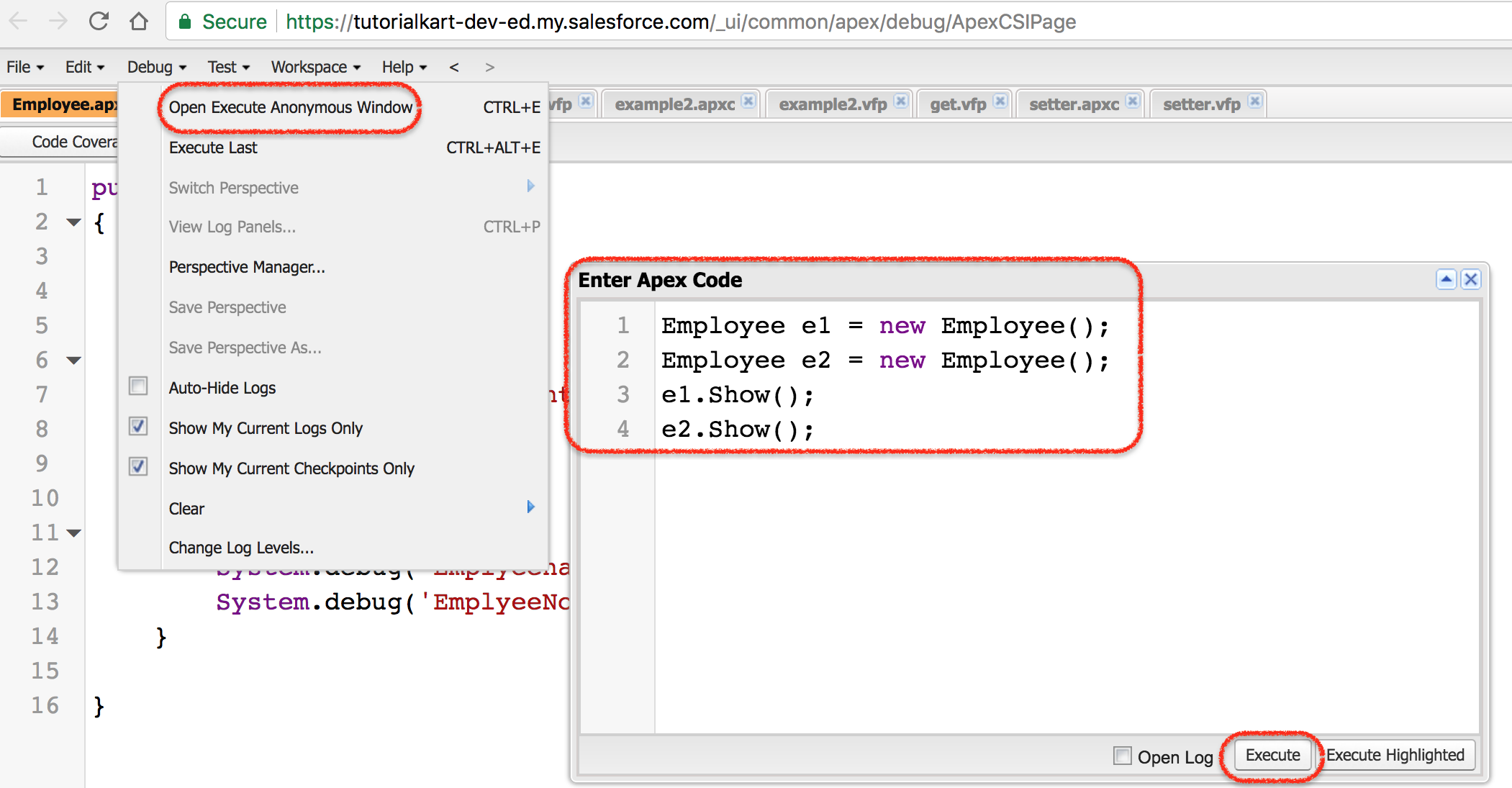
Click on Execute button.
You can create the object and call the method from Execute Anonymous as shown below.
Employee emp = new Employee();
emp.Show();
The debug log will show the values initialized by the constructor. The exact log prefix can vary based on the Salesforce execution context, but the important part is that the constructor runs before Show() is called.
Parameterized constructor in Apex with object creation
A parameterized constructor accepts values from the caller. This is useful when different objects of the same class should start with different values.
public class StudentRecord {
    Integer rollNo;
    String studentName;

    public StudentRecord(Integer rollNo, String studentName) {
        this.rollNo = rollNo;
        this.studentName = studentName;
    }

    public void showStudent() {
        System.debug('Roll No: ' + rollNo);
        System.debug('Student Name: ' + studentName);
    }
}
The object can be created by passing values in the same order as the constructor parameters.
StudentRecord s1 = new StudentRecord(101, 'Asha');
s1.showStudent();
Roll No: 101
Student Name: AshaThe this keyword is used here to clearly refer to the instance variables when the parameter names are the same as the field names.
Apex constructor overloading and constructor chaining
Constructor overloading means writing more than one constructor in the same Apex class, where each constructor has a different parameter list. Constructor chaining means calling one constructor from another constructor in the same class by using this(...).
public class CourseEnrollment {
    String courseName;
    Integer durationInDays;

    public CourseEnrollment() {
        this('Apex Basics', 30);
    }

    public CourseEnrollment(String courseName) {
        this(courseName, 30);
    }

    public CourseEnrollment(String courseName, Integer durationInDays) {
        this.courseName = courseName;
        this.durationInDays = durationInDays;
    }
}
In constructor chaining, the this(...) call must be the first statement inside the constructor. This keeps the initialization order clear and prevents partially initialized objects.
Difference between constructor and method in Apex
| Point | Apex constructor | Apex method |
|---|---|---|
| Name | Same as the class name | Can have any valid method name |
| Return type | No return type | Must declare a return type, such as void, Integer, or String |
| When it runs | Automatically when an object is created | Only when the method is called |
| Main use | Initialize object state | Perform an action or return a value |
| Overloading | Can be overloaded with different parameter lists | Can also be overloaded with different parameter lists |
Where Apex constructors are useful in Salesforce code
Constructors are useful when an Apex class represents an object that should always begin with valid data. They are commonly used in wrapper classes, service classes, controller classes, and helper classes.
- Use a constructor to set default field values for a new object instance.
- Use a parameterized constructor when the caller must provide required values.
- Use overloaded constructors when the class supports different ways of creating the same kind of object.
- Use constructor chaining to avoid repeating the same initialization code in multiple constructors.
- Keep constructor logic simple because Apex code still runs within Salesforce governor limits.
If constructor logic needs SOQL queries, DML operations, or callouts, consider whether that work should be moved to a separate method. Constructors are best for initialization, not for long business processes.
Important Apex constructor rules to remember
- If we want to write a constructor with arguments, we can use a parameterized constructor and pass those values while creating the object.
- If a class contains a parameterized constructor, the default no-argument constructor is not created automatically. We need to create the no-argument constructor explicitly if it is required.
- Constructor in Apex programming can be overloaded by using different parameter lists.
- Constructor in Apex programming can call another constructor using
this(...)syntax. This is called constructor chaining.
For accurate Apex syntax details, you can also refer to the Salesforce Apex Developer Guide page on using constructors and the guide page on using the this keyword.
Common mistakes in Apex constructors
- Adding a return type such as
voidto a constructor. That makes it a method, not a constructor. - Changing the constructor name so it no longer exactly matches the class name.
- Forgetting to add an explicit no-argument constructor after creating a parameterized constructor.
- Putting code before
this(...)in constructor chaining. The chained constructor call must come first. - Doing too much work inside a constructor instead of keeping it focused on initialization.
Apex constructor FAQ
What does constructor mean in Apex programming?
In Apex programming, a constructor is special code that is invoked when an object is created from a class. It initializes the new object’s instance variables and prepares the object for use.
What is a constructor with an example in Apex?
public Employee() inside the Employee class is a constructor. When code runs new Employee(), the constructor executes and can assign starting values such as employee name and employee number.
What is the difference between constructor and method in Apex?
A constructor has the same name as the class and no return type. It runs automatically when an object is created. A method has its own name, declares a return type, and runs only when it is called.
What are the common types of constructors in Apex?
The common constructor forms in Apex are default constructor, non-parameterized constructor, parameterized constructor, and overloaded constructor. Constructor chaining is a related technique where one constructor calls another constructor using this(...).
Can an Apex class have both no-argument and parameterized constructors?
Yes. An Apex class can define both no-argument and parameterized constructors. This is constructor overloading, and it allows objects of the same class to be created in different ways.
Apex constructor tutorial QA checklist
- Confirm every constructor has the same name as its Apex class and does not declare a return type.
- Check that examples using
this(...)place the constructor call as the first statement. - Verify that any class with a parameterized constructor also defines a no-argument constructor if the tutorial later uses
new ClassName(). - Keep all new syntax examples in PrismJS-compatible code blocks such as
language-java syntaxfor Apex-like syntax andoutputfor debug results. - Review whether constructor examples initialize data only, instead of hiding SOQL, DML, or callout-heavy business logic in the constructor.