 TutorialKart.com
How to define project coding mask in SAP PS
In SAP Project System, a project coding mask controls how the project definition number and related WBS element IDs are displayed and entered. It is mainly used to keep project numbers consistent, readable, and aligned with the WBS hierarchy used by the organization.
A coding mask is useful when project IDs include a fixed prefix, a numeric serial number, and separate WBS levels. For example, a company may want project numbers such as AB/001-DE-PL-EX-QA, where each part of the ID has a business meaning.
What a project coding mask controls in SAP PS
The project coding mask does not create the project structure by itself. It defines the permitted format for project and WBS element IDs. When users create project definitions or WBS elements, SAP checks whether the entered identification follows the active mask.
- It standardizes project definition numbers.
- It helps users identify WBS levels from the number format.
- It reduces inconsistent manual numbering.
- It supports easier reporting and project search when naming rules are followed.
- It can be locked when a mask should no longer be used for new projects.
Project coding mask characters used in OPSJ
The below characters are available for editing project coding masks.
| Character | Meaning in project coding mask | Typical use |
|---|---|---|
| X | Allows alphanumeric characters | Department code, project type, WBS level code |
| 0 | Allows numerical characters only | Project serial number or running number |
| / | Acts as a separator | Separating project prefix from project number |
| – | Acts as a separator when used in the mask | Separating WBS levels for readability |
Use separators only where they make the project ID easier to read. A very long or overly detailed mask can make manual entry difficult for users working in project maintenance transactions such as CJ20N.
Example of project coding mask format
An example of project coding mask
XX/000-XX-XX-XX-XX
- 000 can be used for project serial number
- XX – Can be first level of WBS element
- XX – Second level of WBS element.
- XX – Third level of WBS element.
- XX – Fourth level of WBS element
For this mask, a project or WBS element number could be entered in a structured format such as PR/125-EN-DN-QA-RL. Here, PR can represent a project identifier, 125 can represent the serial number, and the remaining parts can represent different WBS levels or internal classification codes.
Before creating a project coding mask in SAP PS
Before maintaining the coding mask, decide the numbering logic with the project team, finance team, and reporting users. Changing project numbering rules later can affect project creation practices and reporting consistency.
- Decide whether the project prefix should represent company, plant, business unit, project type, or department.
- Keep enough numeric positions for future projects, such as 000 for 001 to 999 or more positions if needed.
- Use separators consistently so users can recognize the WBS hierarchy.
- Avoid making the mask too short if many projects will be created under the same identifier.
- Do not lock the mask if users still need to create new projects with that format.
Configuration steps to define project coding mask in SAP PS
Navigation
| SAP R/3 Role Menu | Project coding mask |
| Transaction code | OPSJ |
| SAP Menu Path | SPRO > Project system > Structures > Operative structures > Work breakdown structures > Project coding mask > Define project coding mask. |
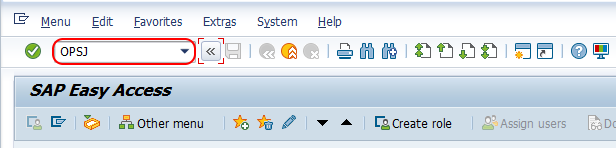
Step 1 : – Execute tcode “OPSJ” from SAP command field.
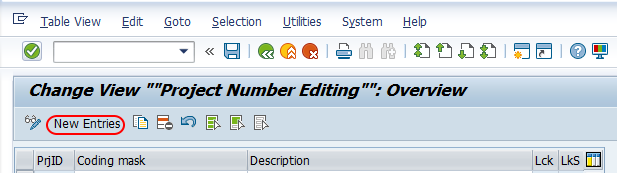
Step 2 : – On change view “Project Number Editing” overview screen, choose new entries button to create new project coding mask.
Step 3 : – On new entries project coding mask screen, enter the following details.
- PrjID: – Enter the key that defines as project identifier in SAP. The key will be tied in next field (coding mask). You can maintain different project identifies as per your requirements of project.
- Coding mask : – The data enter here will be determine how the numbers and characters will look when you are creating a project.
- Lck : – Check this lock operative field to lock this coding mask. If you choose lock option, you are not able to create new project with this mask.
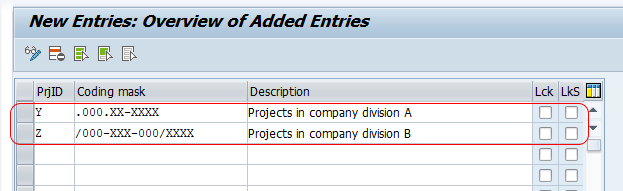
After entering all the required details for coding mask, choose save icon and save the details.
Successfully we have defined new project coding mask in SAP PS.
Field explanation for project number editing in OPSJ
| Field | Purpose | Entry guidance |
|---|---|---|
| PrjID | Identifies the project coding mask key | Use a short identifier that matches your project numbering policy. |
| Coding mask | Defines the visible format of the project and WBS element number | Use X, 0, and separators according to the required project structure. |
| Lck | Locks the coding mask | Select this only when the mask should not be used for creating new project definitions. |
How project coding mask relates to project definition and WBS elements
The project definition is the top-level object in SAP PS. It stores the main project identification and control information. WBS elements break the project into smaller planning, budgeting, scheduling, and reporting units. The coding mask helps maintain a consistent number format across these objects.
For example, in the mask XX/000-XX-XX, the first part may identify the project group, the numeric part may identify the project number, and the later parts may represent WBS levels. This makes it easier to understand where a WBS element belongs in the project structure.
Using project coding mask while creating projects in CJ20N
After the coding mask is saved, users can apply the numbering format while creating or maintaining projects in SAP Project Builder transaction CJ20N. If the entered project definition or WBS element ID does not match the configured mask, SAP may prevent the entry or ask the user to correct the format, depending on the configuration and project creation scenario.
When testing a new mask, create a sample project definition and a few WBS elements in a test client first. Check whether the mask supports the required number of hierarchy levels, expected prefixes, and reporting needs before using it in production.
Common mistakes while defining project coding mask
- Using too few numeric positions: A mask with only two numeric positions may run out quickly if many projects are created.
- Mixing unclear separators: Use separators consistently. Avoid formats that users cannot read easily.
- Locking the mask too early: If the Lck field is selected, users cannot create new projects with that mask.
- Creating too many similar masks: Multiple masks with small differences can confuse users during project creation.
- Not testing WBS levels: Always test whether the mask supports the real WBS hierarchy before moving the configuration to production.
Project coding mask FAQ
What is a coding mask in SAP PS?
A coding mask in SAP PS is a format rule that controls how project definition numbers and WBS element IDs are entered and displayed. It uses characters such as X for alphanumeric positions, 0 for numeric positions, and separators such as / or – for readability.
What is the transaction code to define project coding mask?
The transaction code to define project coding mask is OPSJ. You can also reach it through SPRO under Project System configuration for Work Breakdown Structures.
What is the project definition in SAP PS?
The project definition is the top-level object in SAP Project System. It contains the main project identity and control data, while WBS elements divide the project into smaller manageable parts.
Can a project coding mask be locked in SAP PS?
Yes. The Lck field can be selected to lock a coding mask. When it is locked, users cannot create new projects using that mask.
How is the coding mask used in CJ20N?
In CJ20N, users create and maintain project definitions and WBS elements. The coding mask helps ensure that the project and WBS IDs follow the numbering format configured in SAP PS.
Editorial QA checklist for SAP PS project coding mask
- Confirm that the OPSJ transaction path is correct for defining project coding masks.
- Check that X, 0, and separator usage matches the intended project numbering rule.
- Verify that the example mask can support the required project and WBS levels.
- Ensure the Lck field explanation clearly states that locked masks cannot be used for new project creation.
- Test a sample project definition and WBS structure in CJ20N before using the mask in production.