 TutorialKart.com
CouchDB – Get Database List
CouchDB provides the /_all_dbs HTTP endpoint for retrieving the names of databases available to the authenticated user. You can call this endpoint through the REST API or view the same database list in the CouchDB Fauxton web interface.
Get the CouchDB Database List Using the REST API
Send an HTTP GET request to the /_all_dbs endpoint:
http://hostname/_all_dbs/Replace hostname with the host name or IP address of your CouchDB server. CouchDB commonly listens on port 5984.
In this example, CouchDB is running locally, so the host and port are 127.0.0.1:5984.
The complete GET request URL is:
http://127.0.0.1:5984/_all_dbs/You can send the request using Postman, a browser when authentication permits it, or a command-line HTTP client such as cURL.
List CouchDB Databases with cURL
Run the following command from a terminal:
curl http://127.0.0.1:5984/_all_dbsIf the CouchDB server requires authentication, provide a valid user name and password:
curl -u username:password http://127.0.0.1:5984/_all_dbsA successful request returns an HTTP 200 OK response containing a JSON array of database names.
["_replicator","_users","customers","orders"]Each string in the array is a database name. Names beginning with an underscore, such as _users and _replicator, are CouchDB system databases. The exact result depends on the databases present on the server and the permissions assigned to the current user.
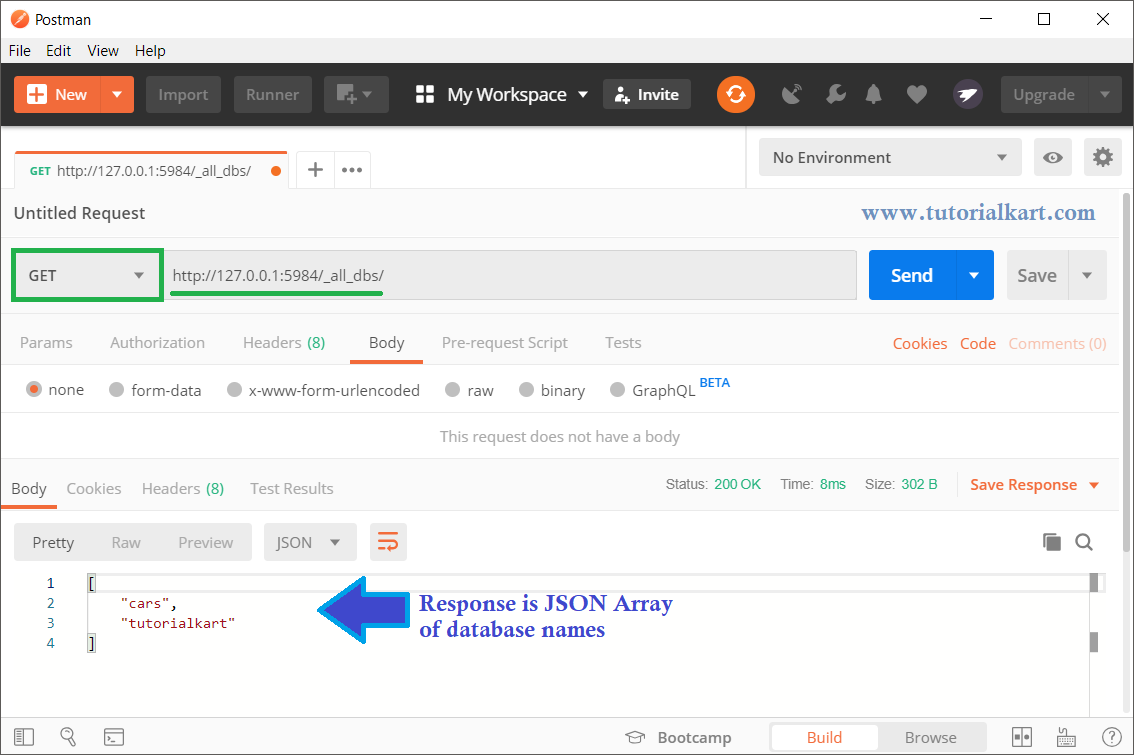
The response shown in Postman is a JSON array with the available database names as its elements.
Limit the CouchDB Database List with Query Parameters
The /_all_dbs endpoint supports range and pagination parameters. These are useful when a server contains many databases.
limitsets the maximum number of database names returned.skipskips a specified number of entries before returning results.startkeystarts the result at a database name.endkeystops the result at a database name.descending=truereturns names in descending order.
For example, the following request returns at most five database names:
curl -u username:password "http://127.0.0.1:5984/_all_dbs?limit=5"Values supplied to startkey and endkey are JSON strings and must be URL-encoded when necessary.
View the CouchDB Database List in Fauxton
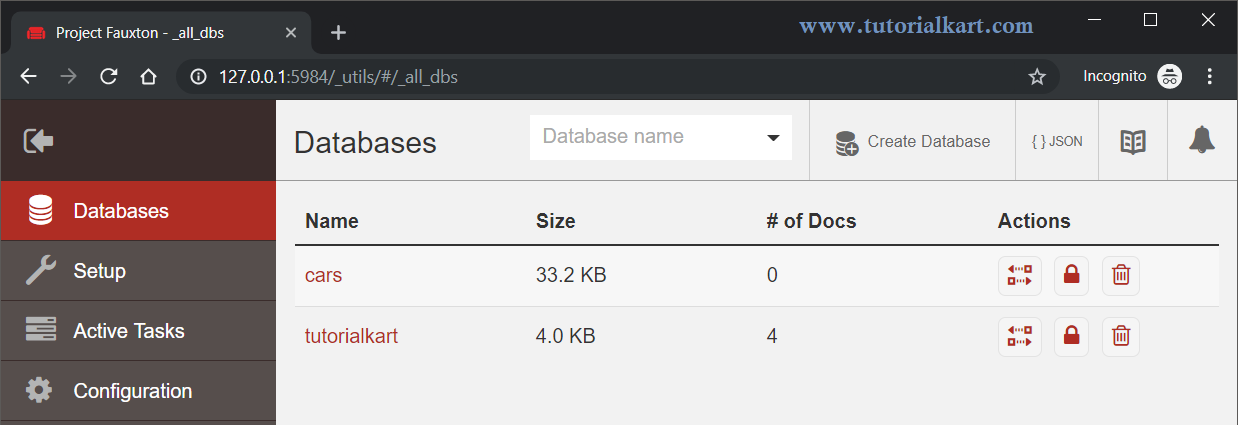
You can also view the database list through Fauxton, the web-based administration interface included with CouchDB.
Open http://hostname/_utils/ in your browser. For a local CouchDB instance, use http://127.0.0.1:5984/_utils/.
Sign in when prompted, and then select Databases from the left navigation panel. Fauxton displays the databases that the signed-in user is permitted to access.
CouchDB _all_dbs Errors and Checks
If the request does not return the expected database list, check the following:
- Confirm that the CouchDB service is running and reachable on the specified host and port.
- Use the
GETmethod rather thanPUTorPOST. - Verify the user name, password, and database permissions when authentication is enabled.
- Check whether a firewall, reverse proxy, container port mapping, or network rule blocks port
5984. - Use the server’s configured HTTPS URL instead of HTTP when TLS is enabled.
An HTTP 401 Unauthorized response normally indicates missing or invalid credentials. An HTTP 403 Forbidden response indicates that the authenticated user is not permitted to perform the request.
Frequently Asked Questions About CouchDB Database Lists
Which HTTP method lists all CouchDB databases?
Use an HTTP GET request with the /_all_dbs endpoint.
What format does the CouchDB _all_dbs endpoint return?
It returns a JSON array in which each element is a database name.
Why are _users and _replicator included in the database list?
They are CouchDB system databases. The _users database stores user documents, while _replicator stores persistent replication documents.
Can _all_dbs return only some database names?
Yes. Parameters such as limit, skip, startkey, and endkey can restrict the returned list.
CouchDB Database List Summary
In this CouchDB Tutorial, we learned how to retrieve database names with a GET request to /_all_dbs, run the request with cURL or Postman, apply list parameters, and view accessible databases in the Fauxton web interface.