 TutorialKart.com
Salesforce Apex before insert trigger
An Apex trigger with the before insert event runs before Salesforce saves new records to the database. Use it when you need to validate incoming field values, stop invalid records, or assign values to fields before the initial insert completes.
A trigger is defined for one Salesforce object, such as Contact, Account, or a custom object. To begin, create an Apex Trigger for the required object and include the before insert event.
This tutorial uses a Contact trigger that checks whether the email entered for a new Contact already exists on another Contact. When a duplicate is found, the trigger adds a field-level error and prevents the record from being inserted.
Syntax of Apex Trigger with before insert event
trigger Trigger_Name on sObject_Name (before insert) {
    // code block section
}
Trigger_Name is the trigger name and sObject_Name is the Salesforce object on which the trigger runs. The event is written in parentheses after the object name. Apex trigger code must handle all records in the transaction, not only one record.
Trigger.new records in a before insert trigger
During before insert, Trigger.new contains the records that Salesforce is about to insert. These records are writable, so you can assign field values directly without issuing a separate update statement.
The records do not yet have database-generated Salesforce IDs. Therefore, code in this event should not depend on the new record’s Id. When validation fails, call addError() on a record or field to stop that record from being saved.
Contact before insert trigger example
Following is the default code when an Apex Trigger is created with name:ValidateEmailTrigger on sObject:Contact for before insert event.
trigger ValidateEmailTrigger on Contact (before insert) {

}
Copy the following code to perform Email validation that we mentioned earlier.
trigger ValidateEmailTrigger on Contact (before insert) {

    // set to store emails present in the contacts that initiated this trigger
    set<String> emailSet = new set<String>();
    // set to store existing emails that matched emailSet
    set<String> existingEmails = new set<String>();

    // add all the emails of contacts in trigger to emailSet
    for(Contact con : Trigger.new) {
        emailSet.add(con.email);
    }

    // get the existing emails which match the emails in emailSet
    for(Contact con : [select Email from contact where email in : emailSet]) {
        existingEmails.add(con.Email);
    }

    // for each contact in trigger.new
    for(contact a:trigger.new) {
        if(existingEmails.contains(a.Email)) {
            a.Email.adderror('This email already exists. Msg from trigger.');
        }
    }
}
How the duplicate email validation works
- The first loop collects email addresses from all Contacts in
Trigger.new. - One SOQL query retrieves existing Contacts whose email matches any collected value.
- The last loop compares each incoming Contact with the existing email set.
- When a match is found,
addError()prevents that Contact from being inserted.
The query is outside the loop, which is essential for bulk processing. A trigger can receive many records from Data Loader, an API integration, an import, or another Apex transaction. Running one query for every record can exceed Salesforce governor limits.
Important duplicate-check limitations
The example checks incoming emails against Contacts already stored in the database. It does not detect two new Contacts with the same email when both are inserted in the same transaction unless additional in-memory duplicate checking is added.
It also adds null email values to the set. Production code should normally skip blank emails, normalize values before comparison, and confirm whether duplicate detection should be case-sensitive or case-insensitive for the business requirement.
Set<String> incomingEmails = new Set<String>();

for (Contact contactRecord : Trigger.new) {
    if (String.isBlank(contactRecord.Email)) {
        continue;
    }

    String normalizedEmail = contactRecord.Email.trim().toLowerCase();

    if (incomingEmails.contains(normalizedEmail)) {
        contactRecord.Email.addError(
            'Another Contact in this transaction uses the same email.'
        );
    } else {
        incomingEmails.add(normalizedEmail);
    }
}
This additional pattern detects repeated email values inside the current transaction. It can be combined with a single SOQL query for database duplicates.
Result when an existing Contact email is entered
Following is an existing contact.
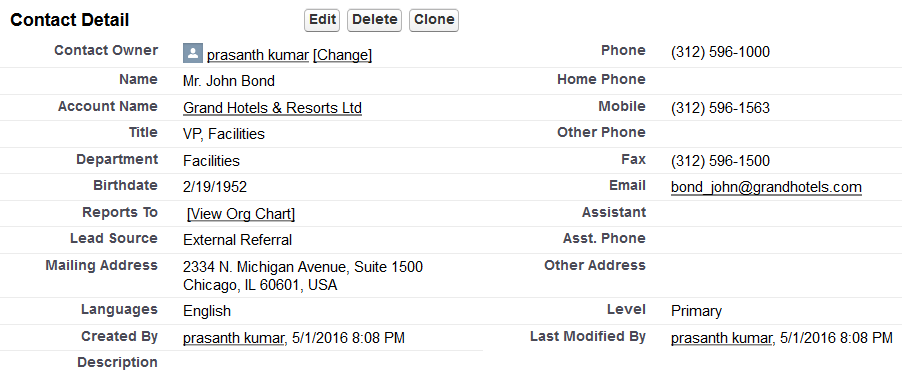
Now we shall try to create a new contact with the same Email: bond_john@grandhotels.com.
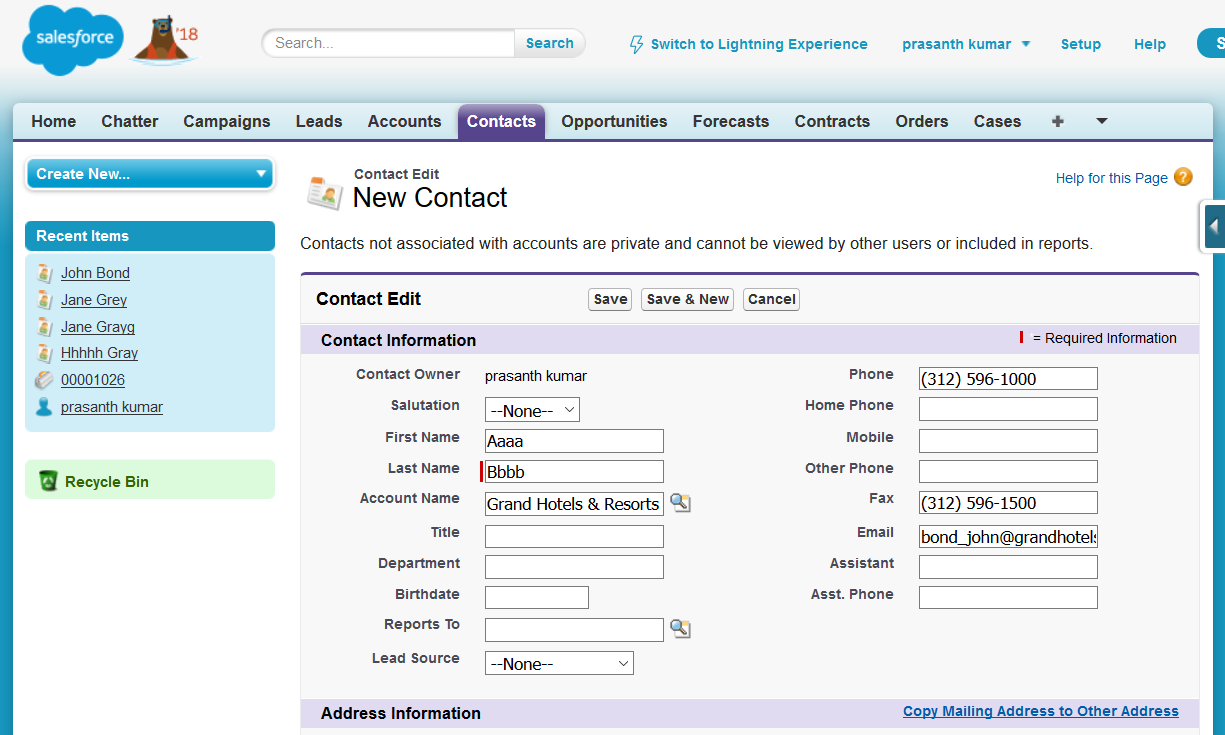
When you click Save, Salesforce begins the insert transaction. Before the Contact is written to the database, ValidateEmailTrigger runs and queries for an existing matching email.
Because the email matches a Contact already in the database, the trigger executes the field-level error statement:
a.Email.adderror('This email already exists. Msg from trigger.');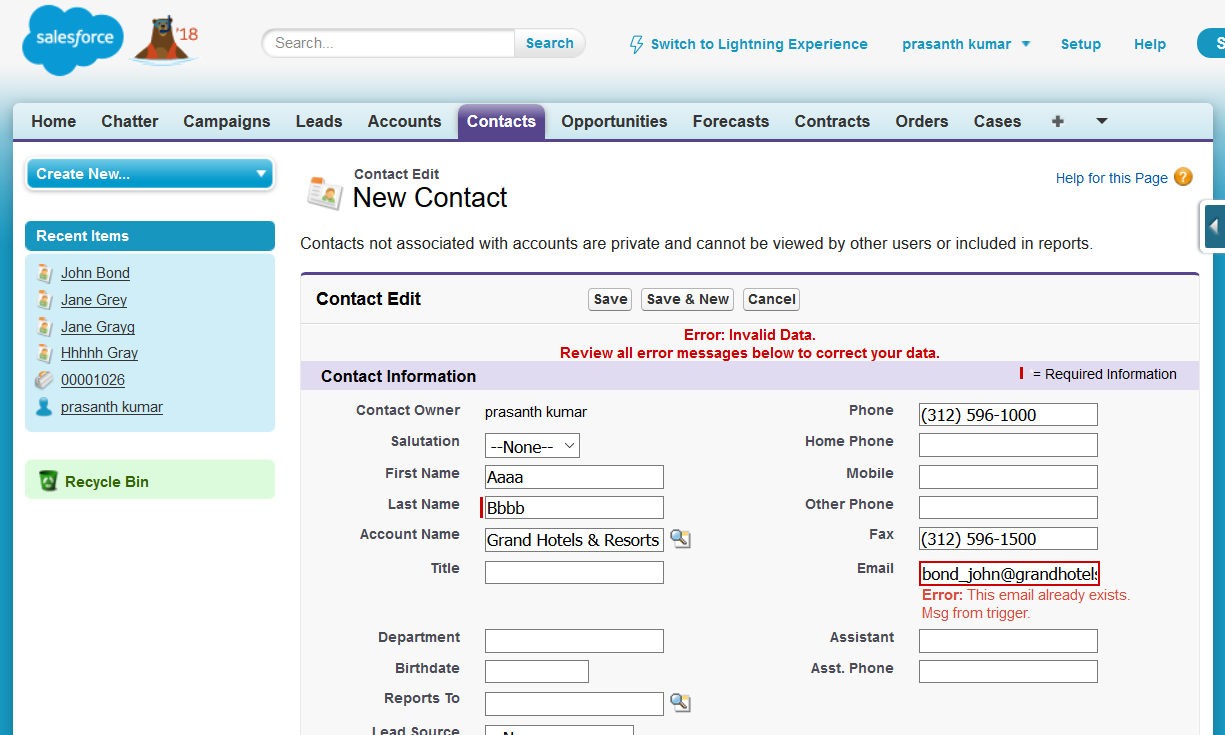
The Contact remains unsaved, and Salesforce displays the error next to the Email field.
Before insert and after insert trigger differences
| Trigger behavior | Before insert | After insert |
|---|---|---|
| Runs relative to database save | Before the record is saved | After the record is saved |
| New record ID available | No | Yes |
| Can directly change fields on Trigger.new | Yes | No; records are read-only |
| Common use | Validation and field assignment | Creating related records or work that requires the new ID |
Choose before insert when the work concerns the incoming record itself. Choose after insert when the logic requires a committed record ID or must create records related to the newly inserted record.
Bulk-safe before insert trigger practices
- Process every record in
Trigger.new. - Collect query values in a
Setbefore running SOQL. - Keep SOQL and DML statements outside loops.
- Skip null or blank values before adding them to query filters.
- Use a trigger handler class when the trigger contains substantial business logic.
- Write tests for single-record, bulk, valid, invalid, and null-value cases.
Apex test class for the Contact trigger
A test should verify both the successful insert path and the duplicate-email failure path. The following example assumes that ValidateEmailTrigger is active.
@IsTest
private class ValidateEmailTriggerTest {
    @IsTest
    static void blocksExistingContactEmail() {
        Contact existingContact = new Contact(
            LastName = 'Existing',
            Email = 'person@example.com'
        );
        insert existingContact;

        Contact duplicateContact = new Contact(
            LastName = 'Duplicate',
            Email = 'person@example.com'
        );

        Database.SaveResult result = Database.insert(duplicateContact, false);

        System.assertEquals(false, result.isSuccess());
        System.assert(
            result.getErrors()[0].getMessage().contains('email already exists')
        );
    }

    @IsTest
    static void allowsUniqueContactEmail() {
        Contact uniqueContact = new Contact(
            LastName = 'Unique',
            Email = 'unique@example.com'
        );

        insert uniqueContact;

        System.assertNotEquals(null, uniqueContact.Id);
    }
}
Salesforce before insert trigger FAQs
Can Trigger.new records be modified in before insert?
Yes. Records in Trigger.new are writable during a before trigger. Assign field values directly, and do not issue an update statement for those same records.
Is the record ID available in before insert?
No. Salesforce has not completed the insert, so the database-generated ID is not yet available. Use an after insert trigger when logic depends on the new ID.
How do I stop a record from being inserted?
Call addError() on the record or on a specific field. Salesforce cancels the save for that record and returns the supplied validation message.
Why should SOQL stay outside trigger loops?
A trigger may process many records in one transaction. Querying once per record consumes governor limits quickly, while collecting values first usually allows the trigger to use one bulk query.
Should all Apex trigger logic stay in the trigger file?
Small examples can remain in the trigger, but larger implementations are easier to test and maintain when the trigger delegates business logic to a handler class.
Editorial QA checklist for this before insert example
- Confirm the trigger event is
before insertonContact. - Verify all incoming records are processed through
Trigger.new. - Check that no SOQL or DML statement appears inside a loop.
- Test blank emails, existing database duplicates, and duplicates within one bulk insert.
- Confirm the displayed error message matches the active Apex code.
A Salesforce Apex before insert trigger is suitable for validating new records and assigning values before they are saved. For logic that depends on the newly generated record ID, use an after insert event instead.