 TutorialKart.com
Named Entity Extraction in OpenNLP using Java
Named Entity Extraction Example in openNLP – In this openNLP tutorial, we shall try entity extraction from a sentence using openNLP pre-built models, that were already trained to find the named entity.
Apache OpenNLP provides Java APIs for common natural language processing tasks such as tokenization, sentence detection, part-of-speech tagging, chunking, parsing, and named entity recognition. In this example, we will use the NameFinderME class with trained model files to identify person names and location names from tokenized text.
What is Named Entity Recognition/Extraction (NER)?
Named Entity Recognition is a task of finding the named entities that could possibly belong to categories like persons, organizations, dates, percentages, etc., and categorize the identified entity to one of these categories.
For example, in the sentence John Smith is from Atlanta, the words John Smith can be recognized as a person name, and Atlanta can be recognized as a location. The exact result depends on the model file used and how the input text is tokenized.
How Named Entity Extraction is done in OpenNLP?
In OpenNLP, Named Entity Extraction is done using statistical models, i.e., machine learning techniques. Coming to specifics, Maxent modeling is used. To get an intuition on how Maxent modeling works, refer to the motivating example of Maxent modeling.
The OpenNLP name finder does not read a raw sentence as one plain string in this example. It expects an array of tokens. The trained model then returns one or more Span objects. Each span contains the start token index, end token index, entity type, and confidence information for the detected entity.
OpenNLP NER classes used in this Java example
| OpenNLP class | Purpose in named entity extraction |
|---|---|
TokenNameFinderModel | Loads the trained named entity model file, such as en-ner-person.bin or en-ner-location.bin. |
NameFinderME | Runs the name finder model on tokenized input and returns matching entity spans. |
Span | Represents the start and end token positions of the entity found by the model. |
Before running the program, keep the required model files in the project path used by the program, or update the file path in FileInputStream. In this tutorial, the example uses en-ner-person.bin for person names and en-ner-location.bin for location names.
Example 1 – Named Entity Extraction Example in OpenNLP
The following example, NameFinderExample.java shows how to use NameFinderME class to extract named entities, person and place.
NameFinderExample.java
import java.io.FileInputStream;
import java.io.IOException;
import java.io.InputStream;

import opennlp.tools.namefind.NameFinderME;
import opennlp.tools.namefind.TokenNameFinderModel;
import opennlp.tools.util.Span;

/**
 * This class demonstrates how to use NameFinderME class to do Named Entity Recognition/Extraction tasks.
 * @author tutorialkart.com
 */
public class NameFinderExample {

	public static void main(String[] args) {
		// find person name
		try {
			System.out.println("-------Finding entities belonging to category : person name------");
			new NameFinderExample().findName();
			System.out.println();
		} catch (IOException e) {
			e.printStackTrace();
		}

		// find place
		try {
			System.out.println("-------Finding entities belonging to category : place name------");
			new NameFinderExample().findLocation();
			System.out.println();
		} catch (IOException e) {
			e.printStackTrace();
		}
	}

	/**
	 * method to find locations in the sentence
	 * @throws IOException
	 */
	public void findName() throws IOException {
		InputStream is = new FileInputStream("en-ner-person.bin");

		// load the model from file
		TokenNameFinderModel model = new TokenNameFinderModel(is);
		is.close();

		// feed the model to name finder class
		NameFinderME nameFinder = new NameFinderME(model);

		// input string array
		String[] sentence = new String[]{
				"John",
				"Smith",
				"is",
				"standing",
				"next",
				"to",
				"bus",
				"stop",
				"and",
				"waiting",
				"for",
				"Mike",
				"."
		};

		Span nameSpans[] = nameFinder.find(sentence);

		// nameSpans contain all the possible entities detected
		for(Span s: nameSpans){
			System.out.print(s.toString());
			System.out.print("  :  ");
			// s.getStart() : contains the start index of possible name in the input string array
			// s.getEnd() : contains the end index of the possible name in the input string array
			for(int index=s.getStart();index<s.getEnd();index++){
				System.out.print(sentence[index]+" ");
			}
			System.out.println();
		}
	}

	/**
	 * method to find locations in the sentence
	 * @throws IOException
	 */
	public void findLocation() throws IOException {
		InputStream is = new FileInputStream("en-ner-location.bin");

		// load the model from file
		TokenNameFinderModel model = new TokenNameFinderModel(is);
		is.close();

		// feed the model to name finder class
		NameFinderME nameFinder = new NameFinderME(model);

		// input string array
		String[] sentence = new String[]{
				"John",
				"Smith",
				"is",
				"from",
				"Atlanta",
				"."
		};

		Span nameSpans[] = nameFinder.find(sentence);

		// nameSpans contain all the possible entities detected
		for(Span s: nameSpans){
			System.out.print(s.toString());
			System.out.print("  :  ");
			// s.getStart() : contains the start index of possible name in the input string array
			// s.getEnd() : contains the end index of the possible name in the input string array
			for(int index=s.getStart();index<s.getEnd();index++){
				System.out.print(sentence[index]+" ");
			}
			System.out.println();
		}
	}

}
When the example program, NameFinderExample.java is run, the output to console is as shown in the following.
Output
-------Finding entities belonging to category : person name------
[0..2) person  :  John Smith
[11..12) person  :  Mike

-------Finding entities belonging to category : place name------
[4..5) location  :  Atlanta
Understanding Span output from OpenNLP NameFinderME
The output [0..2) person means that OpenNLP found a person entity starting at token index 0 and ending before token index 2. In the token array, index 0 is John and index 1 is Smith, so the extracted entity is John Smith. The end value is exclusive, so the loop prints tokens from getStart() up to, but not including, getEnd().
Similarly, [4..5) location means the token at index 4 is identified as a location. In the second input array, token index 4 is Atlanta.
Project structure for the OpenNLP NER Java example
The project structure and the model file location, etc., is shown below:
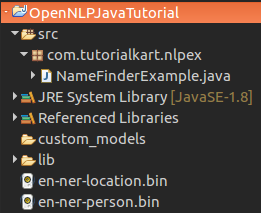
If the model files are not in the same working directory from where the Java program runs, update the file path accordingly. For example, if the model files are in a folder named models, the file path can be changed as shown below.
InputStream is = new FileInputStream("models/en-ner-person.bin");Model File
The model files en-ner-person.bin, en-ner-person.bin and other ner models are available at http://opennlp.sourceforge.net/models-1.5/. Stay updated regarding latest releases of openNLP or model files, at https://opennlp.apache.org/download.html
Use the model that matches the entity type you want to extract. For example, use a person model for person names, a location model for place names, and an organization model for organization names. A person model should not be expected to extract every location or organization correctly because each model is trained for a specific named entity category.
Tokenization before OpenNLP named entity extraction
The example above manually creates a token array. In a real application, the text may come from a file, web page, database, or user input. In that case, tokenize the text first and pass the token array to nameFinder.find(tokens). The quality of tokenization affects the NER result because the spans returned by OpenNLP are based on token positions, not character positions.
String[] tokens = new String[] { "John", "Smith", "is", "from", "Atlanta", "." };
Span[] spans = nameFinder.find(tokens);
If you process multiple unrelated sentences with the same NameFinderME instance, call clearAdaptiveData() between independent documents or contexts. This helps avoid carrying adaptive information from one unrelated text into another.
nameFinder.clearAdaptiveData();Common errors in OpenNLP named entity extraction setup
- Model file not found: Check that
en-ner-person.binanden-ner-location.binare available in the path used byFileInputStream. - Wrong model for the entity type: Use a location model for locations, a person model for person names, and an organization model for organizations.
- Passing untokenized text:
NameFinderMEexpects tokens. Do not pass a full sentence as a single token and expect accurate extraction. - Misreading span indexes: The start index is inclusive and the end index is exclusive.
- Expecting perfect extraction: NER models are statistical. Results can vary based on training data, sentence context, capitalization, punctuation, and domain-specific vocabulary.
QA checklist for OpenNLP Named Entity Extraction using Java
- Confirm that the OpenNLP library is added to the Java project build path or dependency configuration.
- Confirm that the required
.binmodel files are available at the path used in the Java code. - Test person, location, and organization extraction separately with the correct model files.
- Verify that the input is tokenized before calling
NameFinderME.find(). - Check span start and end indexes carefully when converting detected spans back into text.
- Test with short sentences and with realistic application text before using the result in search, indexing, or data processing workflows.
Frequently asked questions on OpenNLP named entity extraction
What is named entity extraction in OpenNLP?
Named entity extraction in OpenNLP is the process of identifying named items such as person names, locations, organizations, dates, or similar entities from tokenized text using a trained name finder model.
Which OpenNLP class is used for named entity recognition in Java?
The main class used for named entity recognition in this Java example is NameFinderME. The trained model is loaded using TokenNameFinderModel, and detected entities are returned as Span objects.
Can the same OpenNLP model detect person and location names?
Usually, each OpenNLP NER model is trained for a specific entity type. Use a person model for person names and a location model for locations. For multiple entity types, run the relevant models separately or use a model trained for the required categories.
Why does OpenNLP NameFinderME return Span objects?
Span objects identify where the entity appears in the token array. The span start index is inclusive, and the span end index is exclusive. This makes it possible to reconstruct the detected entity from the original tokens.
Do I need to train a custom OpenNLP NER model?
For general examples, pre-built models may be enough. For domain-specific text, such as medical terms, product names, internal project names, or custom business entities, training a custom model can improve relevance for that domain.
Conclusion
In this OpenNLP Tutorial, we have seen how to use Named Entity Extraction API of OpenNLP to extract named entities from a paragraph or sentence.
The key steps are to load the correct model file, pass tokenized input to NameFinderME, read the returned Span objects, and map the span indexes back to tokens. With this pattern, you can extend the example to extract other entity types such as organizations, dates, and domain-specific names when suitable models are available.