 TutorialKart.com
In this Apache OpenNLP tutorial, you will learn how to train a Document Categorizer using the Maximum Entropy model, prepare category-based training data, save the trained DoccatModel, and test the model with a sample movie plot.
Training of Document Categorizer using Maximum Entropy Model in OpenNLP
In this tutorial, we shall learn the Training of Document Categorizer using Maximum Entropy Model in OpenNLP.
Document categorization is a supervised text classification task. The categories depend on the application, so Apache OpenNLP does not provide one universal pre-trained document categorizer model for every use case. Instead, you prepare labelled training examples and train a model for your own categories.
In this tutorial, we shall train the Document Categorizer to classify two categories : Thriller, Romantic. The categories chosen are movie generes. The data for each document is the plot of the movie.
The example uses OpenNLP’s DocumentCategorizerME API. Here, ME refers to Maximum Entropy. The trained model learns from the words in each labelled document and later returns probability scores for the available categories.
Training Data Format for OpenNLP Document Categorizer
Each line in the training file should represent one labelled document. The first token is the category name, followed by the document text. The category and the document text are separated by whitespace.
category document text goes hereFor this tutorial, a training line begins with either Thriller or Romantic. The remaining words in that line are the movie plot text used as training data.
Steps for Training of Document Categorizer
Following are the steps to train Document Categorizer that uses Maxent( or Maximum Entropy) mechanism for creating a Model :
Step 1 : Prepare the training data.
The training data file should contain an example for each observation or document with the format : Category followed by data of document, seperated by space.
For example, consider the below line which is from the training file.
en-movie-category.train
Thriller John Hannibal Smith Liam Neeson is held captive in Mexicowhere
- Category is “Thriller”
- Data of the document is “John Hannibal Smith Liam Neeson is held captive in Mexico”.
Find the complete training file used in the example, here en-movie-category.
Step 2 : Read the training data file.
The following code creates an input stream for the training file, reads it line by line, and converts each line into a DocumentSample object.
InputStreamFactory dataIn = new MarkableFileInputStreamFactory(new File("train"+File.separator+"en-movie-category.train"));
ObjectStream lineStream = new PlainTextByLineStream(dataIn, "UTF-8");
ObjectStream sampleStream = new DocumentSampleStream(lineStream);
Step 3 : Define the training parameters.
The number of iterations controls how many times the training algorithm updates the model. The cutoff controls how often a feature must appear to be included. In this small example, the cutoff is kept as 0 so that all observed features are considered.
TrainingParameters params = new TrainingParameters();
params.put(TrainingParameters.ITERATIONS_PARAM, 10+"");
params.put(TrainingParameters.CUTOFF_PARAM, 0+"");
Step 4 : Train and create a model from the read training data and defined training parameters.
DoccatModel model = DocumentCategorizerME.train("en", sampleStream, params, new DoccatFactory());The first argument "en" is the language code for English. The sampleStream supplies the labelled examples, and the DoccatFactory provides the document categorizer factory configuration.
Step 5 : Save the newly trained model to a local file, which can be used later for predicting movie genre.
BufferedOutputStream modelOut = new BufferedOutputStream(new FileOutputStream("model"+File.separator+"en-movie-classifier-maxent.bin"));
model.serialize(modelOut);
The generated .bin file is the trained OpenNLP document categorizer model. You can load this file later in a separate Java program and classify new documents without training again.
Step 6 : Test the model for a sample string and print the probabilities for the string to belong to different categories. The method DocumentCategorizer.categorize(String[] wordsOfDoc) takes an array of Strings which are words of the document as argument.
DocumentCategorizer doccat = new DocumentCategorizerME(model);
double[] aProbs = doccat.categorize("Afterwards Stuart and Charlie notice Kate in the photos Stuart took at Leopolds ball and realize that her destiny must be to go back and be with Leopold That night while Kate is accepting her promotion at a company banquet he and Charlie race to meet her and show her the pictures Kate initially rejects their overtures and goes on to give her acceptance speech but it is there that she sees Stuarts picture and realizes that she truly wants to be with Leopold".replaceAll("[^A-Za-z]", " ").split(" "));
Complete Java Program to Train OpenNLP Document Categorizer Maxent Model
The complete program is shown in the following. Before running it, keep the training file at train/en-movie-category.train and create a model folder where the trained model file can be saved.
DocClassificationMaxentTrainer.java
import java.io.BufferedOutputStream;
import java.io.File;
import java.io.FileOutputStream;
import java.io.IOException;

import opennlp.tools.doccat.DoccatFactory;
import opennlp.tools.doccat.DoccatModel;
import opennlp.tools.doccat.DocumentCategorizer;
import opennlp.tools.doccat.DocumentCategorizerME;
import opennlp.tools.doccat.DocumentSample;
import opennlp.tools.doccat.DocumentSampleStream;
import opennlp.tools.util.InputStreamFactory;
import opennlp.tools.util.MarkableFileInputStreamFactory;
import opennlp.tools.util.ObjectStream;
import opennlp.tools.util.PlainTextByLineStream;
import opennlp.tools.util.TrainingParameters;

/**
 * oepnnlp version 1.7.2
 * Training of Document Categorizer using Maximum Entropy Model in OpenNLP
 * @author www.tutorialkart.com
 */
public class DocClassificationMaxentTrainer {

	public static void main(String[] args) {

		try {
			// read the training data
			InputStreamFactory dataIn = new MarkableFileInputStreamFactory(new File("train"+File.separator+"en-movie-category.train"));
			ObjectStream lineStream = new PlainTextByLineStream(dataIn, "UTF-8");
			ObjectStream sampleStream = new DocumentSampleStream(lineStream);

			// define the training parameters
			TrainingParameters params = new TrainingParameters();
			params.put(TrainingParameters.ITERATIONS_PARAM, 10+"");
			params.put(TrainingParameters.CUTOFF_PARAM, 0+"");

			// create a model from traning data
			DoccatModel model = DocumentCategorizerME.train("en", sampleStream, params, new DoccatFactory());
			System.out.println("\nModel is successfully trained.");

			// save the model to local
			BufferedOutputStream modelOut = new BufferedOutputStream(new FileOutputStream("model"+File.separator+"en-movie-classifier-maxent.bin"));
			model.serialize(modelOut);
			System.out.println("\nTrained Model is saved locally at : "+"model"+File.separator+"en-movie-classifier-maxent.bin");

			// test the model file by subjecting it to prediction
			DocumentCategorizer doccat = new DocumentCategorizerME(model);
			String[] docWords = "Afterwards Stuart and Charlie notice Kate in the photos Stuart took at Leopolds ball and realise that her destiny must be to go back and be with Leopold That night while Kate is accepting her promotion at a company banquet he and Charlie race to meet her and show her the pictures Kate initially rejects their overtures and goes on to give her acceptance speech but it is there that she sees Stuarts picture and realises that she truly wants to be with Leopold".replaceAll("[^A-Za-z]", " ").split(" ");
			double[] aProbs = doccat.categorize(docWords);

			// print the probabilities of the categories
			System.out.println("\n---------------------------------\nCategory : Probability\n---------------------------------");
			for(int i=0;i<doccat.getNumberOfCategories();i++){
				System.out.println(doccat.getCategory(i)+" : "+aProbs[i]);
			}
			System.out.println("---------------------------------");

			System.out.println("\n"+doccat.getBestCategory(aProbs)+" : is the predicted category for the given sentence.");
		}
		catch (IOException e) {
			System.out.println("An exception in reading the training file. Please check.");
			e.printStackTrace();
		}
	}
}
When the above program is run, the output to the console is as shown below :
Indexing events using cutoff of 0

	Computing event counts...  done. 66 events
	Indexing...  done.
Sorting and merging events... done. Reduced 66 events to 66.
Done indexing.
Incorporating indexed data for training...
done.
	Number of Event Tokens: 66
	    Number of Outcomes: 2
	  Number of Predicates: 6886
...done.
Computing model parameters ...
Performing 10 iterations.
  1:  ... loglikelihood=-45.747713916956386	0.4090909090909091
  2:  ... loglikelihood=-41.65758235918323	1.0
  3:  ... loglikelihood=-38.24560021570176	1.0
  4:  ... loglikelihood=-35.34031906559529	1.0
  5:  ... loglikelihood=-32.832760472542496	1.0
  6:  ... loglikelihood=-30.646350698439953	1.0
  7:  ... loglikelihood=-28.72390702819924	1.0
  8:  ... loglikelihood=-27.02122456238792	1.0
  9:  ... loglikelihood=-25.50340047819185	1.0
 10:  ... loglikelihood=-24.142465730604112	1.0

Model is successfully generated.

Model is saved locally at : model/en-movie-classifier-maxent.bin

---------------------------------
Category : Probability
---------------------------------
Thriller : 0.47150150747178926
Romantic : 0.5284984925282107
---------------------------------

Romantic : is the predicted category for the given sentence.
The exact probability values can vary when the training data, OpenNLP version, tokenization, or training parameters are changed. In this run, the model gives a higher probability to Romantic, so that is selected as the best category.
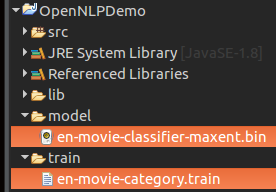
The location of the training file and the locally saved model file are shown in the following picture.
How the OpenNLP Maxent Document Categorizer Prediction Works
After training, the model does not simply return one label. It first calculates probability scores for all available categories. In this example, the categories are Thriller and Romantic. The method categorize() returns the probability array, and getBestCategory() returns the category with the highest score.
double[] probabilities = doccat.categorize(words);
String bestCategory = doccat.getBestCategory(probabilities);
The input passed to categorize() should be tokenized into words. In this tutorial, the text is cleaned using a simple regular expression and then split by spaces. For production use, use a consistent tokenization approach for both training and prediction.
Improving OpenNLP Document Categorizer Training Accuracy
The sample in this tutorial uses a small training file for demonstration. For a practical classifier, the quality and amount of labelled data matter more than the Java code itself.
- Use enough examples for every category: Keep the number of training documents reasonably balanced across categories.
- Keep category names consistent: Do not mix labels such as
Romantic,Romance, andromanticunless they are intended to be different categories. - Clean text consistently: Apply the same lowercasing, punctuation handling, and tokenization strategy during training and prediction.
- Adjust training parameters carefully: More iterations may help in some cases, but very small datasets can still overfit.
- Evaluate with separate test data: Do not judge the classifier only on the same data used for training.
Loading the Saved OpenNLP Document Categorizer Model Later
Once the model is saved as a .bin file, you can load it later and use it for prediction. The following example shows the basic loading pattern.
import java.io.FileInputStream;
import java.io.InputStream;

import opennlp.tools.doccat.DoccatModel;
import opennlp.tools.doccat.DocumentCategorizer;
import opennlp.tools.doccat.DocumentCategorizerME;

public class DocClassificationPredictor {
    public static void main(String[] args) throws Exception {
        try (InputStream modelIn = new FileInputStream("model/en-movie-classifier-maxent.bin")) {
            DoccatModel model = new DoccatModel(modelIn);
            DocumentCategorizer doccat = new DocumentCategorizerME(model);

            String text = "A couple meets again after many years and remembers their old love story";
            String[] words = text.replaceAll("[^A-Za-z]", " ").split(" ");

            double[] probabilities = doccat.categorize(words);
            String category = doccat.getBestCategory(probabilities);

            System.out.println("Predicted category : " + category);
        }
    }
}
Example Output
Predicted category : RomanticCommon Errors in OpenNLP Document Categorizer Training
| Error or issue | Likely reason | Fix |
|---|---|---|
FileNotFoundException for training file | The train folder or en-movie-category.train file is not in the expected location. | Check the file path used in MarkableFileInputStreamFactory. |
| Model file is not created | The model directory does not exist or is not writable. | Create the model directory before running the program. |
| Incorrect or weak category prediction | Training data is too small, unbalanced, or not representative. | Add more labelled examples and keep categories consistent. |
| Different output probabilities | OpenNLP version, parameters, or training data changed. | Use the same dataset, preprocessing, and parameter values while comparing runs. |
FAQs on OpenNLP Document Categorizer Maximum Entropy Training
Does OpenNLP provide a ready-made document categorizer model?
No. Document categorization depends on the labels and text domain of the application. You normally train your own model using labelled examples.
What is the format of OpenNLP document categorizer training data?
Each line starts with the category label, followed by the document text. For example, Thriller movie plot words... uses Thriller as the category and the remaining text as the document.
What does DocumentCategorizerME do in OpenNLP?
DocumentCategorizerME trains and uses a Maximum Entropy based document categorizer. It can classify a tokenized document and return probability scores for the trained categories.
Can I reuse the saved DoccatModel file for prediction?
Yes. After training, serialize the DoccatModel to a .bin file. Later, load that file and create a DocumentCategorizerME object for prediction.
Why are my OpenNLP document categorizer probabilities different from this tutorial?
Probabilities can change when the training data, OpenNLP version, preprocessing, cutoff, or iteration count changes. Compare results only when those inputs are the same.
QA Checklist for OpenNLP Document Categorizer Maxent Tutorial
- Verify that the training file path is
train/en-movie-category.trainbefore running the Java program. - Confirm that every training line starts with exactly one category label followed by document text.
- Check that the
modeldirectory exists before serializingen-movie-classifier-maxent.bin. - Confirm that the prediction input is cleaned and tokenized in a way that is consistent with the training data.
- Review whether the sample category probabilities still match the exact training file and OpenNLP version used by the tutorial.
Conclusion
In this Apache OpenNLP Tutorial, we have learnt briefly the training input requirements for Document Categorizer API of OpenNLP and also learnt the example program for Training of Document Categorizer using Maximum Entropy Model in OpenNLP. The important points are to prepare labelled training data correctly, train the DoccatModel with suitable parameters, save the model file, and use the same text preprocessing steps during prediction.