 TutorialKart.com
In this tutorial, you will learn how to train a custom sentence detection model in Apache OpenNLP using Java. The example reads sentence training data from a text file, creates a SentenceModel, saves it as a .bin model file, and tests it with SentenceDetectorME.
OpenNLP sentence detection model training in Java
How to train a model for sentence detection in OpenNLP – Sentence detection is the task of splitting a paragraph or text document into individual sentences. OpenNLP provides pre-trained models for common languages, but you can train your own model when your text has domain-specific punctuation, abbreviations, sentence endings, or a language style that is not handled well by a ready-made model.
This tutorial focuses on Java-based training with SentenceDetectorME.train(). You will prepare a training file, create a line-by-line sample stream, set training parameters, serialize the generated model, and use the model to detect sentences in a test string.
When a custom OpenNLP sentence detector model is useful
A custom sentence detector is useful when sentence boundaries in your input text are different from general English text. For example, product reviews, chat messages, legal notes, medical text, log messages, OCR output, or content with many abbreviations may not split correctly with a generic model.
- Domain abbreviations: text may contain terms such as
Dr.,Inc.,Fig., or internal short forms that should not always end a sentence. - Different language or writing style: you may need a model for text where a ready model is not available or not accurate enough.
- Special punctuation patterns: input may contain bullet-like fragments, numbered references, quotes, or short messages.
- Consistent production behavior: training on representative data helps the detector behave closer to your application requirement.
Training data format for an OpenNLP sentence detector
The training file used in this example is trainingDataSentences.txt. Keep one complete sentence on each line. The sentence detector learns where a sentence can end from these examples, so the lines should reflect the kind of input that your application will process.
Sugar is sweet.
That doesn't mean its good.
Dr. Rao checked the report.
The sample was tested at 9 a.m.
The result was added to the final document.
Use UTF-8 encoding for the training file. Include enough variation for punctuation, abbreviations, quotes, and sentence lengths that appear in your real text. A tiny file is useful for learning the API, but a practical model needs more representative examples.
Steps to train a sentence detection model in OpenNLP
Follow these steps to train a sentence detector model using Java.
- Create a text file and keep one sentence on each line.
- Create an
InputStreamFactoryfrom the training file. - Wrap the file stream with
PlainTextByLineStreamso OpenNLP can read samples line by line. - Create a
SentenceSampleStreamfrom the line stream. - Set training parameters such as iterations and cutoff.
- Call
SentenceDetectorME.train()to generate aSentenceModel. - Serialize the model as a
.binfile and load it for sentence detection.
The important files in this tutorial are:
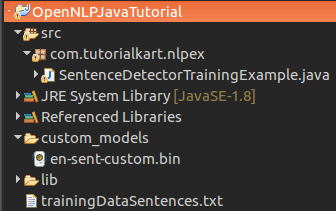
trainingDataSentences.txt– input training data with one sentence per line.SentenceDetectorTrainingExample.java– Java program that trains and tests the model.custom_models/en-sent-custom.bin– generated custom sentence detection model.
OpenNLP sentence detector training parameters
The example sets two training parameters: ITERATIONS_PARAM and CUTOFF_PARAM. Iterations control how many training passes are performed. Cutoff controls how rare events are handled during training. In a small learning example, a low cutoff is commonly used so that the trainer can keep enough events from the small input file.
For a real project, do not tune these values only by looking at the console training accuracy. Keep a separate test set, run sentence detection on unseen text, and inspect whether the model splits sentences correctly in cases such as abbreviations, initials, decimal numbers, and quoted text.
Java example to train an OpenNLP sentence detector model
The following example SentenceDetectorTrainingExample.java shows how to train a sentence detection model for your own training data. If you would like to know how to setup java project to use openNLP, in eclipse, refer to setup of java project with openNLP libraries, in eclipse. The process should be same, even for a different IDE(adding the required jars to the build path should do the magic).
You may also refer to the Apache OpenNLP manual for the sentence detector API and trainer options.
SentenceDetectorTrainingExample.java
import java.io.File;
import java.io.FileOutputStream;
import java.io.IOException;
import java.nio.charset.StandardCharsets;

import opennlp.tools.sentdetect.SentenceDetectorME;
import opennlp.tools.sentdetect.SentenceModel;
import opennlp.tools.sentdetect.SentenceSampleStream;
import opennlp.tools.util.InputStreamFactory;
import opennlp.tools.util.MarkableFileInputStreamFactory;
import opennlp.tools.util.PlainTextByLineStream;
import opennlp.tools.util.TrainingParameters;

/**
 * @author tutorialkart
 */
public class SentenceDetectorTrainingExample {

	public static void main(String[] args) {
		try {
			new SentenceDetectorTrainingExample().trainSentDectectModel();
		} catch (IOException e) {
			e.printStackTrace();
		}
	}

	/**
	 * This method generates s custom model file for sentence detection, in directory "custom_models".
	 * The training data used is "trainingDataSentences.txt". Training data contains a sentence per line in the text file.
	 * @throws IOException
	 */
	public void trainSentDectectModel() throws IOException {
		// directory to save the model file that is to be generated, create this directory in prior
		File destDir = new File("custom_models");

		// training data
		InputStreamFactory in = new MarkableFileInputStreamFactory(new File("trainingDataSentences.txt"));

		// parameters used by machine learning algorithm, Maxent, to train its weights
		TrainingParameters mlParams = new TrainingParameters();
		mlParams.put(TrainingParameters.ITERATIONS_PARAM, Integer.toString(15));
		mlParams.put(TrainingParameters.CUTOFF_PARAM, Integer.toString(1));

		// train the model
		SentenceModel sentdetectModel = SentenceDetectorME.train(
				"en",
				new SentenceSampleStream(new PlainTextByLineStream(in, StandardCharsets.UTF_8)),
				true,
				null,
				mlParams);

		// save the model, to a file, "en-sent-custom.bin", in the destDir : "custom_models"
		File outFile = new File(destDir,"en-sent-custom.bin");
		FileOutputStream outFileStream = new FileOutputStream(outFile);
		sentdetectModel.serialize(outFileStream);

		// loading the model
		SentenceDetectorME sentDetector = new SentenceDetectorME(sentdetectModel);

		// detecting sentences in the test string
		String testString = ("Sugar is sweet. That doesn't mean its good.");
		System.out.println("\nTest String: "+testString);
		String[] sents = sentDetector.sentDetect(testString);
		System.out.println("---------Sentences Detected by the SentenceDetector ME class using the generated model-------");
		for(int i=0;i<sents.length;i++){
			System.out.println("Sentence "+(i+1)+" : "+sents[i]);
		}
	}
}
Download ? SentenceDetectorTrainingExample.java & trainingDataSentences.txt
Console output after training the custom sentence detector
When SentenceDetectorTrainingExample.java is run, OpenNLP prints training progress to the console. After the model is created, the same program tests the model with the string Sugar is sweet. That doesn't mean its good.
Output
Indexing events using cutoff of 1

	Computing event counts...  done. 128 events
	Indexing...  done.
Sorting and merging events... done. Reduced 128 events to 128.
Done indexing.
Incorporating indexed data for training...
done.
	Number of Event Tokens: 128
	    Number of Outcomes: 2
	  Number of Predicates: 279
...done.
Computing model parameters ...
Performing 15 iterations.
  1:  ... loglikelihood=-88.72283911167311	0.890625
  2:  ... loglikelihood=-40.857996455731566	0.90625
  3:  ... loglikelihood=-32.22640634368208	0.90625
  4:  ... loglikelihood=-27.13613120396953	0.90625
  5:  ... loglikelihood=-23.386731336945246	0.90625
  6:  ... loglikelihood=-20.51509016196713	0.9140625
  7:  ... loglikelihood=-18.262162454424875	0.9296875
  8:  ... loglikelihood=-16.453775397116225	0.9453125
  9:  ... loglikelihood=-14.972158154339848	0.9609375
 10:  ... loglikelihood=-13.736687458210751	0.9921875
 11:  ... loglikelihood=-12.690904850490426	1.0
 12:  ... loglikelihood=-11.794274308551026	1.0
 13:  ... loglikelihood=-11.016996711268375	1.0
 14:  ... loglikelihood=-10.336696500866838	1.0
 15:  ... loglikelihood=-9.736254071469505	1.0

Test String: Sugar is sweet. That doesn't mean its good.
---------Sentences Detected by the SentenceDetector ME class using the generated model-------
Sentence 1 : Sugar is sweet.
Sentence 2 : That doesn't mean its good.
Project structure for the OpenNLP sentence detector training files
The project structure, training input file location and model file generation location, etc., for the example is shown below:
Loading the saved OpenNLP sentence model in another Java program
After training, the generated file custom_models/en-sent-custom.bin can be loaded in another program. The following small example shows only the model loading and sentence detection part.
import java.io.FileInputStream;
import java.io.InputStream;

import opennlp.tools.sentdetect.SentenceDetectorME;
import opennlp.tools.sentdetect.SentenceModel;

public class UseCustomSentenceModel {

    public static void main(String[] args) throws Exception {

        try (InputStream modelIn = new FileInputStream("custom_models/en-sent-custom.bin")) {

            SentenceModel model = new SentenceModel(modelIn);
            SentenceDetectorME detector = new SentenceDetectorME(model);

            String paragraph = "Dr. Rao checked the report. It was approved today.";
            String[] sentences = detector.sentDetect(paragraph);

            for (String sentence : sentences) {
                System.out.println(sentence);
            }
        }
    }
}
Common training mistakes in OpenNLP sentence detection
- Using paragraph input instead of sentence-per-line input: for this training setup, keep each training sentence on a separate line.
- Training with too little data: a few sentences can demonstrate the API, but they are not enough for reliable sentence splitting.
- Testing on the same data only: always test with new text that was not used for training.
- Ignoring abbreviations: add realistic abbreviation examples if your input contains names, titles, units, or organization suffixes.
- Wrong file path: create the
custom_modelsdirectory before running the program, and placetrainingDataSentences.txtwhere the Java program expects it.
Checklist for reviewing an OpenNLP sentence detector model
- The training file uses UTF-8 encoding and has one sentence per line.
- The training examples match the domain text that the application will process.
- The test text contains abbreviations, short sentences, long sentences, and quoted text.
- The generated
.binmodel is saved in a stable project location. - The application loads the same model file that was created during training.
FAQs on training an OpenNLP sentence detection model
How do I train a model for sentence detection in OpenNLP?
Create a training text file with one sentence per line, read it with PlainTextByLineStream, convert it to a SentenceSampleStream, set TrainingParameters, and call SentenceDetectorME.train(). The returned SentenceModel can be serialized to a .bin file.
What should the OpenNLP sentence detector training file contain?
It should contain complete sentences, one sentence per line. The sentences should represent the same style of text that your application needs to split, including abbreviations and punctuation patterns that matter in your use case.
Can I use a custom OpenNLP sentence detector model for non-English text?
Yes, you can train a sentence detector for another language when you have suitable training data. Use the correct language code in the training call and prepare sentence examples that match that language and writing style.
Why does my trained OpenNLP sentence model split after abbreviations?
The model may not have enough abbreviation examples in its training data. Add representative examples where abbreviations occur inside a sentence, then retrain and test the model on unseen text.
Is the console training accuracy enough to judge an OpenNLP sentence detector?
No. Console training output is useful for checking that training ran, but you should evaluate the model on separate test text. Inspect the detected sentence boundaries manually or with a small evaluation set.
OpenNLP sentence detection model training recap
In this OpenNLP Tutorial, we have trained a custom model for sentence detection in OpenNLP. The main flow is to prepare one sentence per line in the training file, create a sentence sample stream, call SentenceDetectorME.train(), save the generated SentenceModel, and load it wherever sentence splitting is required.