 TutorialKart.com
SAS Program Basics for Beginners
A SAS program is a sequence of statements submitted to SAS for execution. Most beginner programs combine a DATA step, which reads or creates data, with a PROC step, which examines, summarizes, analyzes, or reports that data.
SAS programming commonly uses three groups of statements:
- DATA step statements read, create, filter, and transform data.
- PROC step statements invoke SAS procedures for reporting, analysis, and data management.
- Global statements control settings that can apply across multiple DATA and PROC steps.
SAS Statement Rules and Program Structure
A SAS statement is an instruction composed of SAS keywords, names, operators, literal values, and other language elements. Statements can perform operations such as assigning values, reading data, filtering observations, controlling program flow, and selecting a procedure.
- SAS statements are generally free-format, so a statement can begin in one column and continue on another line.
- SAS keywords and most SAS names are not case-sensitive. For example, PROC PRINT and proc print are interpreted the same way.
- Most SAS statements end with a semicolon.
- A DATA or PROC step normally ends when SAS encounters RUN;, QUIT;, another DATA statement, or another PROC statement.
- Indentation is not required for execution, but consistent indentation makes the program easier to review.
data output-data-set;
    /* DATA step statements */
run;

proc procedure-name data=input-data-set;
    /* PROC step statements */
run;
Comments can document the purpose of a statement without affecting execution. The comment style shown above begins with /* and ends with */.
DATA Step in a SAS Program
A DATA step reads, creates, or modifies data. Its input can come from an existing SAS data set, raw text, an imported file, or values entered directly in the program. Its output is usually a SAS data set, although a DATA step can also write a text file or produce information in the log.
- The DATA statement names the output data set.
- The SET statement reads observations from an existing SAS data set.
- Assignment statements create variables or change their values.
- The WHERE statement selects observations before they are processed by the step.
- The IF statement can select observations based on values available during DATA step processing.
- The RUN statement marks a step boundary and submits the accumulated step for execution.
In this example, SAS copies rows from SASHELP.CLASS, keeps students older than 13, and calculates height in centimetres:
data work.older_students;
    set sashelp.class;
    where age > 13;
    height_cm = height * 2.54;
run;
WORK.OLDER_STUDENTS is a two-level data set name. WORK is the library reference, and OLDER_STUDENTS is the member name. Data in the WORK library is temporary and normally disappears when the SAS session ends.
PROC Step in a SAS Program
A PROC step invokes a SAS procedure. The selected procedure determines what SAS does with the input data. Procedures can print observations, calculate descriptive statistics, sort data, create frequency tables, produce plots, or perform statistical analysis.
- PROC PRINT displays observations and selected variables.
- PROC CONTENTS displays data set metadata, including variable names and types.
- PROC MEANS calculates descriptive statistics for numeric variables.
- PROC FREQ creates frequency and cross-tabulation tables.
- PROC SORT sorts observations and can create a sorted output data set.
The following PROC PRINT step displays the data created in the preceding DATA step:
proc print data=work.older_students;
    var name age height height_cm;
    title "Students Older Than 13";
run;

title;
The VAR statement controls which variables appear in the report. The TITLE statement is global, so the final empty TITLE; statement cancels the title before later output is generated.
Global Statements in SAS Programs
Global statements can appear outside an individual DATA or PROC step. Their settings can remain active until they are changed, cancelled, or the SAS session ends. The exact duration depends on the statement.
| Global statement | Purpose |
|---|---|
| LIBNAME | Associates a library reference with a data source or storage location. |
| FILENAME | Associates a fileref with an external file or device. |
| OPTIONS | Changes SAS system options. |
| TITLE | Specifies title text for procedure output. |
| FOOTNOTE | Specifies footnote text for procedure output. |
| %LET | Creates a macro variable when the SAS macro facility is available. |
For example, this OPTIONS statement limits the number of observations processed by subsequent steps. The second statement restores normal processing:
options obs=10;

proc print data=sashelp.cars;
run;

options obs=max;
How SAS Reads Raw Data into Variables
How SAS reads raw data depends on the INPUT statement and the format of the source records. With simple list input, SAS normally treats one or more spaces as delimiters between values. Character values containing spaces, fixed-width fields, dates, currency values, and other structured data require suitable input controls or informats.
The following program uses list input. The dollar sign after name tells SAS that NAME is a character variable; AGE and SCORE are numeric variables.
data work.scores;
    input name $ age score;
    datalines;
Anita 14 88
Ravi 15 92
Meera 14 85
;
run;
Character length is not universally limited to eight characters. The resulting length depends on how the variable is defined or first encountered. Use a LENGTH statement when the required character width should be explicit.
data work.students;
    length full_name $ 30;
    input full_name & $30. age;
    datalines;
Anita Sharma  14
Ravi Kumar  15
;
run;
The modified list input modifier & allows a character value to contain single spaces and treats two or more spaces as the delimiter before the next field.
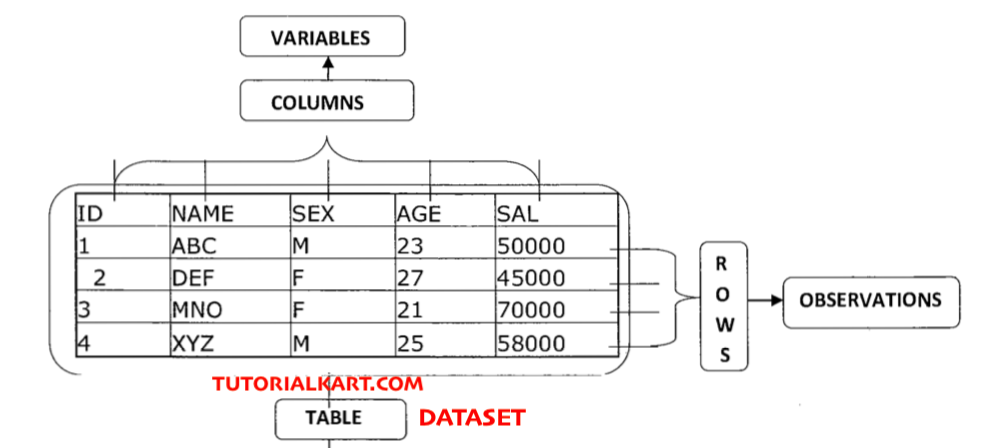
SAS Data Set, Variable, and Observation Terminology
| General term | Relational database term | SAS term |
|---|---|---|
| File or table | Table | Data set |
| Field or column | Column | Variable |
| Record or row | Row | Observation |
- A SAS data set stores data in a tabular structure.
- A variable describes one data attribute, such as name, age, or salary.
- An observation contains the values recorded for one row.
Missing Numeric and Character Values in SAS
A variable can have a missing value for some observations. SAS normally displays a missing numeric value as a period (.). A missing character value is stored as blanks. Special numeric missing values, such as .A through .Z, can be used when an application needs to distinguish different reasons for missing data.
Use the MISSING function when a condition must work with either character or numeric variables:
data work.complete_scores;
    set work.scores;
    if not missing(score);
run;
Existing SAS DATA Step and PROC PRINT Example
The following existing program contains both a DATA step and a PROC step:
data sasuser.admit2;
set sasuser.admit2;
where age>25;
run;
proc print data=sasuser.admit2;
run;
The DATA statement names SASUSER.ADMIT2 as the output data set. The SET statement reads the existing data set, and the WHERE statement retains observations for which AGE is greater than 25. PROC PRINT then displays the resulting observations.
This program reads from and replaces a data set with the same name. For practice, it is safer to create a differently named output data set so that the original remains available:
data sasuser.admits2;
    set sasuser.admit2;
    where age > 25;
run;

proc print data=sasuser.admits2;
run;
The SAS log from the original session is shown below. Notice that its DATA step creates SASUSER.ADMITS2, whereas its PROC PRINT step reads SASUSER.ADMIT2. Data set names should be checked carefully when comparing the editor, log, and report.
 1          OPTIONS NONOTES NOSTIMER NOSOURCE NOSYNTAXCHECK;
 72
 73         data sasuser.admits2;
 74            set sasuser.admit2;
 75            where age>25;
 76            run;

 NOTE: There were 19 observations read from the data set SASUSER.ADMIT2.
       WHERE age>25;
 NOTE: The data set SASUSER.ADMITS2 has 19 observations and 9 variables.
 NOTE: DATA statement used (Total process time):
       real time           0.00 seconds
       cpu time            0.00 seconds


 77            proc print data=sasuser.admit2;
 78            run;

 NOTE: There were 19 observations read from the data set SASUSER.ADMIT2.
 NOTE: PROCEDURE PRINT used (Total process time):
       real time           0.15 seconds
       cpu time            0.12 seconds


 79
 80         OPTIONS NONOTES NOSTIMER NOSOURCE NOSYNTAXCHECK;
 93
How to Read the SAS Log
Every beginner SAS program should be checked in the Log tab after execution. The log identifies the statements SAS processed and reports whether the steps completed as intended.
- ERROR: The step failed or could not perform a requested operation.
- WARNING: SAS completed some processing but detected a condition that requires review.
- NOTE: SAS reports information such as observation counts, created variables, data conversions, and processing time.
A program can produce output even when the log contains warnings. Confirm the input and output data set names, number of observations, number of variables, and any messages about automatic character-to-numeric or numeric-to-character conversion.
SAS Program Result 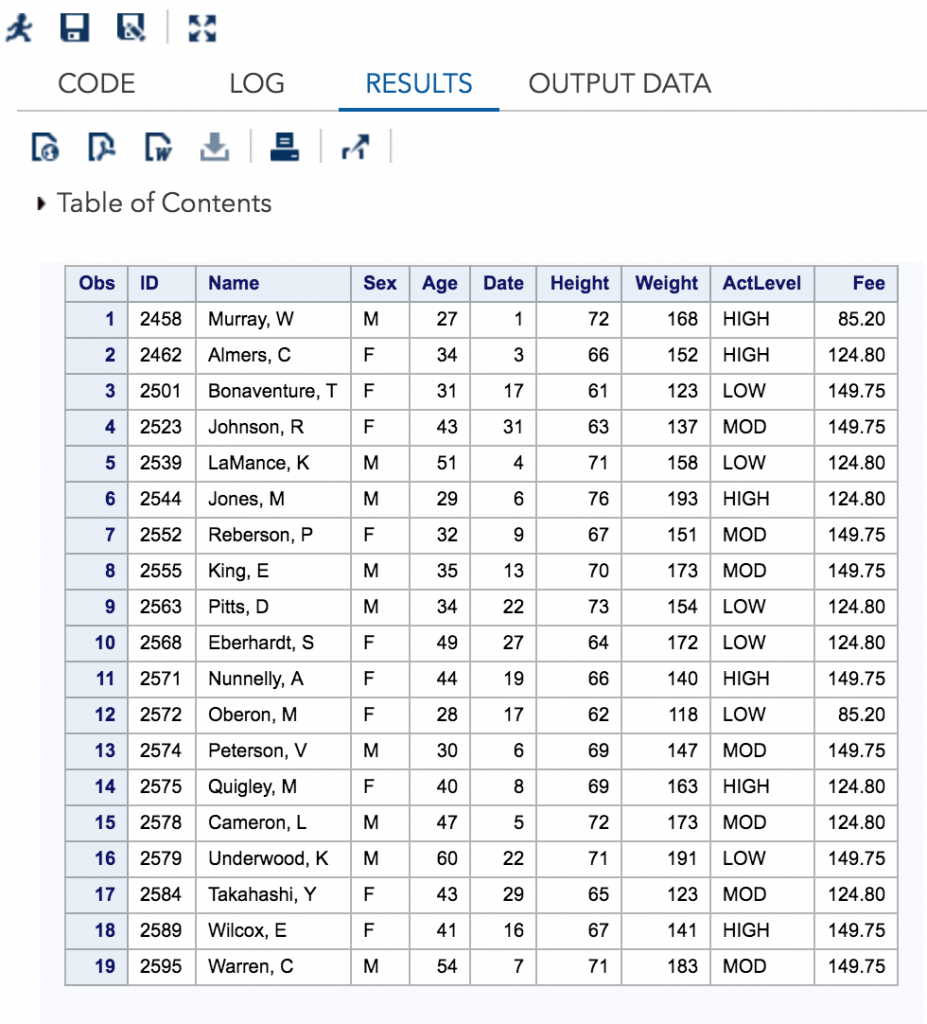
Common SAS Programming Errors for Beginners
- Missing semicolon: SAS may treat the following line as part of the unfinished statement.
- Misspelled data set or variable name: Confirm names with PROC CONTENTS or the Libraries pane.
- Incorrect library reference: Verify that the library is assigned and writable before creating permanent data.
- Unclosed quotation mark: Check quoted text in TITLE, WHERE, IF, and assignment statements.
- Wrong variable type: Character values require quotation marks, while numeric values normally do not.
- Unexpected replacement of data: Use a new output data set name until the transformation has been verified.
- Ignoring the log: Review errors, warnings, observation counts, and conversion notes after every run.
SAS Program Basics FAQ
What is SAS programming?
SAS programming uses the SAS language and procedures to access, prepare, analyze, and report data. A typical program contains DATA steps, PROC steps, and global statements.
How should a beginner learn SAS programming?
Begin with SAS data set terminology, statement syntax, the DATA step, and basic procedures such as PRINT, CONTENTS, MEANS, and FREQ. Run short programs against SASHELP sample data and review the log after each step before moving to imports, joins, macros, or statistical procedures.
Is SAS coding difficult for beginners?
The basic step structure is compact, but beginners need to understand semicolons, data types, libraries, step boundaries, and log messages. Working with small programs and checking each result separately makes errors easier to identify.
What is the difference between a DATA step and a PROC step?
A DATA step usually reads, creates, filters, or transforms data. A PROC step invokes a predefined procedure to display, summarize, manage, visualize, or analyze a data set.
What is the difference between SAS and SaaS?
SAS refers to the analytics software platform and its programming environment. SaaS means software as a service, a method of delivering software over a network. The similar spelling does not indicate that the terms have the same meaning.
SAS Program Basics QA Checklist
- Verify that every SAS statement requiring a semicolon has one.
- Confirm that DATA and PROC steps have clear step boundaries.
- Check that each two-level data set name uses the intended library and member.
- Confirm that character and numeric variables are handled with the correct types and input instructions.
- Review the log for errors, warnings, conversion notes, and unexpected observation counts.
- Verify that examples preserve the source data by writing transformations to a new data set.
- Check that PROC steps reference the data set produced by the preceding DATA step.
- Confirm that temporary WORK data is not described as persistent across SAS sessions.