 TutorialKart.com
About Apache Kafka
Apache Kafka is an open-source distributed event streaming platform. Applications publish events to named topics, retain those events for a configured period, and allow one or more consumers to read and process them independently. Kafka is commonly used for event-driven applications, data pipelines, log aggregation, stream processing, and moving data between operational systems.
Unlike a simple message queue, Kafka stores events in an ordered, append-only log divided into partitions. Consumers track their own position in each partition, so the same event stream can be processed by multiple applications without requiring a separate copy for every consumer.
Apache Kafka Tutorial
This Apache Kafka Tutorial explains Kafka architecture, topics, partitions, brokers, producers, consumers, consumer groups, replication, Kafka Connect, Kafka Streams, command-line tools, and local cluster setup. It also identifies where Kafka fits well and where a conventional queue or database may be simpler.
Prerequisites to Kafka Tutorial
Kafka provides Java client APIs and command-line tools. Familiarity with Java programming, terminal commands, networking basics, and common data formats such as JSON will help when following the examples. The required Java version and configuration files can differ between Kafka releases, so check the documentation supplied with the version you download.
Apache Kafka Architecture and Event Flow
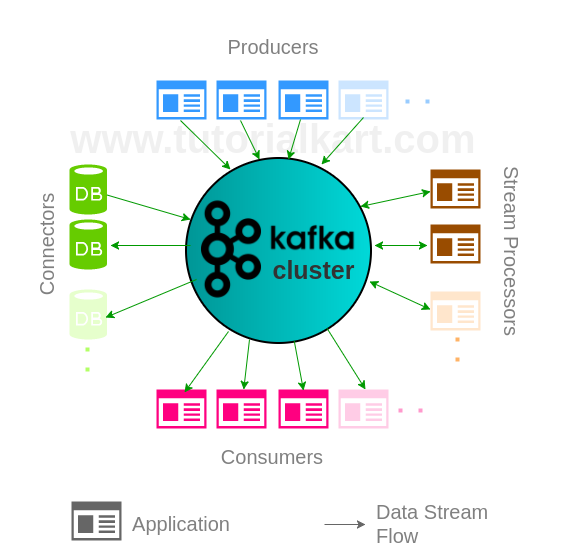
In Apache Kafka Architecture, producers write events to topics hosted by brokers. Topics are split into partitions, and each partition stores events in sequence. Consumers fetch events from those partitions and maintain offsets that represent their current read positions.
Kafka was originally developed at LinkedIn and later became an Apache Software Foundation project. Its architecture is designed to support durable event storage, horizontal scaling, independent consumers, and continuous processing of event streams.
What Apache Kafka Is Used For
- Event-driven applications – Services publish business events that other services process independently.
- Data integration pipelines – Kafka Connect moves records between Kafka and external data systems through source and sink connectors.
- Application and infrastructure events – Logs, metrics, activity records, and operational events can be collected into shared streams.
- Stream processing – Applications filter, aggregate, join, or transform events as they arrive.
- Database change distribution – A change-data-capture connector can publish database changes for downstream systems, subject to the capabilities of the selected connector.
Design Goals of Apache Kafka
Kafka’s architecture addresses the following requirements:
- Horizontal scalability – Topics can use multiple partitions distributed across brokers, while consumer groups can divide partition processing among consumers.
- High-throughput event handling – Kafka batches sequential reads and writes and distributes traffic across partitions and brokers.
- Durable retention – Events remain available according to topic retention settings rather than disappearing as soon as one consumer reads them.
- Stream transformations – Kafka Streams and other processing systems can derive new streams from existing topics.
- Fault tolerance – Replicated partitions allow another in-sync replica to become leader when the current leader is unavailable.
Kafka Messaging, Retention, and Replay
Kafka provides publish-and-subscribe messaging, but its retained log changes how applications consume records. Reading an event does not delete it. Each consumer group records offsets and can continue from its last committed position. Subject to topic retention and available data, a consumer can reset its offsets and process earlier events again.
Ordering is guaranteed within a partition, not across every partition in a topic. Producers can assign a key to an event so events with the same key are normally routed to the same partition. Applications that depend on order should therefore choose keys and partition counts carefully.
Installing Apache Kafka
Download a Kafka release from the official Apache Kafka site and follow the quickstart for that release. The packaged scripts and configuration layout can change, so commands from an older tutorial should not be mixed with a newer distribution.
- Tutorial – Install Apache Kafka on Ubuntu
- Tutorial – Install Apache Kafka on MacOS
After starting a local broker, the following commands demonstrate the basic topic, producer, and consumer workflow. Run them from the extracted Kafka directory. Script names shown here are for Unix-like systems.
bin/kafka-topics.sh --create \
  --topic quickstart-events \
  --bootstrap-server localhost:9092

bin/kafka-topics.sh --describe \
  --topic quickstart-events \
  --bootstrap-server localhost:9092
Start a console producer, enter one event per line, and press Ctrl+C when finished:
bin/kafka-console-producer.sh \
  --topic quickstart-events \
  --bootstrap-server localhost:9092
In another terminal, read the stored events from the beginning:
bin/kafka-console-consumer.sh \
  --topic quickstart-events \
  --from-beginning \
  --bootstrap-server localhost:9092
Kafka Framework – Core APIs
A Kafka solution typically combines the following concepts and APIs:
- Topic – the named stream in which events are retained.
- Producers – applications that publish events.
- Consumers – applications that fetch and process events.
- Stream Processors – applications that transform or aggregate streams.
- Connectors – integrations that move data between Kafka and external systems.
Kafka Topics, Partitions, and Offsets
A topic is a named stream of events stored in a Kafka cluster. A topic can be divided into multiple partitions. Each event receives an offset within its partition, and that offset identifies its position in the partition log.
- Tutorial – Create a Topic in Kafka Cluster
- Tutorial – Describe Kafka Cluster and get complete meta information about the cluster.
Partitions provide units of storage and parallel processing. Adding partitions can increase potential parallelism, but it also affects key distribution, resource use, and ordering. Kafka preserves event order only within an individual partition.
Kafka Cluster and Controller Quorum
A Kafka cluster contains one or more brokers. Current Kafka releases use Kafka Raft metadata mode, commonly called KRaft, to manage cluster metadata and controller elections. A production design normally uses multiple controllers so the controller quorum can tolerate failures.
Kafka Brokers, Partition Leaders, and Replicas
A broker is a Kafka server that stores partition data and handles client requests. One replica of each partition is its leader, and producers and consumers ordinarily communicate with that leader. Other replicas copy the partition data and can provide failover when they remain in sync.
ZooKeeper and Modern Kafka KRaft Mode
Older Kafka clusters used Apache ZooKeeper for controller election and cluster metadata. Current Kafka releases use KRaft instead, and ZooKeeper-based deployment instructions apply only to older Kafka versions. Producers and consumers connect to Kafka brokers through bootstrap server addresses; they do not use ZooKeeper to locate the least occupied broker.
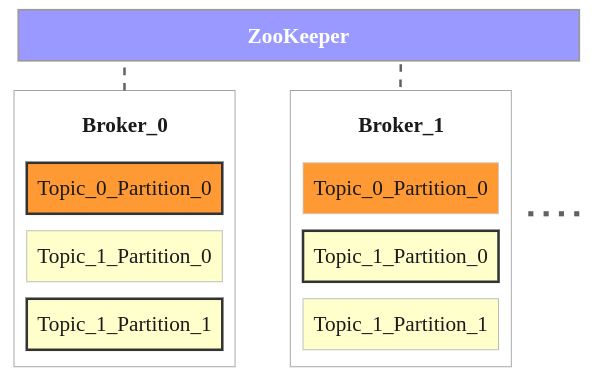
The image illustrates the enduring concepts of brokers, topics, partition leaders, and replicas, although its ZooKeeper element represents the architecture used by older Kafka deployments:
- The example contains two brokers; a real cluster may contain additional brokers.
- It contains two topics named Topic_0 and Topic_1.
- Topic_0 has one partition with two replicas. One replica is the leader and the other is a follower.
- Topic_1 has two partitions. Their leaders are distributed between the brokers, while the other copies serve as replicas.
- Clients connect to configured bootstrap brokers, obtain metadata, and then communicate with the relevant partition leaders.
Producers – Apache Kafka Producer API
Producers publish records to Kafka topics. A record can contain a key, value, timestamp, and headers. The producer selects a partition, batches records, and sends them to the broker leading that partition. Producer settings control acknowledgements, retries, batching, compression, and delivery behavior.
- Tutorial – Kafka Producer with Java Example
Consumers – Apache Kafka Consumer API
Consumers subscribe to topics and fetch records from assigned partitions. Consumers that share a group ID form a consumer group. Within a group, each partition is assigned to one consumer at a time, which divides the processing work. Different consumer groups can read the same topic independently.
- Tutorial – Kafka Consumer with Java Example
Kafka Consumer Groups and Offset Management
A consumer offset represents the next position to read from a partition. Consumers can commit offsets automatically or under application control. Committing only after successful processing reduces the risk of acknowledging work too early, but failures between processing and committing can cause a record to be processed again. Applications should choose an offset strategy that matches their delivery and error-handling requirements.
Stream Processors – Apache Kafka Streams API
Kafka Streams is a Java library for building applications that read Kafka topics, transform or aggregate records, and write results to Kafka topics. It supports stateless operations such as filtering and mapping as well as stateful operations such as counting, joining, grouping, and windowed aggregation.
- Learn Kafka Stream Processor with Java Example.
Connectors – Apache Kafka Connect API
Kafka Connect is a framework for moving data between Kafka and external systems. Source connectors import data into Kafka, while sink connectors export Kafka records to another system. Connect workers run connector and task configurations, distribute work, and manage offsets.
A connector must be selected and configured for the specific database, file system, search service, or other endpoint. Availability, licensing, delivery behavior, schema handling, and configuration options vary by connector.
- Tutorial – Kafka Connector Example to import data from text file to Kafka Cluster.
Kafka Command-Line Tools
Kafka includes command-line tools for managing topics, inspecting consumer groups, producing records, consuming records, checking configurations, and administering cluster resources. Tool names and supported options should be checked with the --help option in the installed Kafka release.

The console producer and consumer provide a direct way to verify that a broker accepts records and that a topic can be read.
- Tutorial – Kafka Console Producer and Consumer Example
Kafka Monitoring and Operational Checks
Kafka monitoring should cover broker availability, request latency, throughput, disk use, partition leadership, under-replicated partitions, failed requests, controller health, and consumer lag. Consumer lag measures how far a consumer group is behind the latest available offset, but it should be interpreted together with processing rate and workload patterns.
Kafka Monitor is a separate open-source tool originally released by LinkedIn for continuously testing Kafka clusters. It can produce and consume test records to detect availability or data-path problems. It is not part of the Apache Kafka distribution, so its compatibility and maintenance status should be evaluated before adoption.
Apache Kafka and Confluent
Apache Kafka is the open-source project maintained by the Apache Software Foundation. Confluent is a separate company founded by Kafka’s original creators. It provides Kafka-related software, connectors, managed services, and commercial capabilities. When following a tutorial, check whether its commands and features apply to the Apache Kafka distribution, a Confluent package, or a managed service.
- Tutorial – Installation of Kafka Confluent
- Tutorial – Kafka Connector to MySQL Source
Apache Kafka Compared with RabbitMQ
Kafka and RabbitMQ can both move messages between applications, but they use different models. Kafka retains ordered partition logs and lets consumer groups manage their own positions, making replay and multiple independent processing pipelines natural. RabbitMQ is a message broker centered on queues, routing through exchanges, and acknowledgements. The appropriate choice depends on retention, replay, routing, ordering, delivery, latency, and operational requirements rather than on a single throughput comparison.
When Apache Kafka May Not Be the Right Choice
- A small application needs only a simple task queue and does not require retained event history or replay.
- The workflow depends on complex per-message routing that another broker provides more directly.
- The team cannot support the storage, monitoring, security, capacity planning, and failure testing required by a distributed event platform.
- The data belongs in a transactional database and no independent event consumers or streaming pipeline are required.
Kafka Examples
The following example explains how multiple brokers participate in one local Kafka cluster:
- Tutorial – Kafka Multi-Broker Cluster Learn to build a cluster with three nodes in the cluster, each containing a broker, that run in your local machine.
Apache Kafka Tutorial QA Checklist
- Verify that installation commands and configuration paths match the Kafka release named in the tutorial.
- Do not present ZooKeeper instructions as current KRaft cluster instructions.
- State that ordering applies within a partition rather than across an entire multi-partition topic.
- Distinguish topic retention from consumer offset storage and message acknowledgement.
- Confirm that replication factor does not exceed the number of available brokers in the example cluster.
- Test topic creation, production, consumption, and consumer-group inspection against a clean local environment.
- Identify whether each connector or platform feature belongs to Apache Kafka, an external project, or a commercial distribution.
Apache Kafka Frequently Asked Questions
What is Apache Kafka used for?
Apache Kafka is used to publish, retain, and process event streams. Typical uses include event-driven services, application activity streams, log and metric pipelines, data integration, change-data-capture pipelines, and real-time stream processing.
Is Apache Kafka a message queue or a database?
Kafka provides messaging capabilities and durable event storage, but it does not behave exactly like a traditional queue or a general-purpose transactional database. It stores partitioned event logs, retains records according to topic policies, and lets consumer groups track their own offsets.
Does Apache Kafka still require ZooKeeper?
Current Kafka releases use KRaft for metadata management and controller elections. ZooKeeper is relevant to older Kafka deployments and older installation guides. Check the documentation for the exact Kafka version being operated or migrated.
How do Kafka consumer groups work?
Consumers with the same group ID share the partitions of subscribed topics. A partition is assigned to one consumer within that group at a time, while another group can consume the same partition independently. Membership or partition changes can cause assignments to be redistributed.
What is the difference between Apache Kafka and Confluent?
Apache Kafka is the open-source Apache Software Foundation project. Confluent is a separate company that develops Kafka-related products, connectors, services, and commercial features. A Confluent deployment can use Kafka while also including components that are not part of the core Apache Kafka distribution.
Apache Kafka Architecture Summary
In this Kafka Tutorial, we covered the event-log model, topics, partitions, offsets, brokers, KRaft controllers, replication, producers, consumer groups, Kafka Streams, Kafka Connect, command-line tools, monitoring, and common use cases. A practical next step is to run one broker locally, create a topic, publish several records, consume them with two different group IDs, and inspect how each group maintains its own offsets.