 TutorialKart.com
Install Kafka on Mac OS
To install Apache Kafka on Mac, Java is the main prerequisite. After Java is installed, you can install Kafka either by downloading the official Kafka binary package or by using Homebrew. This tutorial keeps the manual installation steps and also adds the current local-start flow for Kafka in KRaft mode, where a local Kafka server can run without ZooKeeper.
If you are following an older Kafka tutorial or using an older Kafka distribution, you may still see ZooKeeper commands. Newer Kafka versions use KRaft mode for metadata management, so the recommended local setup is different from the older ZooKeeper-based startup sequence. Both approaches are explained below so that you can match the commands to the Kafka version you downloaded.
Install Java before installing Apache Kafka on macOS
- Open a browser and hit the url http://www.oracle.com/technetwork/java/javase/downloads/index.html.
- Click on JDK, check “Accept License Agreement” and download .dmg file for installation on Mac.
- Double click on the downloaded file and proceed with the installation steps.
- You have successfully installed Java. You may delete the .dmg file, as memory is costly on Mac.
For recent Apache Kafka versions, use a supported Java version for your Kafka release. Java 17 or a newer supported LTS version is a safe choice for modern local development. If you install Java using Homebrew, you can use an OpenJDK package instead of downloading a DMG manually.
brew install openjdk@17You may verify the installation of Java on Mac, by running the following command on a Terminal.
$ java -version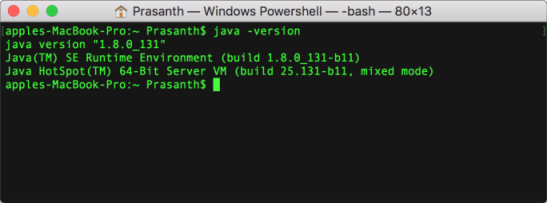
A successful Java installation prints the installed Java version. The exact version number depends on the JDK installed on your Mac.
openjdk version "17.0.x"Install Apache Kafka on Mac from the official binary package
1. Download the latest Apache Kafka from https://kafka.apache.org/downloads under Binary downloads.
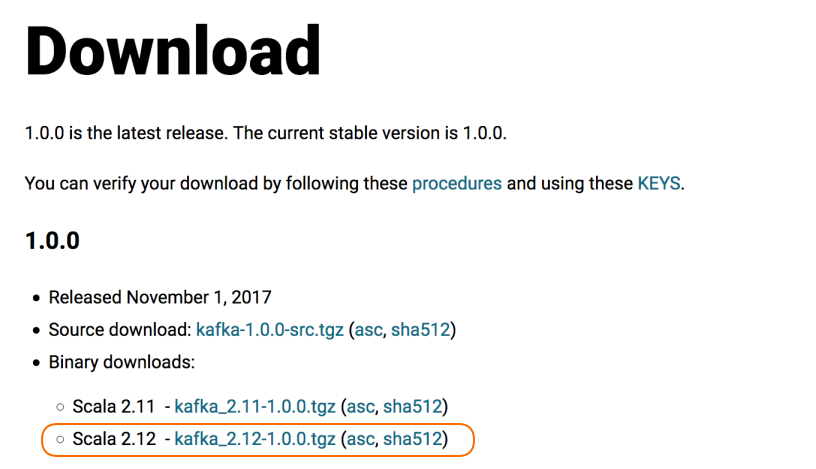
2. Click on any of the binary downloads, or choose a specific scala version if you have any dependency with scala in your development.
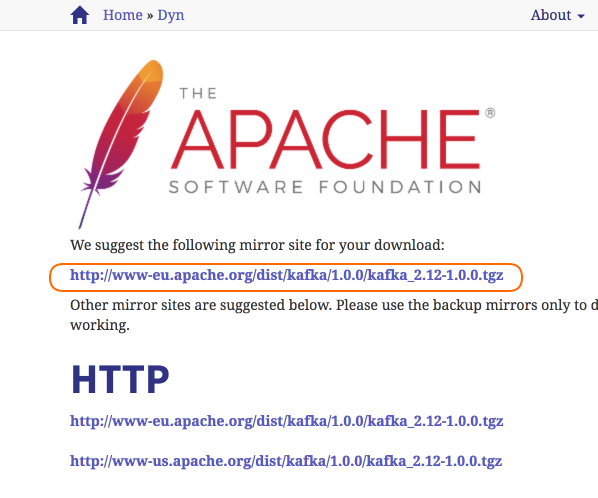
3. Go with the recommended mirror site.
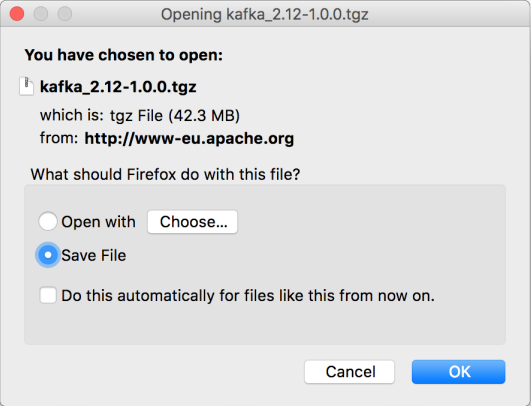
4. Extract the contents.
Navigate to root of Apache Kafka folder and open a Terminal. Or Open a Terminal and navigate to the root directory of Apache Kafka.
apples-MacBook-Pro:kafka_2.12-1.0.0 Prasanth$ ls
bin config libs LICENSE logs NOTICE site-docs
For a newer Kafka binary package, the extracted folder name and the file list may look slightly different, but the important directories are still bin and config. The shell scripts used to start Kafka are inside the bin directory.
cd kafka_2.13-*/
ls
Start Apache Kafka on Mac in KRaft mode without ZooKeeper
Recent Apache Kafka versions can run locally in KRaft mode. In this mode, Kafka manages metadata internally and does not require a separate ZooKeeper process. From the Kafka root directory, first generate a cluster ID.
KAFKA_CLUSTER_ID="$(bin/kafka-storage.sh random-uuid)"
echo "$KAFKA_CLUSTER_ID"
Next, format the Kafka storage directory using the generated cluster ID and the local server properties file. The exact properties file name may differ by Kafka version; recent distributions include KRaft server properties under the config directory.
bin/kafka-storage.sh format -t "$KAFKA_CLUSTER_ID" -c config/server.propertiesThen start the Kafka server.
bin/kafka-server-start.sh config/server.propertiesLeave this Terminal window running. Kafka runs in the foreground and prints server logs in the same window. Open another Terminal window for topic, producer, and consumer commands.
Check if Kafka is installed and running on Mac
After starting Kafka, you can check the installed command-line tools and confirm that the broker is responding on localhost:9092. Run the following commands from the Kafka root directory.
bin/kafka-topics.sh --version
bin/kafka-topics.sh --bootstrap-server localhost:9092 --list
If Kafka is running correctly, the version command prints the Kafka version, and the list command completes without a connection error. It may print no topic names if no topics have been created yet.
Create a Kafka topic on Mac and test producer-consumer messages
To confirm the local Kafka setup, create a topic named quickstart-events.
bin/kafka-topics.sh --create \
  --topic quickstart-events \
  --bootstrap-server localhost:9092
List topics to verify that the topic was created.
bin/kafka-topics.sh --bootstrap-server localhost:9092 --listquickstart-eventsStart a console producer and type a few messages. Press Ctrl+C when you want to stop the producer.
bin/kafka-console-producer.sh \
  --topic quickstart-events \
  --bootstrap-server localhost:9092
>Hello Kafka
>This is a local Kafka messageOpen another Terminal window and start a console consumer to read the messages from the beginning of the topic.
bin/kafka-console-consumer.sh \
  --topic quickstart-events \
  --from-beginning \
  --bootstrap-server localhost:9092
Hello Kafka
This is a local Kafka messageInstall Apache Kafka on Mac using Homebrew
Homebrew is another common way to install Kafka on macOS. This approach installs Kafka and its command-line tools through the package manager.
brew update
brew install kafka
After installation, check the Kafka package information and locate configuration files. On Apple Silicon Macs, Homebrew usually uses /opt/homebrew. On Intel Macs, it commonly uses /usr/local.
brew info kafka
which kafka-topics
The exact start command can vary depending on the Homebrew formula version and whether your installed Kafka package is configured for KRaft or ZooKeeper. Use brew info kafka to see the current service instructions for your installed package.
Start ZooKeeper on Mac for older Kafka versions
Older Apache Kafka versions depend on ZooKeeper for cluster metadata and coordination. If your Kafka distribution includes ZooKeeper configuration and your tutorial or project specifically uses ZooKeeper mode, start ZooKeeper before starting the Kafka broker. There is no need to explicitly install ZooKeeper for this older manual setup because it comes included with the Kafka package shown in this section.
From the root of Apache Kafka, run the following command to start Zookeeper :
~$ sh bin/zookeeper-server-start.sh config/zookeeper.propertiesThe zookeeper should be started with a similar following trace in the output.
apples-MacBook-Pro:kafka_2.12-1.0.0 Prasanth$ sh bin/zookeeper-server-start.sh config/zookeeper.properties
[2017-12-31 15:18:36,556] INFO Reading configuration from: config/zookeeper.properties (org.apache.zookeeper.server.quorum.QuorumPeerConfig)
[2017-12-31 15:18:36,560] INFO autopurge.snapRetainCount set to 3 (org.apache.zookeeper.server.DatadirCleanupManager)
[2017-12-31 15:18:36,560] INFO autopurge.purgeInterval set to 0 (org.apache.zookeeper.server.DatadirCleanupManager)
[2017-12-31 15:18:36,560] INFO Purge task is not scheduled. (org.apache.zookeeper.server.DatadirCleanupManager)
[2017-12-31 15:18:36,560] WARN Either no config or no quorum defined in config, running  in standalone mode (org.apache.zookeeper.server.quorum.QuorumPeerMain)
[2017-12-31 15:18:36,582] INFO Reading configuration from: config/zookeeper.properties (org.apache.zookeeper.server.quorum.QuorumPeerConfig)
[2017-12-31 15:18:36,582] INFO Starting server (org.apache.zookeeper.server.ZooKeeperServerMain)
[2017-12-31 15:18:36,650] INFO Server environment:zookeeper.version=3.4.10-39d3a4f269333c922ed3db283be479f9deacaa0f, built on 03/23/2017 10:13 GMT (org.apache.zookeeper.server.ZooKeeperServer)
[2017-12-31 15:18:36,650] INFO Server environment:host.name=192.168.0.104 (org.apache.zookeeper.server.ZooKeeperServer)
Start Apache Kafka Server
Open another Terminal and run the following command from the root of Apache Kafka to start Apache Kafka.
~$ sh bin/kafka-server-start.sh config/server.propertiesFollowing should be the end of trace stating that Kafka server is started.
[2017-12-31 15:52:20,291] INFO Initiating client connection, connectString=localhost:2181 sessionTimeout=6000 watcher=org.I0Itec.zkclient.ZkClient@4690b489 (org.apache.zookeeper.ZooKeeper)
[2017-12-31 15:52:20,307] INFO Waiting for keeper state SyncConnected (org.I0Itec.zkclient.ZkClient)
[2017-12-31 15:52:20,310] INFO Opening socket connection to server localhost/0:0:0:0:0:0:0:1:2181. Will not attempt to authenticate using SASL (unknown error) (org.apache.zookeeper.ClientCnxn)
[2017-12-31 15:52:20,333] INFO Socket connection established to localhost/0:0:0:0:0:0:0:1:2181, initiating session (org.apache.zookeeper.ClientCnxn)
[2017-12-31 15:52:20,423] INFO Session establishment complete on server localhost/0:0:0:0:0:0:0:1:2181, sessionid = 0x160abf917fa0000, negotiated timeout = 6000 (org.apache.zookeeper.ClientCnxn)
[2017-12-31 15:52:20,425] INFO zookeeper state changed (SyncConnected) (org.I0Itec.zkclient.ZkClient)
[2017-12-31 15:52:20,798] INFO Cluster ID = diRCJM2mQ4qI9KzjiiLRVA (kafka.server.KafkaServer)
[2017-12-31 15:52:20,820] WARN No meta.properties file under dir /tmp/kafka-logs/meta.properties (kafka.server.BrokerMetadataCheckpoint)
[2017-12-31 15:52:20,866] INFO [ThrottledRequestReaper-Fetch]: Starting (kafka.server.ClientQuotaManager$ThrottledRequestReaper)
[2017-12-31 15:52:20,869] INFO [ThrottledRequestReaper-Produce]: Starting (kafka.server.ClientQuotaManager$ThrottledRequestReaper)
[2017-12-31 15:52:20,870] INFO [ThrottledRequestReaper-Request]: Starting (kafka.server.ClientQuotaManager$ThrottledRequestReaper)
[2017-12-31 15:52:20,923] INFO Log directory '/tmp/kafka-logs' not found, creating it. (kafka.log.LogManager)
[2017-12-31 15:52:20,943] INFO Loading logs. (kafka.log.LogManager)
[2017-12-31 15:52:20,973] INFO Logs loading complete in 29 ms. (kafka.log.LogManager)
[2017-12-31 15:52:21,155] INFO Starting log cleanup with a period of 300000 ms. (kafka.log.LogManager)
[2017-12-31 15:52:21,159] INFO Starting log flusher with a default period of 9223372036854775807 ms. (kafka.log.LogManager)
[2017-12-31 15:52:21,535] INFO Awaiting socket connections on 0.0.0.0:9092. (kafka.network.Acceptor)
[2017-12-31 15:52:21,538] INFO [SocketServer brokerId=0] Started 1 acceptor threads (kafka.network.SocketServer)
[2017-12-31 15:52:21,571] INFO [ExpirationReaper-0-Produce]: Starting (kafka.server.DelayedOperationPurgatory$ExpiredOperationReaper)
[2017-12-31 15:52:21,573] INFO [ExpirationReaper-0-Fetch]: Starting (kafka.server.DelayedOperationPurgatory$ExpiredOperationReaper)
[2017-12-31 15:52:21,575] INFO [ExpirationReaper-0-DeleteRecords]: Starting (kafka.server.DelayedOperationPurgatory$ExpiredOperationReaper)
[2017-12-31 15:52:21,588] INFO [LogDirFailureHandler]: Starting (kafka.server.ReplicaManager$LogDirFailureHandler)
[2017-12-31 15:52:21,653] INFO [ExpirationReaper-0-topic]: Starting (kafka.server.DelayedOperationPurgatory$ExpiredOperationReaper)
[2017-12-31 15:52:21,658] INFO [ExpirationReaper-0-Heartbeat]: Starting (kafka.server.DelayedOperationPurgatory$ExpiredOperationReaper)
[2017-12-31 15:52:21,658] INFO Creating /controller (is it secure? false) (kafka.utils.ZKCheckedEphemeral)
[2017-12-31 15:52:21,659] INFO [ExpirationReaper-0-Rebalance]: Starting (kafka.server.DelayedOperationPurgatory$ExpiredOperationReaper)
[2017-12-31 15:52:21,666] INFO Result of znode creation is: OK (kafka.utils.ZKCheckedEphemeral)
[2017-12-31 15:52:21,683] INFO [GroupCoordinator 0]: Starting up. (kafka.coordinator.group.GroupCoordinator)
[2017-12-31 15:52:21,684] INFO [GroupCoordinator 0]: Startup complete. (kafka.coordinator.group.GroupCoordinator)
[2017-12-31 15:52:21,688] INFO [GroupMetadataManager brokerId=0] Removed 0 expired offsets in 4 milliseconds. (kafka.coordinator.group.GroupMetadataManager)
[2017-12-31 15:52:21,727] INFO [ProducerId Manager 0]: Acquired new producerId block (brokerId:0,blockStartProducerId:0,blockEndProducerId:999) by writing to Zk with path version 1 (kafka.coordinator.transaction.ProducerIdManager)
[2017-12-31 15:52:21,782] INFO [TransactionCoordinator id=0] Starting up. (kafka.coordinator.transaction.TransactionCoordinator)
[2017-12-31 15:52:21,784] INFO [Transaction Marker Channel Manager 0]: Starting (kafka.coordinator.transaction.TransactionMarkerChannelManager)
[2017-12-31 15:52:21,797] INFO [TransactionCoordinator id=0] Startup complete. (kafka.coordinator.transaction.TransactionCoordinator)
[2017-12-31 15:52:21,889] INFO Creating /brokers/ids/0 (is it secure? false) (kafka.utils.ZKCheckedEphemeral)
[2017-12-31 15:52:21,895] INFO Result of znode creation is: OK (kafka.utils.ZKCheckedEphemeral)
[2017-12-31 15:52:21,897] INFO Registered broker 0 at path /brokers/ids/0 with addresses: EndPoint(192.168.0.104,9092,ListenerName(PLAINTEXT),PLAINTEXT) (kafka.utils.ZkUtils)
[2017-12-31 15:52:21,900] WARN No meta.properties file under dir /tmp/kafka-logs/meta.properties (kafka.server.BrokerMetadataCheckpoint)
[2017-12-31 15:52:21,920] INFO Kafka version : 1.0.0 (org.apache.kafka.common.utils.AppInfoParser)
[2017-12-31 15:52:21,920] INFO Kafka commitId : aaa7af6d4a11b29d (org.apache.kafka.common.utils.AppInfoParser)
[2017-12-31 15:52:21,922] INFO [KafkaServer id=0] started (kafka.server.KafkaServer)
Stop Kafka and clean local Kafka data on macOS
For a foreground Kafka process, press Ctrl+C in the Terminal window where the Kafka server is running. If you started ZooKeeper separately for an older setup, stop ZooKeeper with Ctrl+C as well.
For local practice only, you can remove temporary Kafka data when you want a clean setup. Do not run these commands on a machine where you need to keep Kafka topics or messages.
rm -rf /tmp/kafka-logs
rm -rf /tmp/zookeeper
Fix common Kafka installation issues on Mac
java: command not found: Install a supported JDK and make surejava -versionworks in a new Terminal window.Connection to node -1 could not be established: Kafka is not running, is not listening onlocalhost:9092, or the command is using the wrong bootstrap server.Address already in use: Another process is already using Kafka’s port. Stop the existing process or update the listener port in the Kafka configuration.- Storage formatting error in KRaft mode: Use a fresh log directory or clean local test data before formatting again.
- ZooKeeper command not found: You may be using a newer Kafka package or a Homebrew setup where ZooKeeper scripts are not part of the recommended local startup flow.
Frequently asked questions about installing Kafka on Mac
How do I install Apache Kafka locally on Mac?
Install a supported JDK, download the Apache Kafka binary package, extract it, and start Kafka from the extracted folder. For recent Kafka versions, generate a KRaft cluster ID, format the storage directory, and start the broker with kafka-server-start.sh.
How do I check if Kafka is installed on Mac?
From the Kafka folder, run bin/kafka-topics.sh --version. If you installed Kafka using Homebrew, run which kafka-topics and brew info kafka to confirm the installed command path and package details.
How do I start ZooKeeper and Kafka on Mac?
For older Kafka versions that use ZooKeeper, start ZooKeeper with sh bin/zookeeper-server-start.sh config/zookeeper.properties, then open another Terminal and start Kafka with sh bin/kafka-server-start.sh config/server.properties. For newer Kafka versions, prefer the KRaft startup flow instead of ZooKeeper.
Can I install Kafka on Mac using Homebrew?
Yes. Run brew install kafka. After installation, run brew info kafka because the exact configuration file paths and service commands can vary depending on your Homebrew prefix and Kafka formula version.
Is Confluent Kafka the same as Apache Kafka on Mac?
No. Apache Kafka is the open-source Kafka distribution from the Apache project. Confluent Platform includes Kafka plus additional tools and components. If your goal is to learn core Kafka commands, the Apache Kafka binary package is enough for local practice.
Editorial QA checklist for Kafka on Mac installation steps
- Verify that Java installation is checked with
java -versionbefore Kafka commands are shown. - Keep KRaft startup steps separate from older ZooKeeper startup steps so users do not mix modes.
- Confirm that every topic, producer, and consumer command uses
--bootstrap-server localhost:9092. - Check that Homebrew paths are described as prefix-dependent for Intel and Apple Silicon Macs.
- Include a practical verification flow: create a topic, produce messages, and consume messages.
Conclusion
In this Apache Kafka Tutorial, we have learnt to install Apache Kafka on Mac, verify Java, start Kafka locally, and test the setup with a topic, producer, and consumer. For newer Kafka versions, use the KRaft-based local setup. For older Kafka versions, use the ZooKeeper and Kafka startup commands that match that distribution.