 TutorialKart.com
An Apache Kafka Connector is a Kafka Connect component that moves data between Kafka and an external system such as a file, database, message queue, object store, or search index. In this tutorial, we use the built-in file source and file sink connectors to read lines from a text file, publish them to a Kafka topic, and write the topic data back to another file.
Apache Kafka Connector and Kafka Connect basics
Apache Kafka Connector – Connectors are the components of Kafka that could be setup to listen the changes that happen to a data source like a file or database, and pull in those changes automatically.
In current Kafka terminology, connectors run inside Kafka Connect. Kafka Connect is the integration framework used to stream data into Kafka from external systems and stream data out of Kafka to external systems. The connector describes what system to connect to, while Kafka Connect provides the runtime, workers, task management, offset tracking, converters, and error handling around that connector.
For reference, the Confluent Kafka Connect developer guide explains connector structure, source connectors, sink connectors, tasks, configuration, and deployment considerations. This page keeps the example simple by using the file connector that is included with Kafka distributions.
Source connector and sink connector in Apache Kafka
Kafka Connect has two common connector directions. A source connector imports data from an external system into Kafka topics. A sink connector exports data from Kafka topics into an external system. In this example, the file source connector reads test.txt and writes records to the connect-test topic. The file sink connector reads the same topic and writes the records to test.sink.txt.
- Source connector: external system to Kafka topic.
- Sink connector: Kafka topic to external system.
- Task: the unit of work created by a connector. A connector may run one or more tasks depending on configuration and connector support.
- Worker: the Kafka Connect process that runs connector tasks.
- Converter: the component that controls how record keys and values are serialized between Connect data and Kafka bytes.
Apache Kafka Connector Example – Import Data into Kafka
In this Kafka Connector Example, we shall deal with a simple use case. We shall setup a standalone connector to listen on a text file and import data from the text file. What it does is, once the connector is setup, data in text file is imported to a Kafka Topic as messages. And any further data appended to the text file creates an event. These events are being listened by the Connector. The change in data is written to the Kafka Topic.
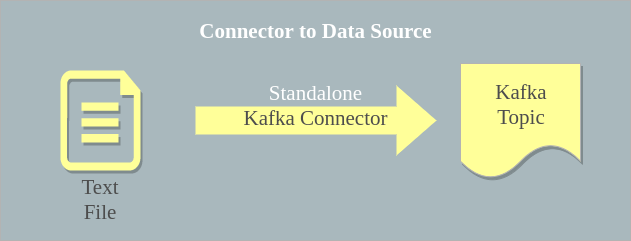
For this example, we shall try using the default configuration files, to keep things simple for understanding. Following is a step by step guide :
The example uses standalone Kafka Connect mode because it is easier to run on a local machine. In production, Kafka Connect is usually run in distributed mode so that connectors can be managed across multiple workers.
Apache Kafka file connector example requirements
Before running the commands, make sure that Kafka is extracted on your machine and that you are running commands from the Kafka installation directory. The older command sequence below starts ZooKeeper and a Kafka broker separately. Newer Kafka setups may use KRaft mode instead of ZooKeeper, so use the startup commands that match your Kafka distribution.
- Kafka installation directory with
binandconfigfolders. - A running Kafka broker listening on
localhost:9092. - Default Kafka Connect configuration files in the
configfolder. - A text file named
test.txtin the location expected by the file source connector.
1. Create test.txt for the Kafka FileStreamSourceConnector
We shall create a text file, test.txt, next to the bin folder.
arjun@tutorialkart:~/kafka_2.12-1.0.0$ ls
bin  config  data  libs  LICENSE  logs  NOTICE  site-docs  test.txt
arjun@tutorialkart:~/kafka_2.12-1.0.0$ cat test.txt
Hello!
Welcome to TutorialKart
Learn Apache KafkaThe file source connector reads the file line by line. Each line becomes one Kafka record value. This connector is useful for learning Kafka Connect concepts, but it is not a replacement for a production file ingestion system that needs recovery, file rotation handling, or complex parsing.
2. Start ZooKeeper and Kafka broker for the connector example
Navigate to the root of Kafka directory and run each of the following commands in separate terminals to start Zookeeper and Kafka Cluster.
$ bin/zookeeper-server-start.sh config/zookeeper.properties$ bin/kafka-server-start.sh config/server.propertiesWait until the broker has started before running the connector. If the broker is not reachable on localhost:9092, the connector worker will not be able to create or write to the connect-test topic.
3. Start the Kafka standalone connector worker
To start a standalone Kafka Connector, we need following three configuration files.
- connect-standalone.properties
- connect-file-source.properties
- connect-file-sink.properties
Kafka by default provides these configuration files in config folder. We shall use those config files as is. If you go through those config files, you may find in connect-file-source.properties, that the file is test.txt, which we have created in our first step.
The source configuration normally points to the input file and target topic. The sink configuration points to the topic and output file. A simplified view of those properties is shown below.
# connect-file-source.properties
name=local-file-source
connector.class=FileStreamSource
tasks.max=1
file=test.txt
topic=connect-test# connect-file-sink.properties
name=local-file-sink
connector.class=FileStreamSink
tasks.max=1
file=test.sink.txt
topics=connect-testRun the following command from the kafka directory to start a Kafka Standalone Connector :
bin/connect-standalone.sh config/connect-standalone.properties config/connect-file-source.properties config/connect-file-sink.propertiesYou might observe some lines printed to the console as shown below :
arjun@tutorialkart:~/kafka/kafka_2.11-0.11.0.0$ bin/connect-standalone.sh config/connect-standalone.properties config/connect-file-source.properties config/connect-file-sink.properties
[2017-11-02 10:44:28,136] INFO Registered loader: sun.misc.Launcher$AppClassLoader@764c12b6 (org.apache.kafka.connect.runtime.isolation.DelegatingClassLoader:199)
[2017-11-02 10:44:28,139] INFO Added plugin 'org.apache.kafka.connect.tools.MockSourceConnector' (org.apache.kafka.connect.runtime.isolation.DelegatingClassLoader:132)
[2017-11-02 10:44:28,139] INFO Added plugin 'org.apache.kafka.connect.tools.MockConnector' (org.apache.kafka.connect.runtime.isolation.DelegatingClassLoader:132)
[2017-11-02 10:44:28,140] INFO Added plugin 'org.apache.kafka.connect.file.FileStreamSourceConnector' (org.apache.kafka.connect.runtime.isolation.DelegatingClassLoader:132)
[2017-11-02 10:44:28,140] INFO Added plugin 'org.apache.kafka.connect.tools.MockSinkConnector' (org.apache.kafka.connect.runtime.isolation.DelegatingClassLoader:132)
[2017-11-02 10:44:28,141] INFO Added plugin 'org.apache.kafka.connect.tools.VerifiableSinkConnector' (org.apache.kafka.connect.runtime.isolation.DelegatingClassLoader:132)
[2017-11-02 10:44:28,141] INFO Added plugin 'org.apache.kafka.connect.file.FileStreamSinkConnector' (org.apache.kafka.connect.runtime.isolation.DelegatingClassLoader:132)
[2017-11-02 10:44:28,141] INFO Added plugin 'org.apache.kafka.connect.tools.VerifiableSourceConnector' (org.apache.kafka.connect.runtime.isolation.DelegatingClassLoader:132)
The important part in the log is that Kafka Connect has found the FileStreamSourceConnector and FileStreamSinkConnector plugin classes. After that, the worker creates connector tasks and starts moving records.
4. Observe test.sink.txt created by the Kafka sink connector
arjun@tutorialkart:~/kafka_2.12-1.0.0$ ls
bin  config  libs  LICENSE  logs  NOTICE  site-docs  test.sink.txt  test.txt
Once the Connector is started, initially the data in test.txt would be synced to test.sink.txt and the data is published to the Kafka Topic named, connect-test. Then any changes to the test.txt file would be synced to test.sink.txt and published to connect-test topic.
Add a new line, ” Learn Connector with Example” to test.txt.
arjun@tutorialkart:~/kafka_2.12-1.0.0$ echo "Learn Connector" >> test.txt
arjun@tutorialkart:~/kafka_2.12-1.0.0$ cat test.sink.txt
Hello!
Welcome to TutorialKart
Learn Apache Kafka
Learn Connector
If the new line does not appear immediately, check that the connector process is still running and that the source file path in connect-file-source.properties matches the file you edited.
5. Consume messages from the connect-test Kafka topic
We shall start a Consumer and consume the messages (test.txt and additions to test.txt).
Following is a Kafka Console Consumer. You may create Kafka Consumer of your application choice.
arjun@tutorialkart:~/kafka_2.12-1.0.0$ bin/kafka-console-consumer.sh --bootstrap-server localhost:9092 --topic connect-test --from-beginning
{"schema":{"type":"string","optional":false},"payload":"Hello!"}
{"schema":{"type":"string","optional":false},"payload":"Welcome to TutorialKart"}
{"schema":{"type":"string","optional":false},"payload":"Learn Apache Kafka"}
{"schema":{"type":"string","optional":false},"payload":"Learn Connector"}
Any changes made to the text file is written as messages to the topic by the Kafka Connector. Hence all the consumers subscribed to the topic receive the messages.
The output contains schema and payload fields because the default Connect converter settings may serialize values as JSON with schema information. If you configure converters differently, the consumer output can look different.
Standalone Kafka Connect mode versus distributed Kafka Connect mode
The example above uses standalone mode because it is simple for local learning. Standalone mode runs all connector tasks in one process and stores offsets locally. Distributed mode runs Kafka Connect workers as a group and stores connector configuration, offsets, and status in Kafka topics.
| Kafka Connect mode | Common use | What to remember |
|---|---|---|
| Standalone mode | Local testing, tutorials, small experiments | One worker process; configuration is passed from local files |
| Distributed mode | Shared environments and production-style deployments | Multiple workers can coordinate connector tasks through Kafka |
When you move beyond this file connector example, study distributed mode and connector REST APIs. They are important for starting, pausing, updating, and monitoring connectors in a managed environment.
Important Kafka connector configuration properties in this file example
The file source and sink connectors use only a few properties, but those properties show the basic pattern used by many Kafka connectors.
nameidentifies the connector instance.connector.classtells Kafka Connect which connector implementation to run.tasks.maxsets the maximum number of tasks that the connector may create.fileidentifies the source file for the source connector or the output file for the sink connector.topicortopicsidentifies the Kafka topic used by the connector.key.converterandvalue.converterin the worker configuration control how keys and values are serialized.
Troubleshooting Apache Kafka Connector file source and sink example
If the Kafka connector does not read the file or does not write to the sink file, check the basic runtime pieces first. Most errors in this example come from a stopped broker, an incorrect file path, a missing connector plugin, or a topic and converter mismatch.
- Connector starts but no records appear: confirm that you appended new lines to the same
test.txtpath configured inconnect-file-source.properties. - Consumer shows no messages: confirm that the topic name is
connect-testand that the broker is listening onlocalhost:9092. - Sink file is not created: confirm that the sink connector is included in the
connect-standalone.shcommand and that the process has write permission in the directory. - Connector class not found: check that the file connector plugin is available in the Kafka distribution and that plugin paths are configured correctly for external connectors.
- Unexpected JSON wrapper in output: review the worker converter settings because converters decide how data is written to Kafka and displayed by consumers.
When to use Apache Kafka connectors instead of custom producers and consumers
Kafka Connect is useful when you need repeatable integration between Kafka and external systems without writing a complete producer or consumer application. For example, a database source connector can stream database changes into Kafka topics, and a sink connector can send Kafka topic data to storage, analytics, or search systems.
A custom producer or consumer is still useful when the application logic is specific to your business process, when you need full control over request handling, or when no connector exists for the system you are integrating. Kafka connectors are best suited to integration patterns where configuration and connector behavior match the requirement.
FAQs on Apache Kafka Connector example
What is an Apache Kafka Connector?
An Apache Kafka Connector is a Kafka Connect component that moves data into Kafka from an external system or moves data out of Kafka to an external system. Source connectors write to Kafka topics, and sink connectors read from Kafka topics.
What is the difference between Kafka Connect and a Kafka connector?
Kafka Connect is the runtime framework that runs connectors and tasks. A Kafka connector is the plugin or implementation that knows how to connect a particular external system, such as a file, database, or storage service, to Kafka.
Why does this Kafka file connector example create test.sink.txt?
The source connector reads lines from test.txt and writes them to the connect-test topic. The sink connector reads from connect-test and writes the same records to test.sink.txt.
Should I use standalone Kafka Connect mode in production?
Standalone mode is suitable for local testing and simple examples. Production-style deployments usually use distributed mode because multiple workers can coordinate connector tasks and store configuration, offsets, and status in Kafka topics.
Why does the console consumer show schema and payload fields?
The output depends on the configured Kafka Connect converters. When JSON converter settings include schemas, records may appear with schema and payload fields in the console consumer output.
Editorial QA checklist for Apache Kafka Connector tutorial
- Confirm that the tutorial explains Kafka Connect, source connectors, sink connectors, workers, and tasks before the example steps.
- Confirm that the existing file connector commands are preserved and that the ZooKeeper note is clear for older Kafka distributions.
- Confirm that
test.txt,connect-test, andtest.sink.txtare used consistently in the explanation. - Confirm that standalone mode is presented as a local learning setup, not as the default production deployment model.
- Confirm that troubleshooting covers broker availability, file paths, connector plugins, sink file permissions, and converter output.
Summary: Apache Kafka Connector example with a text file
In this Kafka Tutorial, we have learnt to create a Kafka Connector to import data from a text file to Kafka Topic. The file source connector reads lines from test.txt, writes them to the connect-test topic, and the file sink connector writes the topic records to test.sink.txt. This example is a practical starting point for understanding how Kafka Connect moves data between Kafka and external systems.