 TutorialKart.com
Kafka Console Producer and Consumer Example
Kafka Console Producer and Consumer Example – In this Kafka Tutorial, we shall learn to create a Kafka Producer and Kafka Consumer using console interface of Kafka.
The Kafka console producer writes text entered in a terminal to a Kafka topic, and the Kafka console consumer reads records from a Kafka topic and prints them in another terminal. These tools are useful when you want to test a local Kafka setup, verify that a topic receives messages, or demonstrate the producer-consumer flow without writing a Java, Python, or Scala client.
bin/kafka-console-producer.sh and bin/kafka-console-consumer.sh in the Kafka directory are the tools that help to create a Kafka Producer and Kafka Consumer respectively. On Windows, the same commands are available in the bin/windows directory with the .bat extension.
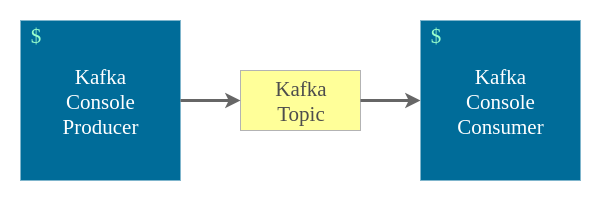
We shall start with a basic example to write messages to a Kafka Topic read from the console with the help of Kafka Producer and read the messages from the topic using Kafka Consumer.
Kafka console producer and consumer command flow
For this example, use three terminal windows from the root directory of your Kafka installation. One terminal runs the local Kafka services, one terminal runs the console producer, and one terminal runs the console consumer. The topic name used in this tutorial is sampleTopic.
| Terminal | Kafka command purpose | What you should see |
|---|---|---|
| Terminal 1 | Start ZooKeeper and Kafka broker for the older local setup shown below | Broker logs remain running |
| Terminal 2 | Start kafka-console-producer.sh for sampleTopic | A prompt waits for message input |
| Terminal 3 | Start kafka-console-consumer.sh for sampleTopic | Messages appear as the producer sends them |
The commands in the original example use ZooKeeper because many older Kafka installations were run that way. Newer Apache Kafka quickstart setups commonly use --bootstrap-server for topic management and may run without ZooKeeper. If your Kafka version does not accept --zookeeper, use the modern --bootstrap-server localhost:9092 topic command shown after Step 2. You can also refer to the Apache Kafka quickstart and the Kafka command-line tools reference for version-specific options.
1. Start ZooKeeper and Kafka broker for the local console example
Navigate to the root of Kafka directory and run each of the following commands in separate terminals to start Zookeeper and Kafka Cluster respectively.
$ bin/zookeeper-server-start.sh config/zookeeper.properties$ bin/kafka-server-start.sh config/server.propertiesKeep these service terminals open. If you close the broker terminal, the producer and consumer commands cannot connect to Kafka on localhost:9092.
2. Create the Kafka topic named sampleTopic
Create a topic named sampleTopic by running the following command.
$ bin/kafka-topics.sh --create --zookeeper localhost:2181 --replication-factor 1 --partitions 1 --topic sampleTopicFor Kafka versions where topic commands use the broker address instead of ZooKeeper, create the same topic with --bootstrap-server.
bin/kafka-topics.sh --create --bootstrap-server localhost:9092 --replication-factor 1 --partitions 1 --topic sampleTopicYou can verify that Kafka created the topic by listing topics from the broker.
bin/kafka-topics.sh --list --bootstrap-server localhost:9092sampleTopic3. Start Kafka console producer for sampleTopic
Run the following command to start a Kafka Producer, using console interface, writing to sampleTopic.
$ bin/kafka-console-producer.sh --broker-list localhost:9092 --topic sampleTopicIn newer Kafka versions, you may use --bootstrap-server with the console producer. After the command starts, type one message per line and press Enter after each message.
bin/kafka-console-producer.sh --bootstrap-server localhost:9092 --topic sampleTopicExample messages entered in the producer terminal:
Hello Kafka
This is a console producer message
Kafka console tools are running
4. Start Kafka console consumer for sampleTopic
Run the following command to start a Kafka Consumer, using console interface, subscribed to sampleTopic.
$ bin/kafka-console-consumer.sh --bootstrap-server localhost:9092 --topic sampleTopic --from-beginningThe --from-beginning option asks the consumer to read available records from the beginning of the topic for a new consumer group. If the same consumer group has already committed offsets, Kafka continues from the committed offset instead of replaying every old message.
When the producer sends the three sample messages above, the consumer terminal should print them as plain text.
Hello Kafka
This is a console producer message
Kafka console tools are running
5. Send messages from Kafka console producer and read them in Kafka console consumer
Start sending messages from the producer. Consumer would get the messages via Kafka Topic.
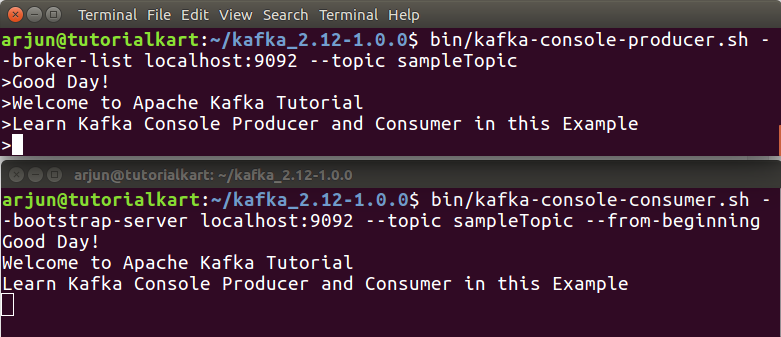
Each line entered in the console producer becomes one Kafka record. The console consumer reads the record value and prints it. This makes the console tools a quick way to check whether the broker, topic, producer, and consumer path are working before you test application code.
Kafka console producer from a text file
You can also send multiple lines from a file into a Kafka topic. Create a text file where each line is one message.
first file message
second file message
third file message
Assume the file is named messages.txt. Redirect the file content to the console producer.
bin/kafka-console-producer.sh --bootstrap-server localhost:9092 --topic sampleTopic < messages.txtThe consumer subscribed to sampleTopic receives each line as a separate record.
Kafka console producer with message keys
By default, the console producer sends only message values. If you want to test keyed records, enable key parsing and choose a separator. In the following example, the text before : is the key and the text after : is the value.
bin/kafka-console-producer.sh --bootstrap-server localhost:9092 --topic sampleTopic --property parse.key=true --property key.separator=:user-1:login
user-2:purchase
user-1:logoutTo print keys in the consumer output, add the matching consumer properties.
bin/kafka-console-consumer.sh --bootstrap-server localhost:9092 --topic sampleTopic --from-beginning --property print.key=true --property key.separator=:user-1:login
user-2:purchase
user-1:logoutKafka console consumer group and offset check
For repeated testing, give the console consumer a specific group id. This helps you inspect offsets and understand why old messages may or may not appear again.
bin/kafka-console-consumer.sh --bootstrap-server localhost:9092 --topic sampleTopic --group tutorial-console-group --from-beginningIn another terminal, describe the consumer group.
bin/kafka-consumer-groups.sh --bootstrap-server localhost:9092 --describe --group tutorial-console-groupThe output shows the topic, partition, current offset, log end offset, and lag for the group. If lag is zero, that consumer group has read all currently available records in the topic.
Common Kafka console producer and consumer issues
| Issue | Likely cause | What to check |
|---|---|---|
| Consumer does not print messages | The producer and consumer may be using different topic names, or the consumer group may have already consumed the old records | Use the same topic name, send a new message, or test with a new --group and --from-beginning |
Connection to localhost:9092 fails | The Kafka broker is not running or is listening on a different address | Check the broker terminal logs and the listeners configuration in config/server.properties |
--zookeeper is not recognized | The installed Kafka version expects broker-based commands | Use the --bootstrap-server localhost:9092 version of the topic command |
--broker-list is not accepted by the producer | The installed Kafka version expects --bootstrap-server | Run the producer with --bootstrap-server localhost:9092 |
| Messages appear only after pressing Enter | The console producer sends one record per completed line | Type the message and press Enter to publish it |
Kafka console producer and consumer QA checklist
- The topic name is the same in the topic creation, producer, and consumer commands.
- The broker address in every command points to the same Kafka broker, usually
localhost:9092for a local setup. - The tutorial mentions both the older ZooKeeper command and the newer
--bootstrap-serveralternative. - Output blocks are separated from command blocks so readers know what to type and what result to expect.
- The consumer offset behavior is explained when
--from-beginningdoes not replay messages for an existing group.
Kafka console producer and consumer FAQs
What is the difference between kafka-console-producer.sh and kafka-console-consumer.sh?
kafka-console-producer.sh writes messages from the terminal to a Kafka topic. kafka-console-consumer.sh reads messages from a Kafka topic and prints them in the terminal.
Why does kafka-console-consumer.sh show no messages with –from-beginning?
Check that the topic name is correct and that records exist in the topic. If you use a named consumer group that has already committed offsets, Kafka may continue from the committed offset. Test with a new group id to replay available records from the beginning.
Should I use –zookeeper or –bootstrap-server in Kafka commands?
Use the option supported by your Kafka version. Older topic commands used --zookeeper. Current command-line examples usually use --bootstrap-server because the tools connect through a Kafka broker address.
Can Kafka console producer send messages from a file?
Yes. Redirect a text file into the console producer. Each line in the file is sent as one Kafka record value, for example: bin/kafka-console-producer.sh --bootstrap-server localhost:9092 --topic sampleTopic < messages.txt.
Can I use Kafka console tools for production applications?
The console producer and consumer are best used for testing, learning, debugging, and simple verification. Production applications usually use Kafka client libraries where you can configure serialization, retries, batching, error handling, authentication, and monitoring in application code.
Conclusion: Kafka console producer and consumer example
In this Apache Kafka Tutorial – Kafka Console Producer and Consumer Example, we have learnt to start a Kafka Producer and Kafka Consumer using console interface.
The key steps are to start the local Kafka services, create a topic, run the console producer for that topic, and run the console consumer for the same topic. Once this basic flow works, you can extend the same test with file input, keyed messages, and consumer group offset checks.