 TutorialKart.com
An Apache Kafka stream processor is an application that continuously reads records from one or more Kafka topics, applies processing logic, and writes the processed records to one or more output topics. In Java applications, the Kafka Streams API is commonly used to build this kind of stream processor because it provides high-level stream operations, state handling, fault tolerance, and integration with Kafka topics.
What is a Stream Processor in Apache Kafka ?
A Stream Processor is an application that transforms or processes records from one or more topics together and writes the processed records to one or more topics in the Kafka cluster. Kafka Streams API helps in making an application, a Stream Processor. The processing includes aggregation of events from multiple topics, enrichment of information from topics or only a transformation from one topic to other (like validation or classification of events).
Following is a picture demonstrating the working of Stream Processor in Apache Kafka.
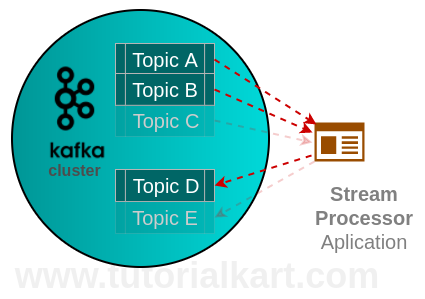
How an Apache Kafka Stream Processor Works
A Kafka stream processor works as a normal Java application that connects to Kafka as a client. It consumes records from an input topic, processes each record or a window of records, and then produces new records to an output topic. The application keeps running as long as the stream processing job is needed.
- Input topic: The topic from which the processor reads raw events.
- Processing logic: The transformation, filtering, aggregation, validation, enrichment, or routing applied to each event.
- Output topic: The topic to which the processor writes the processed result.
- Application id: A Kafka Streams identifier used for consumer group coordination, internal topics, and local state management.
For example, an application can read user activity events from user-events, keep only purchase events, convert the value to uppercase for this simple tutorial, and write the result to processed-user-events.
Typical Stream Processors in Apache Kafka Projects
Following are some of the stream processors you may find in real-time projects :
- Fraudulent Transaction Finder Application – The application reads transactions from the pipeline and writes the fraud transactions (if any) to a Kafka Cluster Topic containing fraud transactions for further processing.
- Trend Finder Application – Based on the real-time browsing behaviour of customers online, Stream Processor Application can find the most trending topics and generate suggestions, through aggregation of search items or such.
Other common examples include log classification, IoT sensor alerting, order status enrichment, clickstream session analysis, real-time metrics calculation, and event routing between business systems.
Kafka Streams API and Processor API in Stream Processing
Kafka provides more than one way to write stream processing applications. The Kafka Streams documentation describes Kafka Streams as a client library for building applications and microservices where input and output data are stored in Kafka clusters. For most beginner and intermediate examples, the high-level Kafka Streams DSL is simpler to use.
The Kafka Streams Processor API is useful when you need lower-level control over processing, custom processors, state stores, or record forwarding. This tutorial uses the high-level Streams DSL first because it is easier to read and is enough for a basic stream processor example.
Stream Processor Example in Apache Kafka
In this Apache Kafka Tutorial, we shall learn Stream Processor in Apache Kafka with a Java Example program. Following is a step by step process to write a simple Stream Processor Example in Apache Kafka.
Kafka Stream Processor Example Requirements
Before running the example, make sure that the following are available on your system.
- Java installed on your machine.
- Apache Kafka installed and running locally or available through a reachable Kafka cluster.
- A Kafka broker address, such as
localhost:9092. - Two Kafka topics: one input topic and one output topic.
- A Java build tool such as Maven or Gradle.
For this example, we shall use the following topic names.
| Topic name | Purpose in this Kafka stream processor example |
|---|---|
input-topic | Receives raw text messages. |
output-topic | Stores transformed messages written by the stream processor. |
Create Kafka Topics for the Stream Processor Example
If the Kafka command-line tools are available in your terminal, create the two topics with the following commands. Change the bootstrap server address if your Kafka broker is not running on localhost:9092.
kafka-topics.sh --create \
  --bootstrap-server localhost:9092 \
  --replication-factor 1 \
  --partitions 1 \
  --topic input-topic

kafka-topics.sh --create \
  --bootstrap-server localhost:9092 \
  --replication-factor 1 \
  --partitions 1 \
  --topic output-topic
On Windows, the command may use kafka-topics.bat instead of kafka-topics.sh.
Maven Dependency for Kafka Streams Java Example
Add the Kafka Streams dependency to your Maven project. Use a Kafka client version that matches the Kafka version used by your project or organization.
<dependency>
    <groupId>org.apache.kafka</groupId>
    <artifactId>kafka-streams</artifactId>
    <version>3.7.0</version>
</dependency>
The version shown above is only an example. In a real project, keep all Kafka client libraries on compatible versions to avoid runtime issues.
Java Kafka Streams Application for Processing Records
The following Java program reads records from input-topic, converts non-empty message values to uppercase, and writes the result to output-topic. This is a simple transformation, but the same structure can be extended for filtering, validation, enrichment, and aggregation.
import org.apache.kafka.common.serialization.Serdes;
import org.apache.kafka.streams.KafkaStreams;
import org.apache.kafka.streams.StreamsBuilder;
import org.apache.kafka.streams.StreamsConfig;
import org.apache.kafka.streams.kstream.KStream;

import java.util.Properties;

public class SimpleStreamProcessor {

    public static void main(String[] args) {
        Properties props = new Properties();
        props.put(StreamsConfig.APPLICATION_ID_CONFIG, "simple-stream-processor-app");
        props.put(StreamsConfig.BOOTSTRAP_SERVERS_CONFIG, "localhost:9092");
        props.put(StreamsConfig.DEFAULT_KEY_SERDE_CLASS_CONFIG, Serdes.String().getClass());
        props.put(StreamsConfig.DEFAULT_VALUE_SERDE_CLASS_CONFIG, Serdes.String().getClass());

        StreamsBuilder builder = new StreamsBuilder();

        KStream<String, String> inputStream = builder.stream("input-topic");

        KStream<String, String> processedStream = inputStream
                .filter((key, value) -> value != null && !value.trim().isEmpty())
                .mapValues(value -> value.toUpperCase());

        processedStream.to("output-topic");

        KafkaStreams streams = new KafkaStreams(builder.build(), props);

        Runtime.getRuntime().addShutdownHook(new Thread(streams::close));

        streams.start();
    }
}
Test the Apache Kafka Stream Processor from Terminal
Start the Java application first. Then produce a few test messages to the input topic.
kafka-console-producer.sh \
  --bootstrap-server localhost:9092 \
  --topic input-topic
Enter the following sample messages in the producer terminal.
hello kafka
stream processor example
apache kafka streams
Open another terminal and consume records from the output topic.
kafka-console-consumer.sh \
  --bootstrap-server localhost:9092 \
  --topic output-topic \
  --from-beginning
You should see transformed records similar to the following output.
HELLO KAFKA
STREAM PROCESSOR EXAMPLE
APACHE KAFKA STREAMS
Explanation of the Kafka Streams Java Code
The Java example contains the main building blocks of a Kafka stream processor.
StreamsConfig.APPLICATION_ID_CONFIGgives the Kafka Streams application a stable id. Kafka uses this id for consumer group membership and internal state.StreamsConfig.BOOTSTRAP_SERVERS_CONFIGtells the application where to connect to Kafka.Serdes.String()configures string serialization and deserialization for keys and values.StreamsBuilderdefines the processing topology.builder.stream("input-topic")creates a stream from the input Kafka topic.filter()removes null or empty values.mapValues()changes only the value of each record while keeping the key unchanged.processedStream.to("output-topic")writes the transformed records to another Kafka topic.streams.start()starts the continuous processing application.
When to Use Kafka Streams for Stream Processor Applications
Kafka Streams is a good fit when your application logic is closely tied to Kafka topics and you want to process events using Java without deploying a separate stream processing cluster. It is commonly used for transformations, joins, aggregations, real-time alerts, event enrichment, and building derived topics from raw topics.
If the processing is only a one-time batch job, Kafka Streams may not be necessary. If the application has complex SQL-style streaming requirements, operational constraints, or needs to combine Kafka with many external systems, compare Kafka Streams with other stream processing options before deciding.
Common Errors in Kafka Stream Processor Examples
- Topic does not exist: Create the input and output topics before running the application, unless your Kafka cluster allows automatic topic creation.
- Wrong bootstrap server: Confirm that the value of
localhost:9092matches your Kafka broker address. - No output records: Check that the Java application is running before producing records and that the consumer is reading from the correct output topic.
- Serde mismatch: Use serializers and deserializers that match the key and value format of your topic records.
- Application id reused unexpectedly: Reusing the same application id means the application may resume from previously committed offsets.
Kafka Stream Processor Example QA Checklist
- The tutorial clearly explains the role of input topic, output topic, processing logic, and application id.
- The Java example uses Kafka Streams classes correctly and keeps the processing flow easy to follow.
- The topic names used in commands match the topic names used in the Java code.
- The command-line examples distinguish between commands, input text, and terminal output.
- The example explains what to check when the output topic does not receive processed records.
FAQs on Stream Processor Example in Apache Kafka
What is a stream processor in Apache Kafka?
A stream processor in Apache Kafka is an application that reads records from Kafka topics, applies processing logic such as filtering, mapping, joining, or aggregation, and writes the processed records to Kafka topics or another destination.
Is Kafka Streams the same as Apache Kafka?
No. Apache Kafka is the distributed event streaming platform. Kafka Streams is a Java client library that helps you build stream processing applications on top of Kafka topics.
What is the difference between Kafka Streams DSL and Processor API?
The Kafka Streams DSL provides high-level operations such as map, filter, groupBy, join, and aggregate. The Processor API provides lower-level control for custom processors, state stores, and forwarding logic.
Can a Kafka stream processor read from multiple topics?
Yes. A Kafka Streams application can read from one or more topics. It can also join streams, merge streams, or route records to different output topics based on processing logic.
Why does my Kafka stream processor not show records in the output topic?
Common causes include using the wrong topic name, starting the consumer before or after the expected offset, using a wrong bootstrap server, filtering out all input records, or running the application with an old application id that has already consumed the input records.
Conclusion
In this tutorial, we learned what a stream processor is in Apache Kafka and how to create a simple Kafka Streams Java application. The example reads records from an input topic, filters empty values, transforms message values to uppercase, and writes the processed records to an output topic. This pattern is the base for many real-time Kafka stream processing applications, including validation, enrichment, routing, aggregation, and alerting.