 TutorialKart.com
MongoDB Date Query
MongoDB stores dates as BSON Date values. You can create a date with new Date(), insert it into a document, and query it with comparison operators such as $gt, $gte, $lt, and $lte.
This tutorial explains the difference between Date() and new Date(), supported date formats, date range queries, date-only searches, and MongoDB Compass date filters.
MongoDB Date() String and new Date() Object
Date() and new Date() do not return the same type:
Date()returns a formatted date string.new Date()returns a JavaScript Date object that MongoDB can store as a BSON Date value.
Use new Date() when inserting dates or building MongoDB date queries. A date stored as a string is compared as text and does not behave like a BSON Date value.
Date()
new Date()
typeof Date()
typeof new Date()
string
objectMongoDB Date as String
To get the date as a string, use Date() command in Mongo Shell or in a Query without new keyword prior to Date() command.
Example – Date() in Mongo Shell
Running Date() command in Mongo Shell returns Date as String.
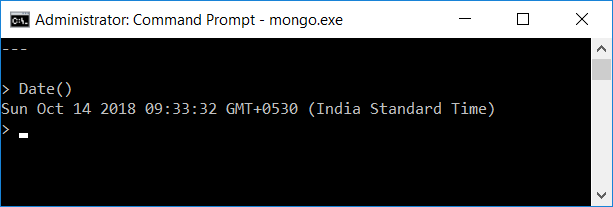
In Mongo Shell, Date() command returns date string formatted in UTC.
Date() in Mongo Script
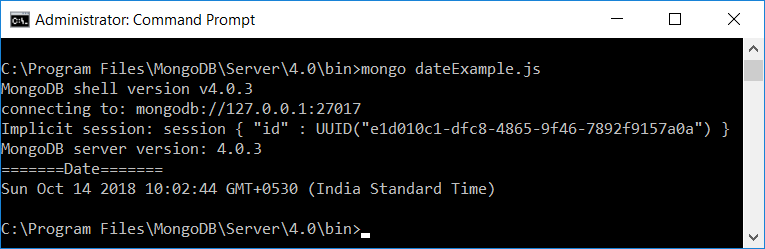
Create a JavaScript file named, dateExample.js in the bin directory and copy the following content to dateExample.js.
dateExample.js
// read Date as String
var date = Date()

print("=======Date=======")
// print date
print(date)
Run the Mongo Script file using mongo command in cmd or terminal as shown below.
Mongo Date Object
The Date can be obtained as an object in MongoDB using new keyword prior to Date() command.
Date Object in Mongo Shell
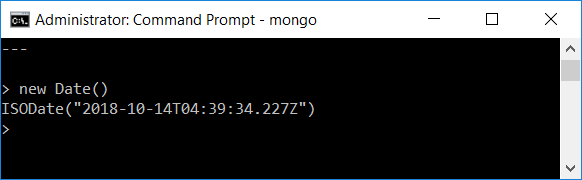
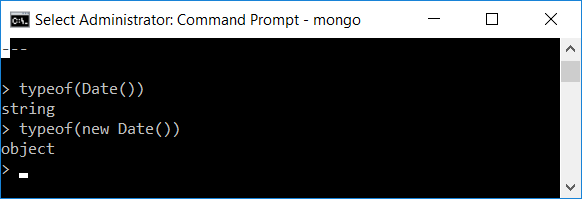
The difference between Date and new Date() might not be quite obvious with the above example. The reason being that Mongo Shell converts Date object to string while echoing to the screen. Using typeof() function we can clear the thoughts on Date type using typeof(Date()) and typeof(new Date()).
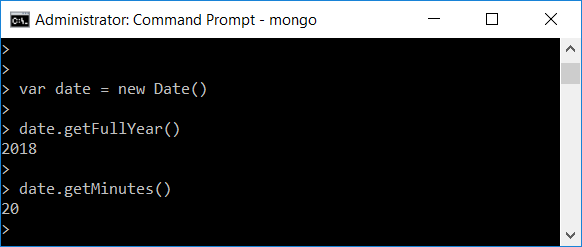
By storing the Date object in a variable, we can access its properties using functions like getFullYear(), getMinutes(), etc.
MongoDB Date Formats
While creating a new Date() object, you can specify the date format.
Following are the allowed date formats and each of them returns the resulting ISODate instance.
- new Date(“<YYYY-mm-dd>”)
- new Date(“<YYYY-mm-ddTHH:MM:ss>”)
- new Date(“<YYYY-mm-ddTHH:MM:ssZ>”)
- new Date(<milliseconds>) where <milliseconds> is an integer and specifies the number of milliseconds since the Unix epoch (Jan 1, 1970).
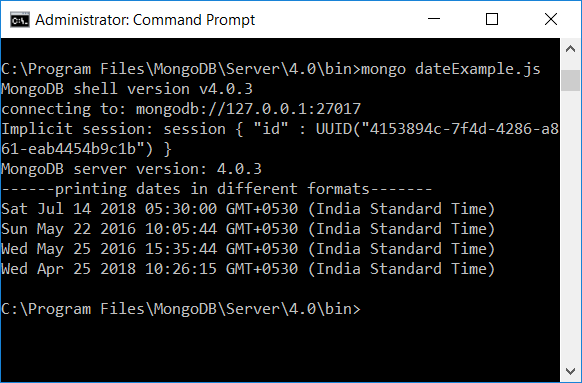
Following Mongo Script demonstrates the usage of Date Formats.
dateExample.js
var date1 = new Date("2018-07-14")
var date2 = new Date("2016-05-22T10:05:44")
var date3 = new Date("2016-05-25T10:05:44Z")
var date4 = new Date(1524632175894)

print("------printing dates in different formats-------")
print(date1)
print(date2)
print(date3)
print(date4)
Output
For predictable results, prefer an ISO 8601 date-time string with a timezone indicator. The trailing Z means UTC.
new Date("2026-07-22T10:30:00Z")A string without a timezone, such as 2026-07-22T10:30:00, may be interpreted using the environment’s local timezone. Include Z or an explicit offset when the exact instant matters.
Insert a BSON Date into a MongoDB Document
The following example inserts documents with a createdAt field stored as a BSON Date:
db.orders.insertMany([
    {
        orderNumber: "ORD-1001",
        createdAt: new Date("2026-07-20T08:30:00Z"),
        total: 1250
    },
    {
        orderNumber: "ORD-1002",
        createdAt: new Date("2026-07-21T14:15:00Z"),
        total: 840
    },
    {
        orderNumber: "ORD-1003",
        createdAt: new Date("2026-07-22T06:45:00Z"),
        total: 1620
    }
])
Use the same BSON type consistently for a date field. Mixing strings and BSON Date values in one field makes filtering, sorting, and indexing less reliable.
MongoDB Date Query Greater Than a Specific Date
Use $gt to find documents whose date is later than a specified instant:
db.orders.find({
    createdAt: {
        $gt: new Date("2026-07-21T00:00:00Z")
    }
})
Use $gte when the boundary date itself must be included:
db.orders.find({
    createdAt: {
        $gte: new Date("2026-07-21T00:00:00Z")
    }
})
MongoDB Date Query Less Than a Specific Date
Use $lt to find documents whose date is earlier than a specified instant:
db.orders.find({
    createdAt: {
        $lt: new Date("2026-07-22T00:00:00Z")
    }
})
Use $lte when the boundary instant must also match:
db.orders.find({
    createdAt: {
        $lte: new Date("2026-07-22T00:00:00Z")
    }
})
MongoDB Date Between Two Dates
To find documents between two dates, place both comparison operators on the same field. A half-open range using $gte for the start and $lt for the end is usually the clearest pattern:
db.orders.find({
    createdAt: {
        $gte: new Date("2026-07-21T00:00:00Z"),
        $lt: new Date("2026-07-23T00:00:00Z")
    }
})
This query includes all dates from the start boundary and excludes the end boundary. The half-open approach avoids relying on values such as 23:59:59.999 and works consistently with millisecond precision.
MongoDB Find by Date Without Matching the Time
A BSON Date always represents an instant in time, so matching a calendar day requires a start and end boundary. To find all documents for July 22, 2026 in UTC, query from midnight at the start of that day to midnight at the start of the next day:
db.orders.find({
    createdAt: {
        $gte: new Date("2026-07-22T00:00:00Z"),
        $lt: new Date("2026-07-23T00:00:00Z")
    }
})
If the required calendar day belongs to a local timezone, convert that local day’s start and end to UTC before building the query. For example, midnight in India Standard Time does not equal midnight UTC.
MongoDB Date Query for the Current Time
You can compare a field with the current date by constructing new Date() when the query runs. The following example finds records whose expiration date has already passed:
db.sessions.find({
    expiresAt: {
        $lt: new Date()
    }
})
The current time is calculated by the client or shell executing the query. Make sure the client system clock is correct.
MongoDB Date Query in Compass
MongoDB Compass accepts MongoDB query syntax in the Filter field. To find orders created on or after a date, enter:
{
    createdAt: {
        $gte: new Date("2026-07-21T00:00:00Z")
    }
}
To filter between two dates in Compass, use:
{
    createdAt: {
        $gte: new Date("2026-07-21T00:00:00Z"),
        $lt: new Date("2026-07-23T00:00:00Z")
    }
}
Confirm that the field is stored as a Date and not as a string. Compass displays BSON Date values with date-specific formatting, while string values remain text.
MongoDB Date Query with ISODate()
In MongoDB shell environments, you may also see ISODate() used to construct a date:
db.orders.find({
    createdAt: {
        $gte: ISODate("2026-07-21T00:00:00Z")
    }
})
For normal shell queries, ISODate("...") and new Date("...") can both represent a BSON-compatible date value. Application drivers use their language-specific date types rather than the shell helper.
Query MongoDB Date Fields Stored as Strings
If a field was stored as a string, a query using new Date() will not match it because the BSON types differ:
// Stored as a string, not a BSON Date
{
    createdAt: "2026-07-22T06:45:00Z"
}
ISO-formatted strings may appear to sort chronologically when every value uses the same format and timezone, but they still lack normal date semantics. For reliable date comparisons, aggregation, indexing, and date arithmetic, convert the field to BSON Date values.
The following aggregation example converts a valid date string before comparing it. It is useful for inspection or migration, but querying a converted expression may be less efficient than storing the field correctly:
db.orders.aggregate([
    {
        $addFields: {
            createdAtDate: {
                $convert: {
                    input: "$createdAt",
                    to: "date",
                    onError: null,
                    onNull: null
                }
            }
        }
    },
    {
        $match: {
            createdAtDate: {
                $gte: new Date("2026-07-21T00:00:00Z")
            }
        }
    }
])
Sort MongoDB Documents by Date
Use sort() with 1 for oldest to newest or -1 for newest to oldest:
// Oldest first
db.orders.find().sort({ createdAt: 1 })

// Newest first
db.orders.find().sort({ createdAt: -1 })
Create an Index for MongoDB Date Range Queries
If date filtering is common, create an index on the date field:
db.orders.createIndex({ createdAt: 1 })A single-field date index can support range filters and date sorting. For queries that also filter by another field, a compound index may be more suitable. Choose the field order according to the actual query pattern and confirm it with explain().
db.orders.find({
    createdAt: {
        $gte: new Date("2026-07-21T00:00:00Z"),
        $lt: new Date("2026-07-23T00:00:00Z")
    }
}).explain("executionStats")
Common MongoDB Date Query Mistakes
- Using
Date()instead ofnew Date():Date()returns a string, not a Date object. - Comparing a BSON Date with a string: the values have different BSON types and may not match.
- Ignoring timezone offsets: a local calendar day must be converted to the correct UTC boundaries.
- Using an inclusive end-of-day timestamp: prefer the next day’s start with
$lt. - Using only a lower boundary: a date-only query normally needs both the start of the day and the start of the following day.
- Mixing date formats in one field: use one BSON Date representation consistently.
MongoDB Date Query FAQs
How do I query a MongoDB date greater than a value?
Use $gt with a Date object, such as { createdAt: { $gt: new Date("2026-07-21T00:00:00Z") } }. Use $gte when the boundary should be included.
How do I query a MongoDB date between two dates?
Use $gte for the start and $lt for the end on the same field. For example, { createdAt: { $gte: startDate, $lt: endDate } }.
How do I find MongoDB documents by date without time?
Query from midnight at the start of the required day to midnight at the start of the next day. Use the timezone that defines the calendar day, then convert the boundaries to UTC when required.
Why does my MongoDB date query return no documents?
Check whether the field is stored as a BSON Date or a string, verify the timezone and date boundaries, and confirm that the comparison operators use Date objects rather than plain text.
Can I use the same date filter in MongoDB Compass?
Yes. Enter the MongoDB filter document in the Compass Filter field, including new Date() or another date representation supported by the active Compass query interface.
MongoDB Date Query QA Checklist
- Verify that every query compares a date field with a BSON Date value rather than an unrelated string type.
- Check that date-only examples use both a start boundary and the next day’s start boundary.
- Confirm that UTC markers and timezone offsets represent the intended calendar period.
- Use
$gtewith$ltconsistently for half-open date ranges unless inclusive boundaries are specifically required. - Confirm that the indexed field name matches the date field used in the query examples.
- Keep
Date()string behavior clearly separate fromnew Date()object behavior.
MongoDB Date Query Summary
Use new Date() to create BSON-compatible date values and comparison operators such as $gt, $gte, $lt, and $lte to filter them. For a date range, the common pattern is an inclusive start with $gte and an exclusive end with $lt. In this MongoDB Tutorial, we covered date strings, Date objects, ISO date formats, MongoDB Compass filters, date-only queries, sorting, indexing, and common date query errors.