 TutorialKart.com
MongoDB Locks
MongoDB Locks are used to coordinate concurrent reads, writes, metadata changes, and administrative operations on the same MongoDB server. In this tutorial, we shall learn how locking happens in MongoDB, the granular locking levels, the shared, exclusive, and intent lock modes, and how to inspect lock activity when an operation appears to wait.
MongoDB uses multi-granularity locking. An operation can lock a broad resource such as the whole mongod instance, or a narrower resource such as a database, collection, or document. In modern MongoDB deployments that use the WiredTiger storage engine, most ordinary read and write operations use intent locks at the global, database, and collection levels, while the storage engine handles document-level concurrency.
MongoDB Locking Levels: Global, Database, Collection, and Document
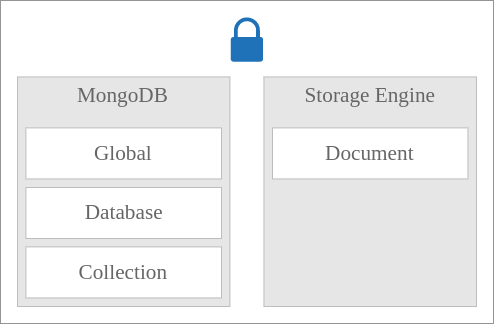
There are four granular levels of locking. They are:
- Global (MongoD instance) – All databases in the instance are affected by the lock.
- Database – Only the database on which the lock is applied is affected.
- Collection – Only the collection on which the lock is applied is affected.
- Document – Only the document on which the lock is applied is affected. With WiredTiger, this level is handled by the storage engine’s concurrency control.
Following figure depicts the level of locks that MongoDB provides, and the ones it allows Storage Engine to implement.
MongoDB Lock Modes: S, X, IS, and IX
There are four main MongoDB lock modes:
- S – Shared – This lock mode allows concurrent readers to share the resource. Shared mode is used for read access at the resource being locked.
- X – Exclusive – This lock mode does not allow other readers or writers to share the same resource. Exclusive mode is used when an operation must modify or control the resource directly.
- IS – Intent Shared – This lock mode indicates that the lock holder intends to read a resource at a finer level. For example, if IS is applied to a database, the operation may read a collection or document inside that database.
- IX – Intent Exclusive – This lock mode indicates that the lock holder intends to modify a resource at a finer level. For example, if IX is applied to a database, the operation may write to a collection or document inside that database.
In MongoDB diagnostic output, the same lock modes may be shown with short letters. Shared is shown as R, exclusive is shown as W, intent shared is shown as r, and intent exclusive is shown as w.
R  - Shared (S)
W  - Exclusive (X)
r  - Intent Shared (IS)
w  - Intent Exclusive (IX)
Why MongoDB Uses Intent Locks on Higher-Level Resources
Intent locks tell MongoDB that an operation is using a finer-grained resource inside a larger one. For example, if an operation writes to a collection, MongoDB must also mark the database and the global instance with intent exclusive locks. This prevents a conflicting operation from taking an incompatible broader lock while the finer-grained operation is active.
An intent lock does not necessarily mean that the whole database or whole collection is blocked. It means that a more specific read or write is happening below that level. This is why many read and write operations can still run concurrently even when you see r or w locks in lock-related output.
Example 1 – MongoDB Collection Locking for a Write Operation
Collection is granular level (or the resource) for this example.
Whenever an operation must take an exclusive write lock on a collection, Exclusive (X) lock mode must be applied on that collection.
As Collection is the resource in this scenario, Exclusive (X) lock mode must be applied on the Collection.
For all outer levels : Database, Global; Intent Exclusive (IX) must be applied.
When a write operation requires an exclusive collection lock, the control must do the following series of locks :
- The MongoD instance must be locked in Intent Exclusive (IX) lock mode, with an intent to apply write operation in a granular level (Database / Collection / Document).
- The Database must be locked in Intent Exclusive (IX) lock mode, with an intent to apply write operation in a granular level (Collection / Document).
- The Collection must be locked in Exclusive (X) lock mode, to apply write operation on the Collection.
For ordinary insert, update, and delete operations on WiredTiger, MongoDB commonly shows intent exclusive locks at the database and collection levels while WiredTiger manages document-level write conflicts. Therefore, treat the above sequence as the multi-granularity locking pattern for operations that need collection-level exclusive control, not as the lock pattern for every single document update.
Example 2 – MongoDB Document Locking for a Read Operation
Document is granular level (or the resource) for this example.
Whenever there is a read operation, Shared (S) lock mode must be applied on the resource being read.
As Document is the resource in this scenario, Shared (S) lock mode must be applied on the Document.
For all outer levels : Database, Global, Collection; Intent Shared (IS) must be applied.
When a read operation is triggered for a Document, the control must do the following series of locks :
- The MongoD instance must be locked in Intent Shared (IS) lock mode, with an intent to apply the read operation in a granular level (Database / Collection / Document).
- The Database must be locked in Intent Shared (IS) lock mode, with an intent to apply read operation in a granular level (Collection / Document).
- The Collection must be locked in Intent Shared (IS) lock mode, with an intent to apply read operation in a granular level (Document).
- The Document must be locked in Shared (S) lock mode, to apply read operation on the Document.
In a WiredTiger deployment, you normally see the intent shared locks at higher levels for a query, while document-level concurrency is handled below the collection layer by the storage engine.
MongoDB Lock Compatibility: Which Lock Modes Can Exist Together?
A resource could simultaneously be locked in multiple locking modes.
For example, a Collection could be simultaneously locked in Shared (S) and Intent Shared(S) lock modes.
However some of the lock modes could not exist simultaneously with other lock modes on a resource.
Following table illustrates the combination of lock modes which are allowed and which are not.
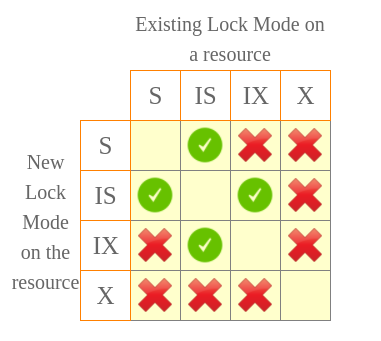
The key rule is that an Exclusive (X) lock conflicts with every other mode on the same resource. A Shared (S) lock can coexist with Intent Shared (IS), but not with Intent Exclusive (IX) or Exclusive (X). Intent locks are designed to allow compatible operations to continue while still protecting broader resources from conflicting locks.
Common MongoDB Operations and the Locks You Usually See
For document-level locking storage engines such as WiredTiger, common client operations often show intent locks at database and collection levels:
| MongoDB operation | Database lock mode | Collection lock mode | Meaning |
|---|---|---|---|
| Query documents | r / IS | r / IS | The operation intends to read data at a finer level. |
| Insert documents | w / IX | w / IX | The operation intends to write data at a finer level. |
| Update documents | w / IX | w / IX | The operation intends to modify matching documents. |
| Delete documents | w / IX | w / IX | The operation intends to remove matching documents. |
| Aggregation that reads data | r / IS | r / IS | The operation intends to read documents from the collection. |
Some administrative and metadata operations may require stronger locks than normal reads and writes. For example, collection rename, index builds, database-level commands, or operations that affect multiple databases may need locks that are broader or less compatible than a simple query.
WiredTiger Document-Level Concurrency and Write Conflicts
MongoDB’s default storage engine, WiredTiger, uses optimistic concurrency control for most read and write operations. Instead of blocking every operation at collection level, WiredTiger allows compatible work to proceed and detects conflicts when two operations try to modify the same data in an incompatible way.
When WiredTiger detects a write conflict, MongoDB can transparently retry the operation internally. This is one reason a workload can show intent locks at the collection level while still allowing many document operations to run concurrently.
Long-running operations may also yield locks. Yielding lets MongoDB avoid holding locks or storage transactions for too long, and it gives other operations a chance to proceed.
How to Check MongoDB Lock Activity with serverStatus, currentOp, profiler, and lockInfo
When an operation is slow, you can inspect lock activity with MongoDB diagnostic commands and tools. Useful places to look include db.serverStatus(), db.currentOp(), mongotop, mongostat, and the database profiler.
db.serverStatus().locks

db.currentOp({ "active": true })
If database profiling is enabled, profiler output can include a locks document with fields such as acquireCount, acquireWaitCount, timeAcquiringMicros, and deadlockCount. These fields help you identify whether an operation acquired locks many times, waited for locks, or spent noticeable time acquiring them.
db.setProfilingLevel(1, { slowms: 100 })

db.system.profile.find(
  { "locks": { $exists: true } },
  { op: 1, ns: 1, millis: 1, locks: 1 }
).sort({ ts: -1 }).limit(5)
The lockInfo command returns information about locks that are currently granted or pending on a mongod instance. It is mainly a diagnostic command and may not be supported in every hosted environment or cluster tier.
db.adminCommand({ lockInfo: 1 })How to Read MongoDB Lock Metrics Without Misdiagnosing a Slow Query
Lock metrics should be read together with query execution details. A slow query may be slow because it scans too many documents, lacks a useful index, waits for I/O, competes for CPU, or waits for locks. Do not assume that every slow operation is a locking problem just because a locks field appears in profiler output.
- Check
acquireWaitCount. A non-zero value means the operation had to wait because a conflicting lock was held. - Check
timeAcquiringMicros. This shows how much time was spent waiting to acquire locks. - Compare with
millis. If lock wait time is small compared with total runtime, the main issue may be query shape, indexing, or storage performance. - Check operation type. Administrative commands, index activity, and metadata operations can affect concurrency differently from normal reads and writes.
Common Mistakes When Learning MongoDB Locks
- Assuming every write takes a collection-level X lock. In WiredTiger, normal document writes usually use intent exclusive locks at higher levels and document-level concurrency below the collection layer.
- Reading
was a full write lock. In diagnostic output, lowercasewmeans Intent Exclusive (IX), not Exclusive (X). - Ignoring storage engine behavior. MongoDB’s lock hierarchy and the storage engine’s concurrency control work together.
- Blaming locks before checking indexes. A poorly indexed query can be slow even when lock wait time is low.
- Using
lockInfoas a general monitoring dashboard. It is a diagnostic command; for regular monitoring, use server metrics, profiler data, and MongoDB monitoring tools.
Official MongoDB References for Locking and Profiling
For deeper reference, see MongoDB’s documentation on concurrency and locking, database profiler lock fields, and the lockInfo command.
MongoDB Locks FAQ
What are MongoDB locks used for?
MongoDB locks coordinate concurrent operations so that reads, writes, metadata changes, and administrative commands do not corrupt or inconsistently modify shared resources.
What is the difference between S and X locks in MongoDB?
Shared (S) locks allow compatible readers to access the same resource. Exclusive (X) locks require exclusive access and conflict with other lock modes on the same resource.
What is an intent lock in MongoDB?
An intent lock shows that an operation intends to read or write at a finer level. IS means intent to read; IX means intent to write.
Does MongoDB lock the whole collection for every document update?
With WiredTiger, ordinary document updates generally use intent locks at global, database, and collection levels while the storage engine handles document-level concurrency and write conflicts.
How can I check whether MongoDB operations are waiting for locks?
Check lock-related fields in serverStatus, currentOp, profiler output, and diagnostic commands such as lockInfo. In profiler output, acquireWaitCount and timeAcquiringMicros are especially useful for identifying lock waits.
MongoDB Locks Tutorial QA Checklist
- Confirm that
S,X,IS, andIXare explained with MongoDB-specific examples. - Check that lowercase diagnostic letters
randware not described as full shared or exclusive locks. - Verify that WiredTiger document-level concurrency is distinguished from collection-level exclusive locking.
- Ensure slow-query troubleshooting does not blame locks without checking profiler wait fields and index usage.
- Keep the original MongoDB lock hierarchy images and the internal MongoDB Tutorial link available for readers.
Conclusion: Understanding MongoDB Shared, Exclusive, and Intent Locks
In this MongoDB Tutorial – MongoDB Locks, we have learnt about global, database, collection, and document-level locking; Shared (S), Exclusive (X), Intent Shared (IS), and Intent Exclusive (IX) lock modes; compatible and conflicting lock combinations; and practical ways to inspect MongoDB lock activity during troubleshooting.