 TutorialKart.com
What is Client in SAP
SAP Client is the highest hierarchical organizational unit within an SAP system that contains its own user master records, application data, customizing settings, and client-dependent tables. It is represented by a three-digit numerical key such as 000, 100, 200, or 300. When a user logs on to an SAP system, the user must enter the client number along with the user name, password, and logon language.
From a business point of view, a client can represent a separate corporate group, company environment, training area, test area, or production environment. Data entered in one SAP client is normally separated from data in another client, even when both clients exist in the same SAP system. For example, master data and transaction data created in client 100 will not automatically be available in client 200.
SAP client meaning in simple terms
In simple terms, a client in SAP is a self-contained working area inside an SAP system. Each client has its own users, business data, and many configuration settings. This separation helps organizations maintain different environments for development, testing, training, and production without mixing their business data.
For example, an SAP landscape may use one client for configuration work, another client for testing business processes, and another client for live production transactions. The exact client numbers depend on the organization’s SAP Basis design and system landscape.
Important SAP client characteristics
- Every SAP user’s access and authorizations must be assigned in the SAP client where the user works.
- A client helps differentiate development, quality, production, training, demo, and reference environments within the same SAP system or across different systems.
- Client-level data is valid for the organizational units maintained inside that client.
- Each client can have one or more company codes, plants and locations but there will be not have connection between clients.
- Business data created in one client is normally not visible in another client unless it is copied, transported, or integrated through an approved process.
- Client settings in SCC4 control important behavior such as client role, change permissions, and whether cross-client changes are allowed.
Client-dependent data and client-independent data in SAP
To understand SAP client administration clearly, it is useful to know the difference between client-dependent and client-independent data.
| Data type | Meaning in SAP client administration | Example |
|---|---|---|
| Client-dependent data | Data that belongs to a specific client and is separated from other clients. | User master records, most customizing settings, master data, and transaction data. |
| Client-independent data | Data or repository objects that can affect the whole SAP system, not just one client. | ABAP repository objects, some dictionary objects, and cross-client customizing. |
This distinction is important because some changes are restricted to one client, while cross-client changes can affect other clients in the same SAP system. For this reason, SCC4 settings should be maintained carefully by the SAP Basis team.
Standard clients delivered in SAP system
SAP delivers three standard clients i.e.
- 000
- 001
- 066
Client 000 is the SAP reference client. It contains standard SAP settings and should not be used for normal business transactions. Client 001 is commonly delivered as an initial client based on client 000. Client 066 was traditionally used for SAP EarlyWatch-related services in older systems. In many modern SAP landscapes, the usage of standard clients depends on the product version, support setup, and security policy followed by the organization.
In real projects, organizations usually create separate clients such as a development customizing client, quality testing client, training client, sandbox client, or production client. The number and purpose of each client should be decided before configuration begins.
When to create a new SAP client
A new SAP client is created when the organization needs a separate working area for a specific purpose. Common examples include implementation configuration, unit testing, integration testing, end-user training, production use, demo work, and sandbox practice.
- Create a development client when consultants need a controlled place to maintain configuration.
- Create a quality or test client when business processes must be tested before moving to production.
- Create a training client when end users need practice data without affecting live transactions.
- Create a production client only after the SAP landscape design, security design, transport path, and client copy strategy are finalized.
Before creating a new client in SAP using SCC4
Before you create a new client, confirm the purpose of the client, client number, logical system name, standard currency, client role, and change settings. The SAP Basis team should also check whether the client will be filled by local client copy, remote client copy, or another approved migration method.
- Choose a three-digit client number that follows the organization’s naming and landscape standard.
- Define the client role correctly, such as Customizing, Test, Production, Demo, Training/Education, or SAP Reference.
- Confirm whether changes should be allowed in the client or restricted.
- Confirm whether client-independent object changes are allowed or should be locked.
- Plan the client copy profile and source client before users start working in the new client.
How to create new SAP client
You can create new clients as per the organizational requirements in SAP Basis by using transaction code SCC4.
Step 1: – Enter SAP Tcode “SCC4” in the SAP command field and enter.

Step 2: – On display view “Clients” overview screen, click on display >> change icon.

Step 3: – Now click on new entries button for creation of new SAP client as per requirements.

Step 4: – On new entries clients overview screen, update the following details.
- Client: – Enter the 3 digits numerical key for creation of new SAP client and its description.
- Update city name to which client belongs to
- Update the logical system id that the client refers to.
- Update the std currency
- Choose the client role from the list (i.e. production, Test, Customizing, Demo, Training/Education, Sap reference).
- Under changes and transports for client specific object, choose appropriate option as per requirements
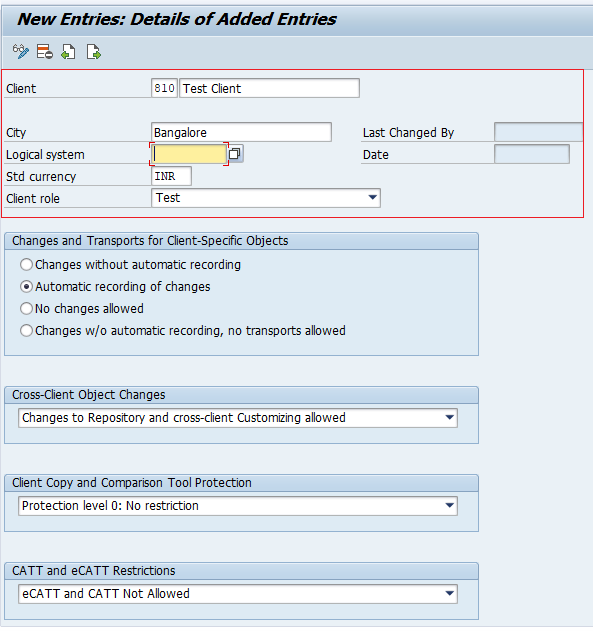
After maintaining all the required details, click on save button and save the configured new SAP client.
SCC4 field details used while creating an SAP client
The SCC4 client entry contains fields that control how the client behaves. The exact screen labels may vary slightly by SAP release, but the purpose of the main fields remains similar.
| SCC4 field | Purpose | Practical note |
|---|---|---|
| Client | Three-digit client key. | Use a number approved in the SAP landscape design. |
| Name / Description | Short description of the client. | Use a clear name such as Development Customizing, Quality Test, Training, or Production. |
| City | Location or business reference for the client. | This helps identify the client in administration screens. |
| Logical system | Logical system name assigned to the client. | Important for ALE, IDoc, integration, and system communication scenarios. |
| Standard currency | Default currency for the client. | Choose the currency based on business and project requirements. |
| Client role | Purpose of the client. | Examples include Production, Test, Customizing, Demo, Training/Education, and SAP Reference. |
| Changes and transports | Controls how client-specific changes are handled. | Use settings that match the transport strategy and project governance. |
| Cross-client object changes | Controls changes that can affect more than one client. | Restrict this carefully because cross-client changes can impact the whole system. |
After creating the SAP client in SCC4
Creating an entry in SCC4 only defines the client in the SAP system. The new client is usually empty until client copy or required setup activities are completed. After saving the SCC4 entry, the SAP Basis team commonly performs client copy, creates required users, checks profiles, validates logical system settings, and confirms transport settings.
- Use a suitable client copy method based on the source client and project requirement.
- Create or copy the required user master records so authorized users can log in.
- Check whether the logical system assignment is correct before integration testing begins.
- Confirm that client role and change options are suitable for the environment.
- Restrict production client changes according to the organization’s change control process.
Common SAP client copy transactions include SCCL for local client copy, SCC9 for remote client copy, and SCC8 for client export. The correct transaction depends on whether the source client is in the same system, another system, or part of an export/import process.
Common mistakes while creating SAP clients
- Creating a client without a clear purpose or landscape naming standard.
- Using an incorrect client role, especially for production and test clients.
- Allowing changes in a client that should be locked or controlled.
- Ignoring logical system assignment before ALE, IDoc, or integration setup.
- Assuming that SCC4 creation also copies master data and transaction data.
- Using standard clients such as 000 for normal project work or business transactions.
SAP client creation FAQ
What is the client in SAP?
A client in SAP is a separate working area inside an SAP system. It contains its own users, client-dependent configuration, master data, and transaction data. Users enter the client number during SAP logon.
Which transaction code is used to create a new SAP client?
Transaction code SCC4 is used to define and maintain clients in SAP. After the client is created in SCC4, additional activities such as client copy and user setup may be required.
Does SCC4 copy data into the new SAP client?
No. SCC4 creates and maintains the client definition. It does not automatically copy business data, customizing, or users into the new client. Client copy transactions such as SCCL, SCC9, or SCC8 may be used depending on the requirement.
Can one SAP system have multiple clients?
Yes. One SAP system can have multiple clients. Each client is identified by a three-digit number and is normally used for a separate purpose such as development, testing, training, or production.
What is the difference between client 000 and a project client?
Client 000 is a standard SAP reference client delivered by SAP. A project client is created by the organization for implementation, testing, training, or production work. Standard clients should not be used for normal business transactions.
Editorial QA checklist for this SAP client tutorial
- Confirm that the tutorial explains SAP client as a three-digit, self-contained environment inside an SAP system.
- Confirm that SCC4 is described as the transaction for maintaining client definitions, not as a client copy transaction.
- Confirm that standard clients 000, 001, and 066 are mentioned with practical caution.
- Confirm that client-dependent and client-independent data are clearly separated.
- Confirm that the post warns readers to plan client role, logical system, change settings, and client copy before using the new client.