 TutorialKart.com
Plant in SAP is a key logistics organizational unit used in SAP MM, SD, PP and related modules. In Materials Management, a plant normally represents a factory, branch, depot, maintenance location, or other physical or logical location where materials are planned, procured, produced, stored, or issued.
In SAP, Plant is an independent, physical and highest organizational unit in MM module. It can be operational unit or manufacturing unit or a sales branch of an organization. From material management view, plant can be defined as a location that holds valued stock.
Plant is responsible for planning, procurement, distribution of goods & services to customers or other resources of an organization under one company code.
Plant in SAP MM and Enterprise Structure
A plant is part of the SAP enterprise structure. It is not only a name used in master data; it affects procurement, inventory management, material valuation, production planning, delivery processing, and stock transfers. Because of this, the plant code should be planned carefully before it is created in a development or customizing client.
| SAP area | How plant is used |
| Materials Management | Plant is used in purchasing, goods receipt, goods issue, stock overview, physical inventory, and material master data. |
| Inventory Management | Stock can be managed at plant and storage location level. |
| Material Valuation | If valuation level is set as plant, each plant acts as a valuation area for material stock values. |
| Sales and Distribution | Delivering plant can be used to determine from where goods are supplied to customers. |
| Production Planning | Plant can represent a production facility where planning and manufacturing activities are carried out. |
In standard SAP customizing, plant details are stored in the plant master customizing table T001W. The transaction code commonly used to define, copy, delete, or check a plant is OX10.
Before You Create a Plant in SAP Using OX10
Before defining a plant, confirm the business meaning of the plant code. A plant may represent a manufacturing unit, a warehouse, a distribution branch, or another logistics location. Also confirm whether the plant will be assigned to the correct company code and whether it will be used for purchasing, sales, production, or inventory only.
For example, in this tutorial we create the following sample plants.
| Plant | Name | Example business meaning |
| TKBL | TKBL – Bangalore Plant | Plant located in Bangalore |
| TKUS | TKUS – US Plant | Plant located in the United States |
A plant key in SAP is normally a four-character code. Use a naming convention that is easy to understand and does not conflict with other plants in the system.
How to Create Plant in SAP
In our previous training tutorials, we have learned how to define valuation level in SAP. In this SAP tutorial you will learn how to define plant in SAP.
| Plant | Name |
| TKBL | TKBL – Bangalore Plant |
| TKUS | TKUS – US Plant |
You can create plant by using one of the following navigation method.
- Transaction code: – OX10
- Menu_Path: – SPRO > IMG > Enterprise Structure > Definition > Logistics – General – Define, copy, delete, check plant.
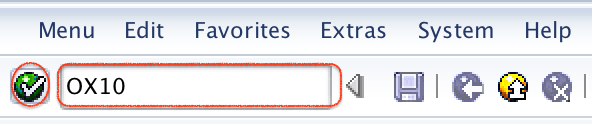
Step 1) Enter T_Code “OX10” in the command and click on execute.
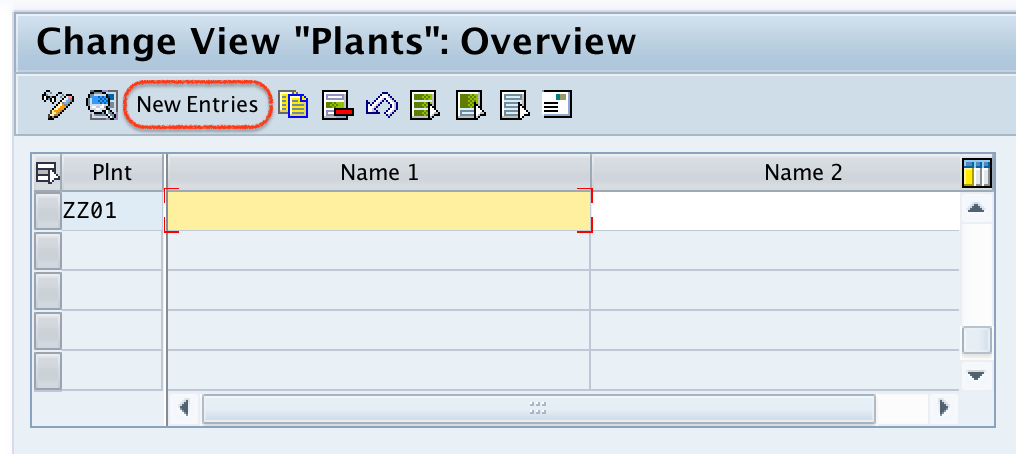
Step 2) On change view plants overview screen, click on new entries button to define new plant code as per the organizational requirements.
Step 3) On new entries screen, update the following details.
- Plant: – Enter the four digits key that identifies the plant in SAP
- Name: – Update the descriptive name of a plant.
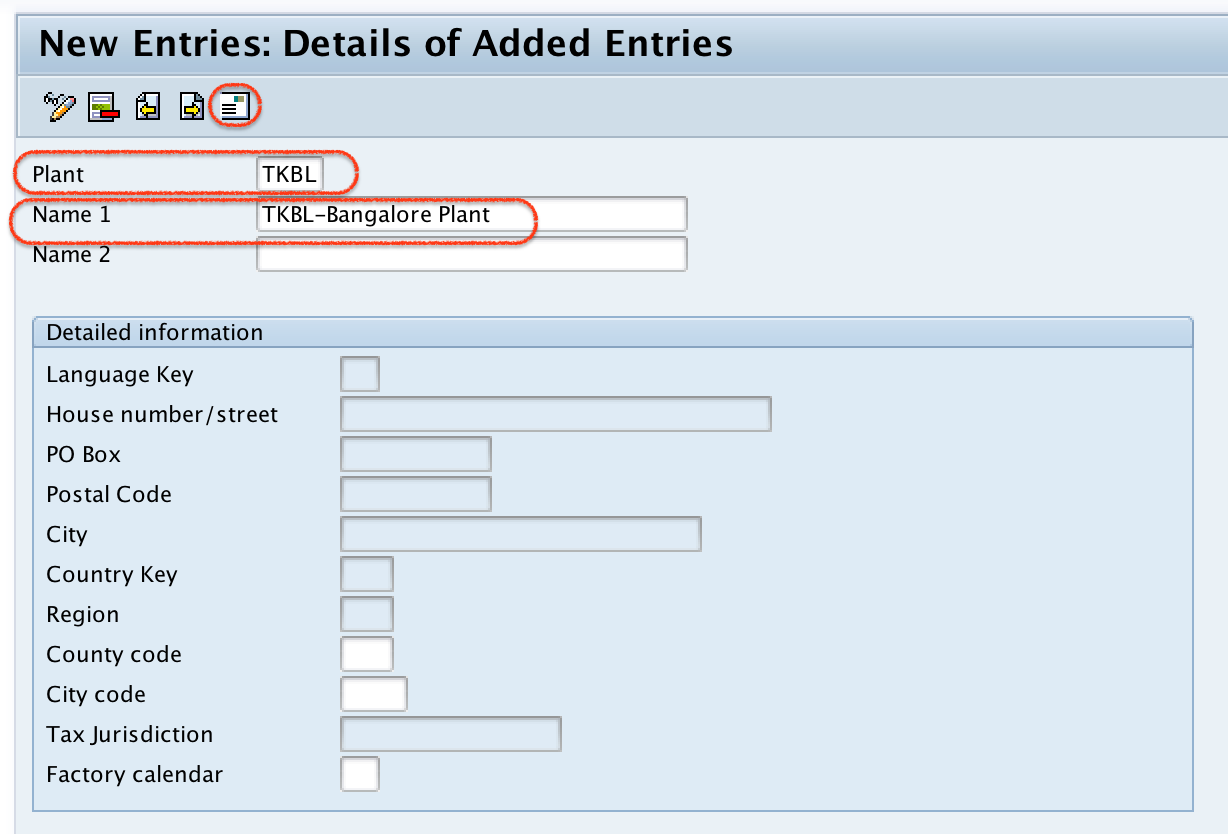
After updating plant code and description, click on address button to update the address of plant.
Step 4) Now update all the required and mandatory details in the address screen.
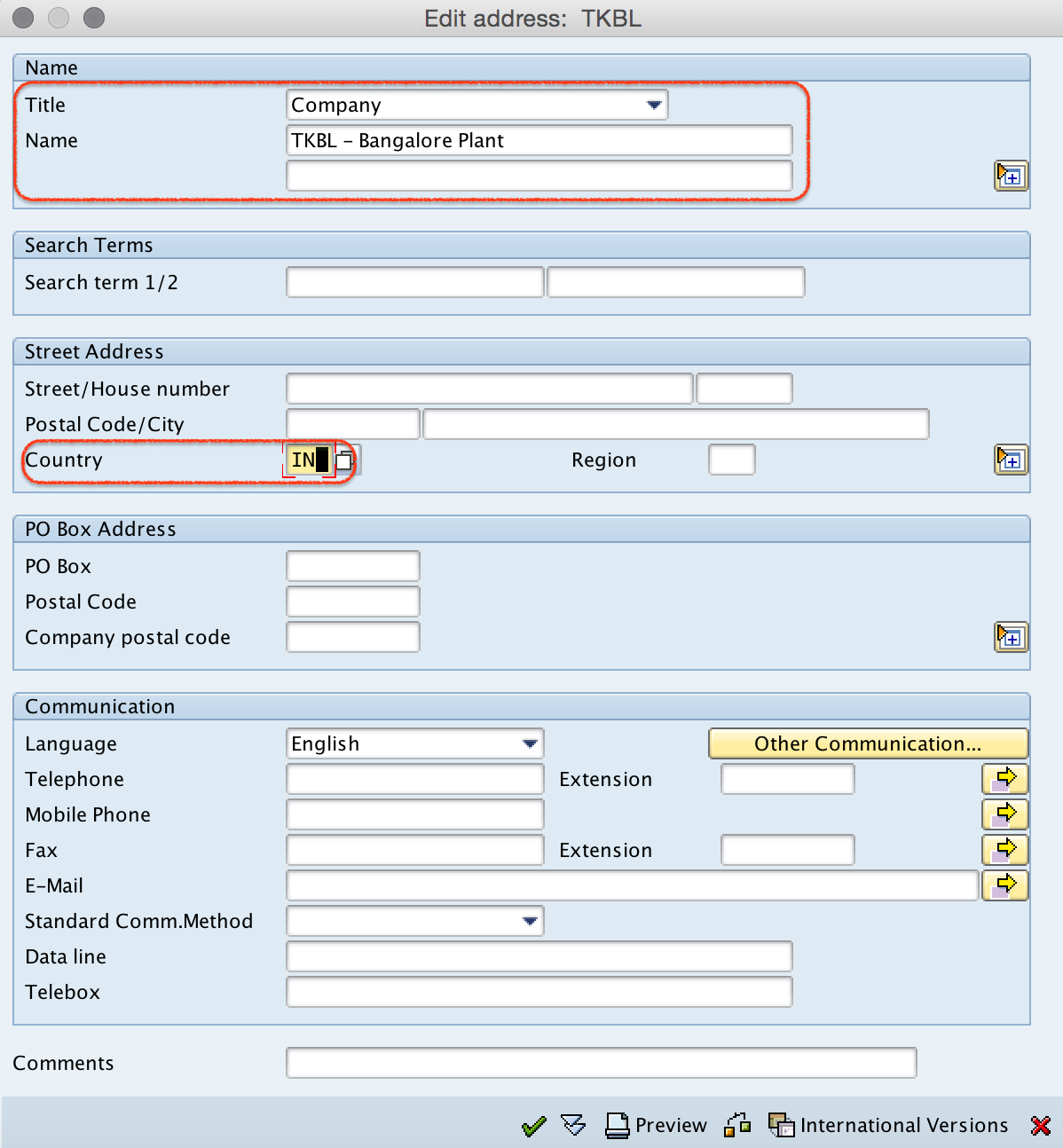
Click on save button, choose customizing request and save the configured plant details.
Now click on next entry button (F8) and similarly create another plant TKUS with required details.
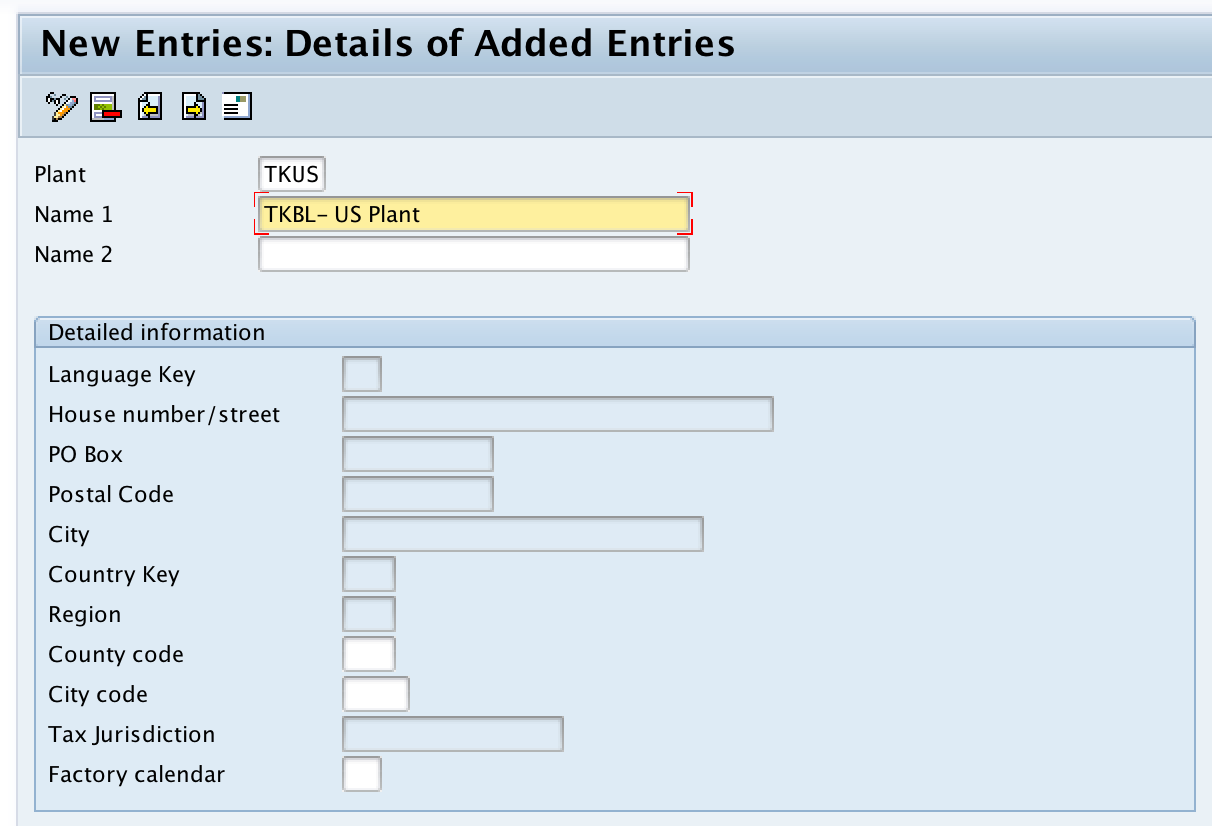
Successfully we have created new plant in SAP.
Assign Plant to Company Code After Defining Plant in SAP
Creating a plant in OX10 only defines the plant. For regular business use, the plant must also be assigned to a company code. A company code can have multiple plants, but a plant is normally assigned to one company code for accounting and logistics integration.
Use the following IMG path to assign plant to company code.
- SPRO > IMG > Enterprise Structure > Assignment > Logistics – General > Assign plant to company code
This assignment is important because plant-level logistics transactions such as procurement, inventory postings, and stock movements may create accounting documents based on the company code relationship.
Plant, Storage Location, Company Code and Valuation Area Difference
Many SAP MM beginners confuse plant with storage location, company code, and valuation area. The difference is important during enterprise structure configuration.
| Object | Meaning in SAP | Example |
| Company Code | Legal accounting unit for which financial statements can be created. | TK01 |
| Plant | Logistics unit where materials are procured, stored, produced, issued, or delivered. | TKBL |
| Storage Location | Subdivision of a plant where stock is physically or logically stored. | RM01, FG01 |
| Valuation Area | Level at which material stock is valuated. It can be at plant level or company code level depending on configuration. | Plant-level valuation for TKBL |
How Plant Is Determined in SAP Transactions
Plant determination depends on the SAP process. In purchasing, the plant may be entered manually in a purchase requisition or purchase order, or proposed from master data and user defaults. In inventory management, the plant is entered with the movement transaction because the stock movement must know which plant stock is affected.
In sales processes, the delivering plant can be determined from master data such as customer-material information, customer master, and material master settings, depending on the system configuration. If the proposed plant is not correct, users normally check the relevant master data and assignment settings.
Plant-to-Plant Stock Transfer in SAP MM
A plant can also be used in stock transfer processes. For example, goods may be transferred from plant TKBL to plant TKUS. Depending on business requirements, the stock transfer may be handled as a simple inventory movement, a stock transport order, or a more detailed intercompany process.
When stock is transferred between plants, SAP needs both the supplying plant and the receiving plant. If the plants belong to different company codes, accounting and intercompany settings may also be involved.
Common Issues While Defining Plant in SAP
If the plant does not work as expected after OX10 configuration, check these points before testing business transactions.
- Plant code already exists: Use a new four-character plant key or copy from an existing plant if that is the approved project approach.
- Plant not assigned to company code: Complete the assignment under Enterprise Structure assignment settings.
- Address is incomplete: Maintain the required plant address fields because they may be used in forms, output, and logistics documents.
- Valuation level not understood: Check whether valuation is at plant level or company code level before material valuation testing.
- Missing purchasing or sales assignments: If the plant is used for procurement or delivery, maintain the required assignments for those processes.
FAQ on Plant in SAP and OX10
What is OX10 in SAP?
OX10 is the transaction code used to define, copy, delete, and check plant in SAP Customizing. It is commonly used during SAP enterprise structure setup for logistics.
Which SAP table stores plant details?
Plant details are stored in table T001W. This table contains plant master customizing data such as plant code, name, and related settings.
Can one company code have more than one plant in SAP?
Yes. One company code can have multiple plants. For example, a company code can have separate plants for Bangalore, Chennai, Mumbai, or different countries, depending on the business structure.
Is plant the same as storage location in SAP MM?
No. A plant is a higher-level logistics unit. A storage location is a subdivision within a plant where stock is stored. One plant can have multiple storage locations.
What should be done after creating a plant in OX10?
After creating a plant, assign it to the correct company code and maintain other required assignments, such as purchasing, sales, storage location, or valuation-related settings, depending on the process scope.
Editorial QA Checklist for SAP Plant Configuration Tutorial
- Confirm that OX10 is shown as the transaction for defining, copying, deleting, and checking plant.
- Confirm that the plant code example uses a four-character key such as TKBL or TKUS.
- Check that plant creation and plant assignment to company code are explained as separate configuration activities.
- Verify that the difference between plant, company code, storage location, and valuation area is clear.
- Ensure that any plant-to-plant stock transfer explanation mentions both supplying and receiving plants.