 TutorialKart.com
How to Maintain Storage Location in SAP MM Using OX09
What is Storage Location in SAP?
Storage location is the sub-division of plant where the stocks are physically stored and maintained within a plant. Each storage location can have its own address within a plant.
- It is required to maintain at least one storage location for one plant.
- One plant can have number of storage locations.
In SAP MM enterprise structure, the storage location is defined below the plant level. A plant can represent a factory, branch, depot, warehouse site, or other logistics unit. Storage locations are then used to separate stock inside that plant, for example raw material store, finished goods store, returns area, quality hold area, or scrap location.
Storage Location in SAP MM Enterprise Structure
The storage location key is maintained for a specific plant. The same storage location code can be used in different plants, but it is treated separately because the plant and storage location combination identifies where the stock is kept.
| SAP element | Purpose in inventory management | Example |
|---|---|---|
| Company Code | Legal accounting unit | 1000 |
| Plant | Logistics unit where procurement, production, or storage is planned | 1000 |
| Storage Location | Place inside the plant where stock is stored | RM01, FG01, 0001 |
| Material Stock | Quantity maintained at plant and storage location level | Material A: 50 EA in RM01 |
Before maintaining a storage location, make sure the plant already exists in the SAP system. If the plant is not defined, the storage location cannot be created for that plant.
How to Define Storage Location in SAP
You can configure storage location by using one of the following navigation method.
- Transaction code: – OX09
- Menu path: – SPRO > IMG > Enterprise Structure > Definition > Material management > Maintain Storage Location.
Transaction code OX09 is the direct customizing transaction for maintaining storage locations in SAP. You can also reach the same configuration activity through the SPRO implementation guide path.
Step 1: Open SAP transaction code OX09 for storage location configuration
Step 1) Enter T-code “OX09” in the SAP command field and enter.
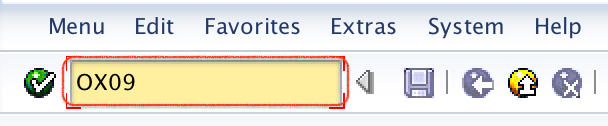
If you are working through the IMG menu, use the SPRO path mentioned above and choose Maintain Storage Location. Both methods open the same storage location maintenance activity.
Step 2: Enter the plant key for the SAP storage location
Step 2) Now you are prompted to enter the plant key, update the plant code in the given work area field as shown below and press enter to continue.
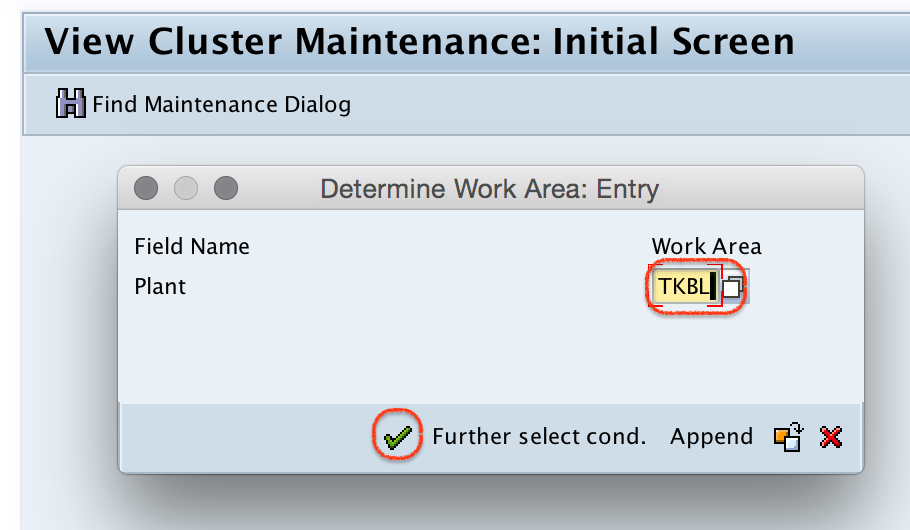
The plant entered here controls where the new storage location will be created. Always confirm the plant code before saving, especially in systems that contain multiple plants with similar descriptions.
Step 3: Choose New Entries for SAP storage location creation
Step 3) On change view “storage locations” overview screen, click on new entries button to define the new storage locations as per requirements.
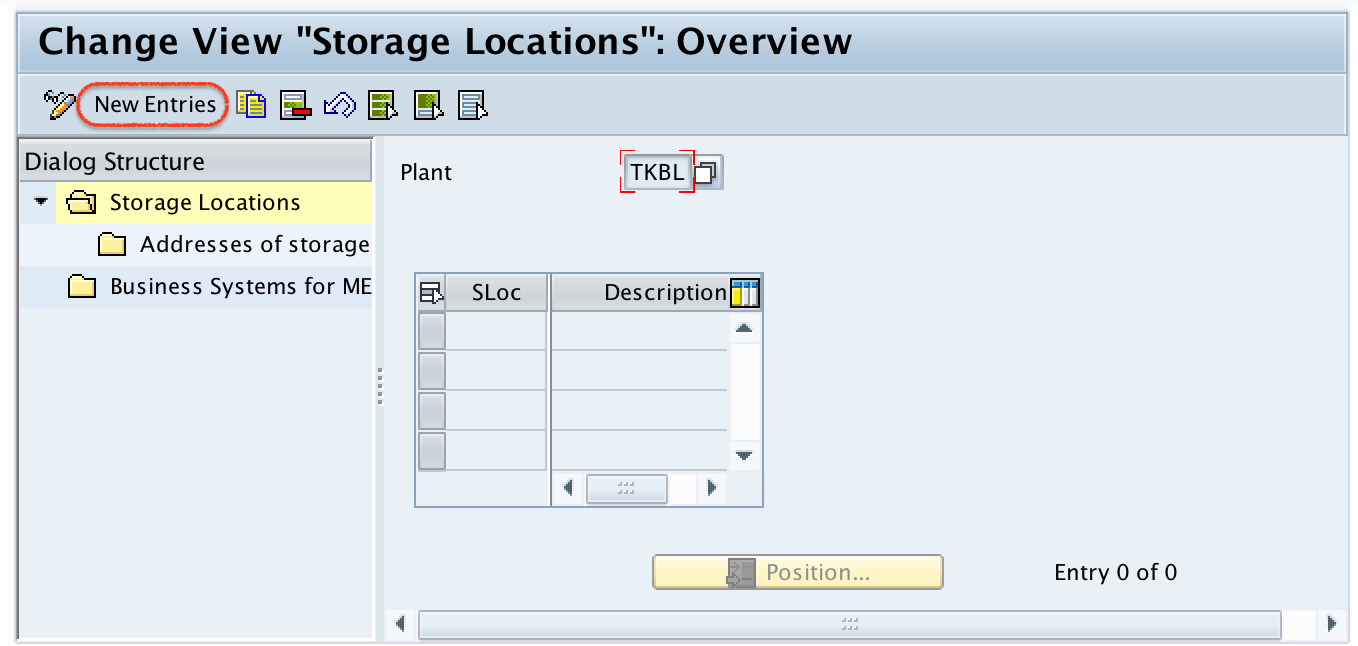
Use New Entries when creating a new storage location. If you are only correcting the description or address of an existing storage location, select the existing row and change the required details.
Step 4: Enter the SAP SLoc key and storage location description
Step 4) On new entries storage location screen, update the following details.
- SLoc: – Enter the four digits key that identifies the storage location in SAP.
- Description: – Update the description of storage location.
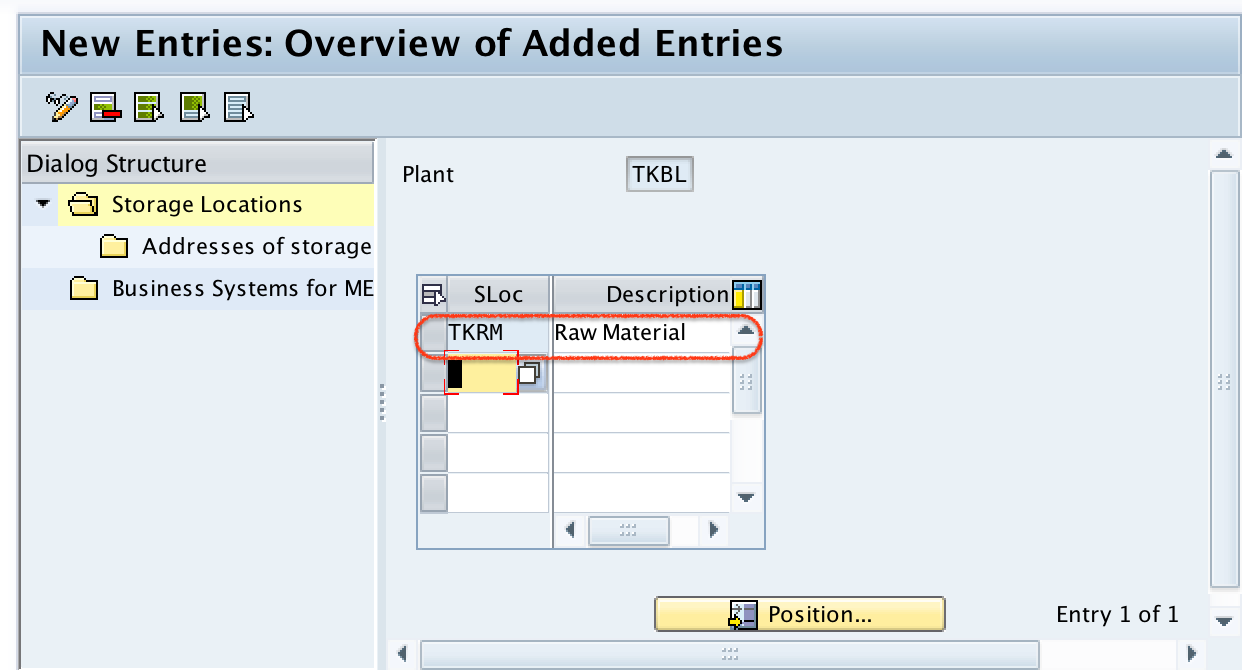
The SLoc field is normally maintained as a four-character key. Use a naming pattern that your organization can understand, such as RM01 for raw material storage, FG01 for finished goods, or Q001 for quality inspection stock area. Avoid creating unclear storage location codes that are difficult to identify during goods receipt, goods issue, transfer posting, and physical inventory.
Step 5: Maintain address details for the SAP storage location
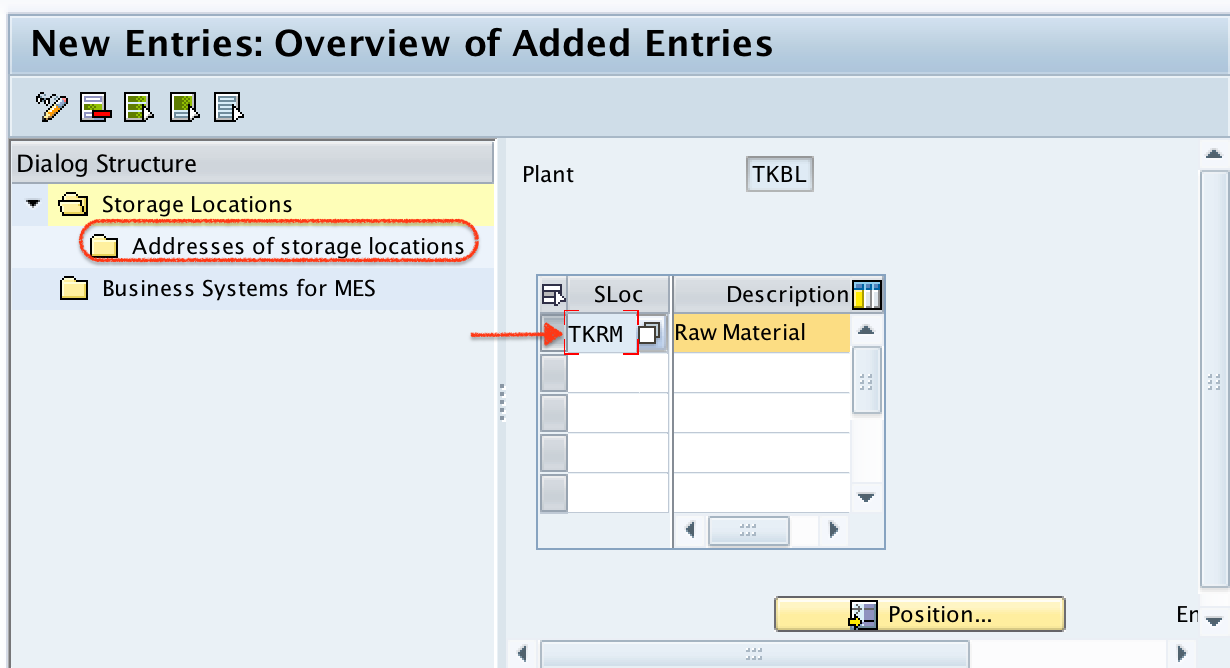
Step 5) Now select the storage location key and click on address of storage location in the dialogue structure.
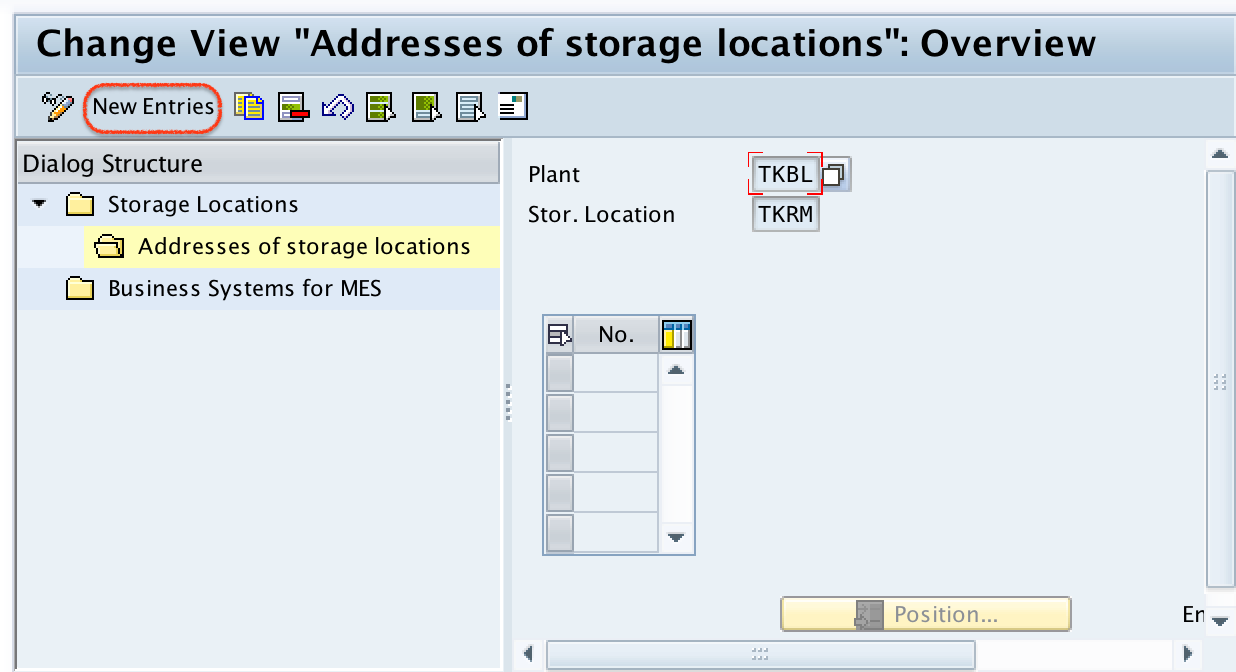
On change view addresses of storage locations overview screen, click on new entries button to update a number for the storage location address.
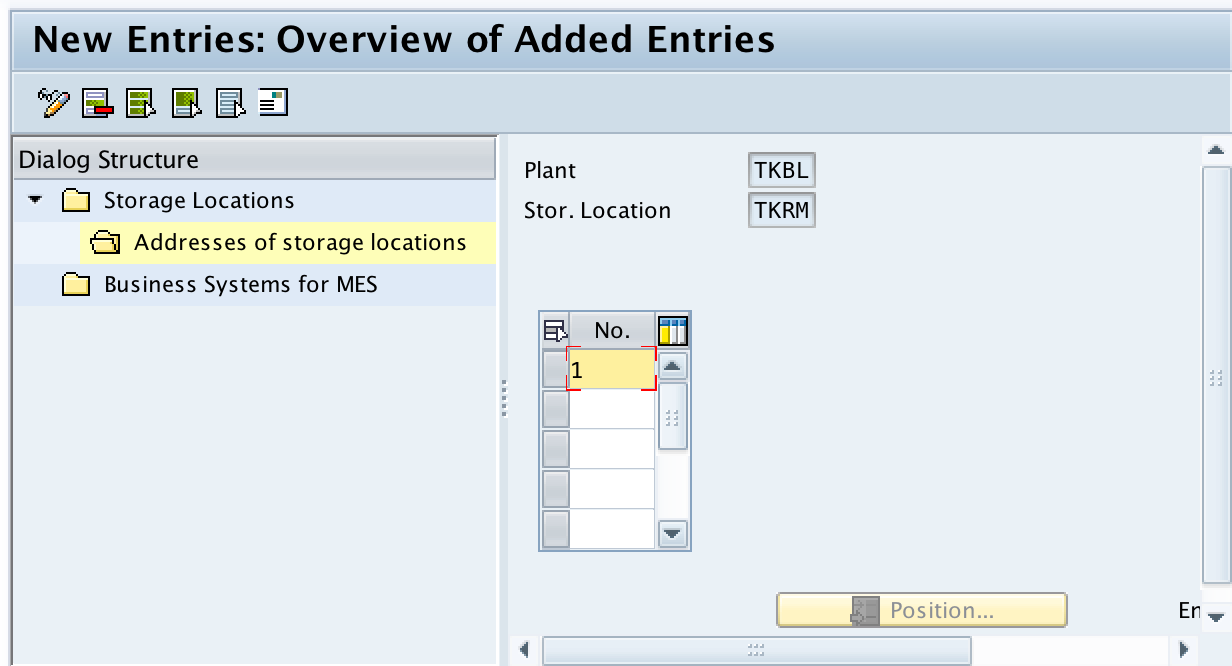
Update the number in the field No, you can update up to three characters. After updating No, press enter to continue and you are directed to another screen for the entry of secondary information.
Update the required details like details address with telephone no, city, etc.
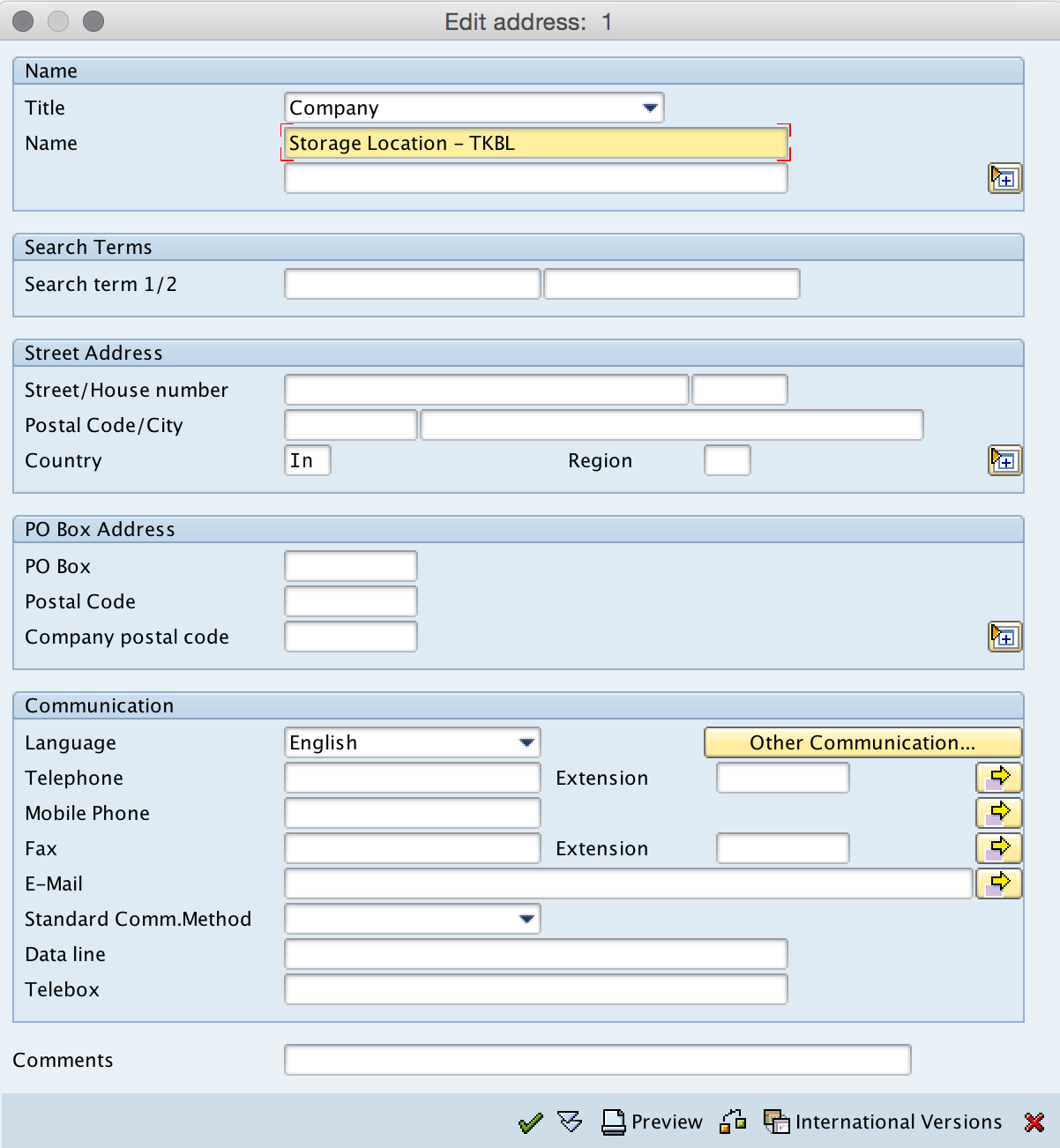
Storage location address details are useful when business documents, warehouse communication, or external references need the exact storage point address. If your company does not use separate addresses for storage locations, maintain only the required fields according to your project design.
Step 6: Save the SAP storage location and capture the customizing request
After updating all the required details, click on save button and save the configured storage location details.
In a customizing client, the system may ask for a transport request. Select the correct customizing request so that the storage location configuration can be moved from development to quality and production according to your SAP landscape process.
Successfully we have maintained storage location in SAP systems.
Important SAP MM Points to Check After Creating Storage Location
Creating the storage location in OX09 is only the enterprise structure step. Depending on your business process, additional checks may be required before the storage location is used in transactions.
- Material master views: Confirm that the material is extended to the required plant and storage location where needed.
- Goods movement testing: Test goods receipt, transfer posting, and goods issue for the plant and storage location combination.
- MRP relevance: Check whether storage location MRP settings are required for planning.
- Physical inventory: Confirm whether the storage location will be counted separately during inventory count.
- Authorization: Ensure users have the required authorization to post or display stock for the plant and storage location.
Common SAP Storage Location Maintenance Mistakes
- Creating duplicate meanings: Do not create multiple storage locations that represent the same physical area unless there is a clear business reason.
- Using unclear SLoc codes: Codes such as 0001, 0002, and 0003 are valid, but descriptions must clearly explain the business purpose.
- Selecting the wrong plant: A storage location is maintained for a plant, so an incorrect plant entry creates the storage location in the wrong part of the enterprise structure.
- Skipping transport control: In project systems, storage location changes should be captured in the correct customizing transport.
- Ignoring downstream transactions: Test the storage location in inventory transactions before handing it over to users.
SAP Storage Location FAQ
What is the transaction code to maintain storage location in SAP?
The transaction code to maintain storage location in SAP is OX09. You can also use the SPRO IMG path under Enterprise Structure, Definition, Material Management, Maintain Storage Location.
Is storage location created under plant in SAP MM?
Yes. A storage location is created under a plant. The plant and storage location combination is used to identify where stock is physically stored and managed.
How many characters are used for SAP storage location key?
The storage location key is maintained as a four-character key in the SLoc field. The description should clearly identify the physical or logical storage area.
Can one plant have multiple storage locations in SAP?
Yes. One plant can have multiple storage locations. For example, a plant can have separate storage locations for raw materials, finished goods, returns, quality stock, and scrap.
Is MM17 used to create storage location in SAP?
No. MM17 is used for mass maintenance of material master data. Storage location configuration is maintained through OX09 or the relevant SPRO enterprise structure path.
SAP Storage Location Editorial QA Checklist
- The tutorial clearly states that storage location is maintained under a plant.
- The OX09 transaction code and SPRO navigation path are both included.
- The SLoc field is explained as a four-character storage location key.
- The article preserves the step-by-step sequence: enter plant, choose new entries, enter SLoc and description, maintain address, and save.
- The FAQ distinguishes OX09 storage location maintenance from MM17 material master mass maintenance.
- The troubleshooting notes remind the editor to check plant selection, transport request, material extension, and goods movement testing.