 TutorialKart.com
In this SAP tutorials article, you will learn what a company code in SAP is, how it differs from a company, and how to define company code TK01 for TK Software Limited using transaction code OX02. The steps below focus on the basic company code definition used in SAP FI configuration before follow-up assignments such as company, chart of accounts, fiscal year variant, and posting period variant.
What is company code in SAP FI?
A company code in SAP is the smallest organizational unit of external accounting for which a complete, self-contained set of accounts can be prepared. Financial transactions are posted at company code level, and financial statements such as the balance sheet and profit and loss statement are created for a company code. SAP Help describes company code in this accounting context in its Company Code documentation.
- The definition of company code in SAP is mandatory for financial accounting configuration.
- At least one company code must be created to implement the SAP financial accounting module.
- The company code is usually aligned with a legal entity, branch, or reporting unit based on the organization’s statutory reporting needs.
- The company code key is a four-character alphanumeric identifier such as TK01, 1000, or IN01.
Company code vs company in SAP
The terms company and company code are related, but they are not the same in SAP configuration. A company code is used for day-to-day FI postings and statutory financial statements. A company, sometimes called company ID, is used to group one or more company codes for consolidated reporting and legal organization requirements.
| Configuration object | What it represents in SAP | Common use |
|---|---|---|
| Company code | Independent accounting unit for which complete books can be maintained | FI postings, balance sheet, profit and loss statement, tax and local reporting |
| Company | Higher-level legal or consolidation unit that can be assigned to company codes | Group reporting and consolidation structure |
For example, a group company may have separate company codes for India, the United States, and Germany if each unit needs its own statutory books. After defining the company code, you can continue with the assignment step explained in assign company code to company in SAP.
SAP company code configuration path, transaction code, and table reference
You can define company code in SAP by using the IMG navigation path or by entering the transaction code directly.
- Navigation: SPRO → IMG → Enterprise Structure → Definition → Financial Accounting → Edit, Copy, Delete, Check Company Code
- Transaction code: OX02
- Company code table commonly used for reference: T001
- Related company data table reference: T880
In project configuration, consultants often copy an existing sample company code and then adjust dependent settings. This tutorial uses New Entries to show the basic company code fields clearly.
How to define company code in SAP using OX02
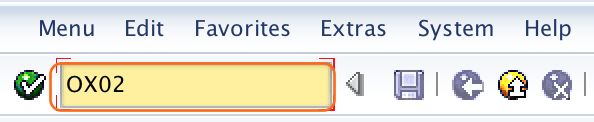
Step 1) Enter transaction code OX02 in the SAP command field and press Enter to continue.
Step 2) On the change view Company Code: Overview screen, SAP displays the existing company codes and their names. Click New Entries to create a new company code as per the organization requirement.

Step 3) On the new entries company code screen, update the following company code details carefully.
- Company code: Enter a four-character alphanumeric code that identifies the company code in SAP, for example TK01.
- Company name: Update the official name of the company or reporting unit.
- City: Enter the city in which the company code is located. spaceman slot
- Country: Enter the country key. Press F4 for possible entries and select the required country code from the list.
- Currency: Enter the local currency, also called home currency, used for company code reporting.
- Language: Enter the default language key. For this example, the language key is English EN.
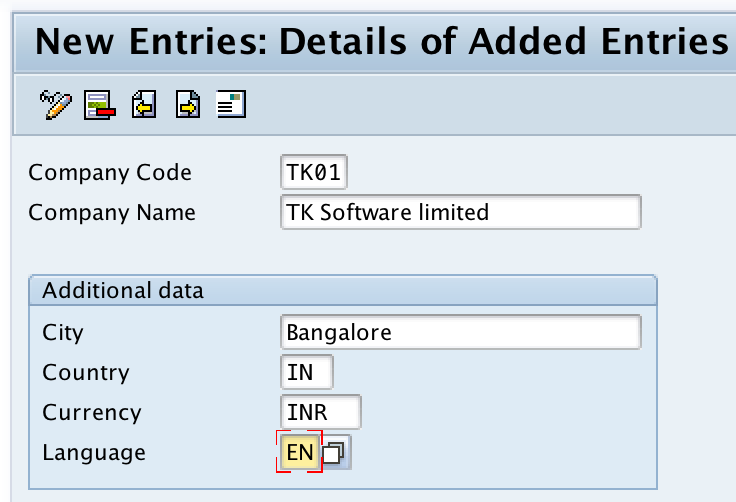
Step 4) After updating the required company code details, click the Save button to save the configured data.
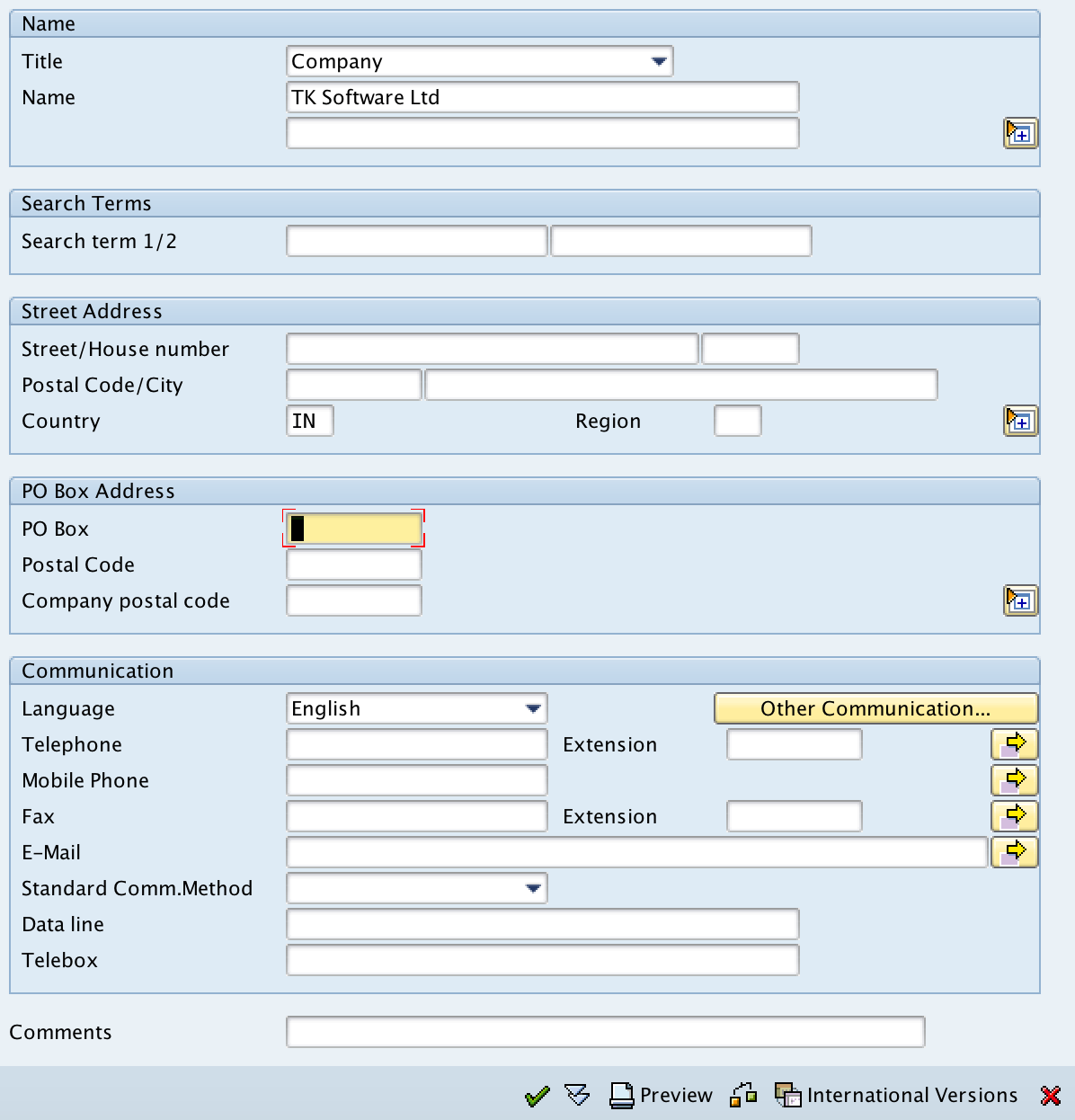
SAP then prompts you to maintain the full company address. Enter the required address details, such as street, postal code, city, region, and country details, and press Enter to continue.
Step 5) SAP prompts for a customizing transport request. Select or create the appropriate transport request and save the configuration. slot garansi kekalahan
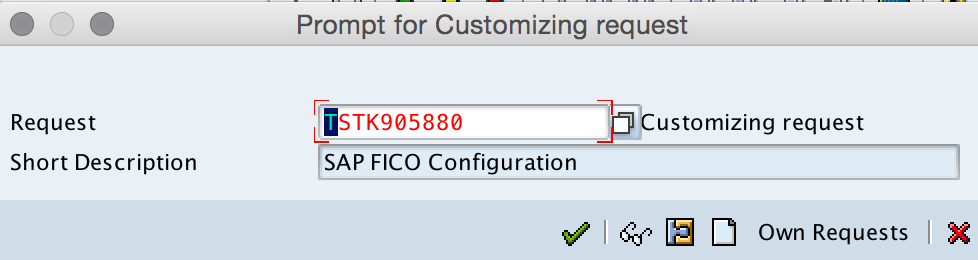
The company code TK01 is now created in the SAP system. The new company code can be used only after the required related FI settings and enterprise structure assignments are completed.
Recommended checks after creating company code TK01 in SAP
Creating a company code is the first step. Before using it for postings, review the basic configuration dependencies that normally follow company code creation.
- Assign company code to company: Link the company code to the correct company ID if consolidated reporting is required.
- Maintain global parameters: Review company code global settings such as chart of accounts, fiscal year variant, posting period variant, and field status variant based on your project design.
- Review local currency: Confirm the local currency before transactional postings are made.
- Check country-specific settings: Verify that the country key supports the tax, address, and reporting requirements for the legal entity.
- Transport sequence: Move the company code and dependent FI configuration through the correct transport path.
Common mistakes while defining company code in SAP
- Using a company code key that does not follow the project’s naming convention.
- Selecting the wrong country key, which can affect address format, tax settings, and country-specific behavior.
- Selecting the wrong local currency and trying to correct it after postings have started.
- Creating the company code but not completing the assignment to company and other FI global settings.
- Saving the configuration in the wrong transport request, which can delay movement to quality or production systems.
Company code in SAP: editorial QA checklist
- Does the tutorial clearly define company code as the FI organizational unit for complete books and financial statements?
- Does the configuration path mention both SPRO IMG navigation and transaction code OX02?
- Are the required OX02 fields explained with SAP-specific meaning: company code, company name, city, country, currency, and language?
- Does the article distinguish company code from company before linking to the assignment step?
- Does the tutorial warn readers to validate country and local currency before postings are made?
FAQs on company code in SAP
What is the difference between company and company code in SAP?
A company code is the FI organizational unit for accounting postings and legal financial statements. A company is a higher-level unit used to group company codes for legal organization or consolidation purposes.
Where do I find company code configuration in SAP?
You can find company code configuration by using transaction code OX02 or by following SPRO → SAP Reference IMG → Enterprise Structure → Definition → Financial Accounting → Edit, Copy, Delete, Check Company Code.
How do I assign company code to company in SAP?
After creating the company code, use the financial accounting assignment activity in Enterprise Structure to assign the company code to a company. You can follow the detailed next step here: assign company code to company in SAP.
Why is company code mandatory in SAP FI?
Company code is mandatory because FI postings, account balances, and statutory financial statements are maintained at company code level. Without a company code, SAP FI cannot record financial transactions for an accounting entity.
Can company code currency be changed after creation?
The local currency should be finalized before the company code is used for postings. Changing company code currency after postings can create accounting and system consistency issues, so it should be avoided unless handled through a controlled project process.
Successfully, company code TK01 is created in SAP system. Continue to learn how to assign company code to company in SAP.