 TutorialKart.com
How to Create Rule Sets in SAP GRC Access Control
A rule set in SAP GRC Access Control is a logical collection of access-risk rules used during risk analysis. Rule sets help administrators separate and manage rule content for different regulatory requirements, business units, regions, or implementation purposes.
This tutorial explains how to create a rule set in SAP GRC by using transaction code NWBC and the Rule Setup work center. The exact labels available in your system can vary according to the SAP GRC release, activated business roles, and user authorizations.
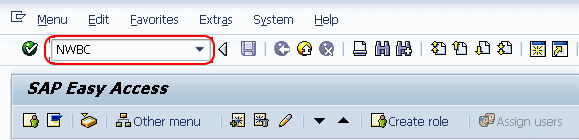
- Transaction code: NWBC
- Navigation path: NWBC > SAP_GRC_NWBC > Rule Setup > Access Rule Setup > Rule Sets
Checks Before Creating an SAP GRC Rule Set
Before creating the rule set, confirm that your user has access to the SAP GRC NWBC role and permission to maintain access rules. You should also decide how the rule set will be used before assigning its ID and description.
- Choose a rule set ID that follows your organization’s naming convention.
- Use a description that clearly identifies the scope, such as the regulation, region, business process, or project.
- Check whether an equivalent rule set already exists to avoid duplicate maintenance.
- Confirm which functions, risks, and rules will later be assigned to the rule set.
Open SAP GRC Rule Setup in NWBC
Step 1: Execute the SAP tcode “NWBC” in the SAP command field.
Step 2: The NetWeaver Business Client opens in the browser. From the available entries, double-click SAP_GRC_NWBC to open the Governance, Risk, and Compliance work center.
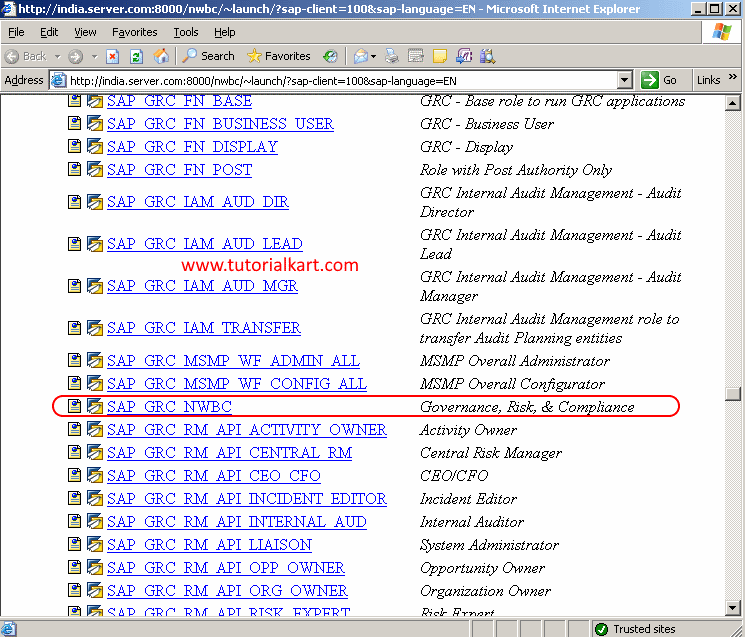
If the SAP_GRC_NWBC entry is not displayed, verify that the required business role has been assigned to your user and that the role menu has been generated correctly.
Navigate to Rule Sets in SAP GRC Access Rule Maintenance
Step 3: In SAP Business Client, open Rule Setup. Under Access Rule Maintenance or Access Rule Setup, select Rule Sets.
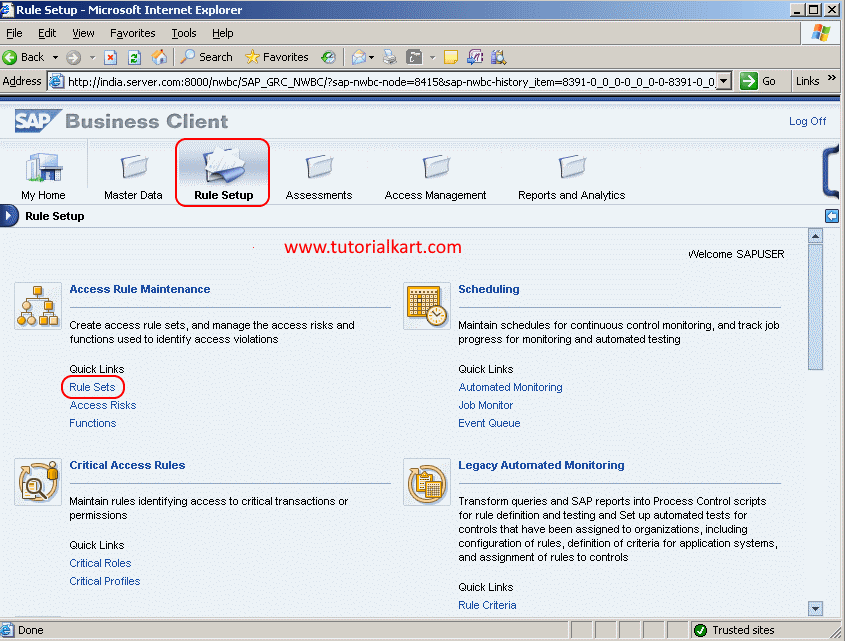
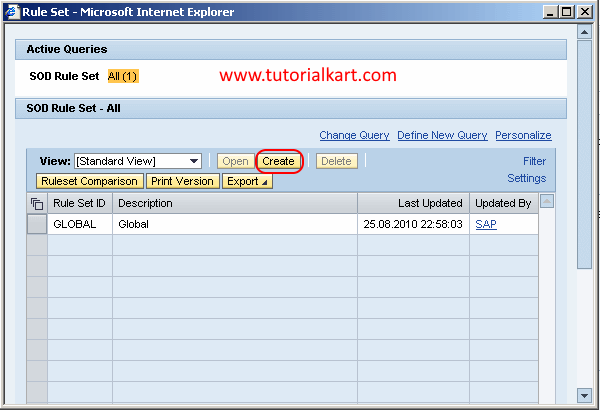
The Rule Sets screen lists rule sets already available in the system. Review the existing entries before creating a new one, particularly when your organization maintains separate rule sets for different compliance frameworks or system landscapes.
Create a New Rule Set ID in SAP GRC
Step 4: On the Rule Sets page, click Create. A new Rule Set maintenance screen opens.
Step 5: On the RuleSet: New screen, maintain the required rule set details.
- Rule Set ID: Enter a unique identifier for the new rule set. Use a stable naming convention because this ID will be referenced when rule content is maintained and analyzed.
- Description: Enter a clear description that explains the rule set’s purpose and scope.
- Save: Choose the save icon to store the configured rule set.
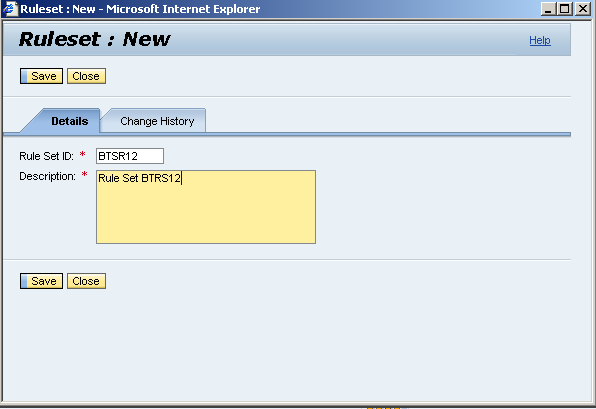
The rule set is now created in SAP GRC. Creating the rule set establishes the container, but it does not by itself define access risks. The required functions, risks, and rules must be maintained and associated with the correct rule content according to your organization’s rule design.
How SAP GRC Rule Sets Relate to Functions, Risks, and Rules
A rule set groups the rule content used by SAP GRC Access Risk Analysis. Understanding the relationship between the main objects helps prevent incomplete or inconsistent configuration.
- Function: Represents a business activity, such as maintaining vendors or processing payments. A function can contain actions, permissions, and other authorization criteria.
- Risk: Represents an access-risk condition, often created by combining two or more conflicting functions for segregation-of-duties analysis or by defining a critical access condition.
- Rule: Contains the technical authorization logic used to identify access that matches a function or risk definition.
- Rule set: Organizes related risks, functions, and rule content so that the appropriate collection can be selected during risk analysis and maintenance.
The precise object relationships and maintenance sequence can depend on the SAP GRC Access Control version and the rule methodology used in your implementation. Follow your approved rule-design documentation when adding content to a new rule set.
Rule Set Naming Practices for SAP GRC Access Control
A consistent naming convention makes rule-set administration easier, especially when several custom and delivered rule sets are maintained in the same SAP GRC system.
- Use an ID that indicates whether the rule set is delivered, copied, or custom.
- Include the relevant framework, region, business unit, or project identifier when those distinctions affect rule content.
- Avoid vague descriptions such as “New Rules” or “Test” in productive rule sets.
- Document the rule-set owner, purpose, approval status, and change process outside the short description field when required by governance procedures.
- Do not overwrite standard or approved rule content without following the organization’s change-control process.
Validate the New SAP GRC Rule Set
After saving, return to the Rule Sets list and confirm that the new entry appears with the correct ID and description. Complete the following checks before the rule set is used in access-risk analysis:
- Search for the rule set ID and confirm that only the intended entry exists.
- Verify that the description identifies the correct compliance or business scope.
- Confirm that the required risks and functions are associated with the intended rule set.
- Check that the technical rules have been generated or maintained as required by the implementation process.
- Run controlled risk-analysis tests with known users or roles before relying on the rule set in production reviews.
Common SAP GRC Rule Set Configuration Issues
- Rule Sets menu is missing: Check the user’s NWBC business role, authorization assignments, and activated GRC services.
- Create button is unavailable: The user may have display-only access or may be missing authorization for rule maintenance.
- Duplicate rule set ID error: Search the complete list and choose a unique ID that follows the approved naming standard.
- Rule set returns no risk results: Confirm that the relevant risks, functions, and generated rules are assigned and active for the systems being analyzed.
- Unexpected risk results: Review the rule content, connector scope, authorization objects, actions, permissions, and any organizational-level conditions used in the rules.
SAP GRC Rule Set FAQs
What is a rule set in SAP GRC Access Control?
A rule set is a named collection of access-risk rule content used by SAP GRC during risk analysis. It allows related risks, functions, and technical rules to be organized for a particular compliance or business scope.
Which transaction opens Rule Sets in SAP GRC?
Transaction code NWBC opens the NetWeaver Business Client. From there, use the SAP GRC work center and navigate to Rule Setup and Rule Sets. The displayed menu path can differ slightly by release and role configuration.
Does creating a rule set automatically create SAP GRC risks?
No. Creating a rule set creates the organizational container only. Risks, functions, and technical rule content must still be maintained and associated according to the approved rule design.
Can an organization maintain multiple SAP GRC rule sets?
Yes. Multiple rule sets can be maintained to support different regulations, regions, business units, projects, or testing purposes. Their scope and ownership should be clearly documented to prevent overlapping or inconsistent analysis.
Why is a newly created rule set not finding access risks?
The rule set may not yet contain the required risk and function assignments, or the corresponding technical rules may not have been generated or maintained. Connector configuration and analysis scope should also be checked.
Editorial QA Checklist for SAP GRC Rule Set Configuration
- Confirm that the NWBC navigation path matches the SAP GRC release and business role shown in the screenshots.
- Verify that the tutorial distinguishes a rule set from the risks, functions, and technical rules contained within it.
- Check that the rule set ID and description guidance does not conflict with the organization’s naming and transport standards.
- Ensure that authorization-related troubleshooting does not imply that all users should receive rule-maintenance access.
- Validate that post-creation testing includes rule assignments, generated rule content, connector scope, and controlled access-risk analysis.