 TutorialKart.com
How to Perform Automatic Workflow Customizing in SAP GRC
Automatic workflow customizing prepares the SAP Business Workflow runtime and definition environment required by SAP Governance, Risk and Compliance processes. You can start the activity directly with transaction code SWU3 or open it through the SAP Reference IMG.
- Transaction code: SWU3
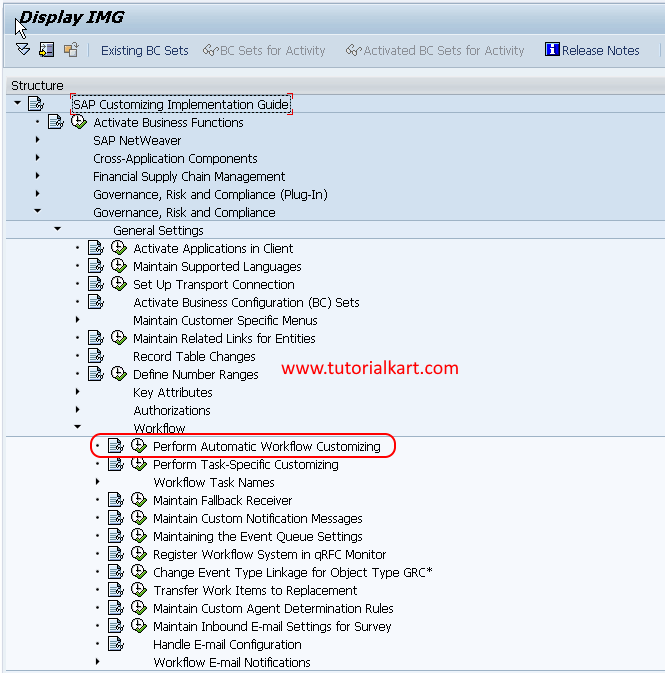
- SAP Path: SPRO > SAP Reference IMG > Governance Risk & Compliance > General Settings > Workflow > Perform automatic workflow customizing.
Checks Before Running SAP GRC Workflow Customizing
Before making changes, confirm that you are working in the correct SAP system and client. The user performing this activity should have authorization for workflow administration, background job maintenance, RFC configuration and the relevant IMG activities.
- Verify that the SAP GRC components and required support packages are installed.
- Confirm that the logical system and client settings are correct.
- Check whether workflow-related changes must be recorded in a transport request.
- Coordinate with the Basis or workflow administration team before changing system-wide technical settings.
- Use the status indicators in SWU3 to identify incomplete configuration instead of repeating steps that are already complete.
Open Perform Automatic Workflow Customizing from SPRO
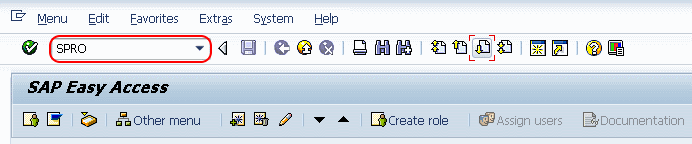
Step 1: Execute transaction code “SPRO” in the SAP command field.
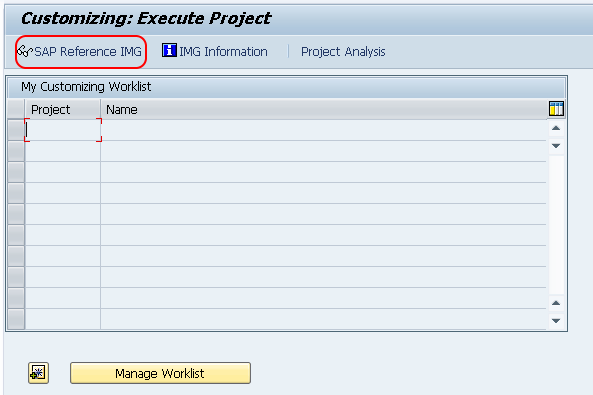
Step 2: On the Customizing: Execute Project screen, choose SAP Reference IMG.
Step 3: Follow the navigation path Governance, Risk and Compliance > General Settings > Workflow, and then choose the IMG activity Perform Automatic Workflow Customizing.
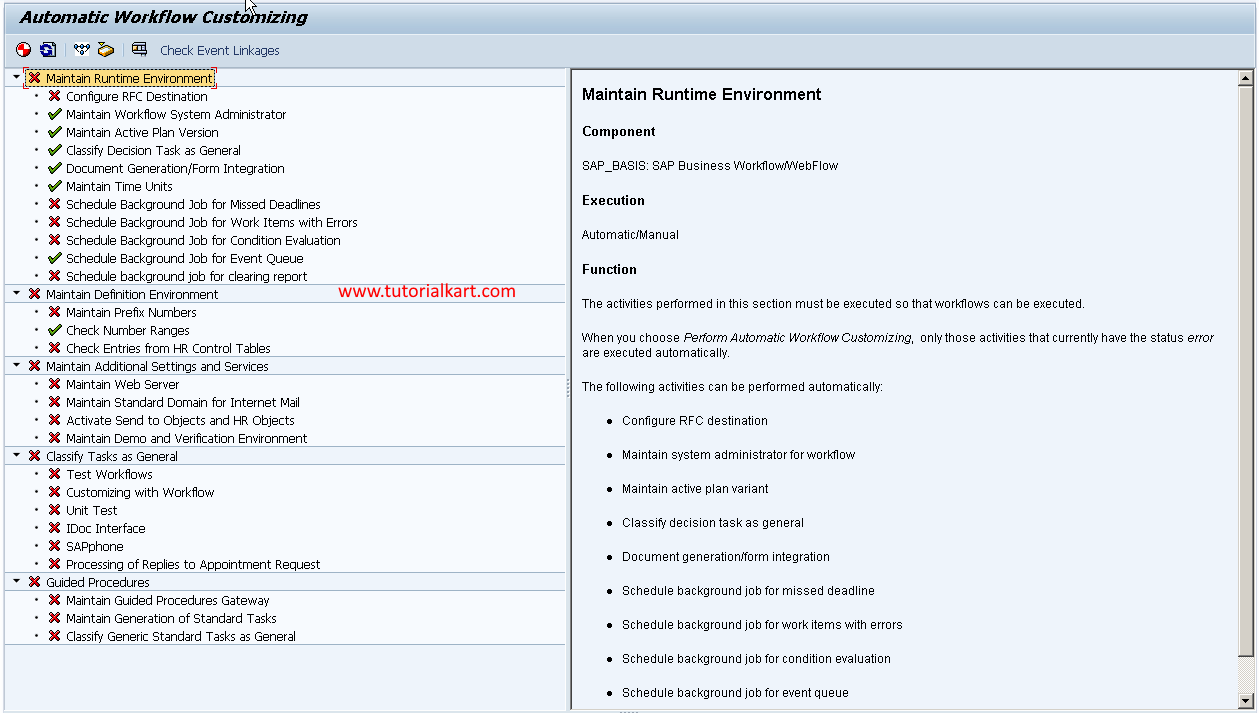
You can also execute transaction code SWU3 directly. Both methods open the automatic workflow customizing overview.
Review the Five SWU3 Workflow Customizing Areas
Step 4: In the automatic workflow customizing screen, review the five main configuration areas displayed by the system.
- Maintain runtime environment
- Maintain definition environment
- Maintain additional settings and services
- Classify tasks as general
- Guided procedures
Maintain the Workflow Runtime Environment
The runtime environment contains the technical settings used when workflows are executed. Depending on the SAP release and system configuration, this area can include checks for the workflow system user, RFC destinations, background jobs and other runtime services.
Maintain the Workflow Definition Environment
The definition environment supports the creation, activation and administration of workflow definitions. Review every subordinate item and correct any warning or error that affects workflow maintenance.
Maintain Additional Workflow Settings and Services
This section groups supplementary services required by SAP Business Workflow. The exact entries can differ by SAP release, installed components and activated business functions, so use the descriptions shown in your system when completing each item.
Classify SAP Workflow Tasks as General Tasks
A task classified as a general task can be executed by all users unless additional agent restrictions are defined elsewhere. Apply this setting only to tasks that are intended to use general-agent determination. Do not classify tasks indiscriminately, because task authorization and agent assignment are part of the workflow design.
Review Guided Procedures in SWU3
The guided procedures area provides structured checks or activities for completing workflow configuration. Open any incomplete node and follow the system instructions shown for that item.
Interpret Green, Yellow and Red SWU3 Status Indicators
Expand each main area and review its subordinate activities. A green status normally indicates that the corresponding check has completed successfully. A yellow or red status requires further review, but the exact meaning depends on the individual check and the SAP release.
- Green: The check is complete or the required setting is available.
- Yellow: The configuration may be incomplete, optional or in need of verification.
- Red: A required setting is missing or the check has failed.
Do not rely only on the color of the top-level node. Expand it and confirm that the relevant subitems are also complete. Select an incomplete item to display its documentation or execute the associated maintenance activity.
Validate SAP GRC Workflow After SWU3 Configuration
Completing SWU3 prepares the technical workflow environment, but it does not by itself configure every SAP GRC process. GRC workflows can also depend on process-specific customizing, agent rules, responsibility assignments, event linkage, workflow activation and application parameters.
- Refresh the SWU3 overview and confirm that required nodes remain green.
- Check that workflow background jobs are scheduled and running without errors.
- Verify the workflow system user and RFC destination used by the runtime environment.
- Confirm that the required workflow templates and event linkages are active.
- Run a controlled test for the relevant GRC process and verify that the expected work item reaches the correct recipient.
- Review the workflow log if the request starts but does not proceed to the next step.
Troubleshoot Incomplete Automatic Workflow Customizing
If one or more SWU3 checks remain incomplete, open the affected node and read the system message before changing configuration. Common causes include missing authorizations, an inactive RFC destination, unscheduled background jobs, an incorrect workflow system user or incomplete task classification.
- Authorization error: Ask the security administrator to review the failed authorization check rather than assigning broad access without analysis.
- RFC or system user error: Verify the destination, logon settings and user status with the Basis team.
- Background processing error: Confirm that the required workflow jobs exist, are released and have not been cancelled.
- Task cannot determine an agent: Review task classification, agent rules, responsibilities and organizational assignments.
- Workflow does not start: Check workflow activation, event linkage and the application-specific trigger.
- Work item remains in error: Open the workflow log and inspect the failed step, container values and application messages.
SAP GRC Automatic Workflow Customizing FAQs
What is transaction code SWU3 used for?
SWU3 is used to check and maintain the basic technical environment for SAP Business Workflow. It groups runtime, definition and supporting configuration checks in one overview.
Does a green SWU3 screen mean every SAP GRC workflow is configured?
No. A green SWU3 status indicates that the corresponding basic workflow checks are complete. SAP GRC processes may still require process-specific workflow configuration, agent determination, rules, parameters and active event linkage.
Why does an SWU3 node remain red after automatic configuration?
The required technical object may be missing, inactive or inaccessible to the current user. Open the red node, review its detailed message and check authorizations, RFC settings, system users and background jobs as applicable.
Should every workflow task be classified as a general task?
No. A task should be classified as general only when that behavior is intended by the workflow design. Agent rules and authorization requirements should be reviewed before changing the classification.
Can automatic workflow customizing be transported to another SAP system?
Some workflow settings are transportable customizing, while other technical settings are system-specific and must be maintained separately in each environment. Check the transport prompt and coordinate with the SAP Basis and workflow teams before moving changes.
Editorial QA Checklist for SAP GRC SWU3 Instructions
- Confirm that the SPRO path matches the SAP GRC release used by the target system.
- Verify that all five SWU3 configuration areas are named exactly as displayed in the relevant SAP system.
- Check that green status is described as completion of a specific check, not proof that every GRC workflow is operational.
- Ensure that task classification guidance does not imply that all tasks should be made general.
- Confirm that validation includes background jobs, RFC settings, workflow logs, event linkage and agent determination.
- Retest the procedure after upgrades or support-package changes because available nodes and labels may differ by release.