 TutorialKart.com
How to Create a Function ID in SAP GRC Access Control
A function ID in SAP GRC Access Control represents a business activity as a collection of actions, such as transaction codes, and related permissions. Functions are used in the access rule set to define Segregation of Duties risks and critical access rules.
This procedure explains how to create a function ID through SAP NetWeaver Business Client using transaction code NWBC. The available fields and menu labels can vary slightly by SAP GRC Access Control release and system configuration.
SAP GRC Function ID Creation Details
- Transaction code: NWBC
- Navigation path: NWBC > SAP_GRC_NWBC > Rule Setup > Access Rule Setup > Functions
- Required access: Authorization to maintain the SAP GRC access rule set
- Information to prepare: Function ID, description, business process, system or connector, actions, permissions, and status
Before creating the function, confirm which business activity it represents and identify the transaction codes and authorization values required for that activity. A narrowly defined function is easier to review and reuse when building risks.
Step 1: Open SAP GRC in Transaction NWBC
Execute the SAP tcode “NWBC” in the SAP command field.
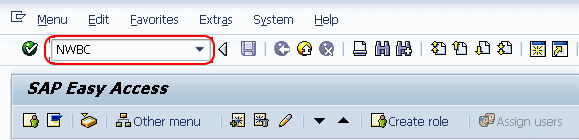
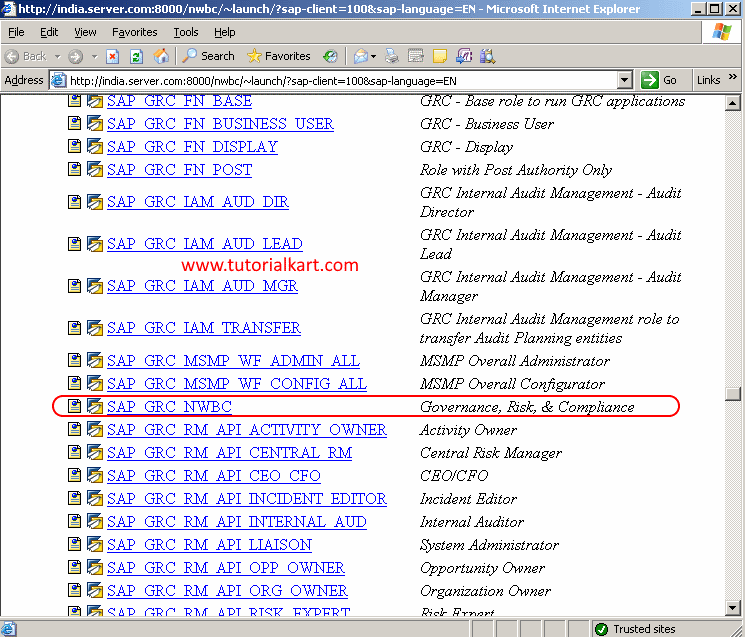
Step 2: Launch the SAP_GRC_NWBC Business Client
The NetWeaver Business Client launch page opens in a web browser. Select SAP_GRC_NWBC, which is the Governance, Risk, and Compliance business client entry, and open it to continue.
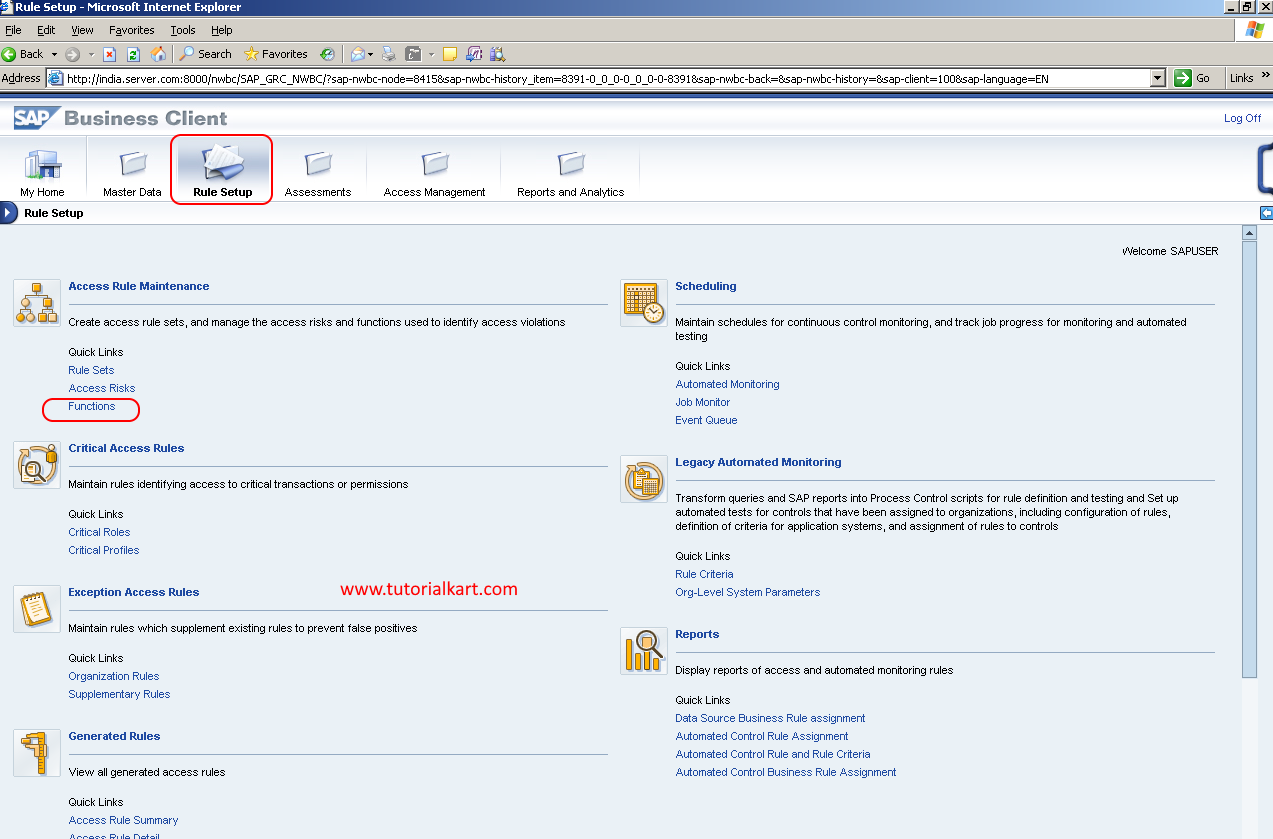
Step 3: Open Functions Under Access Rule Maintenance
In SAP Business Client, choose Rule Setup. Under Access Rule Maintenance, open Functions.
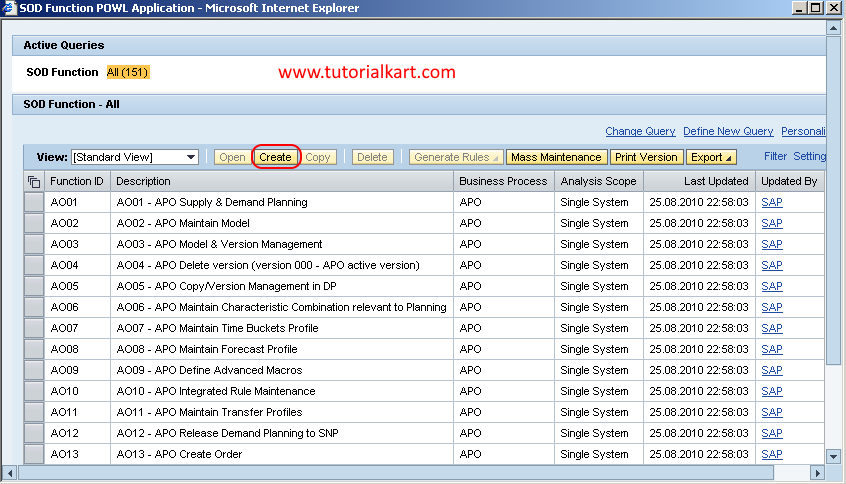
Step 4: Start a New SAP GRC Function
The SoD Functions POWL application displays the function IDs available in the rule set. Choose Create to open a new function record.
Step 5: Enter the Function ID and Business Attributes
On the Function New screen, complete the function header fields.
- Function ID: Enter a unique identifier that follows the naming convention used in your GRC rule set.
- Description: Enter a clear description of the business activity represented by the function.
- Business Process: Select the relevant business process, such as Accounts Payable, Sales, Procurement, or another configured process.
- Analysis Scope: Select the scope required by your rule-set design. Use Single System when the function is intended for analysis within one system context.
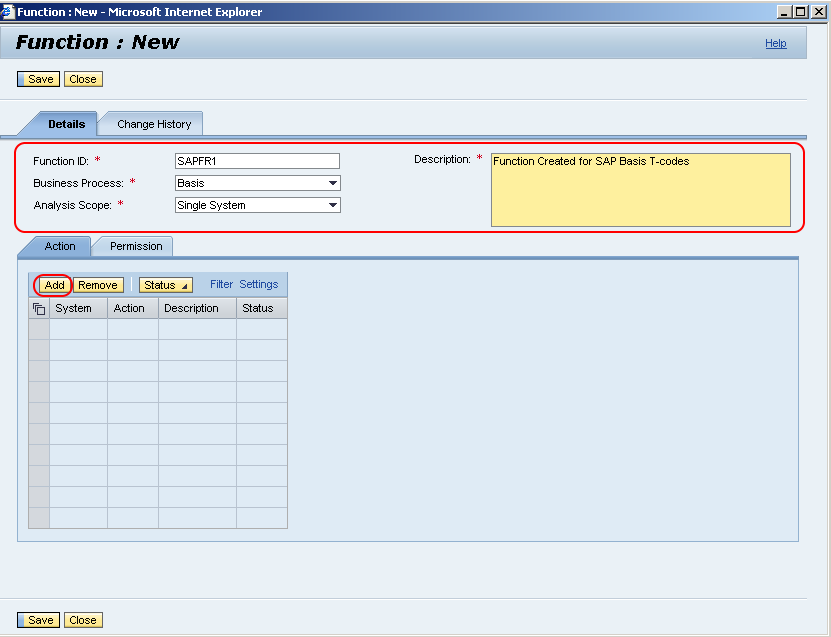
Use a description that identifies the exact task rather than a broad department or job role. For example, a function for maintaining vendor master data should be separate from a function for processing vendor payments when those activities are evaluated as different access capabilities.
Step 6: Add System-Specific Transaction Codes as Actions
In the Action section, add the executable activities included in the function.
- Choose Add and select the required system ID or connector.
- In the Action field, enter the required transaction code and press Enter.
- Add further transaction codes when they belong to the same business activity.
- Set the function status to Active when it is ready to be used in risk analysis.
- Choose Save after completing the action details.
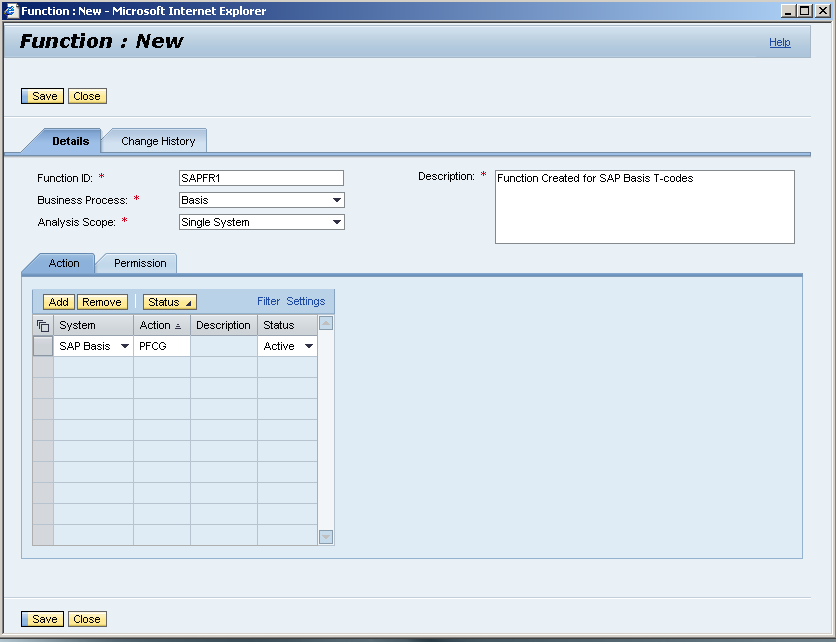
The selected connector determines the action values available for maintenance. If the expected transaction codes do not appear, verify that the connector is configured correctly and that the required authorization data has been synchronized with SAP GRC.
Step 7: Maintain Authorization Permissions for the Function
Choose the Permission section and add the authorization object, field, and value conditions needed to define the function more precisely.
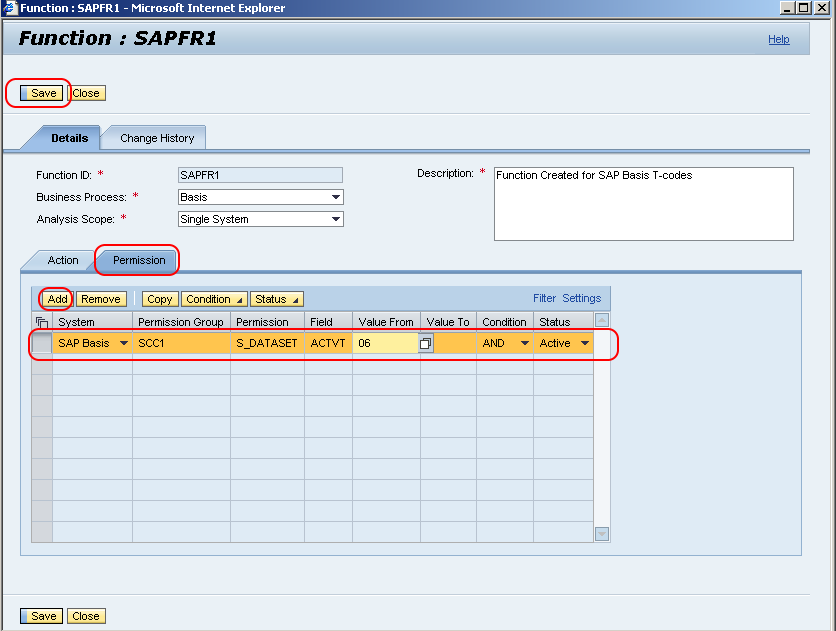
Permission conditions help distinguish between different access levels that use the same transaction code. For example, the authorization values can separate display access from create, change, approve, or delete access when the underlying authorization object supports those activities.
Choose Save after maintaining the required permissions.
How Actions and Permissions Define an SAP GRC Function
An action normally identifies an executable entry point, such as an SAP transaction code. A permission identifies the authorization object and field values that determine what the user can do after starting that action.
- Action-only definition: Use when possession of the transaction code itself is sufficient to represent the business activity.
- Action and permission definition: Use when the same transaction supports multiple access levels and the rule must evaluate specific authorization values.
- Multiple actions: Group transaction codes only when they perform the same logical activity for risk-analysis purposes.
A function should not be defined as an entire job role. In SAP GRC rule-set design, a role can contain many functions, while each function should represent a specific business capability that can be combined with another function to form an SoD risk.
Validate the New Function ID in SAP GRC
After saving the function, complete these checks before including it in a production risk definition:
- Search for the function ID in the Functions application and confirm that the saved record is displayed.
- Open the function and verify its business process, analysis scope, status, actions, systems, and permission values.
- Confirm that every transaction code belongs to the intended business activity and that unrelated actions have not been included.
- Add the function to the appropriate risk definition when it must be evaluated against another function.
- Run a controlled access-risk analysis using a known user or role and verify that the function is detected as expected.
Common SAP GRC Function Maintenance Issues
Transaction Codes Are Not Available in the Action Field
Check that the correct connector or system ID has been selected. Also verify that the relevant repository and authorization data have been synchronized from the connected system to SAP GRC. Missing or outdated synchronization data can prevent expected actions from appearing.
The Function ID Does Not Appear in Risk Analysis
Confirm that the function is active, assigned to the correct risk, and included in the rule set used by the analysis. Also check the analysis scope, connector, action values, permission conditions, and rule-generation status.
The Function Produces Too Many Risk Violations
Review whether the function is too broad. Unnecessary transaction codes, wildcard permission values, or missing authorization-field restrictions can cause the rule to match access that is outside the intended business activity.
The Function Produces No Risk Violations
Verify that the maintained actions and permission values match the authorization data in the target system. An incorrect connector, authorization object, field name, value, or logical condition can prevent valid access from matching the function.
SAP GRC Function ID FAQs
What is a function ID in SAP GRC?
A function ID is the unique identifier for a function in the SAP GRC access rule set. The function represents a specific business activity through one or more actions and, where required, authorization permission conditions.
How is a function ID different from a risk ID in SAP GRC?
A function represents one business capability, such as creating a vendor or approving a payment. A risk identifies a prohibited or sensitive combination of functions, or a critical function that must be monitored independently.
Can one SAP GRC function contain multiple transaction codes?
Yes. A function can contain multiple transaction codes when they represent the same business activity. Unrelated activities should be maintained as separate functions so that risk analysis remains accurate and understandable.
Are permission values required for every SAP GRC function?
No. Some functions can be defined using actions alone. Permission values are useful when the rule must distinguish between access levels, organizational values, activity codes, or other authorization conditions within the same transaction.
Is a Firefighter ID the same as a function ID?
No. A function ID is part of the access rule set used for risk analysis. A Firefighter ID is an emergency access account managed through Emergency Access Management. They serve different purposes and are maintained through different processes.
SAP GRC Function ID Editorial QA Checklist
- Confirm that the NWBC navigation path matches the SAP GRC release shown in the screenshots.
- Verify that the function ID naming example does not conflict with the organization’s rule-set naming convention.
- Check that each listed transaction code represents the same business activity.
- Validate authorization objects, fields, values, and logical conditions against the connected SAP system.
- Confirm that the function is active and included in the intended risk and generated rule set.
- Test the function with a controlled user or role before relying on it for production risk analysis.