 TutorialKart.com
Delete a File in C Using remove()
To delete a file in C, call the remove() function declared in <stdio.h>. Pass the file name, relative path, or absolute path of the file to delete. The function returns 0 when it succeeds and a nonzero value when it fails.
The C runtime performs the deletion directly. It does not provide a portable way to move the file to the Recycle Bin or Trash, so treat a successful call as a permanent deletion.
Syntax and Return Value of remove() in C
The syntax of remove() is:
int remove(const char * filename);| Item | Description |
|---|---|
filename | A null-terminated string containing the file name or path to remove. |
Return value 0 | The file was removed successfully. |
| Nonzero return value | The file was not removed. Inspect the system error to determine the reason. |
The path is interpreted relative to the program’s current working directory unless an absolute path is supplied. The current working directory is not necessarily the directory containing the executable.
C Program to Delete welcome.txt from the Current Directory
In the following example, the program deletes a file named welcome.txt from its current working directory. If the file is stored elsewhere, pass a relative or absolute path instead. Include the file extension when it is part of the actual file name.
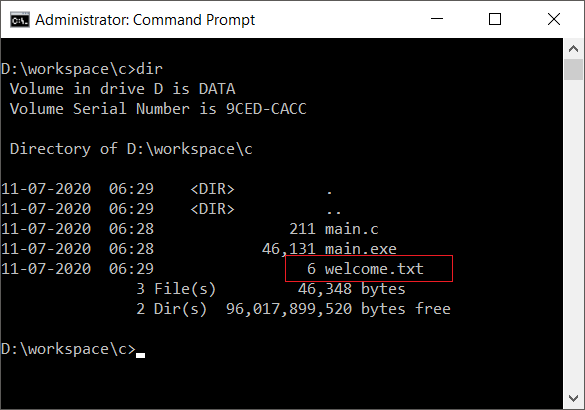
The following screenshot shows welcome.txt next to main.exe. This arrangement works when the program’s current working directory is also that directory.
C Program
#include <stdio.h>

int main() {
    if (remove("welcome.txt") == 0) {
        printf("The file is deleted successfully.");
    } else {
        printf("The file is not deleted.");
    }
    return 0;
}
Output
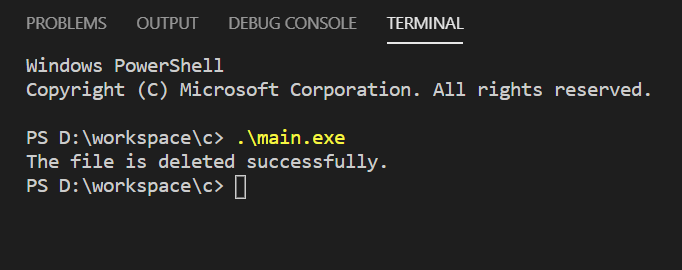
After remove() returns 0, the pathname no longer identifies the deleted file. Do not call remove() on the file until the program has finished reading or writing it and has closed any stream associated with it.
Handle a Missing File When remove() Fails
This example tries to delete welcome.txt again after the previous program has removed it. Because the file is no longer present, remove() returns a nonzero value.
C Program
#include <stdio.h>

int main() {
    if (remove("welcome.txt") == 0) {
        printf("The file is deleted successfully.");
    } else {
        printf("The file is not deleted.");
    }
    return 0;
}
Output
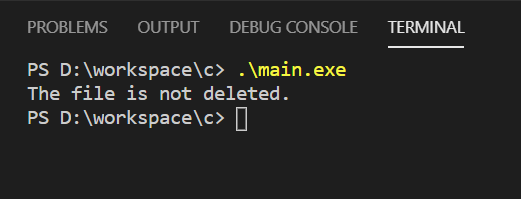
A missing file is only one possible cause of failure. An incorrect path, insufficient permissions, a read-only file system, or operating-system restrictions on an open file can also prevent deletion.
Print the Error When a C File Cannot Be Deleted
A production program should report the system error instead of displaying the same message for every failure. The perror() function prints a description associated with the current errno value set by the failed library call.
#include <stdio.h>

int main(void) {
    const char *path = "welcome.txt";

    if (remove(path) != 0) {
        perror("Could not delete welcome.txt");
        return 1;
    }

    printf("Deleted %s\n", path);
    return 0;
}
Call perror() immediately after remove()` fails, before another library operation can change the error state. The exact message varies by operating system and by the reason for failure.</p>
<!-- /wp:paragraph -->
<!-- wp:heading {"level":3} -->
<h3>Delete a File with a Relative or Absolute Path</h3>
<!-- /wp:heading -->
<!-- wp:paragraph -->
<p>A relative path starts from the current working directory. For example, <code>logs/session.txt identifies a file inside a logs subdirectory. An absolute path identifies a location from the root of the file system or from a Windows drive.
#include <stdio.h>

int main(void) {
    const char *relative_path = "logs/session.txt";

    if (remove(relative_path) == 0) {
        printf("File deleted.\n");
        return 0;
    }

    perror("remove");
    return 1;
}
On Windows, escape each backslash in a C string, as in "C:\\data\\welcome.txt". Forward slashes are conventional on Unix-like systems, as in "/home/user/data/welcome.txt". Avoid constructing a path from untrusted input without first restricting which files the program is allowed to remove.
Delete a File Only If It Exists
It is usually unnecessary to check whether a file exists before deleting it. A separate check creates a timing gap in which another process could change or replace the file. Call remove() directly and handle its result.
If a missing file is acceptable, examine errno after the failed call and treat ENOENT as a non-error for the application:
#include <errno.h>
#include <stdio.h>

int main(void) {
    const char *path = "temporary.txt";

    if (remove(path) == 0) {
        printf("File deleted.\n");
        return 0;
    }

    if (errno == ENOENT) {
        printf("No deletion needed; the file does not exist.\n");
        return 0;
    }

    perror("Unable to delete file");
    return 1;
}
Why remove() May Not Delete a File
- Wrong working directory: The relative path points somewhere other than expected.
- File does not exist: The name, extension, capitalization, or directory is incorrect.
- Insufficient permission: The process lacks permission required to remove the directory entry.
- File is in use: Some operating systems or sharing modes prevent deletion while another process has the file open.
- Path identifies a directory: Directory-removal behavior is platform-dependent; use the operating system’s appropriate directory function when portability matters.
- Read-only file system: The storage location does not permit changes.
Use the error reported by perror() or inspect errno to distinguish these cases. Do not assume that every nonzero result means the file was missing.
remove() Compared with unlink()
remove() is part of the ISO C standard library and is the portable choice for ordinary C programs. unlink() is a POSIX function available on Unix-like systems and is not part of standard C. Use remove() unless the program specifically requires POSIX behavior or APIs.
C remove() File-Deletion FAQs
Is there a delete function in C?
The standard C library provides remove() in <stdio.h>. It deletes the file identified by the supplied path and reports success or failure through its return value.
What does remove() return in C?
remove() returns 0 on success and a nonzero value on failure. When it fails, use perror() or inspect errno for the cause.
Does remove() send a file to the Recycle Bin or Trash?
No portable C behavior sends the file to the Recycle Bin or Trash. A successful remove() call removes it through the file system, so an application that needs recoverable deletion must implement platform-specific trash handling or move the file to a designated recovery directory.
Can remove() delete an open file?
The result depends on the operating system and how the file was opened. Close the program’s file stream before calling remove() when portable, predictable behavior is required.
How can a C program delete a file if it exists?
Call remove() directly. If it fails and errno equals ENOENT, the file did not exist. This avoids a separate existence check and the timing problem between checking and deleting.
Editorial QA Checklist for C File Deletion
- Confirm that every example includes
<stdio.h>before callingremove(). - Verify that the tutorial states
0means success and a nonzero value means failure. - Check that relative paths are described in relation to the current working directory.
- Ensure failure examples report the operating-system error with
perror()orerrno. - Confirm that the deletion warning does not imply portable Recycle Bin or Trash support.
- Test examples with an existing file, a missing file, and a path without deletion permission.
Summary of Deleting Files with remove()
Include <stdio.h>, pass the required file path to remove(), and check its return value. A return value of 0 confirms deletion; otherwise, report or inspect the system error. In this C Tutorial, we used this pattern with files in the current directory and with explicit paths.