 TutorialKart.com
SAP Reference IMG in SAP Implementation Guide
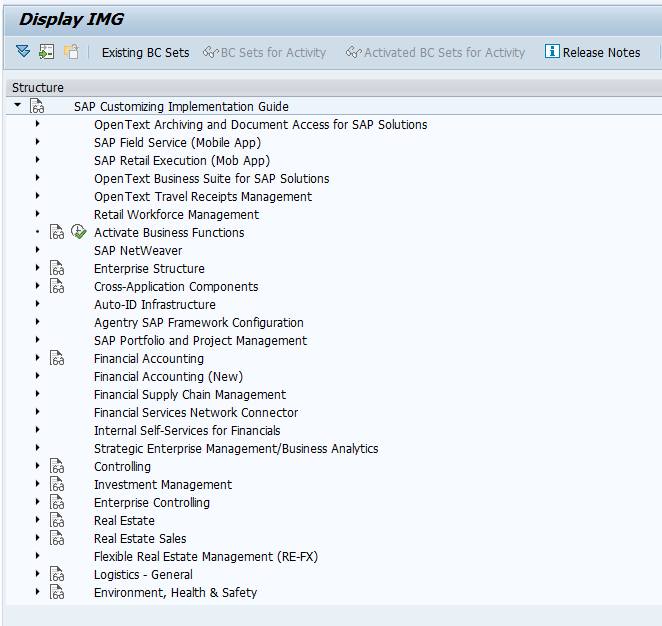
SAP Reference IMG is the complete SAP-delivered Implementation Guide that contains the standard customizing activities used to configure SAP business processes. It is accessed mainly through SAP SPRO or through the SAP menu path Tools > Business Engineering > Customizing. The IMG is arranged as a tree structure so consultants can open the required application area, read the documentation for an activity, and execute the related configuration step.
The implementation guide is grouped by modules and business processes that take place in SAP R/3 and SAP ERP systems. In SAP, SAP Reference IMG provides the required configuration steps for functional areas such as Financial Accounting, Controlling, Sales and Distribution, Materials Management, Production Planning, Plant Maintenance, Human Resources, and Cross-Application Components. SAP consultants and developers spend a significant part of an implementation project in the SAP Implementation Guide because most core business settings are maintained from IMG activities.
How to access SAP Reference IMG using SPRO
The most common way to open SAP Reference IMG is by using the SPRO transaction. Enter SPRO in the command field and choose SAP Reference IMG. You can also reach the same area through the SAP menu path Tools > Business Engineering > Customizing. From there, the system displays the SAP Customizing Implementation Guide with expandable nodes for enterprise structure, general settings, cross-application components, and application-specific configuration areas.
- Enter SPRO in the SAP command field.
- Choose SAP Reference IMG on the next screen.
- Expand the required IMG node, such as Enterprise Structure or Financial Accounting.
- Open the required activity documentation before changing configuration.
- Execute the IMG activity and maintain the required values in the relevant customizing tables.
Many IMG activities update customizing tables directly or indirectly. For this reason, configuration changes should be made in the correct client and transported through the landscape according to the project transport process.
Types of SAP IMG: Reference IMG, Enterprise IMG and Project IMG
The different types of IMG are:
- SAP reference IMG
- Enterprise IMG and
- Project IMG.
SAP Reference IMG: SAP Reference IMG comes with the SAP system installation and contains the full set of SAP-delivered customizing activities. It is the starting point for creating a more focused Enterprise IMG or Project IMG.
Enterprise IMG: Enterprise IMG is generated from SAP Reference IMG. It is normally restricted to the countries, application components, and business processes that are relevant for a particular enterprise implementation. This makes the customizing structure easier to use for a specific SAP system landscape.
Project IMG: Project IMG is created for a specific implementation, rollout, upgrade, or change project. It contains only the IMG activities selected for that project scope. The project manager or responsible configuration lead usually defines the scope so the team can track and complete the required configuration activities without working through the full SAP Reference IMG.
What is SAP Customizing Implementation Guide?
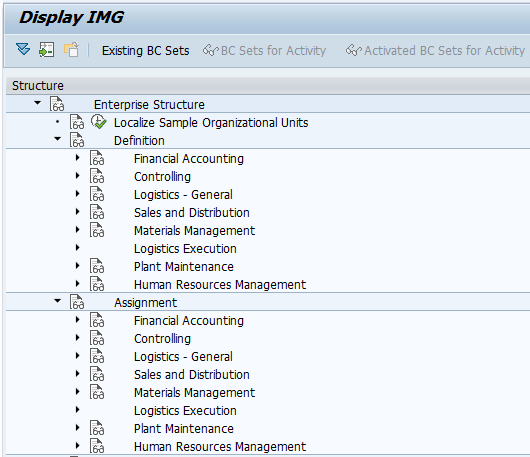
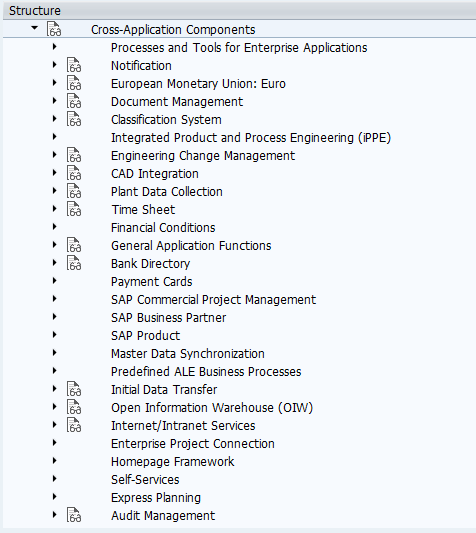
In SAP, SAP customizing implementation guide is a tree structure for easy access with the nodes representing the configuration object. When you execute IMG activity from implementation guide screen, you are directly or indirectly changing the table values. The SAP IMG is structured and arranged into major groups such as General Settings, Enterprise Structure, Cross-Application Components, and Functional Area Settings.
General Settings: Under this section, you maintain settings such as countries, currencies, factory calendars, time zones, units of measurement, and other global settings that support multiple business processes.
Enterprise Structure: Under this section, you define and assign organization structures for functional modules of SAP, including FI, CO, Logistics, SD, MM, PM, and HRM. Examples include company code, plant, storage location, purchasing organization, sales organization, distribution channel, division, and controlling area.
Cross-Application Components: Under this section, you configure processes that can be used across modules, such as classification system, document management, CAD integration, payment cards, financial conditions, time sheet, internet and intranet services, and ALE business processes.
Functional Area Settings: Under this section, you configure and implement various SAP modules such as SAP financial accounting, Controlling, Sales and Distribution, Production Planning, Project System, Quality Management, Plant Maintenance, and Materials Management.
SAP Reference IMG structure used during configuration
SAP Reference IMG helps implementation teams move from broad enterprise settings to module-specific customizing. A typical configuration flow begins with global settings, continues with enterprise structure definitions, then moves to assignments and functional configuration. For example, a finance consultant may first check company code settings, assign the company code to a controlling area, and then continue with General Ledger, accounts payable, accounts receivable, asset accounting, and tax-related configuration.
Each IMG activity usually contains a short description, documentation, and an execution option. Some activities open a customizing view, while others call a transaction, a report, or a maintenance screen. The exact behavior depends on the activity and the SAP component being configured.
SAP Reference IMG and SAP implementation methodology
In an SAP implementation project, the IMG is normally used after the business process design is understood and the required configuration scope is identified. SAP projects may follow SAP Activate, ASAP, or an organization-specific implementation approach, but the IMG remains the area where many system customizing activities are performed. The project team usually defines scope, configures the system, tests the process, records transport requests, and moves approved configuration to the next system.
A common implementation flow includes preparation, business blueprint or fit-to-standard workshops, system configuration, testing, data migration, cutover, and post-go-live support. The exact phase names may vary by methodology, but the IMG is mainly used during configuration and subsequent change cycles.
Important points before changing SAP IMG configuration
- Open the IMG activity documentation before maintaining values.
- Confirm whether the change is client-specific or cross-client.
- Use the correct development or customizing client for configuration.
- Record the correct transport request when the system asks for it.
- Test the business process after the IMG activity is completed.
- Avoid changing production configuration directly unless the organization has an approved emergency process.
SAP Reference IMG FAQs
How to access SAP Reference IMG?
You can access SAP Reference IMG by entering transaction code SPRO and then choosing SAP Reference IMG. You can also use the SAP menu path Tools > Business Engineering > Customizing.
What is the difference between SAP Reference IMG and Project IMG?
SAP Reference IMG is the full SAP-delivered customizing guide. Project IMG is a scoped version created for a specific implementation or change project, so it contains only the configuration activities selected for that project.
What is Enterprise IMG in SAP?
Enterprise IMG is generated from SAP Reference IMG and is restricted to the countries, application components, and business processes relevant to a particular enterprise implementation.
Does every SAP IMG activity change table values?
Many IMG activities maintain customizing table values directly or indirectly, but the exact technical action depends on the activity. Some activities call transactions, reports, or maintenance views.
Which SAP transaction code is used for Customizing Implementation Guide?
The commonly used transaction code for SAP Customizing Implementation Guide is SPRO. From SPRO, choose SAP Reference IMG to open the customizing tree.
SAP Reference IMG editorial QA checklist
- Verify that SPRO and the SAP menu path are mentioned correctly for accessing SAP Reference IMG.
- Check that SAP Reference IMG, Enterprise IMG, and Project IMG are explained as separate IMG types.
- Confirm that the explanation does not suggest making unapproved configuration changes directly in production.
- Ensure the enterprise structure examples include both definition and assignment concepts.
- Review all internal SAP module links to make sure they support the tutorial topic.