 TutorialKart.com
What is SAP Financial Accounting (SAP FI)?
SAP Financial Accounting (SAP FI) is the SAP module used to record, classify, and report financial transactions for an organization. It supports external accounting requirements such as general ledger postings, vendor and customer accounting, asset accounting, bank accounting, closing activities, and financial statements such as the balance sheet and profit and loss statement.
In simple terms, SAP FI helps a company keep its financial books accurate and traceable. Every relevant business transaction, such as a vendor invoice, customer payment, goods receipt, asset purchase, or sales billing document, can create accounting entries that update the company’s ledgers. This makes SAP FI the accounting foundation for many SAP ERP and SAP S/4HANA implementations.
SAP FICO is commonly discussed as one area, but FI and CO are different modules. SAP FI is mainly used for statutory and external reporting, while SAP CO (Controlling) is used for internal cost control, profitability analysis, planning, and management reporting.
How SAP FI Is Used in Financial Accounting
SAP FI is used throughout the accounting cycle, from daily document postings to month-end and year-end closing. It gives finance teams a structured way to capture source transactions, post them to the correct general ledger accounts, reconcile subledgers, and prepare financial reports.
- Transaction recording: SAP FI records financial transactions from manual entries and integrated business processes.
- Audit trail: Financial statements can be traced back to accounting documents and line items.
- Subledger integration: Customer, vendor, and asset postings update the relevant reconciliation accounts in the general ledger.
- Real-time accounting view: Authorized users can view financial data after postings are made, without waiting for a separate batch update in many standard processes.
- Automatic account determination: Integrated processes from materials management, sales, payroll, and other areas can create accounting entries based on configuration.
- Financial reporting: SAP FI supports reporting for company codes, ledgers, fiscal periods, currencies, and statutory requirements.
SAP FI and SAP CO Difference in SAP FICO
Many beginners search for SAP FICO because FI and CO are usually implemented together. The difference is important because both modules answer different accounting questions.
| Area | SAP FI | SAP CO |
|---|---|---|
| Main purpose | External financial accounting and statutory reporting | Internal management accounting and cost control |
| Primary users | Finance, accounts, statutory reporting, audit teams | Cost accounting, management reporting, controlling teams |
| Typical outputs | Balance sheet, profit and loss statement, ledgers, customer/vendor balances | Cost center reports, internal orders, profitability reports, variance analysis |
| Focus | Legal entity and accounting compliance | Internal performance, cost planning, and decision support |
For example, when a vendor invoice is posted, SAP FI records the payable and expense in the accounting books. SAP CO may capture the cost against a cost center, internal order, or profitability segment depending on the business requirement and configuration.
SAP Financial Accounting Integration with Other SAP Modules
SAP FI does not work in isolation. It is closely integrated with other SAP modules such as material management, sales and distribution, controlling, production planning, project systems, human capital management, and payroll. This integration reduces duplicate entry and helps financial postings reflect operational transactions.
- MM to FI: Goods receipts, invoice receipts, inventory valuation, and vendor liabilities can create FI documents.
- SD to FI: Customer billing, receivables, taxes, revenue, and incoming payments flow into FI.
- AA to FI: Asset acquisitions, depreciation, retirements, and transfers update accounting ledgers.
- CO to FI: Cost allocations and settlements may create accounting impact depending on the process and configuration.
SAP Financial Accounting Organizational Structure
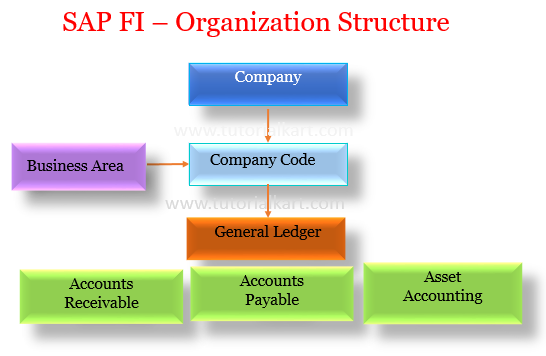
The SAP FI organizational structure defines how financial data is grouped, posted, and reported. Before transactions are recorded, the enterprise structure and accounting settings must be configured correctly.
- Company – A company represents the group or legal consolidation unit used for financial statements across one or more company codes.
- Company Code – A company code is the main legal entity in SAP FI for which a complete set of financial statements can be prepared.
- Business Area – A business area can be used for internal financial reporting across company codes where the design requires it.
- Functional area – A functional area supports reporting expenses by function, such as production, administration, sales, or research and development.
Main SAP FI Submodules for Accounting Processes
The SAP Financial Accounting module is divided into submodules that support different accounting activities. In a project, these areas are configured based on the company’s accounting policies, legal requirements, chart of accounts design, and business processes.
| SAP FI submodule | Purpose | Common examples |
|---|---|---|
| General Ledger Accounting (FI-GL) | Maintains general ledger accounts and financial statement balances | Journal entries, opening balances, accruals, financial statements |
| Accounts Receivable (FI-AR) | Manages customer accounting | Customer invoices, incoming payments, credit memos, customer balances |
| Accounts Payable (FI-AP) | Manages vendor accounting | Vendor invoices, outgoing payments, advances, vendor balances |
| Asset Accounting (FI-AA) | Tracks fixed assets and depreciation | Asset acquisition, depreciation run, transfer, retirement |
| Bank Accounting | Supports bank transactions and reconciliation | Bank master data, bank statements, payment processing |
| Special Purpose Ledger / Reporting | Supports specific reporting requirements where configured | Additional ledgers, reporting views, custom financial analysis |
Important SAP FI Concepts for Beginners
Chart of Accounts: At least one chart of accounts must be defined in the SAP system. Each G/L account is created under a chart of accounts. The chart of accounts contains the list of general ledger accounts, account numbers, account names, and account types used for postings and reporting.
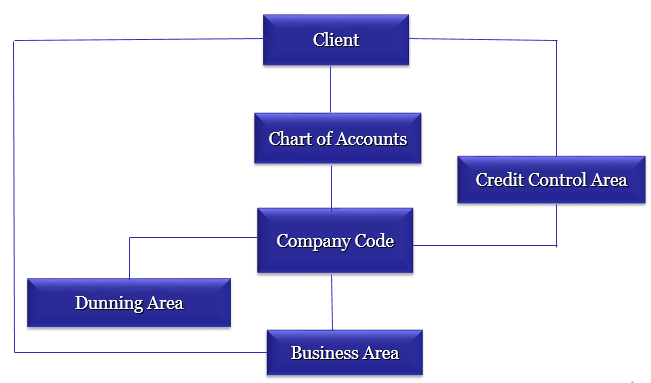
Company Code Currency: Each company code has a local currency in which its books are maintained. SAP can also handle document currency, group currency, and additional currencies depending on configuration and reporting needs.
Document Currency: The currency entered in a transaction document is known as the document currency. For example, a vendor invoice may be entered in USD even when the company code currency is INR.
Fiscal Year: A fiscal year, also called a financial year, divides accounting transactions into posting periods. A fiscal year variant can be year independent or year dependent based on how the organization defines its accounting calendar.
Posting Period: Posting periods control which accounting periods are open for transaction posting. Finance teams use posting period controls to prevent accidental postings into closed periods.
Reconciliation Account: A reconciliation account connects a subledger account, such as a customer or vendor account, with the general ledger. When a customer or vendor document is posted, the corresponding G/L reconciliation account is updated automatically.
Accounting Document: An accounting document is created when a financial posting is made. It contains the document header, posting date, document date, company code, currency, line items, debit and credit amounts, and account assignments.
Example of SAP FI Posting Flow from Business Transaction to Ledger
The following simplified example shows how SAP FI records a vendor invoice for office supplies. The exact accounts depend on the company’s chart of accounts and configuration.
| Step | Accounting impact | SAP FI result |
|---|---|---|
| Vendor invoice is entered | Expense is recognized and liability is created | Vendor subledger and G/L reconciliation account are updated |
| Invoice is posted | Debit expense account, credit vendor account | Accounting document is generated |
| Payment is made | Vendor liability is cleared and bank balance is reduced | Payment document and clearing document are created |
| Reports are viewed | Balances are available for review | G/L, vendor line item, and financial reports can be checked |
Is SAP FICO Easy or Hard to Learn?
SAP FICO is easier to understand when you already know basic accounting terms such as debit, credit, ledger, vendor, customer, asset, fiscal year, and financial statement. It becomes harder when learners try to memorize configuration screens without understanding the accounting purpose behind them.
For beginners, the best learning order is to start with SAP FI organizational structure, chart of accounts, company code settings, G/L posting, accounts payable, accounts receivable, asset accounting, and then integration with MM, SD, and CO. This approach makes the configuration steps easier to connect with real accounting processes.
SAP FI Learning Checklist for Finance and ERP Beginners
- Understand the difference between company, company code, business area, and functional area.
- Learn how the chart of accounts, G/L accounts, account groups, and reconciliation accounts work together.
- Practice basic G/L, vendor, customer, and asset postings in a training system.
- Check how MM and SD transactions create FI documents through integration.
- Review posting periods, fiscal year variants, document types, number ranges, and field status settings.
- Compare FI reports with accounting documents and subledger line items to build tracing skills.
SAP FI Editorial QA Checklist
- Does the article clearly explain SAP Financial Accounting before introducing SAP FICO terminology?
- Are FI and CO described as separate but integrated SAP modules?
- Are SAP FI organizational units explained with accounting context instead of only listing names?
- Are SAP FI submodules connected to practical accounting processes such as vendor invoices, customer payments, assets, and G/L postings?
- Are beginner terms such as chart of accounts, fiscal year, posting period, currency, and reconciliation account explained plainly?
SAP FI Frequently Asked Questions
What is SAP Financial Accounting?
SAP Financial Accounting, or SAP FI, is the SAP module used to record and report financial transactions. It supports general ledger accounting, accounts payable, accounts receivable, asset accounting, bank accounting, and financial statements.
How is SAP FI used in financial accounting?
SAP FI is used to post accounting documents, update general ledger and subledger balances, manage customer and vendor accounts, record asset transactions, control posting periods, and prepare financial reports for a company code.
What is the difference between SAP FI and SAP CO?
SAP FI focuses on external financial accounting and statutory reporting. SAP CO focuses on internal controlling, cost tracking, planning, and management reporting. In many processes, both modules work together.
What are the main submodules in SAP FI?
The main SAP FI submodules include General Ledger Accounting, Accounts Receivable, Accounts Payable, Asset Accounting, Bank Accounting, and related reporting functions. The exact scope depends on the SAP implementation.
Is SAP FICO hard for beginners?
SAP FICO can be challenging at first because it combines accounting concepts with SAP configuration. It becomes easier when learners first understand basic accounting, company code structure, G/L accounts, posting documents, and FI integration with MM and SD.
Continue to read free SAP FICO tutorial and SAP CO tutorial with real time scenarios.