 TutorialKart.com
ERP software connects core business processes such as finance, accounting, purchasing, inventory, sales, manufacturing, projects, and human resources in one coordinated system. This tutorial explains what ERP means, how an ERP system works, its main components, common deployment types, practical examples, benefits, limitations, and implementation steps.
What Is ERP?
ERP stands for Enterprise Resource Planning.
An ERP system is business software that integrates an organization’s important processes and data into a shared environment. It helps departments record transactions, plan resources, monitor operations, apply business controls, and prepare reports from connected information.
Instead of maintaining separate systems for sales, inventory, purchasing, accounting, production, and human resources, an organization can use ERP applications to coordinate these functions. A transaction entered in one process may update related records in other processes according to configured business rules.
Simple ERP Definition
ERP can be defined as an integrated software system used to plan and manage an organization’s people, money, materials, equipment, products, services, and operational activities.
- ERP combines information from departments such as sales, finance, purchasing, inventory, production, projects, and human resources.
- ERP uses shared master data and connected transactions to reduce duplicate records.
- ERP provides workflows, reports, controls, and planning tools for day-to-day operations.
- ERP does not automatically improve a business; results depend on process design, data quality, configuration, training, governance, and user adoption.
How an ERP System Works
An ERP system organizes business activities around shared data, defined processes, and connected application modules. Users create business documents such as purchase orders, sales orders, goods receipts, invoices, production orders, journal entries, and employee records. The system validates the information and updates the relevant operational and financial data.
For example, when goods are received from a supplier, an ERP system may perform several related actions:
- Increase the recorded inventory quantity.
- Update the purchase order with the received quantity.
- Create a material movement or receipt document.
- Prepare the transaction for invoice verification.
- Create or support the required accounting entries.
- Make the updated information available to purchasing, inventory, finance, and reporting users.
The exact actions depend on the ERP product, system configuration, accounting rules, approval workflow, and the organization’s operating procedures.
ERP Master Data and Transaction Data
ERP systems normally work with two broad categories of business data:
| ERP data type | Purpose | Examples |
|---|---|---|
| Master data | Reusable information referenced by many transactions. | Customers, suppliers, products, materials, accounts, employees, assets, warehouses, and cost centers. |
| Transaction data | Records created by day-to-day business activities. | Sales orders, purchase orders, invoices, payments, deliveries, goods movements, production orders, and journal entries. |
Accurate master data is essential because an incorrect supplier, account, tax code, product, unit of measure, or warehouse record can affect several connected transactions and reports.
History and Evolution of ERP Systems
ERP software developed gradually from systems created for manufacturing planning and inventory control. Its scope later expanded to cover finance, sales, procurement, human resources, customer service, projects, analytics, and other enterprise activities.
- Material Requirements Planning: Early MRP systems focused on calculating material needs for manufacturing.
- Manufacturing Resource Planning: MRP II expanded planning to include production capacity, scheduling, purchasing, and related manufacturing resources.
- Enterprise Resource Planning: ERP connected manufacturing with finance, sales, distribution, procurement, human resources, and other enterprise processes.
- Extended ERP: ERP platforms added supply-chain, customer, supplier, e-commerce, analytics, and integration capabilities.
- Cloud and hybrid ERP: Modern ERP products may be delivered through public cloud, private cloud, on-premise, or mixed deployment models.
Why Businesses Use ERP Software
- To connect business processes that would otherwise operate in separate applications or spreadsheets.
- To maintain common records for customers, suppliers, products, materials, accounts, and organizational units.
- To coordinate transactions between sales, purchasing, inventory, production, finance, and service teams.
- To apply approval workflows, accounting controls, access permissions, and audit trails.
- To improve the consistency and timeliness of operational and financial reporting.
- To support multiple locations, companies, currencies, languages, warehouses, and business units.
- To standardize recurring activities while allowing approved variations for different regions or business lines.
ERP is commonly used by medium and large organizations, but smaller businesses may also use ERP products when their processes, reporting needs, inventory, projects, or regulatory requirements become difficult to manage with basic accounting software alone.
Main Components of an ERP System
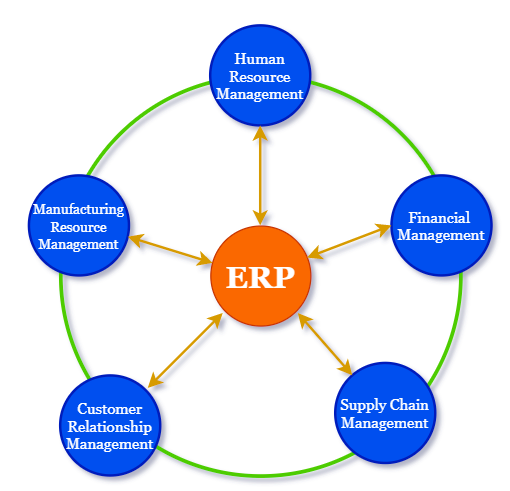
The components included in an ERP system vary by product and industry. Common ERP functional areas include:
- Financial accounting: General ledger, accounts payable, accounts receivable, cash, banking, taxes, assets, and financial closing.
- Management accounting: Budgets, cost centers, product costs, profitability, internal orders, allocations, and management reporting.
- Sales and customer order management: Quotations, pricing, sales orders, deliveries, billing, returns, and customer records.
- Procurement: Purchase requisitions, supplier records, purchase orders, sourcing, receiving, and invoice matching.
- Inventory and warehouse management: Stock levels, locations, transfers, receipts, issues, picking, packing, and cycle counting.
- Manufacturing: Bills of materials, routings, production planning, material requirements, capacity planning, and production orders.
- Supply-chain planning: Demand forecasting, replenishment, distribution, and supplier coordination.
- Human resources: Employee administration, organizational structures, time, payroll, recruitment, learning, and performance processes.
- Project management: Project structures, tasks, budgets, resources, costs, billing, and progress tracking.
- Asset and maintenance management: Equipment records, maintenance plans, work orders, inspections, repairs, and asset history.
- Reporting and analytics: Operational reports, dashboards, financial statements, forecasts, and performance indicators.
Core Features of ERP Software
- Integrated modules: Related business functions exchange information through defined processes.
- Centralized or coordinated data: Users work with common records instead of maintaining conflicting copies in separate systems.
- Real-time transaction processing: Posted transactions can update related records immediately.
- Workflow and approvals: Business documents can follow defined review, approval, and exception processes.
- Role-based security: Access can be restricted by job responsibility, organizational unit, transaction, or data type.
- Configurable business rules: Organizations can define structures, document types, posting rules, tolerances, and process controls.
- Reporting and audit trails: ERP systems retain document relationships and support operational, management, and financial reporting.
- Integration services: ERP applications can exchange data with banks, tax systems, e-commerce platforms, suppliers, customers, payroll services, and other applications.
ERP Example: Order-to-Cash Process
The order-to-cash process illustrates how ERP modules connect a customer order with inventory, delivery, billing, and accounting.
- A sales user creates a customer order.
- The ERP system checks customer information, product availability, prices, taxes, and credit rules.
- The warehouse prepares and ships the goods.
- The system records the inventory reduction and delivery status.
- A customer invoice is created.
- The invoice updates accounts receivable and revenue records.
- The customer payment is received and matched against the open invoice.
Because the process is connected, users in sales, logistics, inventory, and finance can work with related documents instead of recreating the same transaction in separate applications.
ERP in Accounting and Finance
In accounting, ERP software connects operational transactions with financial records. A supplier invoice, customer billing document, inventory movement, payroll posting, asset purchase, or production transaction may create accounting entries according to configured rules.
Typical ERP accounting capabilities include:
- General ledger accounting
- Accounts payable and supplier payments
- Accounts receivable and customer collections
- Bank and cash management
- Fixed-asset accounting
- Tax calculation and reporting
- Cost-center and profit-center reporting
- Budgeting and planning
- Financial consolidation
- Period-end and year-end closing
ERP accounting differs from a basic bookkeeping application because it usually links financial entries to broader operational processes such as purchasing, inventory, manufacturing, sales, projects, maintenance, and human resources.
ERP Deployment Types
| ERP deployment type | How it is operated | Common considerations |
|---|---|---|
| On-premise ERP | The organization runs the ERP software in its own data center or on infrastructure operated for it. | Greater infrastructure responsibility, control over the environment, upgrades, security, and maintenance. |
| Public cloud ERP | The provider delivers a standardized ERP service over the internet. | Subscription pricing, provider-managed updates, standardized processes, and defined extension options. |
| Private cloud ERP | The ERP environment is hosted in dedicated cloud infrastructure. | More control than a shared public-cloud model, with cloud hosting and managed-service options. |
| Hybrid ERP | Cloud and on-premise applications operate together. | Integration, data ownership, security, process coordination, and support responsibilities. |
| Two-tier ERP | A primary ERP system is used at headquarters while subsidiaries or divisions use another ERP solution. | Common in groups that need local flexibility while maintaining consolidated reporting and integration. |
Common Types of ERP Systems
ERP systems can be classified in several ways. There is no single universal list of four or five ERP types, because classifications vary by deployment, business size, industry, and functional scope.
- General-purpose ERP: Supports standard functions used across many industries.
- Industry-specific ERP: Includes processes designed for industries such as manufacturing, construction, retail, healthcare, distribution, education, or professional services.
- Small-business ERP: Provides accounting, inventory, purchasing, sales, and reporting with a scope suited to smaller organizations.
- Enterprise ERP: Supports complex organizational structures, international operations, high transaction volumes, and broad integration requirements.
- Open-source ERP: Provides source-code access under an open-source licence, although implementation, hosting, development, and support still require resources.
- Cloud-native ERP: Is designed primarily for cloud delivery and provider-managed updates.
Advantages of ERP for Business Operations
- Connected information: Departments can use related data from a shared system.
- Reduced duplicate entry: Information entered in one process can support later transactions and reports.
- Consistent processes: Standard workflows and controls can be applied across business units.
- Improved traceability: Users can follow relationships between orders, deliveries, invoices, payments, and accounting documents.
- Faster reporting: Operational and financial reports can use current transaction data.
- Better inventory visibility: ERP systems can track stock quantities, locations, movements, reservations, and availability.
- Stronger financial control: Accounting rules, approvals, period controls, and access permissions can be applied systematically.
- Support for growth: An ERP platform can support additional users, locations, companies, products, and processes when designed appropriately.
ERP Limitations and Implementation Risks
ERP projects can improve coordination, but they also introduce cost, complexity, and organizational change. Common challenges include:
- Incorrect or incomplete business requirements.
- Poor-quality customer, supplier, product, account, or inventory data.
- Excessive customization that makes upgrades and support more difficult.
- Insufficient testing of integrated business processes.
- Weak user training and change management.
- Unclear ownership of master data and business controls.
- Underestimated integration, migration, security, and reporting work.
- Inadequate segregation of duties or user-access controls.
- Unrealistic implementation schedules or incomplete cutover planning.
- Dependence on spreadsheets or manual workarounds after go-live.
ERP Implementation Process
An ERP implementation is a business-transformation project as well as a software project. A typical implementation includes the following stages:
- Business case and scope: Define objectives, expected outcomes, budget, timeline, processes, locations, and users.
- ERP selection: Evaluate functional fit, industry capabilities, deployment options, security, integration, vendor support, and total cost.
- Process design: Document current processes and define how future ERP processes should work.
- Configuration and development: Set up organizational structures, workflows, rules, reports, integrations, and approved extensions.
- Data preparation: Clean, map, validate, and migrate master data and required transaction history.
- Testing: Perform unit, integration, security, performance, regression, and user-acceptance testing.
- Training and change management: Prepare users for new tasks, responsibilities, controls, and procedures.
- Cutover and go-live: Complete final data migration, open transactions, balances, system access, and production readiness activities.
- Support and improvement: Resolve issues, monitor controls, improve processes, and manage future releases.
How to Evaluate ERP Software
An ERP product should be evaluated against the organization’s actual processes rather than a generic feature list. Important evaluation criteria include:
- Fit for finance, sales, purchasing, inventory, manufacturing, projects, service, or human-resource requirements.
- Support for the organization’s industry, countries, currencies, languages, tax rules, and reporting obligations.
- Cloud, private-cloud, on-premise, or hybrid deployment requirements.
- Integration with banks, e-commerce platforms, payroll systems, suppliers, customers, and existing applications.
- Data migration tools and master-data governance capabilities.
- Security, audit, privacy, backup, recovery, and access-control requirements.
- Reporting, analytics, budgeting, and forecasting capabilities.
- Usability, mobile access, accessibility, and training requirements.
- Implementation partner experience and ongoing support arrangements.
- Total cost of licences or subscriptions, implementation, infrastructure, integration, support, upgrades, and internal staffing.
Examples of ERP Software Systems
ERP products differ in scale, industry focus, deployment model, and functional coverage. The following examples illustrate well-known ERP product families without ranking them.
SAP: SAP provides ERP applications for finance, procurement, inventory, manufacturing, sales, projects, maintenance, and other enterprise processes. SAP application areas include Financial Accounting, Controlling, Materials Management, Sales and Distribution, Human Capital Management, Quality Management, and technical development with ABAP.
Oracle E-Business Suite: Oracle E-Business Suite is an integrated collection of business applications. Its functional areas include financial management, procurement, order management, manufacturing, logistics, asset management, projects, and human-capital processes.
Microsoft Dynamics 365: Microsoft Dynamics 365 includes business applications for finance, supply chain, sales, service, commerce, projects, and related operations. Organizations can implement selected applications and connect them with other Microsoft and third-party services.
Tally.ERP 9: Tally has been used for accounting, inventory, taxation, payroll, invoicing, and financial reporting. Product names and available versions may change, so organizations should compare current capabilities with their operational requirements before selection.
Is Accounting Software the Same as ERP?
Accounting software and ERP software overlap, but they are not always the same. Accounting software primarily records financial transactions and produces financial reports. ERP software usually includes accounting while also connecting it with operational functions such as purchasing, inventory, sales, manufacturing, projects, maintenance, and human resources.
A product may be suitable for bookkeeping and financial reporting without providing the broader integrated processes normally associated with ERP. Whether a particular product should be described as ERP depends on its functional scope, integration, workflow, data model, and intended use.
Frequently Asked Questions About ERP Systems
How do you define an ERP system?
An ERP system is integrated business software that manages connected processes and data across functions such as accounting, purchasing, sales, inventory, manufacturing, projects, and human resources.
What are examples of ERP systems?
Examples include ERP product families from SAP, Oracle, Microsoft, and other vendors that provide integrated finance, procurement, supply-chain, manufacturing, project, service, or human-resource capabilities. Products vary considerably, so they should be compared by business fit rather than name alone.
Is SAP an ERP system?
SAP is a software company that provides ERP and other enterprise applications. SAP ERP products connect functions such as finance, procurement, inventory, sales, manufacturing, projects, maintenance, and human resources.
Is Oracle an ERP system?
Oracle is a technology company that provides several enterprise application products, including ERP software. The term Oracle ERP may refer to different Oracle product families, so the specific product and deployment model should be identified when comparing capabilities.
Is QuickBooks an ERP system?
QuickBooks is primarily known as accounting software. Some businesses extend it with inventory, payroll, payments, reporting, and third-party applications, but whether it meets ERP requirements depends on the organization’s required process integration, operational scope, controls, and scale.
Editorial QA Checklist for This ERP Tutorial
- Confirm that ERP is expanded as Enterprise Resource Planning.
- Explain ERP as integrated business software rather than only a planning tool.
- Distinguish ERP software from standalone accounting or bookkeeping software.
- Verify that ERP components include both financial and operational processes.
- Avoid presenting one fixed list of four or five ERP pillars as a universal industry standard.
- Describe ERP benefits as potential outcomes that depend on implementation quality, data, governance, and user adoption.
- Do not include unsupported vendor rankings, market-share claims, or statements that one ERP product is suitable for every organization.
- Check that product names and links already included in the tutorial remain unchanged.
- Verify current product availability, deployment options, and vendor terminology before adding time-sensitive details.