 TutorialKart.com
A Java project can run Apache Spark applications when the project has a compatible JDK, the Spark libraries, and a main class that creates a Spark context or Spark session. In Eclipse, you can add Spark either by using Maven dependencies or by attaching the jars from a downloaded Spark distribution.
This tutorial shows both approaches. The Maven approach is cleaner for new Java Spark projects because dependencies can be updated in one place. The manual jar approach is still useful when you are following an older local setup, learning from an extracted Spark package, or reproducing the Spark MLlib example shown later in this page.
Before you start, install a supported Java Development Kit and Eclipse IDE. Apache Spark’s current documentation should be checked for the Java version required by the Spark release you download; for Spark 4.x, the documentation lists Java 17/21 and Scala 2.13 as the runtime line. If you use an older Spark archive, follow the requirements for that specific archive instead of mixing versions.
Create a Java Project with Apache Spark in Eclipse
The important rule is version consistency. Use one Spark version throughout the project, use the Scala suffix expected by that Spark release, and do not mix jars from different Spark folders. A project may compile even with mismatched jars, but it can fail at runtime with class loading errors.
Option A: Create an Eclipse Maven Project for Apache Spark Java Code
For a new project, create a Maven project in Eclipse using File → New → Maven Project. Add the Spark dependency in pom.xml. The example below uses Spark SQL because it also brings the common Spark APIs used by many Java examples. Replace the Spark version with the version you decide to use from the official Apache Spark downloads or Maven Central.
<project xmlns="http://maven.apache.org/POM/4.0.0"
         xmlns:xsi="http://www.w3.org/2001/XMLSchema-instance"
         xsi:schemaLocation="http://maven.apache.org/POM/4.0.0 https://maven.apache.org/xsd/maven-4.0.0.xsd">
  <modelVersion>4.0.0</modelVersion>

  <groupId>com.tutorialkart.spark</groupId>
  <artifactId>spark-java-demo</artifactId>
  <version>1.0-SNAPSHOT</version>

  <properties>
    <maven.compiler.release>17</maven.compiler.release>
    <spark.version>4.1.0</spark.version>
  </properties>

  <dependencies>
    <dependency>
      <groupId>org.apache.spark</groupId>
      <artifactId>spark-sql_2.13</artifactId>
      <version>${spark.version}</version>
    </dependency>
  </dependencies>
</project>
After saving pom.xml, right click the project and choose Maven → Update Project. Eclipse downloads the required dependencies and places them on the project build path. If your organization runs Spark on a cluster, ask whether Spark dependencies should use Maven scope provided for the packaged application. For local Eclipse runs, leaving the dependency without provided is simpler.
Small Java Spark Program to Verify the Eclipse Maven Setup
Create a Java class named SparkJavaWordCount.java under src/main/java. This program uses local mode, so it can run directly from Eclipse without a separate Spark cluster.
import java.util.Arrays;

import org.apache.spark.api.java.JavaRDD;
import org.apache.spark.sql.SparkSession;

public class SparkJavaWordCount {
  public static void main(String[] args) {
    SparkSession spark = SparkSession.builder()
        .appName("SparkJavaWordCount")
        .master("local[*]")
        .getOrCreate();

    JavaRDD<String> words = spark.sparkContext()
        .parallelize(Arrays.asList("spark", "java", "spark", "eclipse"), 2)
        .toJavaRDD();

    long sparkCount = words.filter(word -> word.equals("spark")).count();

    System.out.println("Count of spark: " + sparkCount);

    spark.stop();
  }
}
Run the class as a Java application. A Spark run prints many INFO log lines. The important line for this test is the result printed by the program.
Count of spark: 2Option B: Download Apache Spark and Add the Distribution Jars Manually
The remaining steps show the manual setup that uses jars from the Apache Spark package. This is close to the original Eclipse workflow and is helpful when you want to inspect Spark’s local examples, data files, and bundled libraries.
1. Download Apache Spark for the Java Project
Download Apache Spark from [https://spark.apache.org/downloads.html]. Choose one Spark release and keep the same release for the whole project. The package size depends on the Spark release and Hadoop build option, so download time can vary.
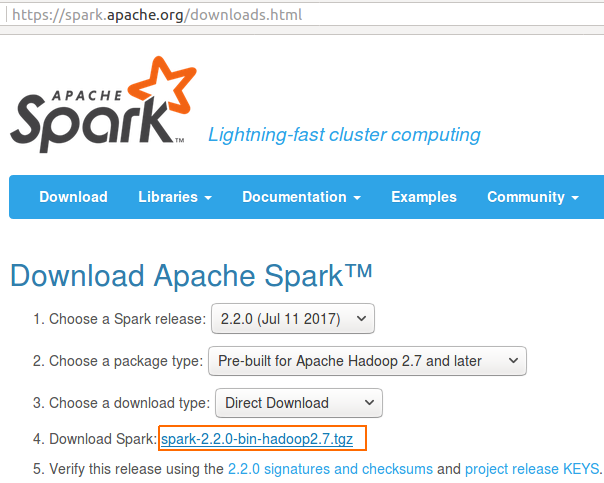
2. Unzip Apache Spark and Locate the jars Folder
Unzip the downloaded folder. The extracted Spark directory contains scripts, examples, data, and the library jars used by Spark.
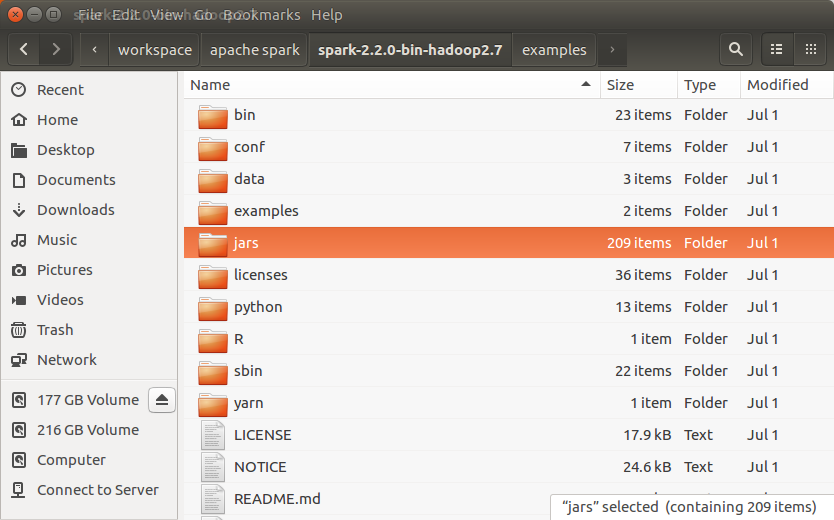
jars : this folder contains the jar files that need to be included in the build path when you are not using Maven or Gradle. Do not copy only one or two jar files unless you know the exact dependency tree. Spark examples usually need several transitive dependencies.
3. Create the Eclipse Java Project and Copy Spark jars
Create a Java Project in Eclipse, and copy jars folder in spark directory to the Java Project, SparkMLlib22.
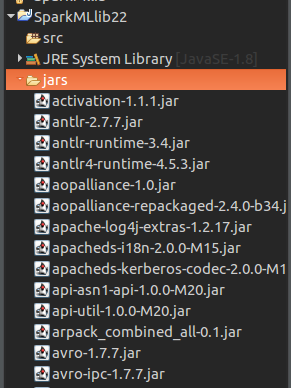
For a small learning project, copying the folder is acceptable. For a team project, Maven or Gradle is preferred because it avoids committing a large number of external jar files to source control.
4. Add Apache Spark jars to the Eclipse Java Build Path
Right click on Project (SparkMLlbi22) -> Properties -> Java Build Path(3rd item in the left panel) -> Libraries (3rd tab) -> Add Jars (button on right side panel) -> In the Jar Selection, Select all the jars in the ‘jars‘ folder -> Apply -> OK.
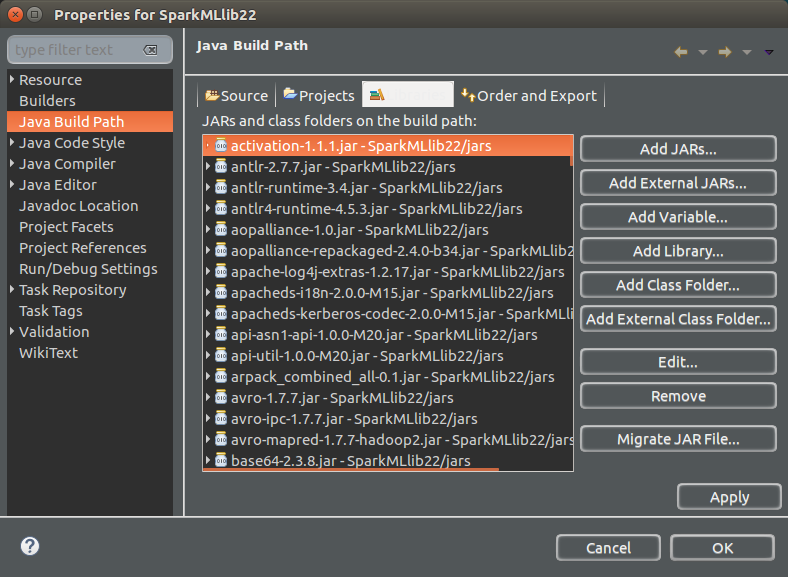
If Eclipse shows a build path warning, confirm that the jar folder is inside the same project and that you selected jars using Add Jars, not Add External JARs. External jars also work, but moving the Spark folder later can break the project path.
5. Run a Java MLlib Example to Check the Apache Spark Setup
You may also copy ‘data’ folder to the project and add ‘jars’ in spark ‘examples‘ directory to have a quick glance on how to work with different modules of Apache Spark. We shall run the following Java Program, JavaRandomForestClassificationExample.java, to check if the Apache Spark setup is successful with the Java Project.
JavaRandomForestClassificationExample.java
/*
* Licensed to the Apache Software Foundation (ASF) under one or more
* contributor license agreements.  See the NOTICE file distributed with
* this work for additional information regarding copyright ownership.
* The ASF licenses this file to You under the Apache License, Version 2.0
* (the "License"); you may not use this file except in compliance with
* the License.  You may obtain a copy of the License at
*
*    http://www.apache.org/licenses/LICENSE-2.0
*
* Unless required by applicable law or agreed to in writing, software
* distributed under the License is distributed on an "AS IS" BASIS,
* WITHOUT WARRANTIES OR CONDITIONS OF ANY KIND, either express or implied.
* See the License for the specific language governing permissions and
* limitations under the License.
*/


// $example on$
import java.util.HashMap;

import scala.Tuple2;

import org.apache.spark.SparkConf;
import org.apache.spark.api.java.JavaPairRDD;
import org.apache.spark.api.java.JavaRDD;
import org.apache.spark.api.java.JavaSparkContext;
import org.apache.spark.api.java.function.Function;
import org.apache.spark.api.java.function.PairFunction;
import org.apache.spark.mllib.regression.LabeledPoint;
import org.apache.spark.mllib.tree.RandomForest;
import org.apache.spark.mllib.tree.model.RandomForestModel;
import org.apache.spark.mllib.util.MLUtils;
// $example off$

public class JavaRandomForestClassificationExample {
  public static void main(String[] args) {
    // $example on$
    SparkConf sparkConf = new SparkConf().setAppName("JavaRandomForestClassificationExample")
            .setMaster("local[2]").set("spark.executor.memory","2g");
    JavaSparkContext jsc = new JavaSparkContext(sparkConf);
    // Load and parse the data file.
    String datapath = "data/mllib/sample_multiclass_classification_data.txt";
    JavaRDD data = MLUtils.loadLibSVMFile(jsc.sc(), datapath).toJavaRDD();
    // Split the data into training and test sets (30% held out for testing)
    JavaRDD[] splits = data.randomSplit(new double[]{0.7, 0.3});
    JavaRDD trainingData = splits[0];
    JavaRDD testData = splits[1];

    // Train a RandomForest model.
    // Empty categoricalFeaturesInfo indicates all features are continuous.
    Integer numClasses = 3;
    HashMap<Integer, Integer> categoricalFeaturesInfo = new HashMap<>();
    Integer numTrees = 55; // Use more in practice.
    String featureSubsetStrategy = "auto"; // Let the algorithm choose.
    String impurity = "gini";
    Integer maxDepth = 5;
    Integer maxBins = 32;
    Integer seed = 12345;

    final RandomForestModel model = RandomForest.trainClassifier(trainingData, numClasses,
      categoricalFeaturesInfo, numTrees, featureSubsetStrategy, impurity, maxDepth, maxBins,
      seed);

    // Evaluate model on test instances and compute test error
    JavaPairRDD<Double, Double> predictionAndLabel =
      testData.mapToPair(new PairFunction<LabeledPoint, Double, Double>() {
        @Override
        public Tuple2<Double, Double> call(LabeledPoint p) {
          return new Tuple2<>(model.predict(p.features()), p.label());
        }
      });
    Double testErr =
      1.0 * predictionAndLabel.filter(new Function<Tuple2<Double, Double>, Boolean>() {
        @Override
        public Boolean call(Tuple2<Double, Double> pl) {
          return !pl._1().equals(pl._2());
        }
      }).count() / testData.count();
    System.out.println("Test Error: " + testErr);
    System.out.println("Learned classification forest model:\n" + model.toDebugString());

    // Save and load model
    model.save(jsc.sc(), "target/tmp/myRandomForestClassificationModel");
    RandomForestModel sameModel = RandomForestModel.load(jsc.sc(),
      "target/tmp/myRandomForestClassificationModel");
    // $example off$

    jsc.stop();
  }
}
Output
17/07/23 09:46:09 INFO DAGScheduler: Submitting ResultStage 6 (MapPartitionsRDD[20] at map at RandomForest.scala:553), which has no missing parents
17/07/23 09:46:09 INFO MemoryStore: Block broadcast_8 stored as values in memory (estimated size 8.1 KB, free 882.2 MB)
17/07/23 09:46:09 INFO MemoryStore: Block broadcast_8_piece0 stored as bytes in memory (estimated size 3.4 KB, free 882.2 MB)
17/07/23 09:46:09 INFO BlockManagerInfo: Added broadcast_8_piece0 in memory on 192.168.1.100:34199 (size: 3.4 KB, free: 882.5 MB)
17/07/23 09:46:09 INFO SparkContext: Created broadcast 8 from broadcast at DAGScheduler.scala:1006
17/07/23 09:46:09 INFO DAGScheduler: Submitting 2 missing tasks from ResultStage 6 (MapPartitionsRDD[20] at map at RandomForest.scala:553) (first 15 tasks are for partitions Vector(0, 1))
17/07/23 09:46:09 INFO TaskSchedulerImpl: Adding task set 6.0 with 2 tasks
17/07/23 09:46:09 INFO TaskSetManager: Starting task 0.0 in stage 6.0 (TID 11, localhost, executor driver, partition 0, ANY, 4621 bytes)
17/07/23 09:46:09 INFO TaskSetManager: Starting task 1.0 in stage 6.0 (TID 12, localhost, executor driver, partition 1, ANY, 4621 bytes)
17/07/23 09:46:09 INFO Executor: Running task 0.0 in stage 6.0 (TID 11)
17/07/23 09:46:09 INFO Executor: Running task 1.0 in stage 6.0 (TID 12)
. .
. .
Run the Java Spark Project Outside Eclipse with spark-submit
Running from Eclipse is convenient while learning. For a packaged Spark application, build a jar and submit it with Spark’s launcher. Spark’s own examples are also launched through bin/run-example or spark-submit, which is the same style used for real deployments.
spark-submit \
  --class com.tutorialkart.spark.SparkJavaWordCount \
  --master local[*] \
  target/spark-java-demo-1.0-SNAPSHOT.jar
Use local[*] for local testing. When the same jar is moved to a cluster, the master URL, deploy mode, memory settings, and dependency packaging may change according to the cluster manager.
Apache Spark Java Project Setup Problems and Fixes
Java version mismatch while starting Spark
If Spark fails before your code runs, check the JDK used by Eclipse, the JDK used by Maven, and the Java version expected by the Spark release. In Eclipse, open Window → Preferences → Java → Installed JREs and make sure the selected JDK matches the project compiler level.
NoClassDefFoundError or ClassNotFoundException for Spark classes
This usually means one or more required jars are missing, or the project contains mixed Spark versions. With Maven, refresh the project and inspect the dependency tree. With the manual jar method, remove old Spark jars and add all jars from one extracted Spark jars folder again.
Spark master is not set for a local Eclipse run
When running directly from Eclipse, set the master in code for the first test, as shown with .master(“local[*]”) or .setMaster(“local[2]”). In a submitted job, the master is normally provided by spark-submit.
MLlib data file path is not found
The random forest example expects data/mllib/sample_multiclass_classification_data.txt relative to the project working directory. Copy the Spark data folder into the Eclipse project, or change the file path to the actual location on your machine.
Apache Spark Java API Notes for Beginners
Spark operations are often lazy. Transformations such as map, filter, and select build a plan. Actions such as count, collect, show, and save trigger execution. This is why the small word-count program starts real Spark work only when count() is called.
For modern Spark Java examples, prefer starting with SparkSession. JavaSparkContext is still useful for RDD-based examples, including older MLlib examples, but Spark SQL and DataFrame examples usually begin with a SparkSession.
QA Checklist for an Eclipse Apache Spark Java Project
- Confirm that Eclipse, Maven, and the terminal use the same supported JDK for the Spark release.
- Use either Maven dependencies or one complete Spark jars folder; do not mix both unless you know why.
- Match the Spark artifact suffix, such as _2.13, with the Scala line used by the Spark release.
- Run a small local program before trying a large MLlib or cluster example.
- Check that sample data paths are relative to the Eclipse working directory.
- Ignore normal Spark INFO logs during the first run, but read exception stack traces carefully.
FAQs on Creating a Java Project with Apache Spark
Should I copy Spark jars into Eclipse or use Maven for a Java Spark project?
Use Maven for a new Java Spark project because it keeps dependencies readable and easier to update. Copying Spark jars manually is acceptable for a small learning project or when you are following a specific downloaded Spark example.
What Java version should I use for Apache Spark?
Use the Java version supported by your Spark release. Current Spark documentation should be checked before setup; Spark 4.x documentation lists Java 17/21. Older Spark releases may have different Java requirements.
Why does a Java Spark program show many INFO log lines in Eclipse?
Spark starts a driver, scheduler, executors in local mode, and internal stages even for a small program. INFO logs are normal. Look for the line printed by your program or for exception messages if the run fails.
Is Spark read lazy in Java examples?
Yes. Spark transformations are evaluated lazily. A read or transformation prepares a plan, and an action such as count, collect, show, or save triggers actual execution.
Can I run the same Java Spark code from Eclipse and spark-submit?
Usually yes, but packaging and dependency scope can differ. Eclipse local runs often include all dependencies, while cluster jobs may expect Spark libraries to be supplied by the cluster and only the application jar to be submitted.
Conclusion: Java Project with Apache Spark in Eclipse
In this Apache Spark Tutorial, we have successfully learnt to create a Java Project with Apache Spark libraries as dependencies; and run a Spark MLlib example program. For new Java Spark work, start with a Maven-based Eclipse project and use the manual jar method only when it matches your learning setup or a specific Spark distribution example.