 TutorialKart.com
Load data from JSON file and execute SQL query in Spark SQL by reading the JSON file into a DataFrame, registering the DataFrame as a temporary view, and running a SQL statement with spark.sql().
Apache Spark Dataset and DataFrame APIs provides an abstraction to the Spark SQL from data sources. Dataset provides the goodies of RDDs along with the optimization benefits of Spark SQL’s execution engine.
This tutorial explains the Java Spark SQL flow for JSON data: create a SparkSession, read JSON records, inspect the schema, create a temporary view, execute a SQL query, and display the result.
Dataset loads JSON data source as a distributed collection of data. DataFrame is Dataset with data arranged into named columns. The architecture containing JSON data source, Dataset, Dataframe and Spark SQL is shown below :
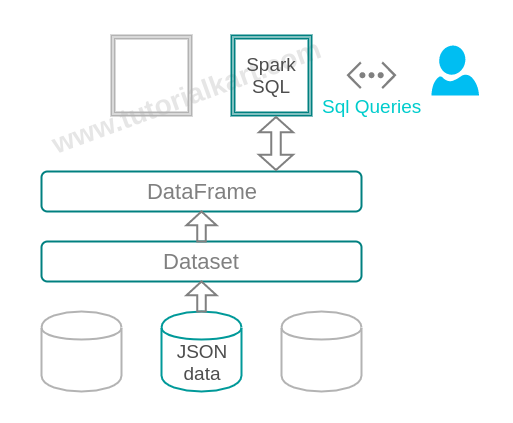
How Spark SQL Reads JSON Files Before Running SQL Queries
Spark SQL can read JSON data and represent it as a DataFrame. Each field in the JSON data becomes a column in the DataFrame schema. After that, the DataFrame can be queried using the DataFrame API or SQL syntax.
By default, Spark expects JSON data in newline-delimited JSON format, where each line is a complete JSON object. This format is common in logs, event data, and exported records.
{"name":"Michael", "salary":3000}
{"name":"Andy", "salary":4500}
{"name":"Justin", "salary":3500}
If your input file contains one JSON document spread across multiple lines, use the multiLine option while reading the file. For large analytics datasets, newline-delimited JSON is usually easier for Spark to split and process in parallel.
Load Data from JSON File and Execute SQL Query in Spark SQL
Following is a step-by-step process to load data from JSON file and execute SQL query on the loaded data from JSON file.
1. Create a Spark Session for the JSON SQL Example
Provide application name and set master to local with two threads.
SparkSession spark = SparkSession
        .builder()
        .appName("Java Spark SQL data source JSON example")
        .master("local[2]")
        .getOrCreate();
SparkSession is the entry point used for reading the JSON file, creating the temporary view, and running the SQL query.
2. Read JSON Data Source into a Dataset<Row>
SparkSession.read().json(String path) can accept either a single text file or a directory storing text files, and load the data to Dataset.
Dataset<Row> people = spark.read().json("path-to-json-files");When a directory path is given, Spark reads the JSON files inside that directory. In the example below, the path data/sql/json/ contains a file named people.json.
3. Create a Temporary View for SQL Queries on JSON Data
people.createOrReplaceTempView("people");The temporary view name people is used like a table name in Spark SQL. It exists for the lifetime of the current Spark session unless it is replaced or dropped.
4. Run a Spark SQL Query on the JSON Temporary View
Temporary view could be considered as a table and attributes under schema root as columns
root
|-- name: string (nullable = true)
|-- salary: long (nullable = true)
Table : people Columns : name, salary
Dataset<Row> namesDF = spark.sql("SELECT name FROM people WHERE salary>3500 ");
namesDF.show();
The query selects only the name column from records where the salary value is greater than 3500.
SELECT name
FROM people
WHERE salary > 3500;
5. Stop the Spark Session After the JSON Query Runs
After the query result is displayed, stop the Spark session to release the resources used by the local Spark application.
spark.stop();Complete Java Program to Query JSON File in Spark SQL
Complete java program to load data from JSON file and execute SQL query in given below:
data/sql/json/people.json
{"name":"Michael", "salary":3000}
{"name":"Andy", "salary":4500}
{"name":"Justin", "salary":3500}
{"name":"Berta", "salary":4000}
{"name":"Raju", "salary":3000}
{"name":"Chandy", "salary":4500}
{"name":"Joey", "salary":3500}
{"name":"Mon", "salary":4000}
{"name":"Rachel", "salary":4000}
Each line in this file is a separate JSON object. Spark reads these records and infers the columns name and salary.
JSONsqlExample.java
import org.apache.spark.sql.Dataset;
import org.apache.spark.sql.Row;
import org.apache.spark.sql.SparkSession;

public class JSONsqlExample {

    public static void main(String[] args) {
        SparkSession spark = SparkSession
                .builder()
                .appName("Java Spark SQL data source JSON example")
                .master("local[2]")
                .getOrCreate();

        // A JSON dataset is pointed to by path.
        // The path can be either a single text file or a directory storing text files
        Dataset<Row> people = spark.read().json("data/sql/json/");

        // The inferred schema can be visualized using the printSchema() method
        System.out.println("Schema\n=======================");
        people.printSchema();

        // Creates a temporary view using the DataFrame
        people.createOrReplaceTempView("people");

        // SQL statements can be run by using the sql methods provided by spark
        Dataset<Row> namesDF = spark.sql("SELECT name FROM people WHERE salary>3500 ");
        System.out.println("\n\nSQL Result\n=======================");
        namesDF.show();

        // stop spark session
        spark.stop();
    }
}
Output
Schema
=======================
root
|-- name: string (nullable = true)
|-- salary: long (nullable = true)

SQL Result
=======================
+------+
| name|
+------+
| Andy|
| Berta|
|Chandy|
| Mon|
|Rachel|
+------+
Using an Explicit Schema When Loading JSON in Spark SQL
In the example above, Spark infers the JSON schema from the input data. Schema inference is convenient for learning and exploration, but production jobs often use an explicit schema so that field types stay predictable.
import org.apache.spark.sql.types.DataTypes;
import org.apache.spark.sql.types.StructType;

StructType schema = new StructType()
        .add("name", DataTypes.StringType, true)
        .add("salary", DataTypes.LongType, true);

Dataset<Row> people = spark.read()
        .schema(schema)
        .json("data/sql/json/");
An explicit schema is helpful when a column may be missing from some records, when numeric values must be treated consistently, or when reading a large JSON dataset where repeated schema inference is unnecessary.
Reading Multi-line JSON Files in Spark SQL
The sample file in this tutorial uses newline-delimited JSON. If a file contains one JSON object or array spread across multiple lines, enable the multiLine option while reading it.
Dataset<Row> people = spark.read()
        .option("multiLine", true)
        .json("data/sql/json/people-multiline.json");
Use this option only when the file layout needs it. For many Spark workloads, one JSON record per line is the preferred input format because it is easier to process in parallel.
Querying Nested JSON Fields with Spark SQL
JSON data may contain nested objects. Spark SQL can represent nested objects as struct columns. After reading the data, use printSchema() to confirm the nested field names before writing the SQL query.
{"name":"Andy", "salary":4500, "address":{"city":"Hyderabad", "country":"India"}}SELECT name, address.city AS city
FROM people
WHERE salary > 3500;For deeply nested JSON, it is usually better to inspect the schema first and then flatten only the fields required for the query or downstream table.
Common Mistakes When Running Spark SQL on JSON Files
- Using regular JSON instead of newline-delimited JSON: If the JSON document spans multiple lines, set
multiLinetotrue. - Querying a wrong column name: Use
printSchema()to check the exact field names inferred by Spark. - Forgetting to create the temporary view:
spark.sql()can querypeopleonly aftercreateOrReplaceTempView("people")is called. - Assuming schema inference is always best: For stable pipelines, define the schema explicitly to avoid unexpected type changes.
- Using SQL syntax before escaping special field names: If a JSON field name contains spaces or special characters, use backticks in Spark SQL.
Spark SQL JSON File FAQ
How do I load data from JSON file and execute SQL query in Spark SQL?
Read the JSON file using spark.read().json(path), create a temporary view using createOrReplaceTempView(), and run the SQL query using spark.sql(). The result is returned as a Dataset<Row>.
Can Spark SQL read a directory of JSON files?
Yes. The JSON path can point to a single JSON file or to a directory that contains JSON files. Spark reads the matching files and creates one DataFrame from the input data.
Why does Spark SQL infer the salary column as long?
In this example, all salary values are whole numbers, so Spark infers the column as a numeric long type. If the input contains decimal values, missing values, or mixed data types, the inferred type may differ.
When should I provide a schema for Spark JSON data?
Provide a schema when the JSON structure is known and the job is part of a repeatable pipeline. This helps keep column types stable and avoids scanning the data only to infer the schema.
Can Spark SQL query nested JSON fields?
Yes. Nested JSON objects are represented as struct columns. You can query nested fields using dot notation, such as address.city, after checking the schema with printSchema().
Spark SQL JSON Tutorial QA Checklist
- Confirm that the JSON sample is newline-delimited, with one complete JSON object per line.
- Verify that the temporary view name in the explanation matches the SQL query table name
people. - Check that the SQL query condition
salary>3500matches the displayed output rows. - Make sure Java examples use
SparkSession,Dataset<Row>, andspark.sql()consistently. - Keep output-only blocks marked as output and syntax-only examples marked with the proper PrismJS language class.
Official reference: Apache Spark SQL JSON Files documentation.
Conclusion
In this Apache Spark Tutorial, we have learnt to load a json file into Dataset and access the data using SQL queries through Spark SQL.
The key steps are simple: read the JSON source into a DataFrame, inspect the inferred schema, register a temporary view, and query the view with Spark SQL. For production jobs, consider using an explicit schema and the correct JSON input mode for your file structure.