 TutorialKart.com
Install Apache Spark on Ubuntu 16.04 with Java, SPARK_HOME, and spark-shell
Apache Spark can be run on the majority of operating systems, including Linux. In this tutorial, we shall look into the process of installing Apache Spark on Ubuntu 16, which was a popular desktop flavor of Linux when this installation guide was first written.
The commands below keep the original Ubuntu 16.04 and Spark 2.2.0 installation flow, and the tutorial also adds notes for choosing a newer Apache Spark release. If you are installing Spark on a current Ubuntu system, check the Java requirement for the Spark version you download before copying the commands exactly.
Choose the right Apache Spark version for Ubuntu 16.04
Apache Spark releases are tied to Java, Scala, Python, and Hadoop compatibility. Ubuntu 16.04 normally uses older Java packages, so the Spark 2.x style commands in this tutorial are suitable for a legacy local setup. Current Spark releases should normally be installed on a supported Ubuntu version with a supported Java version.
| Installation choice | Use this when | Important note |
|---|---|---|
| Spark 2.2.0 on Ubuntu 16.04 | You are following the original tutorial or maintaining an old learning environment. | The existing commands and screenshot in this page use spark-2.2.0-bin-hadoop2.7.tgz. |
| Latest Spark release from Apache | You are setting up a fresh machine for current Spark learning or development. | Use the official download page and match the Java version required by the Spark documentation. |
| PySpark local setup | You want to use Spark with Python after the base Spark install works. | Install Python separately and verify with pyspark after spark-shell is working. |
Install Java dependency for Apache Spark on Ubuntu 16.04
Java is the required runtime dependency for Apache Spark. For the legacy Spark 2.2.0 setup shown here, the default JDK available on Ubuntu 16.04 is commonly used.
To install Java, open a terminal and run the following command :
~$ sudo apt-get install default-jdkAfter installing Java, verify that the java command is available.
java -version
javac -version
If the terminal says that Java is not found, install the JDK again or check whether JAVA_HOME and PATH are set correctly.
Steps to install Apache Spark 2.2.0 on Ubuntu 16.04
1. Download Apache Spark archive for Ubuntu 16.04
There is continuous development of Apache Spark. Newer versions roll out from time to time. For a new installation, download the current stable Spark version only after checking its Java requirement. For this Ubuntu 16.04 walkthrough, the commands use Spark 2.2.0 with Hadoop 2.7.
To download latest Apache Spark release, open the url http://spark.apache.org/downloads.html in a browser.
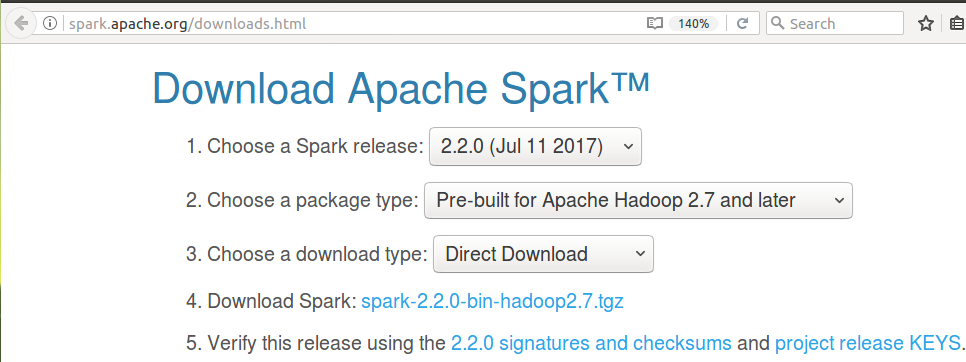
If your downloaded file name is different from the one used below, replace spark-2.2.0-bin-hadoop2.7.tgz with the actual file name in every command.
2. Extract Apache Spark and move it to /usr/lib/
The Spark download is a .tgz archive. Before setting up Apache Spark in the PC, extract the file. To extract the download, open a terminal and run the tar command from the location of the downloaded archive.
~$ tar xzvf spark-2.2.0-bin-hadoop2.7.tgzNow move the folder to /usr/lib/ . In the following terminal commands, we copied the contents of the unzipped spark folder to a folder named spark. Then we moved the spark named folder to /usr/lib/.
~$ mv spark-2.2.0-bin-hadoop2.7/ spark
~$ sudo mv spark/ /usr/lib/
You can confirm that the Spark files are in the expected location with the following command.
ls /usr/lib/sparkThe directory should contain folders such as bin, conf, jars, python, and sbin. If the directory is missing, check whether the sudo mv command completed successfully.
3. Add JAVA_HOME, SPARK_HOME, and Spark bin to PATH
Now we need to set SPARK_HOME environment variable and add it to the PATH. As a prerequisite, JAVA_HOME variable should also be set.
To set JAVA_HOME variable and add /usr/lib/spark/bin folder to PATH, open ~/.bashrc with any of the editor. We shall use nano editor here :
$ sudo nano ~/.bashrcAnd add following lines at the end of ~/.bashrc file.
export JAVA_HOME=/usr/lib/jvm/default-java/jre
export SPARK_HOME=/usr/lib/spark/bin
export PATH=$PATH:SPARK_HOME
For new installations, keep SPARK_HOME as the Spark root directory and add $SPARK_HOME/bin to PATH. This form is easier to reuse for spark-shell, pyspark, spark-submit, and Spark configuration files.
export JAVA_HOME=/usr/lib/jvm/default-java
export SPARK_HOME=/usr/lib/spark
export PATH=$PATH:$SPARK_HOME/bin
Save the file, close the editor, and load the updated shell configuration.
source ~/.bashrc
echo $JAVA_HOME
echo $SPARK_HOME
which spark-shell
If which spark-shell prints a path similar to /usr/lib/spark/bin/spark-shell, the Spark executable path is available to the terminal.
Latest Apache Spark is successfully installed in your Ubuntu 16.
4. Verify Apache Spark installation with spark-shell
Now that we have installed everything required and setup the PATH, we shall verify if Apache Spark has been installed correctly.
To verify the installation, close the Terminal already opened, and open a new Terminal again. Run the following command :
~$ spark-shell~$ spark-shell
Using Sparks default log4j profile: org/apache/spark/log4j-defaults.properties
Setting default log level to "WARN".
To adjust logging level use sc.setLogLevel(newLevel). For SparkR, use setLogLevel(newLevel).
17/08/04 03:42:23 WARN NativeCodeLoader: Unable to load native-hadoop library for your platform... using builtin-java classes where applicable
17/08/04 03:42:23 WARN Utils: Your hostname, arjun-VPCEH26EN resolves to a loopback address: 127.0.1.1; using 192.168.1.100 instead (on interface wlp7s0)
17/08/04 03:42:23 WARN Utils: Set SPARK_LOCAL_IP if you need to bind to another address
17/08/04 03:42:36 WARN ObjectStore: Failed to get database global_temp, returning NoSuchObjectException
Spark context Web UI available at http://192.168.1.100:4040
Spark context available as 'sc' (master = local[*], app id = local-1501798344680).
Spark session available as 'spark'.
Welcome to
____ __
/ __/__ ___ _____/ /__
_\ \/ _ \/ _ `/ __/ '_/
/___/ .__/\_,_/_/ /_/\_\ version 2.2.0
/_/
Using Scala version 2.11.8 (OpenJDK 64-Bit Server VM, Java 1.8.0_131)
Type in expressions to have them evaluated.
Type :help for more information.
scala> :quit
sparkuser@tutorialkart:~$
Also verify the versions of Spark, Java and Scala displayed during the start of spark-shell.
:quit command exits you from scala script of spark-shell.
Some warnings in the Spark shell startup output are common in local mode. For example, the native Hadoop library warning usually means Spark is using built-in Java classes for local execution. A hostname loopback warning can be handled later by setting SPARK_LOCAL_IP if your local network configuration requires it.
5. Run a small Apache Spark expression in local mode
After the shell starts, run a small expression to confirm that the Spark session is responding. This is a simple local-mode check; it does not require a cluster.
val numbers = sc.parallelize(Seq(1, 2, 3, 4))
numbers.sum()
res0: Double = 10.0If you get a numeric result, Spark is able to create an RDD and run a small local job.
Optional PySpark check on Ubuntu 16.04
If you installed Spark to use Python, first confirm that Python is installed. Then start the PySpark shell from the same terminal where Spark environment variables are available.
python --version
pyspark
Inside the PySpark shell, run a small count operation.
data = sc.parallelize([1, 2, 3, 4])
data.count()4If pyspark is not found, check whether $SPARK_HOME/bin is included in PATH. If Python itself is not found, install Python before testing PySpark.
Troubleshooting Apache Spark installation on Ubuntu 16.04
| Problem during Spark setup | Likely cause | What to check |
|---|---|---|
spark-shell: command not found | Spark bin directory is not in PATH. | Run echo $SPARK_HOME and confirm that $SPARK_HOME/bin is added to PATH. |
JAVA_HOME is not set | Java path is missing or points to the wrong directory. | Run which java and update JAVA_HOME in ~/.bashrc. |
| Permission denied while moving Spark | The target folder is owned by root. | Use sudo mv spark/ /usr/lib/ as shown in the installation step. |
| Downloaded file name is different | You selected a different Spark version or Hadoop package. | Replace the archive name in the tar and mv commands. |
| Hostname resolves to loopback warning | Local host mapping points to a loopback address. | For local learning, this warning may not block Spark. Set SPARK_LOCAL_IP only if networking causes an issue. |
Apache Spark download and documentation references
For current installation files and compatibility notes, use the official Apache Spark resources: Apache Spark downloads, Apache Spark documentation, and Apache Spark quick start. For more learning topics, continue with the Spark Tutorial.
FAQ about installing Apache Spark on Ubuntu 16.04
Can I install the latest Apache Spark on Ubuntu 16.04?
You can install Spark manually on Ubuntu 16.04, but the latest Spark releases may require newer Java versions than the default packages commonly used with Ubuntu 16.04. For a current Spark release, check the official Spark documentation first and consider using a supported Ubuntu version.
Is Java the only dependency required for Spark shell on Ubuntu 16.04?
For the basic Spark shell shown in this tutorial, Java is the main dependency. If you want PySpark, Python is also required. If you plan to connect Spark with external storage, databases, or Hadoop services, additional packages and configuration may be needed.
What should SPARK_HOME point to on Ubuntu?
SPARK_HOME should point to the Spark installation root directory, such as /usr/lib/spark. Then add $SPARK_HOME/bin to PATH so commands like spark-shell, pyspark, and spark-submit can be run from the terminal.
Why does spark-shell show Hadoop native library warnings?
In a local installation, Spark may show a warning that the native Hadoop library could not be loaded. For many local learning setups, Spark continues by using built-in Java classes. If you are configuring a production Hadoop environment, review Hadoop and Spark native library settings separately.
Do I need a Spark cluster to test this Ubuntu installation?
No. The spark-shell command starts Spark in local mode by default for this tutorial. That is enough to verify the installation and run small examples on a single machine.
Editorial QA checklist for this Apache Spark Ubuntu 16 tutorial
- Confirm that the original Spark 2.2.0 command blocks are preserved for the Ubuntu 16.04 walkthrough.
- Check that the page explains the difference between the legacy Ubuntu 16.04 setup and current Spark release requirements.
- Verify that new command examples use the
language-bashclass and output-only examples use theoutputclass. - Check that
SPARK_HOMEis explained as the Spark root directory and that$SPARK_HOME/binis added toPATH. - Verify that the troubleshooting table covers
spark-shellnot found,JAVA_HOMEissues, permission problems, archive name differences, and common startup warnings.
Apache Spark installation summary for Ubuntu 16.04
In this Spark Tutorial, we have gone through a step by step process to make environment ready for Spark Installation, and the installation of Apache Spark itself. The key steps are to install Java, download the Spark archive, extract it, move it to a stable location, set JAVA_HOME and SPARK_HOME, add Spark to PATH, and verify the setup with spark-shell.