 TutorialKart.com
PostgreSQL CREATE TABLE Using SQL and pgAdmin
The PostgreSQL CREATE TABLE statement creates a new table in a database. A table definition normally specifies the table name, column names, data types, default values, and constraints such as primary keys, unique values, and required fields.
You can create a PostgreSQL table by running an SQL statement or by using the graphical interface in pgAdmin. The SQL approach is easier to repeat, review, and include in database scripts, while pgAdmin is useful when you prefer to configure the table through a form.
PostgreSQL CREATE TABLE Syntax
To create a new table in a PostgreSQL database, use the SQL CREATE TABLE statement.
The basic syntax of the CREATE TABLE statement is:
 CREATE TABLE table_name(
    column1 datatype,
    column2 datatype,
    ...
    columnN datatype
 );
In this syntax:
table_nameis the name of the new table.column1,column2, …,columnNare the column names.datatypespecifies the type of data that each column can store.
PostgreSQL table and column names must follow identifier rules. Unquoted names are converted to lowercase, so simple lowercase names such as students and student_id are generally easier to work with.
Create a Students Table in PostgreSQL
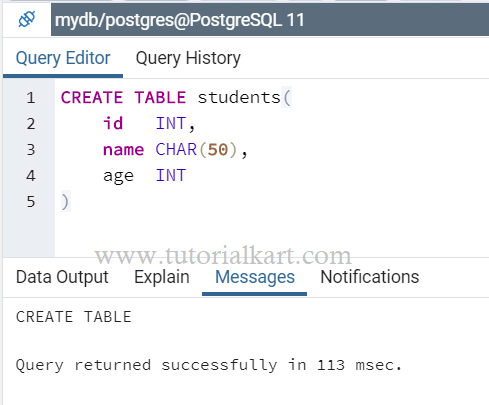
In this example, we create a PostgreSQL table by running a CREATE TABLE query in the pgAdmin Query Tool.
CREATE TABLE students(
	id   INT,
	name CHAR(50),
	age  INT
)
This statement creates a table named students with three columns:
idstores integer values.namestores fixed-length character values of up to 50 characters.agestores integer values.
If the CREATE TABLE query succeeds, pgAdmin displays a success message.
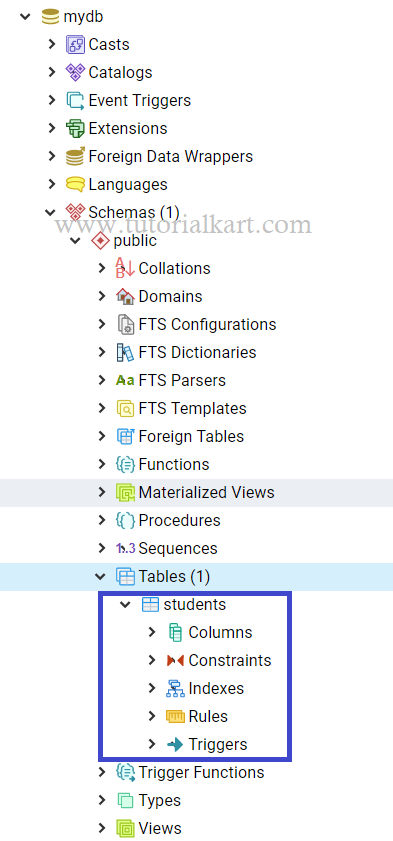
To view the table, refresh or right-click the Tables node under the database schema. The new students table should then appear in the object browser.
Create a PostgreSQL Table with Constraints
A practical table definition usually includes constraints that protect data quality. The following example defines an automatically generated primary key, required columns, a unique email address, a valid age range, and a default creation timestamp.
CREATE TABLE student_records (
    student_id INTEGER GENERATED ALWAYS AS IDENTITY PRIMARY KEY,
    student_name VARCHAR(100) NOT NULL,
    email VARCHAR(255) UNIQUE,
    age INTEGER CHECK (age >= 0),
    created_at TIMESTAMP NOT NULL DEFAULT CURRENT_TIMESTAMP
);
GENERATED ALWAYS AS IDENTITYgenerates a value for each new row.PRIMARY KEYuniquely identifies every row.NOT NULLprevents a column from containing a null value.UNIQUEprevents duplicate values in the specified column.CHECKrequires inserted values to satisfy a condition.DEFAULTsupplies a value when one is not explicitly provided.
VARCHAR is usually more suitable than CHAR for names and other values whose length varies. A CHAR(50) value is blank-padded to its declared length, whereas VARCHAR(50) stores a variable-length string up to the specified limit.
Prevent an Error When a PostgreSQL Table Already Exists
Running CREATE TABLE for an existing table name normally produces an error. Add IF NOT EXISTS when the statement should avoid failing if a table with that name is already present.
CREATE TABLE IF NOT EXISTS students (
    id INTEGER,
    name VARCHAR(50),
    age INTEGER
);
This clause prevents the duplicate-table error, but it does not compare the existing table structure with the definition in the statement. If the table already exists with different columns or constraints, PostgreSQL leaves it unchanged.
Create a PostgreSQL Table in a Specific Schema
To create a table in a particular schema, qualify the table name with the schema name.
CREATE TABLE school.students (
    id INTEGER PRIMARY KEY,
    name VARCHAR(100) NOT NULL,
    age INTEGER
);
This statement creates students inside the school schema. The schema must already exist, and the current database user must have permission to create objects in it.
Create a PostgreSQL Table from a SELECT Query
PostgreSQL can create a table from the result of a query by using CREATE TABLE AS. This creates the destination columns from the query output and copies the selected rows.
CREATE TABLE adult_students AS
SELECT id, name, age
FROM students
WHERE age >= 18;
The new adult_students table contains the selected columns and rows. Constraints, indexes, and triggers from the source table are not automatically copied.
Create a PostgreSQL Table with the pgAdmin GUI
You can also create a PostgreSQL table through the pgAdmin graphical interface without writing the SQL statement manually.
Expand the database in which you want to create the table. Then expand Schemas, select the required schema such as public, right-click Tables, and choose Create followed by Table.

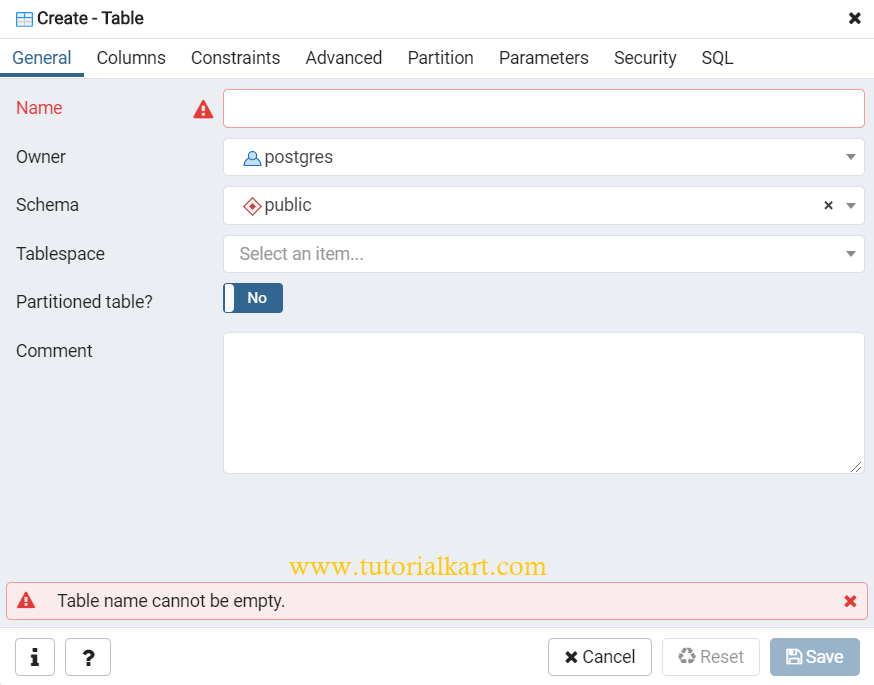
The table creation dialog appears.
Set the PostgreSQL Table Name and Schema
Enter the table name in the Name field. You can also choose the owner, schema, tablespace, partitioning settings, and an optional comment. For a basic table, the default values are usually sufficient apart from the table name.
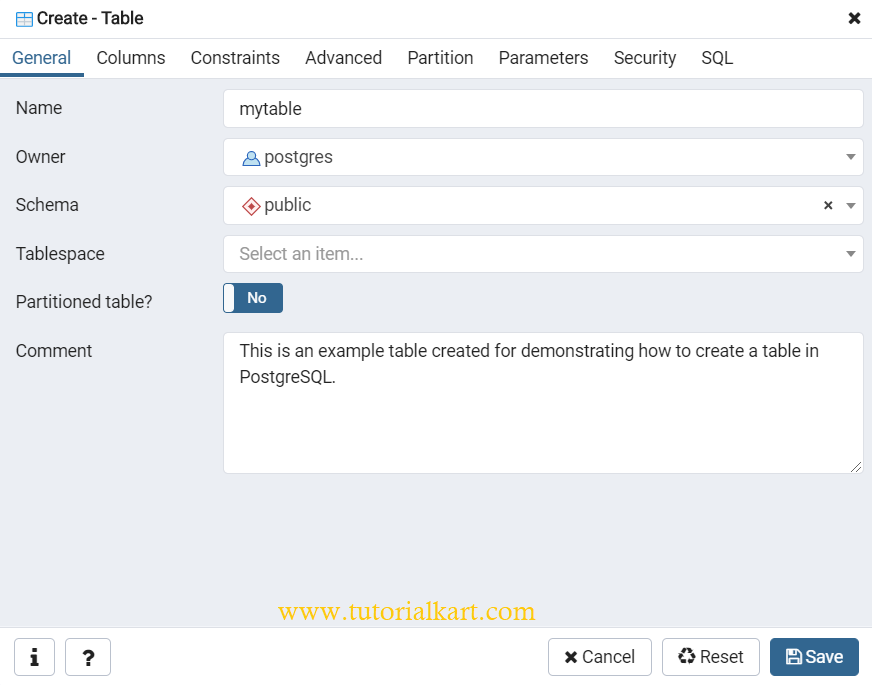
In this example, we provide a name and comment and leave the remaining settings at their defaults.
Add Columns to the PostgreSQL Table in pgAdmin
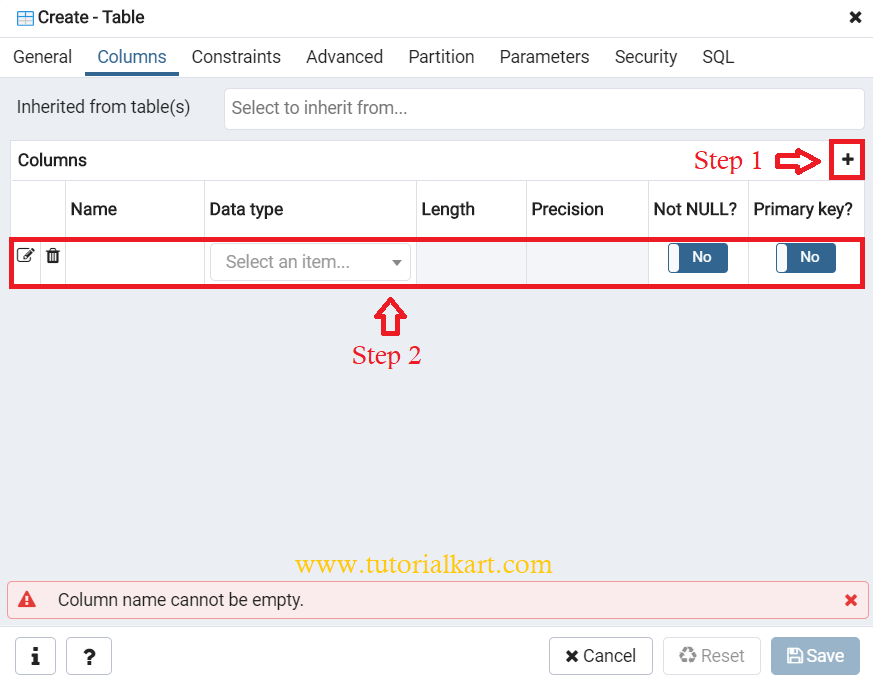
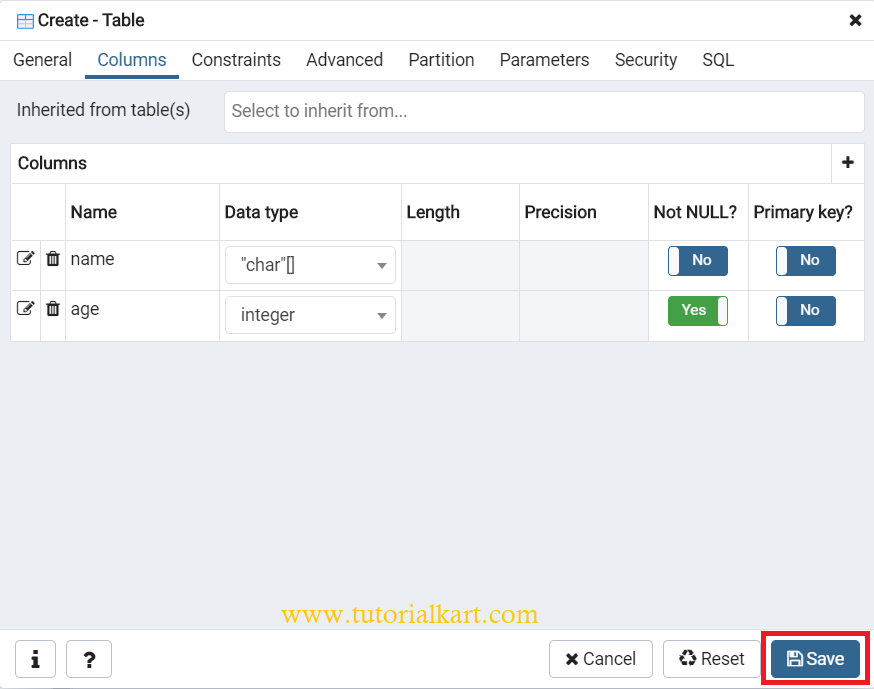
Select the Columns tab and click the + button to add a column. Enter the column name, select its data type, and configure options such as length, precision, default value, and whether null values are allowed. Repeat the process for each required column.
In this example, two columns have been added and their data types and options have been configured. After adding all required columns, click Save.
A new table named mytable is created and appears under Tables in the pgAdmin object browser. Refresh the node if it does not appear immediately.
Verify the PostgreSQL Table Definition
You can query PostgreSQL’s information schema to verify the columns and data types of a newly created table.
SELECT column_name, data_type, is_nullable, column_default
FROM information_schema.columns
WHERE table_schema = 'public'
  AND table_name = 'students'
ORDER BY ordinal_position;
This query returns one row for each column in the public.students table, in the order in which the columns were defined.
Common PostgreSQL CREATE TABLE Errors
- Relation already exists: choose another table name, drop or rename the existing table, or use
IF NOT EXISTS. - Syntax error near a column: check commas, parentheses, data type names, and constraint placement.
- Schema does not exist: create the schema first or use an existing schema such as
public. - Permission denied for schema: use a database role with the required
CREATEprivilege. - Invalid data type: use a PostgreSQL-supported data type and provide valid length or precision arguments.
PostgreSQL CREATE TABLE Questions
How do I create a table only when it does not already exist?
Use CREATE TABLE IF NOT EXISTS table_name (...). PostgreSQL avoids the duplicate-table error, but it does not update or validate the structure of an existing table.
How do I make a PostgreSQL column auto-increment?
Define the column with an identity clause, such as INTEGER GENERATED ALWAYS AS IDENTITY or BIGINT GENERATED BY DEFAULT AS IDENTITY. Identity columns are the standard approach for generated numeric keys.
What is the difference between CHAR and VARCHAR in PostgreSQL?
CHAR(n) stores fixed-length values and pads shorter entries with spaces. VARCHAR(n) stores variable-length values up to the specified limit and is usually more appropriate for names, email addresses, and similar text.
Does CREATE TABLE AS copy constraints and indexes?
No. CREATE TABLE AS creates columns from a query result and optionally copies rows, but it does not automatically copy primary keys, unique constraints, foreign keys, indexes, or triggers from the source table.
PostgreSQL CREATE TABLE Summary
In this PostgreSQL Tutorial, we learned how to create a table using an SQL query and the pgAdmin interface. We also covered column data types, identity columns, constraints, schemas, IF NOT EXISTS, CREATE TABLE AS, and ways to verify a table definition.