 TutorialKart.com
PostgreSQL UPDATE Query
The PostgreSQL UPDATE statement changes existing column values in one or more rows of a table. Use a WHERE clause to limit the update to rows that match a condition. Without a WHERE clause, PostgreSQL updates every row in the table.
An UPDATE statement can change a single column, multiple columns, values calculated from existing data, or values obtained from another table. PostgreSQL also supports a RETURNING clause that displays the rows changed by the statement.
PostgreSQL UPDATE Syntax
The basic syntax of a PostgreSQL UPDATE query is:
 UPDATE table_name
	SET column1 = value1, column2 = value2, columnN = valueN
	WHERE condition;
In this syntax, table_name is the table to modify. The SET clause assigns a new value to each specified column, and the optional WHERE condition determines which rows are updated.
column1,column2, andcolumnNare columns to update.value1,value2, andvalueNmay be constants, expressions, column values, or subquery results.conditionis a Boolean expression evaluated for each row.
Before running an update, it is good practice to test the same condition with a SELECT query so that you can confirm which rows will be affected.
SELECT *
FROM students
WHERE id = 3;
PostgreSQL UPDATE One Column in One Row
To update one row, use a WHERE condition that identifies that row. A primary key or another unique column is usually the safest choice.
Consider the following students table.
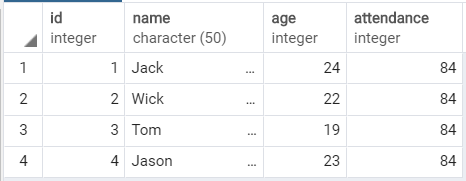
The following query changes the attendance value to 81 only for the student whose id is 3.
 UPDATE students
	SET attendance=81
	WHERE id=3;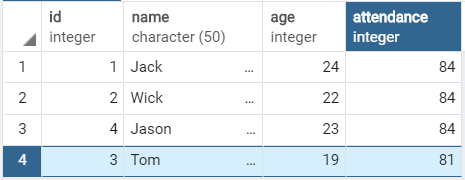
If more than one row has id = 3, PostgreSQL updates every matching row. A uniqueness constraint on the identifier prevents this ambiguity.
PostgreSQL UPDATE One Column in Every Row
Omitting the WHERE clause updates all rows. The following statement sets attendance to 73 for every student in the table.
 UPDATE students
	SET attendance=73;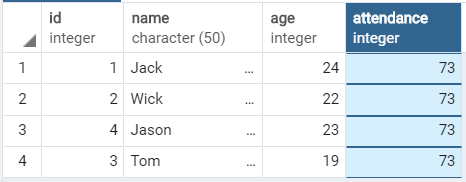
Use an update without WHERE only when the same change is intended for the entire table. In an application, database permissions, transactions, and backups can help reduce the impact of an accidental full-table update.
PostgreSQL UPDATE Multiple Columns in One Statement
Place multiple assignments in the SET clause and separate them with commas. PostgreSQL applies all assignments to each matching row as part of the same statement.
The following query updates both age and attendance for the student whose id is 3.
 UPDATE students
	SET age=21, attendance=73
	WHERE id=3;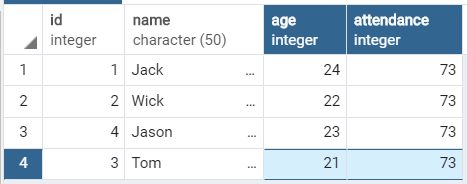
PostgreSQL UPDATE with Calculated Values
A new value may be calculated from the row’s current value. For example, the following statement increases attendance by 1 for students whose current attendance is below 75.
UPDATE students
SET attendance = attendance + 1
WHERE attendance < 75;
If the source column contains NULL, an arithmetic expression using that column also produces NULL. Use COALESCE when a null value should be treated as a default.
UPDATE students
SET attendance = COALESCE(attendance, 0) + 1
WHERE id = 3;
PostgreSQL UPDATE with AND, OR, IN, and NULL Conditions
The WHERE clause in an UPDATE statement supports the same conditions used in a SELECT statement. You can combine comparisons with AND, OR, IN, BETWEEN, and null checks.
UPDATE students
SET attendance = 80
WHERE age >= 20
  AND id IN (2, 3, 4);
Use IS NULL rather than = NULL when updating rows that contain a null value.
UPDATE students
SET attendance = 0
WHERE attendance IS NULL;
PostgreSQL UPDATE RETURNING Changed Rows
The PostgreSQL-specific RETURNING clause returns values from rows changed by an UPDATE. This can remove the need for a separate query to retrieve the updated data.
UPDATE students
SET attendance = 85
WHERE id = 3
RETURNING id, age, attendance;
You can use RETURNING * to return every column, although listing only the required columns usually produces a clearer result.
PostgreSQL UPDATE Values from Another Table
PostgreSQL supports UPDATE ... FROM when the new values come from another table. The target table is named after UPDATE, while related source tables appear in the FROM clause.
UPDATE students AS s
SET attendance = a.new_attendance
FROM attendance_updates AS a
WHERE s.id = a.student_id;
The join condition must identify the intended source row. If one target row matches multiple source rows, the chosen source row may not be predictable, so the source data should be unique for the join key.
PostgreSQL UPDATE Inside a Transaction
A transaction lets you inspect an update before making it permanent. Run the update after BEGIN, verify the result, and then use COMMIT to save it or ROLLBACK to undo it.
BEGIN;

UPDATE students
SET attendance = 90
WHERE id = 3
RETURNING *;

COMMIT;
Replace COMMIT with ROLLBACK when the returned data is not correct. Other sessions may not see uncommitted changes, depending on transaction behavior and isolation settings.
Common PostgreSQL UPDATE Mistakes
- Forgetting the WHERE clause: this updates every row in the table.
- Using an imprecise condition: a broad condition may change more rows than intended.
- Comparing a value with NULL: use
IS NULLorIS NOT NULLinstead of= NULL. - Leaving text values unquoted: string and date literals normally require single quotes.
- Using double quotes for string values: PostgreSQL treats double-quoted text as an identifier, not a string literal.
- Assuming one row will match: PostgreSQL updates every row that satisfies the condition.
- Ignoring constraints and triggers: an update may fail or cause additional database actions when constraints or triggers are defined.
PostgreSQL UPDATE Query FAQs
What happens when a PostgreSQL UPDATE has no WHERE clause?
PostgreSQL updates every row in the target table. The SET assignments are evaluated separately for each row.
Can PostgreSQL update multiple columns at once?
Yes. Add multiple column assignments to the SET clause and separate them with commas.
How can I see which rows a PostgreSQL UPDATE changed?
Add a RETURNING clause. For example, RETURNING id, attendance returns those values from every updated row.
Can PostgreSQL update a column using its current value?
Yes. An assignment may reference the current row, as in SET attendance = attendance + 1.
Can a PostgreSQL UPDATE use data from another table?
Yes. Use PostgreSQL’s UPDATE ... FROM syntax and connect the target and source rows with an appropriate condition.
PostgreSQL UPDATE Editorial QA Checklist
- Confirm that every example identifies whether one row, multiple rows, or all rows will be updated.
- Check that text literals use single quotes and identifiers are not confused with string values.
- Verify that examples involving null values use
IS NULL,IS NOT NULL, orCOALESCEcorrectly. - Ensure that
UPDATE ... FROMexamples include an unambiguous join condition. - Confirm that safety guidance recommends testing the condition with
SELECTor using a transaction before a broad update.
PostgreSQL UPDATE Query Summary
In this PostgreSQL Tutorial, we used the UPDATE statement to change one or more columns in selected rows. We also covered full-table updates, calculated values, conditional updates, RETURNING, UPDATE ... FROM, null handling, and transaction-based verification.