 TutorialKart.com
PostgreSQL – Delete Column
Use the PostgreSQL ALTER TABLE ... DROP COLUMN statement to permanently remove a column from an existing table. Dropping a column deletes its stored values and may also affect indexes, constraints, views, or other database objects that depend on it.
Before running the command, confirm that the column is no longer needed and create a backup when the data cannot be recreated.
PostgreSQL DROP COLUMN Syntax
To delete one column from a PostgreSQL table, use the following ALTER TABLE command.
 ALTER TABLE tablename
	DROP COLUMN column_name;
Replace tablename with the table name and column_name with the column you want to remove. The COLUMN keyword is optional in PostgreSQL, but including it makes the statement clearer.
Example – Delete a Column from a PostgreSQL Table
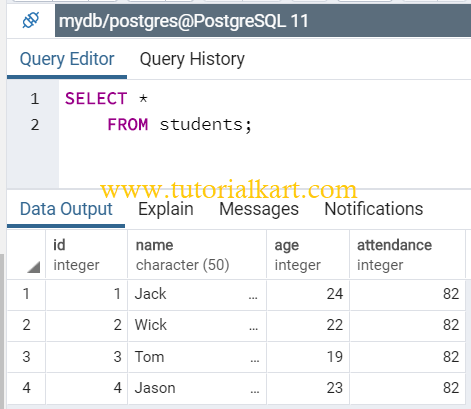
Consider the following students table. In this example, we will delete the attendance column.
Run the following ALTER TABLE query to delete the attendance column from the students table.
ALTER TABLE students
	DROP COLUMN attendance;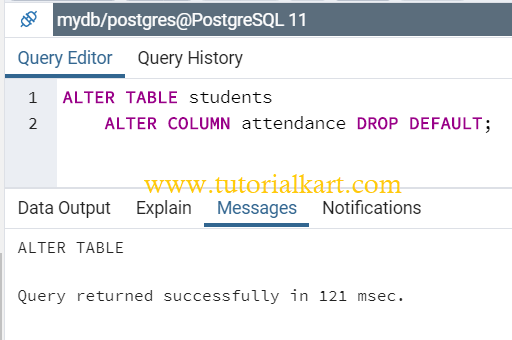
After the command succeeds, PostgreSQL removes the column definition and all values stored in that column.
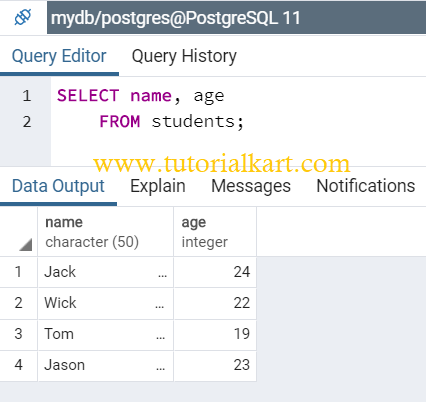
You can verify the result by querying the table again.
Delete a PostgreSQL Column Only If It Exists
Use IF EXISTS when the command may run more than once or when you are not certain that the column is present. PostgreSQL issues a notice instead of an error when the named column does not exist.
ALTER TABLE students
    DROP COLUMN IF EXISTS attendance;
This form is useful in repeatable migration scripts. It only checks whether the column name exists; it does not confirm that the surrounding table structure matches the expected schema.
Delete Multiple Columns from a PostgreSQL Table
You can remove several columns in one ALTER TABLE statement by adding a separate DROP COLUMN action for each column.
ALTER TABLE students
    DROP COLUMN attendance,
    DROP COLUMN percentage;
PostgreSQL processes the changes as one statement. If one of the columns does not exist, the statement fails unless IF EXISTS is used for that column.
ALTER TABLE students
    DROP COLUMN IF EXISTS attendance,
    DROP COLUMN IF EXISTS percentage;
PostgreSQL DROP COLUMN with RESTRICT and CASCADE
PostgreSQL does not remove a column when another database object depends on it unless those dependencies are handled. The optional RESTRICT and CASCADE keywords control this behavior.
Use RESTRICT to Protect Dependent Objects
RESTRICT prevents the column from being dropped when dependent objects exist. This is the default behavior.
ALTER TABLE students
    DROP COLUMN attendance RESTRICT;
The command fails when a view, constraint, or another object depends on the column. Review the reported dependency before deciding how to proceed.
Use CASCADE to Remove Dependent Objects
CASCADE removes the column and automatically drops objects that depend on it.
ALTER TABLE students
    DROP COLUMN attendance CASCADE;
Use CASCADE carefully because it may remove more database objects than the column itself. Inspect dependent views, constraints, and indexes before executing the statement.
Check Whether a PostgreSQL Column Exists Before Deleting It
You can query information_schema.columns to confirm that a column exists before removing it.
SELECT column_name, data_type, is_nullable
FROM information_schema.columns
WHERE table_schema = 'public'
  AND table_name = 'students'
  AND column_name = 'attendance';
If the query returns a row, the column exists in the specified schema and table. If it returns no rows, check the schema, table name, and column name for spelling or capitalization differences.
Verify the PostgreSQL Table after Dropping a Column
In the psql command-line client, inspect the table structure with the following command:
\d studentsYou can also list all remaining columns using information_schema.columns.
SELECT column_name, data_type
FROM information_schema.columns
WHERE table_schema = 'public'
  AND table_name = 'students'
ORDER BY ordinal_position;
Recover Data after Dropping a PostgreSQL Column
A committed DROP COLUMN operation does not provide an automatic undo command. Recovery normally requires restoring the data from a backup, replaying a migration rollback, or recreating the column and repopulating it from another source.
When testing a schema change, you can run it inside a transaction and inspect the result before committing.
BEGIN;

ALTER TABLE students
    DROP COLUMN attendance;

-- Inspect the table before deciding.
ROLLBACK;
ROLLBACK restores the column when the transaction has not been committed. In a production migration, confirm that the surrounding tools and workflow do not automatically commit the statement.
Common PostgreSQL DROP COLUMN Errors
- Column does not exist: Check the column name or use
DROP COLUMN IF EXISTSin a repeatable migration. - Table does not exist: Confirm the table name, schema, and active database.
- Dependent objects still exist: Remove or update the dependent objects, or use
CASCADEonly after reviewing what PostgreSQL will delete. - Permission denied: Run the statement as the table owner or as a role with sufficient privileges.
- Unexpected data loss: Restore from a backup if the statement was committed and the removed values are still required.
PostgreSQL DROP COLUMN FAQs
Does dropping a PostgreSQL column delete its data?
Yes. Dropping a column removes the column definition and the values stored in that column. Back up or copy the data before running the command when it may be needed later.
Can PostgreSQL drop multiple columns in one query?
Yes. Add multiple comma-separated DROP COLUMN actions to one ALTER TABLE statement.
What is the difference between DROP COLUMN CASCADE and RESTRICT?
RESTRICT blocks the operation when dependent objects exist. CASCADE drops the column and also removes dependent objects.
Can a dropped PostgreSQL column be restored with ROLLBACK?
It can be restored with ROLLBACK only when the DROP COLUMN statement is still inside an uncommitted transaction. After the transaction is committed, restore the data from a backup or another source.
PostgreSQL Delete Column Summary
Use ALTER TABLE ... DROP COLUMN to permanently delete a column from a PostgreSQL table. Add IF EXISTS to make repeatable scripts safer, list multiple DROP COLUMN actions to remove several columns, and review dependencies before using CASCADE.
In this PostgreSQL Tutorial, we deleted a column from a PostgreSQL table, removed multiple columns, handled missing columns and dependent objects, verified the resulting schema, and reviewed recovery precautions.