 TutorialKart.com
PostgreSQL INSERT INTO Query
Use the PostgreSQL INSERT INTO statement to add one or more rows to a table. In most cases, you should name the destination columns explicitly so that each value is mapped clearly and the query remains reliable if the table structure changes.
PostgreSQL INSERT INTO Syntax
INSERT INTO table_name(
	column1, column2,.., columnN)
	VALUES (value1, value2,.., valueN);
In this syntax:
table_nameis the table into which the new row will be inserted.column1, column2, ..., columnNare the destination columns.value1, value2, ..., valueNare the corresponding values for those columns.
The number of listed values must match the number of listed columns. Each value must also be compatible with the data type and constraints of its corresponding column.
Insert One Row into a PostgreSQL Table
In the following example, we are inserting one row into the students table of the mydb database.
 INSERT INTO students(
    id, name, age)
    VALUES (1, 'Jack', 24);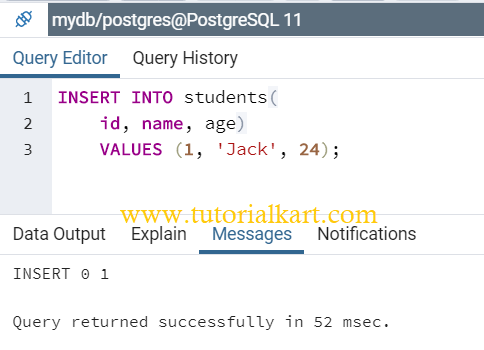
After the statement runs successfully, PostgreSQL reports that one row was inserted. In command-line clients, a successful single-row insertion is commonly represented by an INSERT 0 1 status message.
You can verify the inserted row by selecting it from the table.
SELECT id, name, age
FROM students
WHERE id = 1;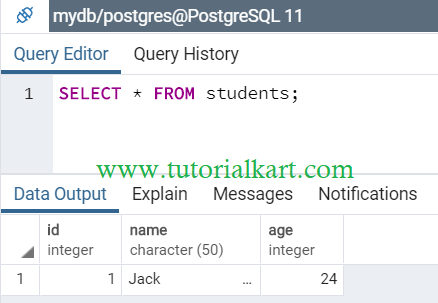
The result confirms that the row containing Jack’s student record was added to the table.
Insert Multiple Rows with One PostgreSQL Query
You can insert multiple rows with one INSERT statement by providing several parenthesized value lists after the VALUES keyword. Separate each row with a comma.
INSERT INTO students(
	id, name, age)
	VALUES (2, 'Wick', 22), (3, 'Tom', 19), (4, 'Jason', 23);
This statement supplies three value lists, so PostgreSQL attempts to insert three rows as one statement.
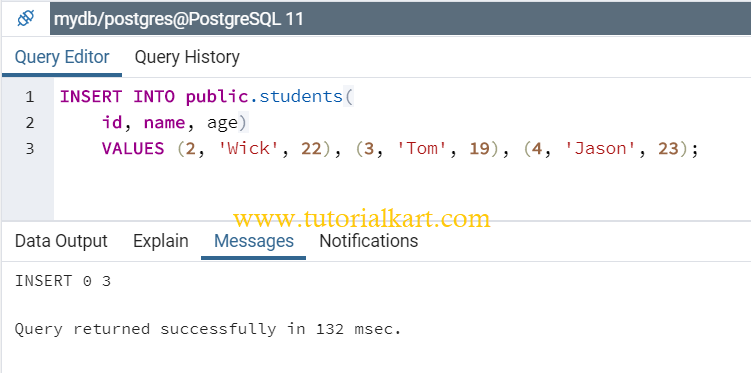
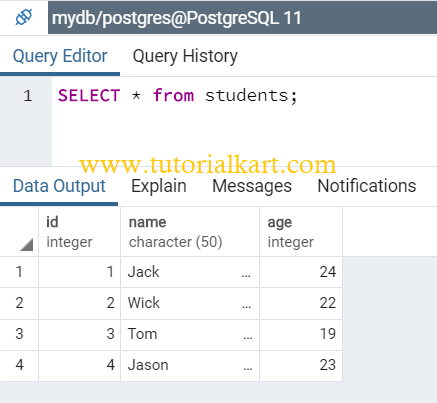
When the query succeeds, all three rows are inserted. If one row violates a constraint and the error is not handled, the statement fails rather than partially inserting only the valid rows.
Insert a Row and Return the Stored Values
PostgreSQL supports a RETURNING clause that returns data from the inserted row without requiring a separate SELECT statement. This is useful for retrieving generated identifiers, timestamps, or values changed by defaults and triggers.
INSERT INTO students (name, age)
VALUES ('Maria', 21)
RETURNING id, name, age;
If the id column is generated automatically, the returned result includes the identifier assigned to Maria’s row.
Insert Default Values into PostgreSQL Columns
You may omit columns that have default values or allow NULL. PostgreSQL fills an omitted column with its declared default value, or with NULL when no default exists and the column permits null values.
INSERT INTO students (name, age)
VALUES ('Nina', 20);
You can also request a column’s default explicitly with the DEFAULT keyword.
INSERT INTO students (id, name, age)
VALUES (DEFAULT, 'Arun', 23);
To create a row using defaults for every column, use DEFAULT VALUES. This succeeds only when all required columns can obtain valid default values.
INSERT INTO table_name DEFAULT VALUES;Insert Rows from a PostgreSQL SELECT Query
An INSERT statement can use the rows produced by a SELECT query instead of a literal VALUES list. The selected columns must appear in the same order as the destination columns and must have compatible data types.
INSERT INTO archived_students (id, name, age)
SELECT id, name, age
FROM students
WHERE age >= 23;
This query copies every qualifying row from students into archived_students.
Handle Duplicate Keys with INSERT ON CONFLICT
If an insertion may conflict with a primary key or unique constraint, PostgreSQL’s ON CONFLICT clause can skip the conflicting row or update the existing row.
INSERT INTO students (id, name, age)
VALUES (1, 'Jack', 25)
ON CONFLICT (id)
DO UPDATE SET
    name = EXCLUDED.name,
    age = EXCLUDED.age;
Here, EXCLUDED refers to the row that PostgreSQL attempted to insert. If a row with the same id already exists, its name and age values are updated.
To ignore a conflicting row instead, use DO NOTHING.
INSERT INTO students (id, name, age)
VALUES (1, 'Jack', 24)
ON CONFLICT (id) DO NOTHING;
Common PostgreSQL INSERT Errors
- Column and value counts do not match: provide exactly one value for each listed column.
- Invalid data type: make sure each supplied value can be converted to the destination column’s type.
- Duplicate key violation: use a unique value or handle the conflict with
ON CONFLICT. - Not-null violation: provide a value for every required column that has no usable default.
- Foreign-key violation: insert the referenced parent row first or use an existing referenced key.
- Text is not quoted: enclose SQL string values in single quotes, such as
'Jack'.
PostgreSQL INSERT INTO Questions
Should column names be included in a PostgreSQL INSERT statement?
Column names are not always required, but including them is recommended. Without a column list, values must be supplied for all table columns in the table’s defined order, which makes the statement more fragile.
How do I get the generated ID after inserting a row?
Add a RETURNING clause, such as RETURNING id, to the INSERT statement. PostgreSQL returns the generated identifier as part of the same query.
Can PostgreSQL insert several rows in one statement?
Yes. Add multiple parenthesized value lists after VALUES and separate them with commas. Every row must provide values in the same column order.
What is the difference between INSERT and INSERT ON CONFLICT?
A regular INSERT raises an error when it violates a relevant unique constraint. INSERT ... ON CONFLICT defines what PostgreSQL should do instead, such as ignore the row or update the existing record.
PostgreSQL INSERT INTO Summary
In this PostgreSQL Tutorial, we learned how to insert one row, insert multiple rows, use default values, return inserted data, copy rows from a query, and handle duplicate-key conflicts with ON CONFLICT.